2013 Hyundai Genesis fuel switch
[x] Cancel search: fuel switchPage 15 of 429

Your vehicle at a glance
22
INTERIOR OVERVIEW
B010000ABH-EUOBH012001E
1. Door lock/unlock button ....................4-17
2. Power window switches ....................4-23
3. Outside rearview mirror control
switch ................................................4-46
4. Trunk lid release switch .....................4-20
5. Fuel filler lid release button...............4-28
6. Hood release lever ............................4-27
7. Foot parking brake* ..........................5-19
8. Electric parking brake* ......................5-20
9. Auto hold control button* ..................5-25
10. Brake pedal .....................................5-18
11. Accelerator pedal .....................5-6, 5-9
12. Parking assist button* .....................4-72
13. Lane departure warning system switch*.............................................5-51
14. ESC OFF button .............................5-30
15. Instrument panel illumination control knob ................................................4-48
16. Light control/Turn signals ................4-77
17. Steering wheel manual tilt or Power tilt/ telescope control* ...........................4-37
18. Steering wheel ................................4-37
* : if equipped
* The actual vehicle may differ from the illustration.
Page 131 of 429
Features of your vehicle
52
4
D150204BBH
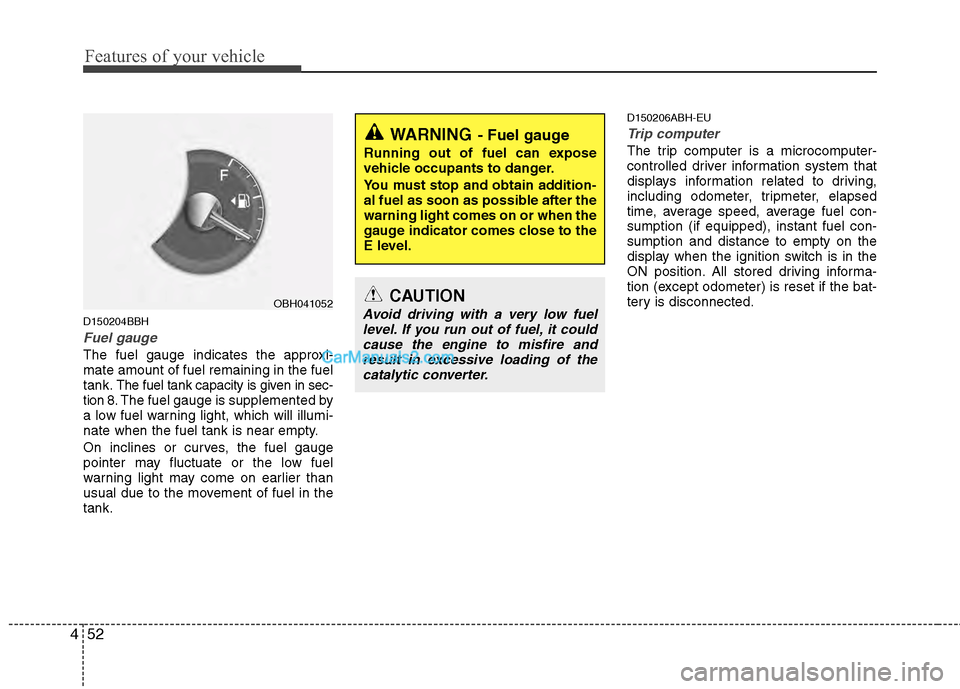
Fuel gauge
The fuel gauge indicates the approxi-
mate amount of fuel remaining in the fuel
tank.
The fuel tank capacity is given in sec-
tion 8.The fuel gauge is supplemented by
a low fuel warning light, which will illumi-
nate when the fuel tank is near empty.
On inclines or curves, the fuel gauge
pointer may fluctuate or the low fuel
warning light may come on earlier than
usual due to the movement of fuel in the
tank.
D150206ABH-EU
Trip computer
The trip computer is a microcomputer-
controlled driver information system that
displays information related to driving,
including odometer, tripmeter, elapsed
time, average speed, average fuel con-
sumption (if equipped), instant fuel con-
sumption and distance to empty on the
display when the ignition switch is in the
ON position. All stored driving informa-
tion (except odometer) is reset if the bat-
tery is disconnected.WARNING- Fuel gauge
Running out of fuel can expose
vehicle occupants to danger.
You must stop and obtain addition-
al fuel as soon as possible after the
warning light comes on or when the
gauge indicator comes close to the
E level.
CAUTION
Avoid driving with a very low fuel level. If you run out of fuel, it could cause the engine to misfire andresult in excessive loading of the catalytic converter.OBH041052
Page 134 of 429

455
Features of your vehicle
Average speed (MPH or km/h)
This mode calculates the average speed
of the vehicle since the last average
speed reset.
Even if the vehicle is not in motion, the
average speed is calculated while the
engine is running.
Pressing the RESET button for more
than 1 second, when the average speed
is being displayed, clears the average
speed to zero (---). If the ignition switch is
turned to OFF for more than 2 hours, it
will be reset automatically.Elapsed time
This mode indicates the total time trav-
eled since the last driving time reset.
Even if the vehicle is not in motion, the
driving time is calculated while the
engine is running.
The meter’s working range is from
0:00~99:59.
Pressing the RESET button for more
than 1 second, when the driving time is
being displayed, clears the driving time to
zero (0:00). If the ignition switch is turned
to OFF for more than 2 hours, it will be
reset automatically.Average fuel consumption (if equipped)
(MPG or
l/100 km)
This mode calculates the average fuel
consumption from the total fuel used and
the distance since the last average con-
sumption reset. The total fuel used is cal-
culated from the fuel consumption input.
For an accurate calculation, begin driving
the vehicle for several miles.
Pressing the RESET button for more than
1 second, when the average fuel con-
sumption is being displayed, clears the
average fuel consumption to zero (----).
If the vehicle speed exceeds 1.6 MPH (1
km/h) after refueled more than 1.6 gal-
lons (6 l ), the average fuel consumption
will be cleared to zero (---).
OBH042059N
Type I Type
II
OBH042060L
Type I Type
II
OBH042333N
Type I Type
II
Page 136 of 429

457
Features of your vehicle
AV information (if equipped)
This mode displays the state of the AV
(RADIO, CD, USB, AUX etc.).Turn by turn navigation (if equipped)
This mode displays the information of the
navigation.
D150300AEN
Warnings and indicators
All warning lights are checked by turning
the ignition switch ON (do not start the
engine). Any light that does not illuminate
should be checked by an authorized
HYUNDAI dealer.
After starting the engine, check to make
sure that all warning lights are off. If any
are still on, this indicates a situation that
needs attention. When releasing the
parking brake, the brake system warning
light should go off. The fuel warning light
will stay on if the fuel level is low.
OBH042353LOBH042350L
Page 137 of 429

Features of your vehicle
58
4
ECO indicator
(if equipped)
The ECO indicator light helps that you to
drive economically.
It is displayed if you drive fuel efficiently
to help you improve fuel efficiency.
The ECO indicator (green) will turn on when you are driving fuel efficiently in
the ECO Driving ON mode.
If you don't want the indicator dis-
played, you can turn the ECO Driving
ON mode to OFF mode by pressing the
DISP button (or the RESET button).
As per ECO Driving ON/OFF mode
operation, refer to the previous page.
The fuel-efficiency can be changed by the driver's driving habits and road
conditions.
The ECO indicator will not display if the condition doesn't meet economical
driving such as P (Park), N (Neutral), R
(Reverse) or sports mode.
While the instant fuel consumption mode is displayed on the LCD screen,
the ECO indicator turns off (if equipped).
D150302ABH
Air bag warning light
This warning light will illuminate for
approximately 6 seconds each time you
turn the ignition switch to the ON posi-
tion.
This light also comes on when the
Supplemental Restraint System (SRS) is
not working properly. If the SRS air bag
warning light does not come on, or
continuously remains on after operating
for about 6 seconds when you turned the
ignition switch to the ON position or start-
ed the engine, or if it comes on while
driving, have the SRS inspected by an
authorized HYUNDAI dealer.
D150303AEN
Anti-lock brake system(ABS) warning light
This light illuminates if the ignition switch
is turned ON and goes off in approxi-
mately 3 seconds if the system is operat-
ing normally.
If the ABS warning light remains on,
comes on while driving, or does not
come on when the ignition switch is
turned to the ON position, this indicates
that there may be a malfunction with the
ABS.
If this occurs, have your vehicle checked
by an authorized HYUNDAI dealer as
soon as possible. The normal braking
system will still be operational, but with-
out the assistance of the anti-lock brake
system.
ECOWARNING
Do not watch the indicator while
driving. This will distract you and
may cause an accident that results
in severe personal injury.
Page 143 of 429

Features of your vehicle
64
4
D150318AUN
Low fuel level warning light
This warning light indicates the fuel tank
is nearly empty. When it comes on, you
should add fuel as soon as possible.
Driving with the fuel level warning light on
or with the fuel level below “E” can cause
the engine to misfire and damage the
catalytic converter.
D150319AUN
Low washer fluid level
warning light (if equipped)
This warning light indicates the washer
fluid reservoir is near empty. Refill the
washer fluid as soon as possible.
D150320ABH-EU
Malfunction indicator light (MIL) (check engine light)
This indicator light is part of the Engine
Control System which monitors various
emission control system components. If
this light illuminates while driving, it indi-
cates that a potential malfunction has
been detected somewhere in the emis-
sion control system.
This light will also illuminate when the
ignition switch is turned to the ON posi-
tion, and will go out in a few seconds
after the engine is started. If it illuminates
while driving, or does not illuminate when
the ignition switch is turned to the ON
position, take your vehicle to your near-
est authorized HYUNDAI dealer and
have the system checked.
Generally, your vehicle will continue to be
drivable, but have the system checked by
an authorized HYUNDAI dealer promptly.
CAUTION
Prolonged driving with the Malfunction Indicator Light illumi-nated may cause damage to the emission control systems whichcould effect drivability and/or fueleconomy.
If the Malfunction Indicator Light illuminates, potential catalyticconverter damage is possible. This could result in loss of enginepower. Have the Engine ControlSystem inspected as soon as pos-sible by an authorized HYUNDAI dealer.
Page 312 of 429

63
What to do in an emergency
2. When the car is stopped, turn on youremergency hazard flashers, set the
parking brake and put the shift lever in
P.
3. Have all passengers get out of the car. Be sure they all get out on the side of
the car that is away from traffic.
4. When changing a flat tire, follow the instruction provided later in this sec-
tion.
F020300AEN
If engine stalls while driving
1. Reduce your speed gradually, keeping a straight line. Move cautiously off the
road to a safe place.
2. Turn on your emergency flashers.
3. Try to start the engine again. If your vehicle will not start, contact an
authorized HYUNDAI dealer or seek
other qualified assistance.
F030100BBH
If engine doesn't turn over or
turns over slowly
1. Be sure the shift lever is in N (Neutral)or P (Park) and the emergency brake
is set.
2. Check the battery connections to be sure they are clean and tight.
3. Turn on the interior light. If the light dims or goes out when you operate the
starter, the battery is discharged.
4. Check the starter connections to be sure they are securely tightened.
5. Do not push or pull the vehicle to start it. See instructions for "Jump starting".
F030200ABH
If engine turns over normally but
does not start
1. Check fuel level.
2. With the ignition switch in the LOCKposition, check all connectors at igni-
tion coils and spark plugs. Reconnect
any that may be disconnected or
loose.
3. If the engine still does not start, call an authorized HYUNDAI dealer or seek
other qualified assistance.
IF THE ENGINE WILL NOT START
WARNING
If the engine will not start, do not
push or pull the car to start it. This
could result in a collision or cause
other damage.
Page 389 of 429

755
Maintenance
Description Fuse ratingProtected component
MODULE 110AFAM, IPM, Tilt & Telescopic Module, PDM, Driver Door Module, Passenger Door Module, IMS Control
Module, Multifunction Switch, Electronic Parking Brake Module, Power Trunk Lid Control Module,
Forward & Rear Parking Assist Control Module
MODULE 3 10A FAM, Multifunction Switch, Tilt & Telescopic Module, Instrument Cluster, Driver Door Module,
Passenger Door Module, Power Trunk Lid Control Module, IMS Control Module, Rear Curtain Module
P/HANDLE 15A Tilt & Telescopic Module
ECS 15A ECS Control Module
A/BAG 15A SRS Control Module
AUDIO(B+) 15A Audio, Front Monitor, AV Head Module, Rear Monitor (With AV), Rear Audio Switch, Media Module
(With AV)
S/HEATER DRV 15A Driver CCS Control Module, Driver Seat Warmer Module (W/O CCS)
P/TRUNK 30A Power Trunk Lid Control Module
F/LID 10A Trunk Lid & Fuel Filler Door Switch (Fuel Filler Door Switch)
AUDIO(IG1) 10A AV Head Module, Audio, Active Headrest Sensor Module
RF RECEIVER 10A RF Receiver
A/CON(B+) 10A A/C Control Module,Tire Pressure Monitoring Module
I.O.D 30A I/P Junction Box LH Fuse (MODULE 3 10A, AUDIO(B+) 15A ,Rf Receiver 10A , A/CON(IG1) 15A)