Page 139 of 479
Features of your vehicle
50 4
3. Press the button until the new zone
number appears in the display.
After you stop pressing the button
in, the display will show a compass
direction within a few seconds.
4. Changing Mirror Angle setting
(if equipped):
Due to mirror positions being angled
towards the driver, the compass mir-
ror can also compensate for drivers
seated on the Left Hand side of the
vehicle (steering wheel on the LH
side of the vehicle) or Right Hand
side of the vehicle (steering wheel on
the RH side of the vehicle).To adjust the Left Hand, “L” or Right
Hand, “R”, setting:
1. Press and hold the button for more
than 12 seconds.
2. Release then press the button to
toggle between “L” and “R”.
✽NOTICE
This procedure also causes the com-
pass to be de-calibrated.
3. To re-calibrate the compass, drive
the vehicle in 2 complete circles at
less than 8km/h (5mph).
CAUTION
1.Do not install the ski rack,
antenna, etc. which are
attached to the vehicle by
means of a magnet. They affect
the operation of the compass.
2.If the compass deviates from
the correct indication soon
after repeated adjustment, we
recommend that the system
be checked by an authorized
HYUNDAI dealer.
3.The compass may not indicate
the correct compass point in
tunnels or while driving up or
down a steep hill.
(The compass returns to the
correct compass point when
the vehicle moves to an area
where the geomagnetism is
stabilized.)
4.When cleaning the mirror, use
a paper towel or similar materi-
al dampened with glass clean-
er. Do not spray glass cleaner
directly on the mirror as that
may cause the liquid cleaner to
enter the mirror housing.
Page 144 of 479
455
Features of your vehicle
INSTRUMENT CLUSTER
1. Tachometer
2. Speedometer
3. Engine coolant temperature gauge
4. Fuel gauge
5. Odometer
6. LCD display (including trip computer)
Instrument cluster theme (Type B)
• The instrument cluster theme is automati-
cally changed in accordance with the drive
mode (NORMAL, SPORT, SNOW).
❈For more details of the drive mode, refer
to "Drive mode integrated control system"
in chapter 5.
• On the "User Settings Mode" of the LCD
display, you can activate or deactivate the
automatic change of the instrument cluster
theme.
❈For more details, refer to "LCD Display" in
this chapter.
OVIEDI3901/OVIEDI3902
■Type A
❈The actual instrument cluster in the vehicle
may differ from the illustration. For more
details, refer to the "Gauges" in this chap-
ter.
■Type B
Page 146 of 479
457
Features of your vehicle
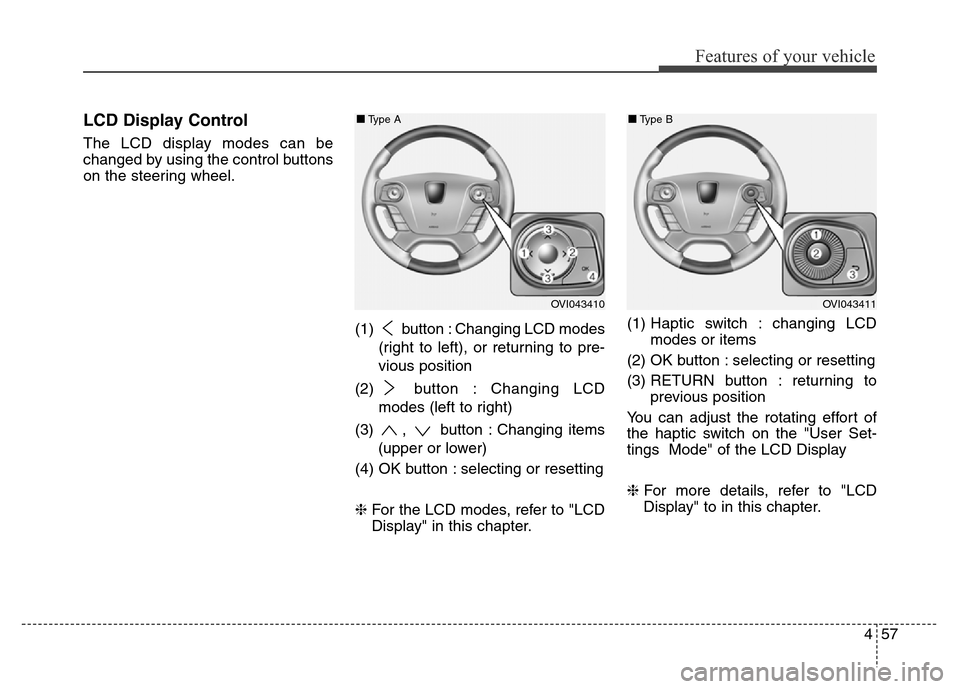
LCD Display Control
The LCD display modes can be
changed by using the control buttons
on the steering wheel.
(1) button : Changing LCD modes
(right to left), or returning to pre-
vious position
(2) button : Changing LCD
modes (left to right)
(3) , button : Changing items
(upper or lower)
(4) OK button : selecting or resetting
❈For the LCD modes, refer to "LCD
Display" in this chapter.(1) Haptic switch : changing LCD
modes or items
(2) OK button : selecting or resetting
(3) RETURN button : returning to
previous position
You can adjust the rotating effort of
the haptic switch on the "User Set-
tings Mode" of the LCD Display
❈For more details, refer to "LCD
Display" to in this chapter.
OVI043410
■Type A
OVI043411
■Type B
Page 147 of 479
Features of your vehicle
58 4
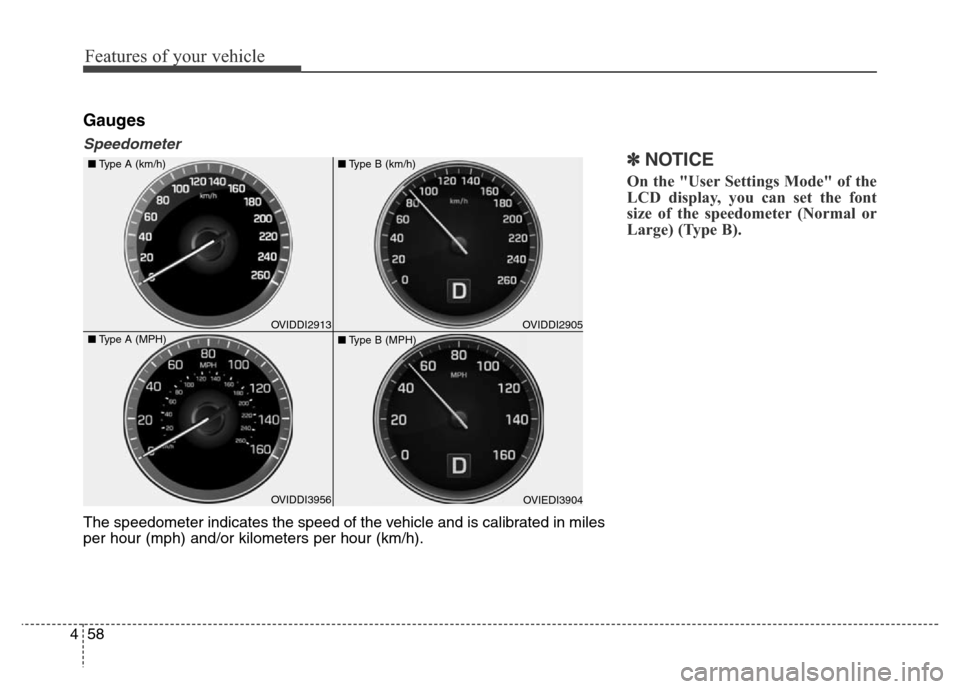
Gauges
Speedometer
✽NOTICE
On the "User Settings Mode" of the
LCD display, you can set the font
size of the speedometer (Normal or
Large) (Type B).
The speedometer indicates the speed of the vehicle and is calibrated in miles
per hour (mph) and/or kilometers per hour (km/h).
OVIDDI3956 ■Type A (km/h)
■Type A (MPH)OVIDDI2913OVIEDI3904 ■Type B (km/h)
■Type B (MPH)OVIDDI2905
Page 151 of 479
Features of your vehicle
62 4
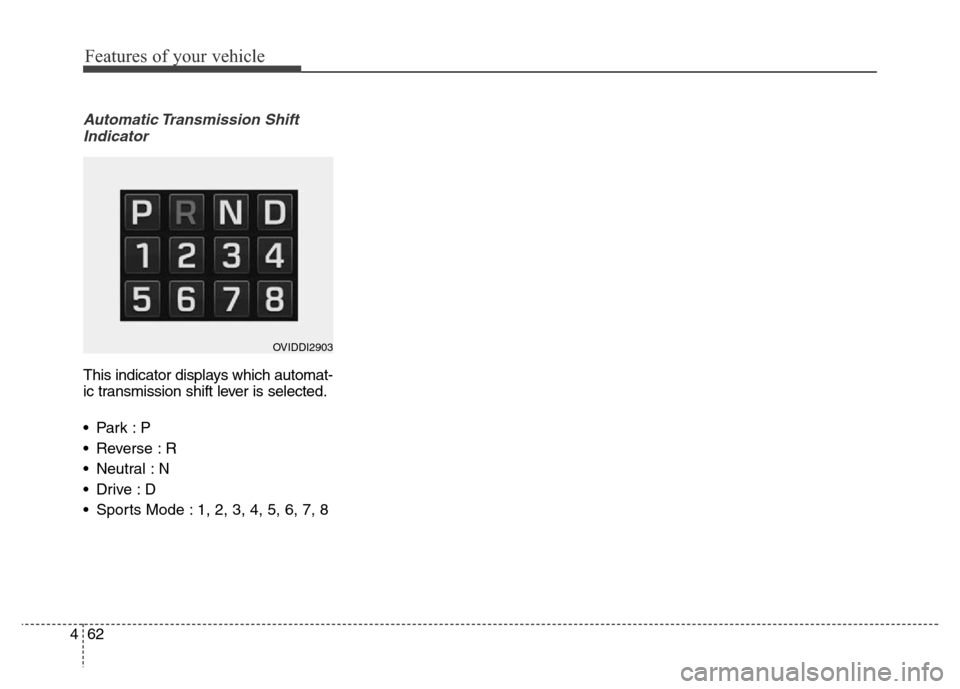
Automatic Transmission Shift
Indicator
This indicator displays which automat-
ic transmission shift lever is selected.
•Park :P
• Reverse : R
• Neutral : N
•Drive :D
• Sports Mode : 1, 2, 3, 4, 5, 6, 7, 8
OVIDDI2903
Page 152 of 479
463
Features of your vehicle
LCD Modes
LCD DISPLAY
Modes SymbolExplanation
Trip Computer This mode displays driving information like the tripmeter, fuel economy, and so on.
❈For more details, refer to "Trip Computer" in this chapter.
ASCC/LDWS
(if equipped)
This mode displays the state of the Advanced Smart Cruise Control (ASCC) and
Lane Departure Warning System (LDWS).
❈For more details, refer to “Advanced Smart Cruise Control (ASCC)” and
“Lane Departure Warning System (LDWS)” in chapter 5.
A/V
(if equipped)This mode displays the state of the A/V system.
Turn By Turn (TBT)
(if equipped)This mode displays the state of the navigation.
InformationThis mode informs of service interval (mileage or days) and warning messages
related to the advanced smart cruise control system, pre-safe seat belt, and so on.
User SettingsOn this mode, you can change settings of the doors, lamps, and so on.
❈For controlling the LCD modes, refer to "LCD Display Control" in this chapter.
or
Page 153 of 479
Features of your vehicle
64 4
Trip Computer Mode
This mode displays driving informa-
tion like the tripmeter, fuel economy,
and so on.
❈For more details, refer to “Trip
Computer” in this chapter.
ASCC/LDWS Mode
(if equipped)
This mode displays the state of the
Advanced Smart Cruise Control
(ASCC) and Lane Departure
Warning System (LDWS).
❈ For more details, refer to "Advanced
Smart Cruise Control (ASCC)" and
"Lane Departure Warning System
(LDWS)" in chapter 5.
A/V Mode
This mode displays the state of the
A/V system.
OVIEDI3906OVIDDI2923
OVIDDR2912/OVIDDR2919 ASCCLDWS
Page 154 of 479
465
Features of your vehicle
Turn By Turn (TBT) Mode
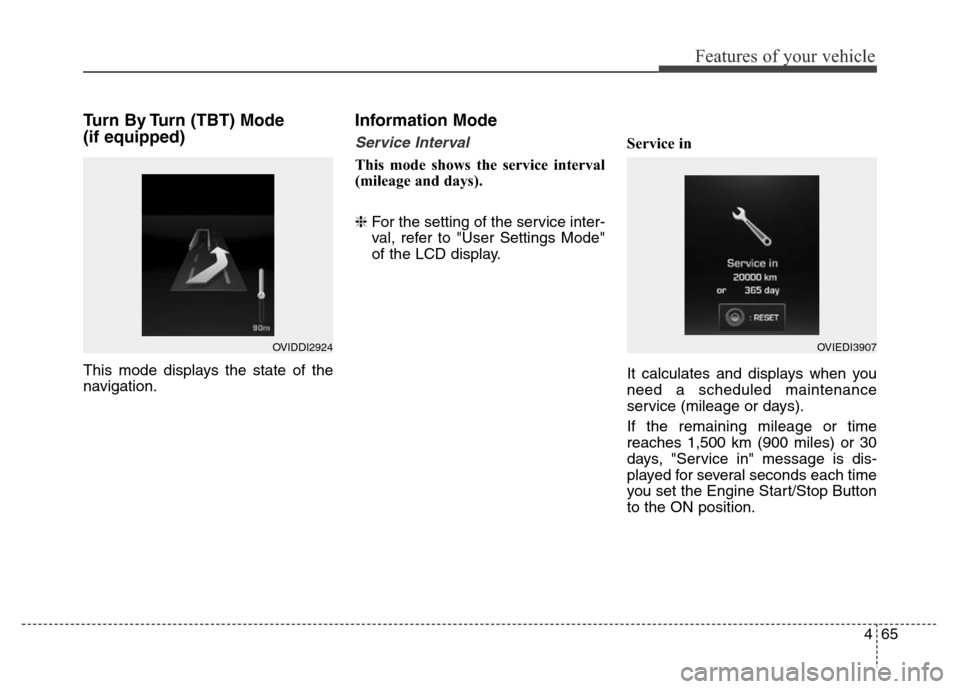
(if equipped)
This mode displays the state of the
navigation.
Information Mode
Service Interval
This mode shows the service interval
(mileage and days).
❈For the setting of the service inter-
val, refer to "User Settings Mode"
of the LCD display.Service in
It calculates and displays when you
need a scheduled maintenance
service (mileage or days).
If the remaining mileage or time
reaches 1,500 km (900 miles) or 30
days, "Service in" message is dis-
played for several seconds each time
you set the Engine Start/Stop Button
to the ON position.
OVIDDI2924OVIEDI3907