2013 Hyundai Azera table
[x] Cancel search: tablePage 53 of 403
Safety features of your vehicle
38 3
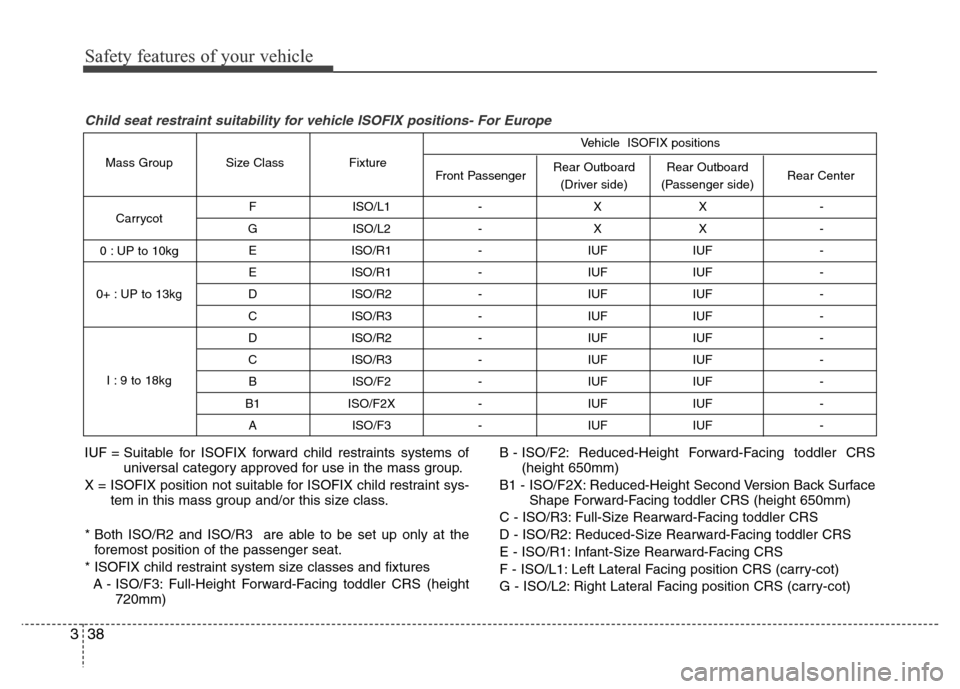
F ISO/L1 - X X -
G ISO/L2 - X X -
E ISO/R1 - IUF IUF -
E ISO/R1 - IUF IUF -
D ISO/R2 - IUF IUF -
C ISO/R3 - IUF IUF -
D ISO/R2 - IUF IUF -
C ISO/R3 - IUF IUF -
B ISO/F2 - IUF IUF -
B1 ISO/F2X - IUF IUF -
A ISO/F3 - IUF IUF -
Rear Outboard
(Passenger side) Rear Outboard
(Driver side) Front Passenger Fixture Size Class Mass Group
Carrycot
0 : UP to 10kg
0+ : UP to 13kg
I : 9 to 18kgRear Center Vehicle ISOFIX positions
IUF = Suitable for ISOFIX forward child restraints systems of
universal category approved for use in the mass group.
X = ISOFIX position not suitable for ISOFIX child restraint sys-
tem in this mass group and/or this size class.
* Both ISO/R2 and ISO/R3 are able to be set up only at the
foremost position of the passenger seat.
* ISOFIX child restraint system size classes and fixtures
A - ISO/F3: Full-Height Forward-Facing toddler CRS (height
720mm)B - ISO/F2: Reduced-Height Forward-Facing toddler CRS
(height 650mm)
B1 - ISO/F2X: Reduced-Height Second Version Back Surface
Shape Forward-Facing toddler CRS (height 650mm)
C - ISO/R3: Full-Size Rearward-Facing toddler CRS
D - ISO/R2: Reduced-Size Rearward-Facing toddler CRS
E - ISO/R1: Infant-Size Rearward-Facing CRS
F - ISO/L1: Left Lateral Facing position CRS (carry-cot)
G - ISO/L2: Right Lateral Facing position CRS (carry-cot)
Child seat restraint suitability for vehicle ISOFIX positions- For Europe
Page 105 of 403
429
Features of your vehicle
(Continued)
• Do not get back into a vehicle
once you have begun refueling
since you can generate static
electricity by touching, rubbing
or sliding against any item or fab-
ric (polyester, satin, nylon, etc.)
capable of producing static elec-
tricity. Static electricity discharge
can ignite fuel vapors resulting in
rapid burning. If you must re-
enter the vehicle, you should
once again eliminate potentially
dangerous static electricity dis-
charge by touching a metal part
of the vehicle, away from the fuel
filler neck, nozzle or other gaso-
line source.
• When using an approved
portable fuel container, be sure to
place the container on the
ground prior to refueling. Static
electricity discharge from the
container can ignite fuel vapors
causing a fire. Once refueling has
begun, contact with the vehicle
should be maintained until the
filling is complete.
(Continued)WARNING - Refueling dan-
gers
Automotive fuels are flammable
materials. When refueling, please
note the following guidelines care-
fully. Failure to follow these guide-
lines may result in severe personal
injury, severe burns or death by fire
or explosion.
• Read and follow all warnings at
the gas station facility.
• Before refueling note the location
of the Emergency Gasoline Shut-
Off, if available, at the gas station
facility.
• Before touching the fuel nozzle,
you should eliminate potentially
dangerous static electricity dis-
charge by touching another metal
part of the vehicle, a safe dis-
tance away from the fuel filler
neck, nozzle, or other gas source.
(Continued)
(Continued)
Use only approved portable plas-
tic fuel containers designed to
carry and store gasoline.
• Do not use cellular phones while
refueling. Electric current and/or
electronic interference from cel-
lular phones can potentially
ignite fuel vapors causing a fire.
• When refueling, always shut the
engine off. Sparks produced by
electrical components related to
the engine can ignite fuel vapors
causing a fire. Once refueling is
complete, check to make sure the
filler cap and filler door are
securely closed, before starting
the engine.
• DO NOT use matches or a lighter
and DO NOT SMOKE or leave a lit
cigarette in your vehicle while at
a gas station especially during
refueling. Automotive fuel is
highly flammable and can, when
ignited, result in fire.
(Continued)
Page 111 of 403
435
Features of your vehicle
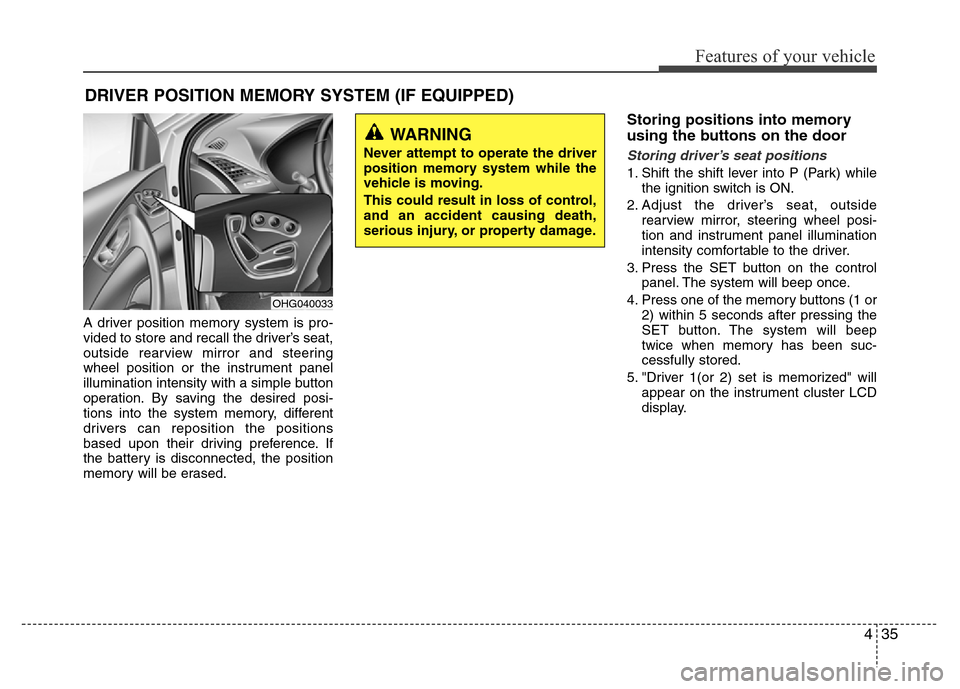
A driver position memory system is pro-
vided to store and recall the driver’s seat,
outside rearview mirror and steering
wheel position or the instrument panel
illumination intensity with a simple button
operation. By saving the desired posi-
tions into the system memory, different
drivers can reposition the positions
based upon their driving preference. If
the battery is disconnected, the position
memory will be erased.
Storing positions into memory
using the buttons on the door
Storing driver’s seat positions
1. Shift the shift lever into P (Park) while
the ignition switch is ON.
2. Adjust the driver’s seat, outside
rearview mirror, steering wheel posi-
tion and instrument panel illumination
intensity comfortable to the driver.
3. Press the SET button on the control
panel. The system will beep once.
4. Press one of the memory buttons (1 or
2) within 5 seconds after pressing the
SET button. The system will beep
twice when memory has been suc-
cessfully stored.
5. "Driver 1(or 2) set is memorized" will
appear on the instrument cluster LCD
display.
DRIVER POSITION MEMORY SYSTEM (IF EQUIPPED)
WARNING
Never attempt to operate the driver
position memory system while the
vehicle is moving.
This could result in loss of control,
and an accident causing death,
serious injury, or property damage.
OHG040033
Page 113 of 403
437
Features of your vehicle
Power steering
Power steering uses energy from the
engine to assist you in steering the vehi-
cle. If the engine is off or if the power
steering system becomes inoperative,
the vehicle may still be steered, but it will
require increased steering effort.
Should you notice any change in the
effort required to steer during normal
vehicle operation, have the power steer-
ing checked by an authorized HYUNDAI
dealer.
✽NOTICE
If the power steering drive belt breaks
or if the power steering pump malfunc-
tions, the steering effort will greatly
increase.
✽NOTICE
If the vehicle is parked for extended
periods outside in cold weather (below -
10°C/14°F), the power steering may
require increased effort when the engine
is first started. This is caused by
increased fluid viscosity due to the cold
weather and does not indicate a mal-
function.
When this happens, increase the engine
RPM by depressing accelerator until the
RPM reaches 1,500 rpm then release or
let the engine idle for two or three min-
utes to warm up the fluid.
Tilt steering
Tilt steering allows you to adjust the
steering wheel before you drive. You can
also raise it to give your legs more room
when you exit and enter the vehicle.
The steering wheel should be positioned
so that it is comfortable for you to drive,
while permitting you to see the instru-
ment panel warning lights and gauges.
STEERING WHEEL
CAUTION
Never hold the steering wheel
against a stop (extreme right or left
turn) for more than 5 seconds with
the engine running. Holding the
steering wheel for more than 5 sec-
onds in either position may cause
damage to the power steering
pump.
WARNING
• Never adjust the angle of the
steering wheel while driving. You
may lose steering control and
cause severe personal injury,
death or accidents.
• After adjusting, push the steering
wheel both up and down to be
certain it is locked in position.
Page 139 of 403
463
Features of your vehicle
Overspeed warning
(if equipped)
Overspeed warning light
If you drive with the speed of 120 km/h or
more, the overspeed warning light will
blink. This is to prevent you from driving
your vehicle with overspeed.
Overspeed warning chime (if equipped)
If you drive with the speed of 120 km/h or
more, the overspeed warning chime will
sound for about 5 seconds. This is to pre-
vent you from driving your vehicle with
overspeed.
LCD display warning (if equipped)
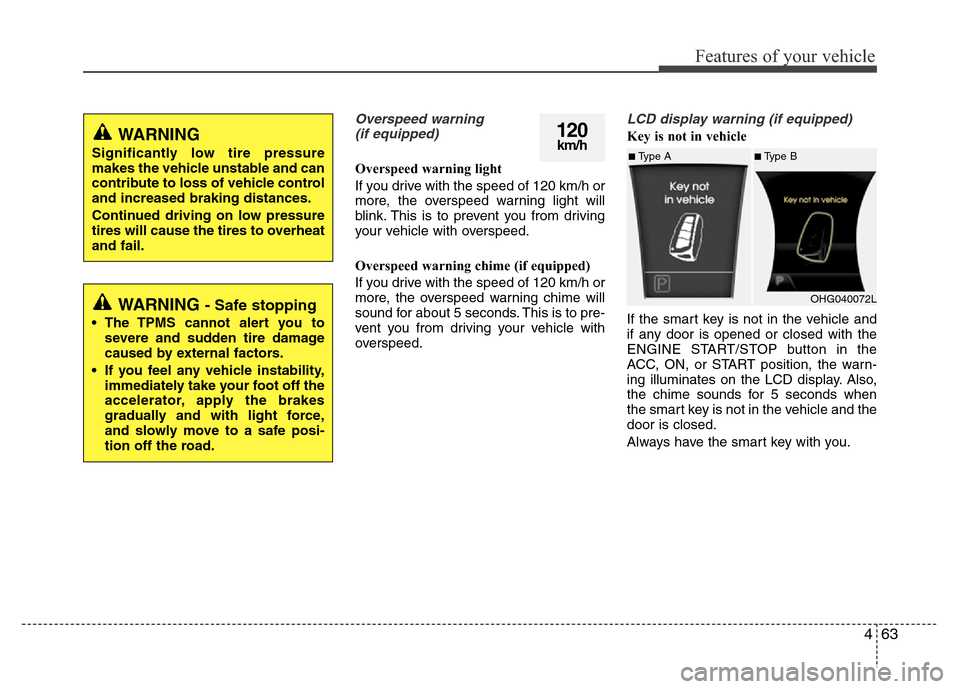
Key is not in vehicle
If the smart key is not in the vehicle and
if any door is opened or closed with the
ENGINE START/STOP button in the
ACC, ON, or START position, the warn-
ing illuminates on the LCD display. Also,
the chime sounds for 5 seconds when
the smart key is not in the vehicle and the
door is closed.
Always have the smart key with you.120km/hWARNING
Significantly low tire pressure
makes the vehicle unstable and can
contribute to loss of vehicle control
and increased braking distances.
Continued driving on low pressure
tires will cause the tires to overheat
and fail.
WARNING - Safe stopping
• The TPMS cannot alert you to
severe and sudden tire damage
caused by external factors.
• If you feel any vehicle instability,
immediately take your foot off the
accelerator, apply the brakes
gradually and with light force,
and slowly move to a safe posi-
tion off the road.
■Type A■Type B
OHG040072L
Page 144 of 403
Features of your vehicle
68 4
REAR PARKING ASSIST SYSTEM (IF EQUIPPED)
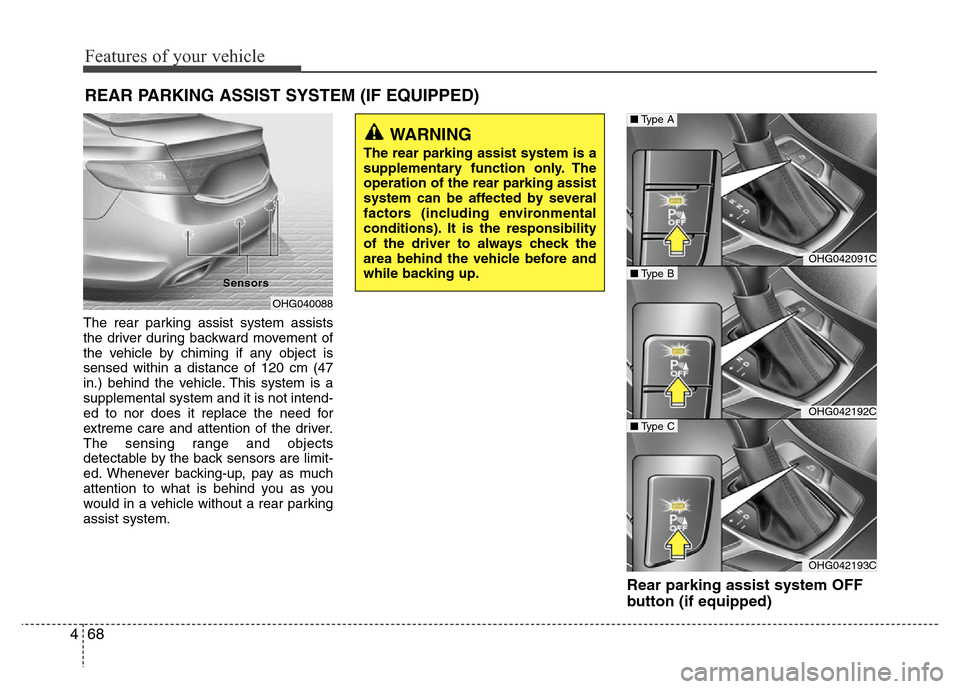
The rear parking assist system assists
the driver during backward movement of
the vehicle by chiming if any object is
sensed within a distance of 120 cm (47
in.) behind the vehicle. This system is a
supplemental system and it is not intend-
ed to nor does it replace the need for
extreme care and attention of the driver.
The sensing range and objects
detectable by the back sensors are limit-
ed. Whenever backing-up, pay as much
attention to what is behind you as you
would in a vehicle without a rear parking
assist system.
Rear parking assist system OFF
button (if equipped)
OHG042091C
OHG042192C
OHG042193C
■Type B
■Type A
■Type C
OHG040088 Sensor Sensor
s s
WARNING
The rear parking assist system is a
supplementary function only. The
operation of the rear parking assist
system can be affected by several
factors (including environmental
conditions). It is the responsibility
of the driver to always check the
area behind the vehicle before and
while backing up.
Page 146 of 403
Features of your vehicle
70 4
Non-operational conditions of
rear parking assist system
The rear parking assist system may
not operate properly when:
1. Moisture is frozen to the sensor. (It will
operate normally when the moisture
has been cleared.)
2. The sensor is covered with foreign
matter, such as snow or water, or the
sensor cover is blocked. (It will operate
normally when the material is removed
or the sensor is no longer blocked.)
3. Driving on uneven road surfaces
(unpaved roads, gravel, bumps, gradi-
ent).
4. Objects generating excessive noise
(vehicle horns, loud motorcycle
engines, or truck air brakes) are within
range of the sensor.
5. Heavy rain or water spray exists.
6. Wireless transmitters or mobile phones
are within range of the sensor.
7. The sensor is covered with snow.
8. Trailer towingThe detecting range may decrease
when:
1. The sensor is stained with foreign mat-
ter such as snow or water. (The sens-
ing range will return to normal when
removed.)
2. Outside air temperature is extremely
hot or cold.
The following objects may not be rec-
ognized by the sensor:
1. Sharp or slim objects such as ropes,
chains or small poles.
2. Objects which tend to absorb the sen-
sor frequency such as clothes, spongy
material or snow.
3. Undetectable objects smaller than 1 m
(40 in.) in height and narrower than 14
cm (6 in.) in diameter.
Rear parking assist system pre-
cautions
• The rear parking assist system may
not sound sequentially depending on
the speed and shapes of the objects
detected.
• The rear parking assist system may
malfunction if the vehicle bumper
height or sensor installation has been
modified or damaged. Any non-factory
installed equipment or accessories
may also interfere with the sensor per-
formance.
• The sensor may not recognize objects
less than 25 cm (9 in.) from the sensor,
or it may sense an incorrect distance.
Use caution.
• When the sensor is frozen or stained
with snow, dirt, or water, the sensor
may be inoperative until the stains are
removed using a soft cloth.
• Do not push, scratch or strike the sen-
sor. Sensor damage could occur.
Page 148 of 403
Features of your vehicle
72 4
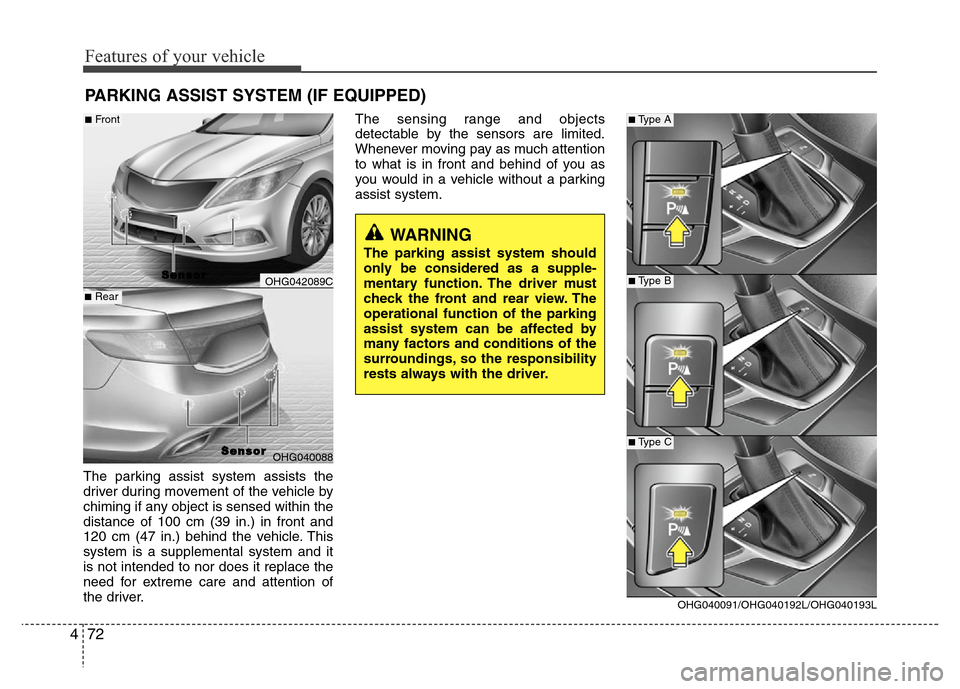
The parking assist system assists the
driver during movement of the vehicle by
chiming if any object is sensed within the
distance of 100 cm (39 in.) in front and
120 cm (47 in.) behind the vehicle. This
system is a supplemental system and it
is not intended to nor does it replace the
need for extreme care and attention of
the driver.The sensing range and objects
detectable by the sensors are limited.
Whenever moving pay as much attention
to what is in front and behind of you as
you would in a vehicle without a parking
assist system.
PARKING ASSIST SYSTEM (IF EQUIPPED)
WARNING
The parking assist system should
only be considered as a supple-
mentary function. The driver must
check the front and rear view. The
operational function of the parking
assist system can be affected by
many factors and conditions of the
surroundings, so the responsibility
rests always with the driver.
OHG042089C
OHG040088
S S
e e
n n
s s
o o
r r
■Front
■Rear
S S
e e
n n
s s
o o
r r
OHG040091/OHG040192L/OHG040193L
■Type A
■Type B
■Type C