Page 4 of 488
3
Quick Reference Guide
❙ (Select/Reset) Knob (P81)
❙Headlights/Turn Signals (P125)
❙Fog Lights* (P127)
❙Brightness Control (P130)
❙Cruise Control Buttons (P348)
❙Wipers/Washers (P128)
❙Horn (Press an area around .)
❙SEL/RESET Button* (P81)
❙ / (Information) Button* (P85)
❙Navigation System Voice Control Buttons*
() See Navigation System Manual
❙Bluetooth® HandsFreeLink® System
Voice Control Buttons (P301)
❙Remote Audio Control Buttons (P184, 217)
* Not available on all models
Page 9 of 488

8
Quick Reference Guide
Instrument Panel (P 67)
System Indicators
Malfunction Indicator Lamp
Low Oil Pressure Indicator
Charging System Indicator
Daytime Running Lights Indicator*
Vehicle Stability Assist (VSA®) System Indicator
VSA® OFF Indicator
Low Tire Pressure Indicator*/Low Tire Pressure/TPMS Indicator*
Lights Reminders
Lights On Indicator
High Beam Indicator
Fog Light Indicator*
Immobilizer System Indicator
Seat Belt Reminder Indicator
System Indicators
CRUISE CONTROL Indicator
Parking Brake and Brake System Indicator
Supplemental Restraint System Indicator
Side Airbag Off Indicator
Door Open Indicator
CRUISE MAIN Indicator
Tachometer
Speedometer
Fuel Gauge
Low Fuel Indicator
Shift Lever Position Indicator
System Message Indicator*
Gauges (P80)/Information Display* (P81)/
Multi-Information Display* (P85)/System Indicators (P68)
Fuel Economy Indicator
VTM-4r system Indicator*TPMS Indicator*
Maintenance Minder Indicator*
Washer Level Indicator*
A/T Temperature Indicator*
Turn Signal and Hazard Warning Indicators
Starter System Indicator*System Indicators
Canada
U.S.
Canada
U.S.
Anti-lock Brake System (ABS) Indicator
Power Tailgate Indicator*
Security System Alarm Indicator*
Information Display*/Multi-Information Display*
Canada
U.S.
Canada
U.S.
Page 16 of 488

15
Quick Reference Guide
VSA® OFF Button (P353)
●The vehicle stability assist (VSA®) system
helps stabilize the vehicle during cornering, and helps maintain traction
while accelerating on loose or slippery
road surfaces.●VSA® comes on automatically every time
you start the engine.
●To turn VSA® on or off, press and hold the button until you hear a beep.
Cruise Control (P348)
●Cruise control allows you to maintain a
set speed without keeping your foot on the accelerator pedal.
●To use cruise control, press the CRUISE
button, then press DECEL/SET button
once you have achieved the desired speed (above 25 mph or 40 km/h).
Tire Pressure Monitoring
System (TPMS) (P355)
●TPMS monitors tire pressure.●TPMS is turned on automatically every
time you start the engine.
Refueling (P371)
aPull the fuel fill door
release handle.
bTurn the fuel fill cap slowly to remove the
cap.
cPlace the cap in the
holder on the fuel fill
door.
dAfter refueling, screw
the cap back on until it clicks at least once.
Fuel recommendation: Unleaded gasoline with a pump octane number 87 or
higher required
Fuel tank capacity: 21 US gal (79.5 L)
Page 78 of 488
77
uuIndicatorsu
Instrument Panel
IndicatorNameOn/BlinkingExplanationMessage*
CRUISE MAIN
Indicator
●Comes on when you press the
CRUISE button.2Cruise Control P. 348—
CRUISE
CONTROL
Indicator
●Comes on if you have set a speed for
cruise control.2Cruise Control P. 348—
Washer Level
Indicator*●Comes on when washer fluid is low.
●Refill washer fluid.
2Refilling Window Washer Fluid P. 401
Maintenance
Minder
Indicator*
●Comes on when you turn the ignition
switch to ON (w, then goes off.●Comes on when the scheduled
maintenance is due soon.
2Maintenance Minder™ P. 381—
Power Tailgate
Indicator*
●Comes on for a few seconds when
you turn the ignition switch to ON
(w.●Comes on if there is a problem with
the power tailgate system.
●Stays on constantly or does not come
on at all - You can still open or close the
tailgate manually. Have the vehicle
checked by a dealer.
U.S.
Canada
U.S.
Canada
* Not available on all models
Page 324 of 488

323
Driving
This chapter discusses driving, refueling, and information on items such as accessories.
Before DrivingDriving Preparation .......................... 324 Maximum Load Limit........................ 327Towing a TrailerTowing Preparation .......................... 329Driving Safely with a Trailer .............. 338Towing Your Vehicle ........................ 339Off-Highway Driving GuidelinesGeneral Information ......................... 340Important Safety Precautions............ 340Avoiding Trouble ............................. 341When DrivingStarting the Engine .......................... 342Precautions While Driving................. 344
Automatic Transmission ................... 345Shifting ............................................ 346Cruise Control ................................. 348VSA® (Vehicle Stability Assist), aka ESC (Electronic Stability Control), System ...... 352VTM (Variable Torque Management)-4r System*............................................. 354TPMS (Tire Pressure Monitoring System) ... 355Tire Pressure Monitoring System (TPMS) - Required Federal Explanation ......... 357BrakingBrake System ................................... 360ABS (Anti-lock Brake System) ........... 362
Brake Assist System ......................... 363Parking Your VehicleWhen Stopped ................................ 364Parking Sensor System*................... 365Rearview Camera*............................ 369Multi-View Rear Camera*................ 370Refueling
Fuel Information .............................. 371
How to Refuel ................................. 372
Fuel Economy.................................... 374
Accessories and Modifications
Accessories ...................................... 375
Modifications................................... 375
* Not available on all models
Page 349 of 488
348
uuWhen DrivinguCruise Control
Driving
Cruise Control
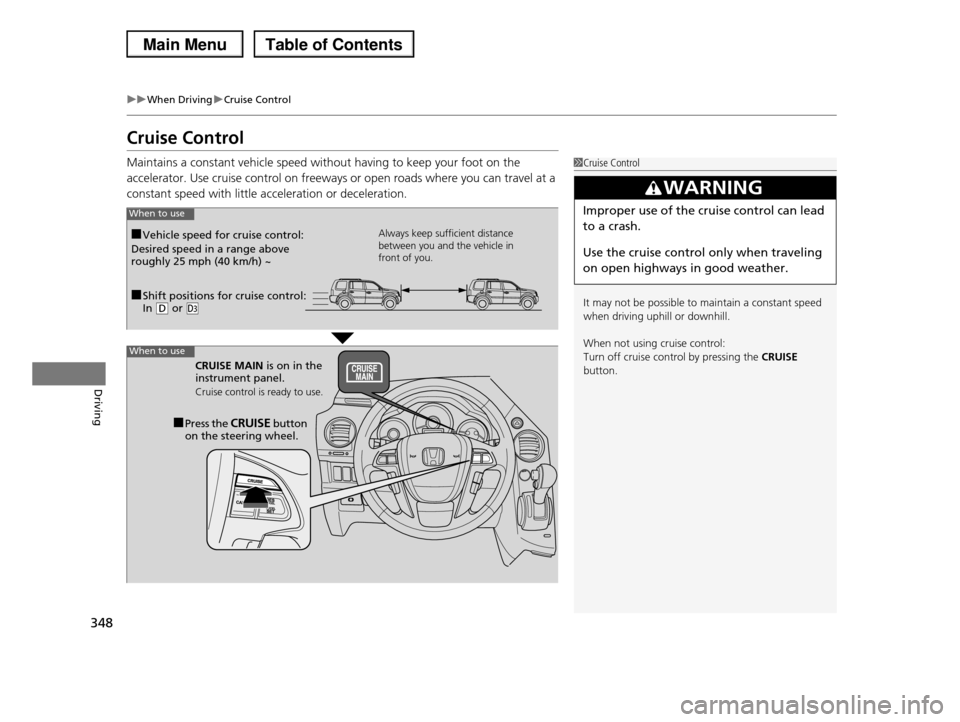
Maintains a constant vehicle speed without having to keep your foot on the
accelerator. Use cruise control on freeways or open roads where you can travel at a
constant speed with little acceleration or deceleration.
1Cruise Control
It may not be possible to maintain a constant speed
when driving uphill or downhill.
When not using cruise control:
Turn off cruise control by pressing the CRUISE button.
3WARNING
Improper use of the cruise control can lead
to a crash.
Use the cruise control only when traveling
on open highways in good weather.
■Shift positions for cruise control: In (D or (d
Always keep sufficient distance between you and the vehicle in front of you.
■Vehicle speed for cruise control:
Desired speed in a range above roughly 25 mph (40 km/h) ~
CRUISE MAIN is on in the instrument panel.
Cruise control is ready to use.
■Press the CRUISE button on the steering wheel.
When to use
When to use
Page 350 of 488
349
uuWhen DrivinguCruise Control
Continued
Driving
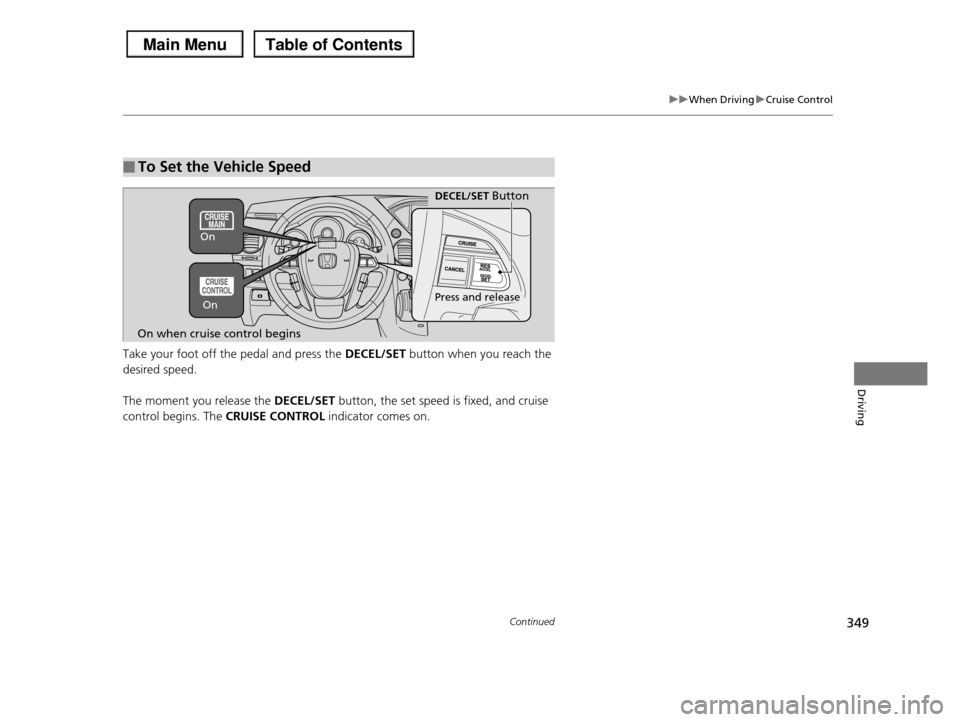
Take your foot off the pedal and press the DECEL/SET button when you reach the
desired speed.
The moment you release the DECEL/SET button, the set speed is fixed, and cruise
control begins. The CRUISE CONTROL indicator comes on.
■To Set the Vehicle Speed
DECEL/SET Button
On when cruise control begins
Press and releaseOn
On
Page 351 of 488
uuWhen DrivinguCruise Control
350
Driving
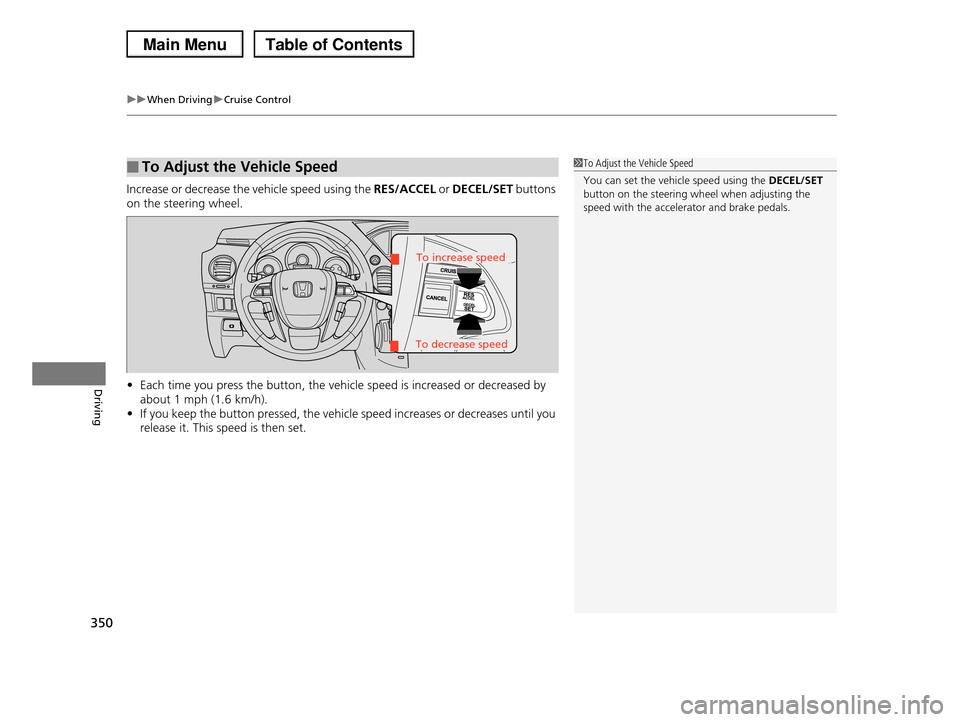
Increase or decrease the vehicle speed using the RES/ACCEL or DECEL/SET buttons
on the steering wheel.
•Each time you press the button, the vehicle speed is increased or decreased by
about 1 mph (1.6 km/h).
•If you keep the button pressed, the vehicle speed increases or decreases until you
release it. This speed is then set.
■To Adjust the Vehicle Speed1To Adjust the Vehicle Speed
You can set the vehicle speed using the DECEL/SET button on the steering wheel when adjusting the
speed with the accelerator and brake pedals.
To decrease speed
To increase speed