Page 96 of 488
95
uuGauges and DisplaysuMulti-Information Display*
Instrument Panel
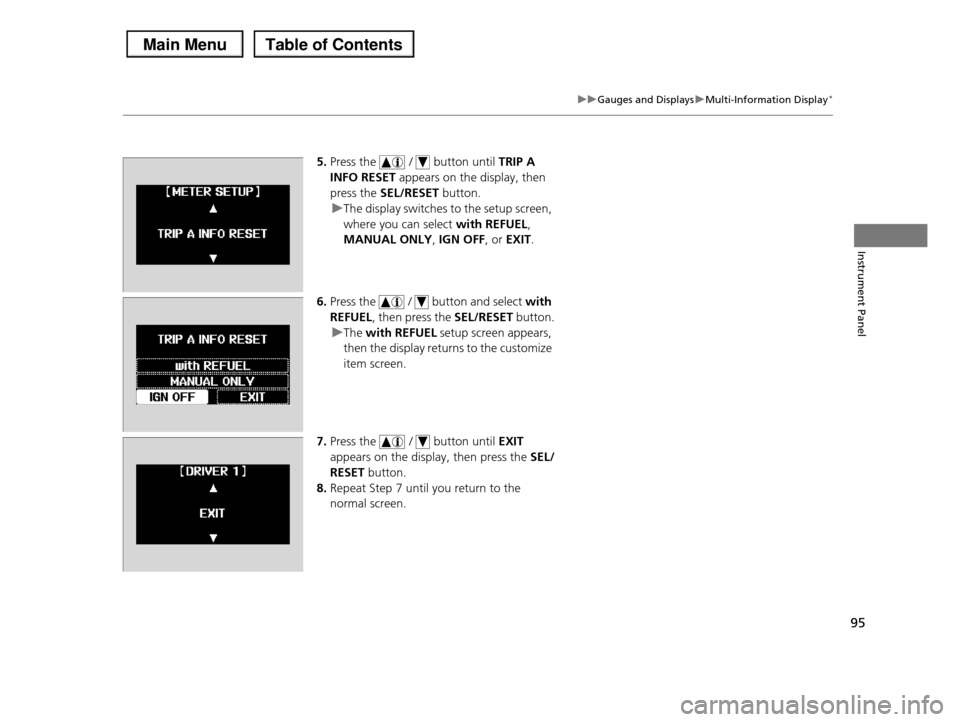
5.Press the / button until TRIP A
INFO RESET appears on the display, then
press the SEL/RESET button.
uThe display switches to the setup screen,
where you can select with REFUEL,
MANUAL ONLY, IGN OFF, or EXIT.
6.Press the / button and select with
REFUEL, then press the SEL/RESET button.
uThe with REFUEL setup screen appears,
then the display returns to the customize
item screen.
7.Press the / button until EXIT
appears on the display, then press the SEL/
RESET button.
8.Repeat Step 7 until you return to the
normal screen.
Page 120 of 488

119
uuSecurity SystemuSecurity System Alarm*
Controls
■Setting the security system alarm
The security system alarm automatically sets when the following conditions have
been met:
•The ignition switch is in LOCK (0, and the key has been removed from the
ignition switch.
•The hood and tailgate are closed.
•All doors, the tailgate, and the glass hatch are locked with the key or the remote
transmitter.
■When the security system alarm sets
The security system alarm indicator in the instrument panel blinks. When the
blinking interval changes after about 15 seconds, the security system alarm is set.
■To cancel the security system alarm
The security system alarm is canceled when the vehicle is unlocked using the key or
remote transmitter. The security system alarm indicator goes off at the same time.
■The PANIC button on the remote
transmitter
If you press the PANIC button for
approximately one second, the following will occur for about 30 seconds:
•The horn sounds.
•Some exterior lights flash.
■Canceling panic mode
Press any button on the remote transmitter, or turn the ignition switch to ON (w.
■Panic Mode
1Security System Alarm*
Do not set the security system alarm when someone is in the vehicle or a window is open. The system can
accidentally activate when:
•Unlocking the door with the lock tab or the master door lock switch.
If the battery goes dead after you have set the security system alarm, the security alarm may go off
once the battery is recharged or replaced.
If this occurs, deactivate the security system alarm by unlocking a door using the key or remote transmitter.
Do not attempt to alter this system or add another device to it.
PANIC Button
* Not available on all models
Page 127 of 488

uuOperating the Switches Around the Steering WheeluLight Switches
126
Controls
Automatic lighting control can be used when
the ignition switch is in ON (w.
When you turn the light switch to AUTO, the
headlights and other exterior lights will switch
on and off automatically depending on the
ambient brightness.
uYou can change the auto light sensitivity
setting.
2Customized Features P. 90
The headlights, all other exterior lights, and the instrument panel lights turn off
within 15 seconds after you remove the key and close the driver's door.
uYou can change the headlight auto off timer setting.
2Customized Features P. 90
If you turn the ignition switch to LOCK (0 with the headlight switch on, but do not
open the door, the lights turn off after 10 minutes (three minutes, if the switch is in
the AUTO position).
The lights turn on again when you unlock or open the driver's door. If you unlock
the door, but do not open it within 15 seconds, the lights go off. If you open the
driver's door, you will hear a lights on reminder chime.
■Automatic Lighting Control1Automatic Lighting Control
We recommend that you turn on the lights manually when driving at night, in a dense fog, or in dark areas
such as long tunnels or parking facilities.
The light sensor is in the location shown below.
Do not cover this light sensor with anything;
otherwise, the automatic lighting system may not work properly.
Adjust the auto light sensitivity as follows:
SettingThe exterior lights come on
when the ambient light is at
MAX
HIGH
MID
LOW
MIN
Light Sensor
Bright
Dark
■Automatic Lighting Off Feature
Page 128 of 488
127
uuOperating the Switches Around the Steering WheeluFog Lights*
Controls
Fog Lights*
When the low beam headlights are on, turn
the fog light switch on to use the fog lights.
Daytime Running Lights
The high beam headlights come on slightly dimmer than normal when the following
conditions have been met:
•The ignition switch is in ON (w.
•The headlight switch is off, or in .
•The parking brake is released.
The lights remain on even if you set the parking brake. Turning off the ignition
switch will turn off the daytime running lights.
The high beam headlights return to the original brightness once the headlight
switch is turned on.
1Fog Lights*
When the fog lights are on, the indicator in the
instrument panel will be on.
Fog Light Switch
* Not available on all models
Page 131 of 488
130
uuOperating the Switches Around the Steering WheeluBrightness Control
Controls
Brightness Control
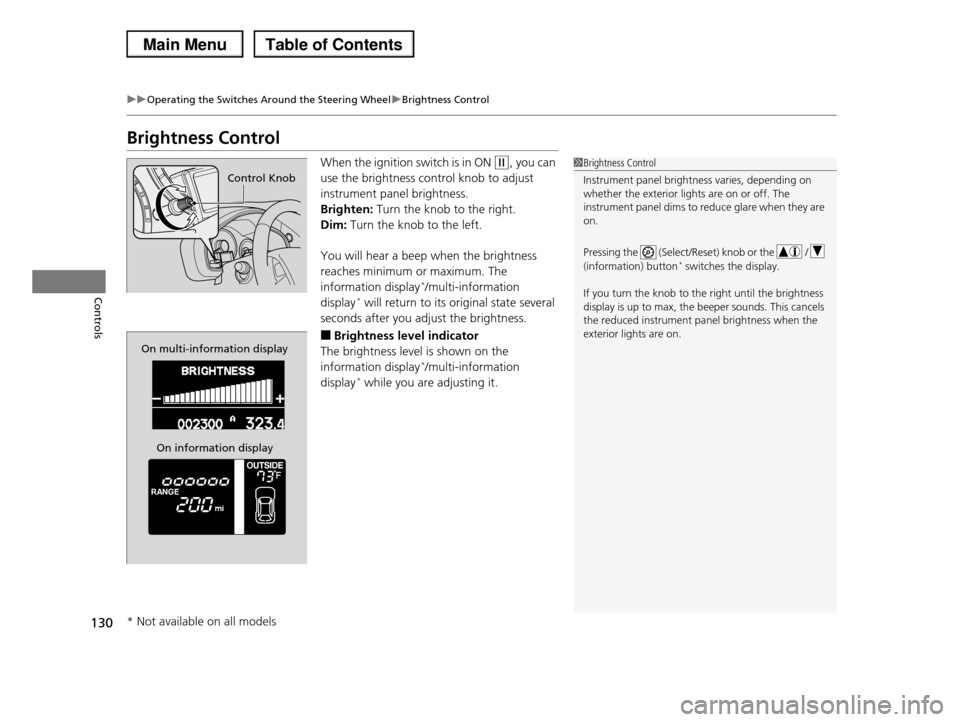
When the ignition switch is in ON (w, you can
use the brightness control knob to adjust
instrument panel brightness.
Brighten: Turn the knob to the right.
Dim: Turn the knob to the left.
You will hear a beep when the brightness
reaches minimum or maximum. The
information display*/multi-information
display* will return to its original state several
seconds after you adjust the brightness.
■Brightness level indicator
The brightness level is shown on the
information display*/multi-information
display* while you are adjusting it.
1Brightness Control
Instrument panel brightness varies, depending on
whether the exterior lights are on or off. The
instrument panel dims to reduce glare when they are on.
Pressing the (Select/Reset) knob or the /
(information) button* switches the display.
If you turn the knob to the right until the brightness
display is up to max, the beeper sounds. This cancels the reduced instrument panel brightness when the
exterior lights are on.
Control Knob
On multi-information display
On information display
* Not available on all models
Page 135 of 488

134
uuOperating the Switches Around the Steering WheeluAdjusting the Steering Wheel
Controls
Adjusting the Steering Wheel
The steering wheel height and distance from your body can be adjusted so that you
can comfortably grip the steering wheel in an appropriate driving posture.
1.Push the steering wheel adjustment lever
down.
uThe steering wheel adjustment lever is
under the steering column.
2.Move the steering wheel up or down, and
in or out.
uMake sure you can see the instrument
panel gauges and indicators.
3.Pull the steering wheel adjustment lever up
to lock the steering wheel in position.
uAfter adjusting the position, make sure
you have securely locked the steering
wheel in place by trying to move it up,
down, in, and out.
1Adjusting the Steering Wheel
Make any steering wheel adjustments before you
start driving.
3WARNING
Adjusting the steering wheel position while
driving may cause you to lose control of the
vehicle and be seriously injured in a crash.
Adjust the steering wheel only when the
vehicle is stopped.
Lever
Page 157 of 488
uuInterior Lights/Interior Convenience ItemsuInterior Convenience Items
156
Controls
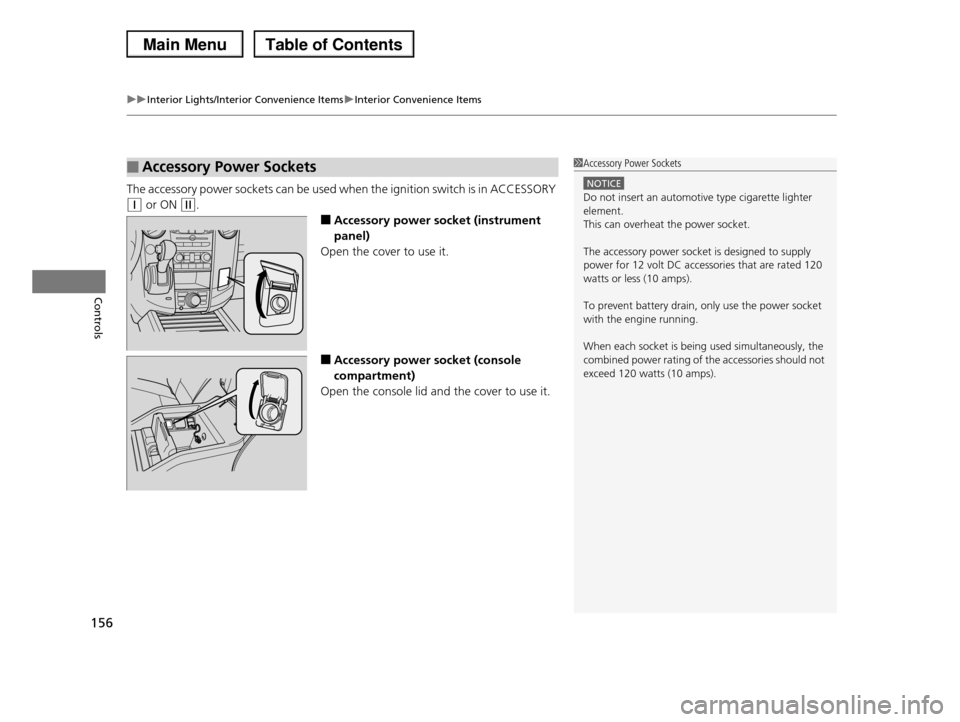
The accessory power sockets can be used when the ignition switch is in ACCESSORY
(q or ON (w.
■Accessory power socket (instrument
panel)
Open the cover to use it.
■Accessory power socket (console
compartment)
Open the console lid and the cover to use it.
■Accessory Power Sockets1Accessory Power Sockets
NOTICE
Do not insert an automotive type cigarette lighter element.
This can overheat the power socket.
The accessory power socket is designed to supply
power for 12 volt DC accessories that are rated 120
watts or less (10 amps).
To prevent battery drain, only use the power socket
with the engine running.
When each socket is being used simultaneously, the
combined power rating of the accessories should not exceed 120 watts (10 amps).
Page 327 of 488
326
uuBefore DrivinguDriving Preparation
Driving
•Be sure items placed on the floor behind the front seats cannot roll under the
seats.
uThey can interfere with the driver's ability to operate the pedals, the operation
of the seats, or the operation of the sensors under the seats.
•Everyone in the vehicle must fasten their seat belt.
2Fastening a Seat Belt P. 32
•Make sure that the indicators in the instrument panel come on when you start the
vehicle, and go off soon after.
uAlways have a dealer check the vehicle if a problem is indicated.
2Indicators P. 68