Page 1 of 488

Contents
This owner’s manual should be considered a permanent part of the
vehicle and should remain with the vehicle when it is sold.
This owner’s manual covers all models of your vehicle. You may find
descriptions of equipment and features that are not on your
particular model.
Images throughout this owner’s manual (including the front cover)
represent features and equipment that are available on some, but
not all, models. Your particular model may not have some of these
features.
This owner’s manual is for vehicles sold in the United States and
Canada.
The information and specifications included in this publication were
in effect at the time of approval for printing. Honda Motor Co., Ltd.
reserves the right, however, to discontinue or change specifications
or design at any time without notice and without incurring any
obligation.
2Safe Driving P. 23
For Safe Driving P. 24 Seat Belts P. 29Airbags P. 37
2Instrument Panel P. 67
Indicators P. 68Gauges and Displays P. 80
2Controls P. 97
Setting the Clock P. 98 Locking and Unlocking the Doors P. 99
Opening and Closing the Moonroof* P. 123
Adjusting the Seats P. 137
2Features P. 171
Audio System P. 172Audio System Basic Operation P. 216
General Information on the Audio System P. 272
Compass* P. 320
2Driving P. 323
Before Driving P. 324 Towing a Trailer P. 329
Parking Your Vehicle P. 364 Rearview Camera* P. 369
Accessories and Modifications P. 375
2Maintenance P. 377
Before Performing Maintenance P.378 Maintenance Minder™ P. 381
Checking and Maintaining Wiper Blades P. 410
Remote Control and Wireless Headphone Care* P. 425
2Handling the Unexpected P. 433
Tools P. 434If a Tire Goes Flat P. 435
Overheating P. 448Indicator, Coming On/Blinking P. 450
2Information P. 463
Specifications P. 464Identification Numbers P. 466Emissions Testing P. 470Warranty Coverages P. 472
Gracenote® End User License Agreement P. 476
Page 5 of 488
Visual Index
4
Quick Reference Guide
❙Power Door Lock Master Switch (P103)
❙Power Window Switches (P120)
❙Rearview Mirror (P135)
❙Hood Release Handle (P390)
❙Glove Box (P 152)
❙Driver's Front Airbag (P40)
❙Door Mirror Controls (P136)
❙Passenger's Front Airbag
(P40)
❙Fuel Fill Door Release Handle (P372)
❙Parking Brake Release Handle (P360)
❙Shift Lever
Automatic Transmission
(P345)
❙Accessory Power Socket
(P156)
❙Interior Fuse Box (P456)
❙Seat Heater Switches* (P162)
❙Parking Brake (P360)
Page 7 of 488
Visual Index
6
Quick Reference Guide
❙Windshield Wipers (P128, 410)
❙Door Lock/Unlock Control (P101)
❙How to Refuel (P372)
❙High-Mount Brake Light (P409)
❙Opening/Closing the Tailgate
(P110)
❙Rear Wiper (P129, 410)
❙Back-Up Lights (P406)
❙Brake/Taillights (P406)
❙Rear Turn Signal Lights (P406)
❙Rear Side Marker Lights (P406)
❙Power Door Mirrors (P136)
❙Maintenance Under the Hood (P389)
❙Fog Lights* (P127, 403)
❙Rearview Camera* (P369)
❙Front Turn Signal/Parking Lights (P125, 405)
❙Side Marker Lights (P125, 405)
❙Tires (P414, 435)
❙Headlights (P125, 402)
❙Tailgate Release Button (P111)
Page 9 of 488

8
Quick Reference Guide
Instrument Panel (P 67)
System Indicators
Malfunction Indicator Lamp
Low Oil Pressure Indicator
Charging System Indicator
Daytime Running Lights Indicator*
Vehicle Stability Assist (VSA®) System Indicator
VSA® OFF Indicator
Low Tire Pressure Indicator*/Low Tire Pressure/TPMS Indicator*
Lights Reminders
Lights On Indicator
High Beam Indicator
Fog Light Indicator*
Immobilizer System Indicator
Seat Belt Reminder Indicator
System Indicators
CRUISE CONTROL Indicator
Parking Brake and Brake System Indicator
Supplemental Restraint System Indicator
Side Airbag Off Indicator
Door Open Indicator
CRUISE MAIN Indicator
Tachometer
Speedometer
Fuel Gauge
Low Fuel Indicator
Shift Lever Position Indicator
System Message Indicator*
Gauges (P80)/Information Display* (P81)/
Multi-Information Display* (P85)/System Indicators (P68)
Fuel Economy Indicator
VTM-4r system Indicator*TPMS Indicator*
Maintenance Minder Indicator*
Washer Level Indicator*
A/T Temperature Indicator*
Turn Signal and Hazard Warning Indicators
Starter System Indicator*System Indicators
Canada
U.S.
Canada
U.S.
Anti-lock Brake System (ABS) Indicator
Power Tailgate Indicator*
Security System Alarm Indicator*
Information Display*/Multi-Information Display*
Canada
U.S.
Canada
U.S.
Page 10 of 488
9
Quick Reference Guide
Controls (P97)
Clock (P 98)
aPress the CLOCK button to access the
clock adjustment mode screen.
bPress to select the item you want to
adjust (12/24 hour mode, hour, minutes).
cRotate to make the adjustment.
dPress to enter your selection. Repeat
steps 2 to 4 to adjust other items.
eTo enter the selection, press and
select EXIT, then press .
The navigation system receives signals from
GPS satellites, updating the clock automatically.
Models without navigation system
Models with navigation system
Turn Signals (P125)
Turn Signal Control Lever
Right
Left
Lights (P125)
Light Control Switches
Low Beam
High Beam
Flashing
* Not available on all models
Page 11 of 488
10
Quick Reference Guide
Wipers and Washers
(P128)
Wiper/Washer Control Lever
Adjustment Ring: Long Delay : Short Delay
MIST
OFF
INT: Low speed with intermittentLO: Low speed wipe
HI: High speed wipe
Pull toward you to spray washer fluid.
Steering Wheel (P134)
●To adjust, pull the adjustment lever
towards you, adjust to the desired position, then lock the lever back in place.
Tailgate (P110)
●With all the doors unlocked, press the
tailgate release button and lift open the
tailgate.
●Press the power tailgate button on the
driver’s door or the remote transmitter to open and close the power tailgate.
Glass Hatch (P116)
●To open the glass hatch, press the glass
hatch release button on the tailgate.
●Press the glass hatch release button on
the driver’s door or the remote transmitter to open the glass hatch.
Models with the power tailgate
Models without the power tailgate
Page 12 of 488
11
Quick Reference Guide
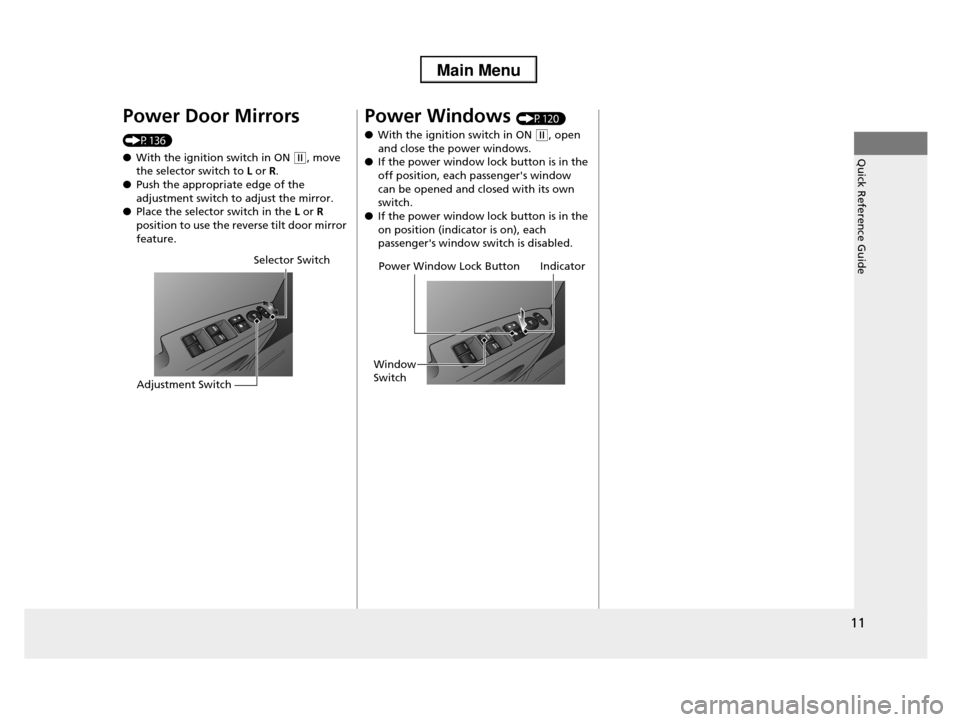
Power Door Mirrors
(P136)
●With the ignition switch in ON (w, move the selector switch to L or R.
●Push the appropriate edge of the
adjustment switch to adjust the mirror.●Place the selector switch in the L or R
position to use the reverse tilt door mirror
feature.
Selector Switch
Adjustment Switch
Power Windows (P120)
●With the ignition switch in ON (w, open
and close the power windows.●If the power window lock button is in the
off position, each passenger's window
can be opened and closed with its own switch.
●If the power window lock button is in the
on position (indicator is on), each passenger's window switch is disabled.
Power Window Lock Button
Window
Switch
Indicator
Page 15 of 488
14
Quick Reference Guide
Driving (P323)
Release ButtonShift Lever
Depress the brake pedal and press the release button to move out of (P.
Move the shift lever without pressing the release button.
Press the release button to move the shift lever.
Automatic Transmission (P346)
●Shift to (P and depress the brake pedal when starting the engine.
●Shifting
ParkTurn off or start the engine.
Transmission is locked.
Reverse
NeutralTransmission is not locked.
DriveNormal driving.
Drive (D3)Press the (d button while the shift lever is in
(D.
Used when:
•Going up or down hills•Towing a trailer in hilly terrain
SecondUsed to increase engine braking (the
transmission is locked in 2nd gear)
FirstUsed to further increase engine braking
(the transmission is locked in 1st gear)
(d Button