Page 96 of 488
95
uuGauges and DisplaysuMulti-Information Display*
Instrument Panel
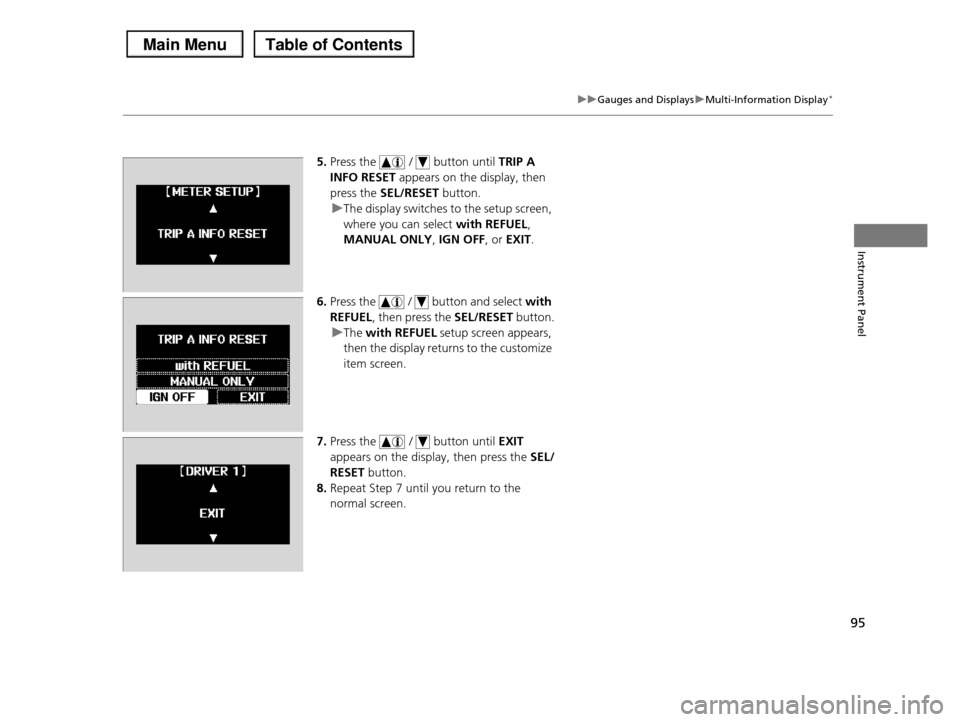
5.Press the / button until TRIP A
INFO RESET appears on the display, then
press the SEL/RESET button.
uThe display switches to the setup screen,
where you can select with REFUEL,
MANUAL ONLY, IGN OFF, or EXIT.
6.Press the / button and select with
REFUEL, then press the SEL/RESET button.
uThe with REFUEL setup screen appears,
then the display returns to the customize
item screen.
7.Press the / button until EXIT
appears on the display, then press the SEL/
RESET button.
8.Repeat Step 7 until you return to the
normal screen.
Page 99 of 488
98
Controls
Setting the Clock
Clock
You can adjust the time in the clock display, using the CLOCK button with the ignition switch in ON (w.
1.Press the CLOCK button to access the clock
adjustment mode screen.2.Press to select the item you want to
adjust (12/24 hour mode, hour, minute).
3.Rotate to make the adjustment.4.Press to enter your selection. Repeat
steps 2 to 4 to adjust other items.
5.To enter the selection, press and select EXIT, then press .
Models with audio/information screen1Clock
These indications are used to show how to operate
the selector knob.
Rotate to select. Press to enter.
You can also press the SETUP button to access the clock adjustment mode screen.
1. Press the SETUP button.
2. Rotate to select CLOCK ADJUST on the screen.
3. Press , CLOCK ADJUST appears.
The clock is automatically updated through the
navigation system, so the time does not need to be adjusted.
Models with navigation system
Page 102 of 488

101
uuLocking and Unlocking the DoorsuLocking/Unlocking the Doors from the Outside
Continued
Controls
Locking/Unlocking the Doors from the Outside
■Locking the doors
Press the lock button.
Once:
uSome exterior lights flash, all the doors
and tailgate lock, and the security system
sets.
Twice (within five seconds after the first
push):
uA beeper sounds and verifies the security
system is set.
■Unlocking the doors
Press the unlock button.
Once:
uSome exterior lights flash twice, and the
driver's door unlocks.
Twice:
uThe remaining doors and tailgate unlock.
■Using the Remote Transmitter1Using the Remote Transmitter
If you do not open a door within 30 seconds of unlocking the vehicle with the remote transmitter, the doors will automatically relock.
You can change the relock timer setting.
2Customized Features P. 90
If the interior light switch is in the door activated position, the interior lights come on when you press the unlock button. No doors opened: The lights fade out after 30 seconds.Doors relocked with the remote: The lights go off immediately.2Interior Lights P. 150
The remote transmitter uses low-power signals, so the operating range may vary depending on the surroundings.
The remote will not lock the vehicle when a door or the tailgate is open.
If the distance at which it works varies, the battery is probably low.If the LED does not come on when you press a button, the battery is dead.2Replacing the Button Battery P. 424
You can customize the door unlock mode setting.
2Customized Features P. 90
Models with multi-information display
Models with multi-information display
LED
Unlock Button
Lock Button
Page 103 of 488

uuLocking and Unlocking the DoorsuLocking/Unlocking the Doors from the Outside
102
Controls
Fully insert the key and turn it.
■Locking the driver's door
Push the lock tab rearward a or push the master door lock switch in the lock direction
b, and close the door.
■Locking the passenger's doors
Push the lock tab rearward and close the door.
■Lockout prevention system
The doors and the tailgate cannot be locked when the key is in the ignition switch, and
any door or the tailgate is open.
■Locking/Unlocking the Doors Using a Key1Locking/Unlocking the Doors Using a Key
When you lock the driver's door with a key, all of the other doors and tailg a t e l o c k a t t h e s a m e t i m e . W h e n
unlocking, the driver's door unlocks first. Turn the
key a second time within a few seconds to unlock the remaining doors and the tailgate.
You can customize the door unlock mode setting.
2Customized Features P. 90
Models with multi-information displayLock
Unlock
■Locking a Door Without Using a Key1Locking a Door Without Using a Key
When you lock the driver's door, all the other doors
and tailgate lock at the same time.
Make sure you have the key in your hand before locking the door to prevent it from being locked in
the vehicle.
2
Page 106 of 488
105
uuLocking and Unlocking the DoorsuAuto Door Locking/Unlocking
Controls
Auto Door Locking/Unlocking
Your vehicle locks all doors and unlocks the driver’s door automatically when a
certain condition is met.
■Drive lock mode
All doors and the tailgate lock when the vehicle’s speed reaches about 10 mph (15
km/h).
■Park unlock mode
The driver’s door unlocks when the shift lever is moved into (P with the brake pedal
depressed.
■Auto Door Locking
■Auto Door Unlocking
1Auto Door Locking/Unlocking
You can turn off or change to another auto door
locking/unlocking setting using the master door lock
switch.2Customizing the Auto Door Locking/
Unlocking Setting* P. 106
You can turn off or change to another auto door
locking/unlocking setting using the multi-information display.
2Customized Features P. 90
Models without multi-information display
Models with multi-information display
* Not available on all models
Page 114 of 488

Continued113
uuOpening and Closing the TailgateuOpening/Closing the Power Tailgate*
Controls
Press the power tailgate button for more than
one second to operate.
To reverse direction while the power tailgate is
in operation, press the button again. The
beeper sounds three times and the tailgate
reverses direction.
■Customizing when to open the tailgate
ANYTIME:
The power tailgate unlocks and opens at the same time. This is the default setting.
WHEN UNLOCKED:
The tailgate opens when all doors are unlocked.
2Customized Features P. 90
To change the setting, do the following:
1.Apply the parking brake.
2.Turn the ignition switch to ON (w.
3.Press and hold the power tailgate button in the driver' s door until you hear a
beep.
4.Turn the ignition switch to OFF (0.
uWhen ANYTIME is set, you hear one long beep.
uWhen WHEN UNLOCKED is set, you hear three short beeps.
■Remote Transmitter1Opening/Closing the Power Tailgate*
If the power tailgate meets resistance while opening
or closing, the auto reverse feature reverses the direction. Three beeps sound.
The auto reverse function stops sensing when the tailgate is almost closed to make sure that it fully
closes.
Do not touch the sensors located on both sides of the
tailgate. The power tailgate does not close if you
touch either sensor when you are trying to close the tailgate.
Be careful not to scratch the sensors with a sharp object. If scratched, they can be damaged, and the
power tailgate closing feature malfunctions.
Power Tailgate Button
Models with multi-information display
Models without multi-information display
* Not available on all models
Page 125 of 488
124
Controls
Operating the Switches Around the Steering Wheel
Ignition Switch
1Ignition Switch
You cannot take the key out unless the shift lever is in (P.
If you open the driver's door when the key is in LOCK (0 or ACCESSORY (q, a warning buzzer will sound
to remind you to take the key out.
When this happens, the following messages appear on the multi-information display*:
•In LOCK (0: REMOVE KEY
•In ACCESSORY (q: REMOVE KEY The buzzer will stop when you take the key out.
If the key won't turn from LOCK (0 to ACCESSORY
(q, turn the key while moving the steering wheel left and right. The steering wheel will unlock, allowing
the key to turn.
(0 LOCK: Insert and remove the key in this position.
(q ACCESSORY: Operate the audio system and other accessories in this position.
(w ON: This is the position when driving.
(e START: This position is for starting the engine. The switch returns to ON (w when you let go of the key.
* Not available on all models
Page 131 of 488
130
uuOperating the Switches Around the Steering WheeluBrightness Control
Controls
Brightness Control
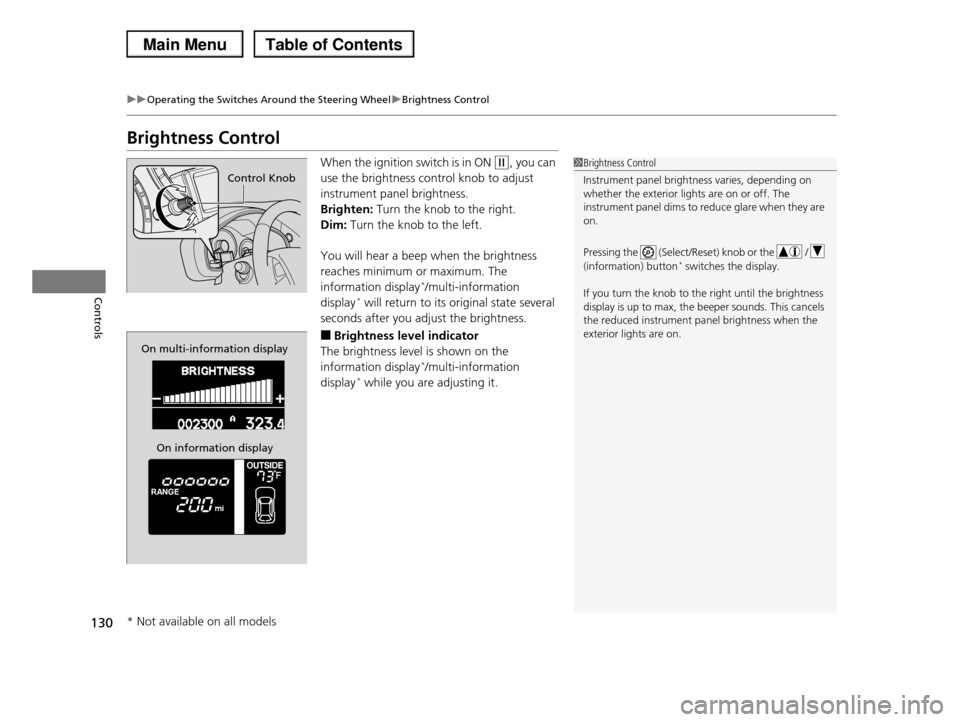
When the ignition switch is in ON (w, you can
use the brightness control knob to adjust
instrument panel brightness.
Brighten: Turn the knob to the right.
Dim: Turn the knob to the left.
You will hear a beep when the brightness
reaches minimum or maximum. The
information display*/multi-information
display* will return to its original state several
seconds after you adjust the brightness.
■Brightness level indicator
The brightness level is shown on the
information display*/multi-information
display* while you are adjusting it.
1Brightness Control
Instrument panel brightness varies, depending on
whether the exterior lights are on or off. The
instrument panel dims to reduce glare when they are on.
Pressing the (Select/Reset) knob or the /
(information) button* switches the display.
If you turn the knob to the right until the brightness
display is up to max, the beeper sounds. This cancels the reduced instrument panel brightness when the
exterior lights are on.
Control Knob
On multi-information display
On information display
* Not available on all models