uuMaintenance Minder™uTo Use Maintenance MinderTM
388
Maintenance
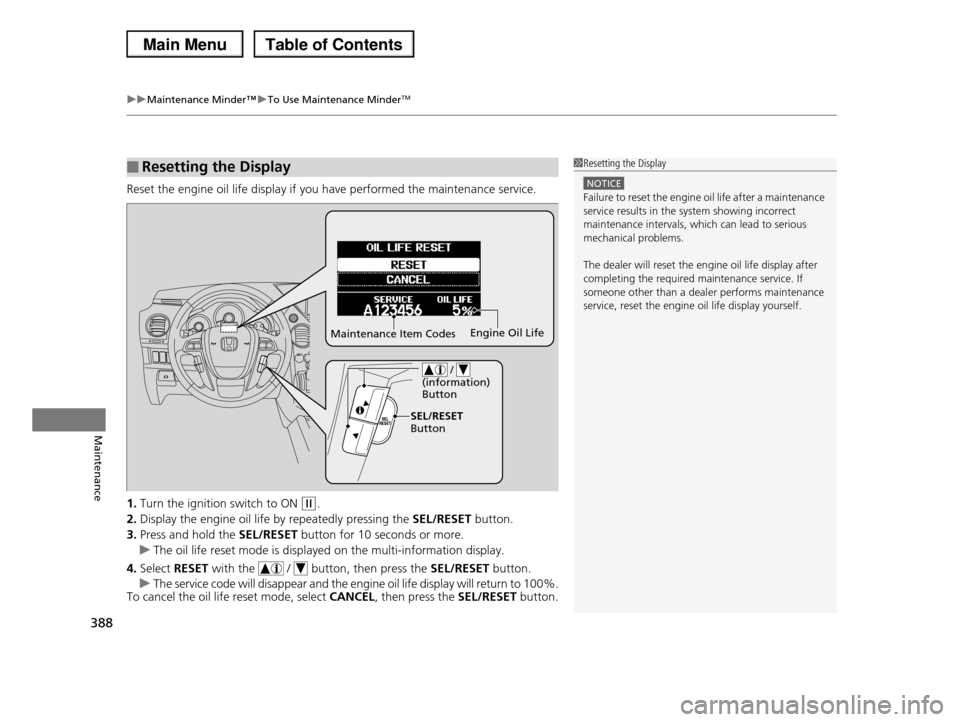
Reset the engine oil life display if you have performed the maintenance service.
1.Turn the ignition switch to ON (w.
2.Display the engine oil life by repeatedly pressing the SEL/RESET button.
3.Press and hold the SEL/RESET button for 10 seconds or more.
uThe oil life reset mode is displayed on the multi-information display.
4.Select RESET with the / button, then press the SEL/RESET button.
uThe service code will disappear and the engine oil life display will return to 100%.To cancel the oil life reset mode, select CANCEL, then press the SEL/RESET button.
■Resetting the Display1Resetting the Display
NOTICE
Failure to reset the engine oil life after a maintenance service results in the system showing incorrect
maintenance intervals, which can lead to serious
mechanical problems.
The dealer will reset the engine oil life display after
completing the required maintenance service. If someone other than a dealer performs maintenance
service, reset the engine oil life display yourself.
Maintenance Item CodesEngine Oil Life
/ (information) Button
SEL/RESET Button
423
Maintenance
Battery
Checking the Battery
Check the battery condition monthly. Look at
the test indicator window and check the
terminals for corrosion.
If your vehicle's battery is disconnected or goes dead:
•The audio system is disabled.
2Reactivating the audio system P. 174
•The clock resets.
2Setting the Clock P. 98
•The navigation system* is disabled.
2Refer to the navigation system manual
Charging the Battery
Disconnect both battery cables to prevent damaging your vehicle's electrical system.
Always disconnect the negative (–) cable first, and reconnect it last.
1Battery
WARNING: Battery post, terminals,
and related accessories contain lead
and lead compounds.
Wash your hands after handling.
The test indicator's color information is on the battery.
When you find corrosion, clean the battery terminals by applying a baking powder and water solution.
Clean terminals with a damp towel. Cloth/towel dry
the battery. Coat the terminals with grease to help prevent future corrosion.
3WARNING
The battery gives off explosive hydrogen
gas during normal operation.
A spark or flame can cause the battery to
explode with enough force to kill or
seriously hurt you.
When conducting any battery
maintenance, wear protective clothing and
a face shield, or have a skilled technician do
it.
Test Indicator Window
* Not available on all models