2013 HONDA ODYSSEY tail light
[x] Cancel search: tail lightPage 2 of 433

Contents
Child Safety P. 54 Exhaust Gas Hazard P. 68 Safety Labels P. 69Opening and Closing the Tailgate P. 119 Opening and Closing the Sliding Doors P. 125
Opening and Closing the Moonroof
* P. 139 Operating the Switches Around the Steering Wheel P. 140
Adjusting the Seats P. 153 Interior Lights/Interior Convenience Items P. 168
Climate Control System
* P. 186
Audio Error Messages P. 230 General Information on the Audio System P. 232
Bluetooth® HandsFreeLink® P. 254 Compass
* P. 277
When Driving P. 291 Braking P. 308 Parking Your Vehicle P. 312
Fuel Economy P. 321 Accessories and Modifications P. 322Maintenance Under the Hood P. 335 Replacing Light Bulbs P. 347
Checking and Maintaining Tires P. 362 Battery P. 371 Remote Transmitter Care P. 372
Heating and Cooling System
*/Climate Control System
* Maintenance P. 376 Cleaning P. 377
Engine Does Not Start P. 392 Jump Starting P. 393 Shift Lever Does Not Move P. 395
Fuses P. 403 Emergency Towing P. 409Devices that Emit Radio Waves P. 415 Reporting Safety Defects P. 416 Emissions Testing P. 417
Customer Service Information P. 422 Gracenote® End User License Agreement P. 423
Quick Reference Guide
P. 2
Safe Driving
P. 25
Instrument Panel
P. 71
Controls
P. 107
Features
P. 193
Driving
P. 279
Maintenance
P. 323
Handling the Unexpected
P. 381
Information
P. 411
Index
P. 425
Page 7 of 433
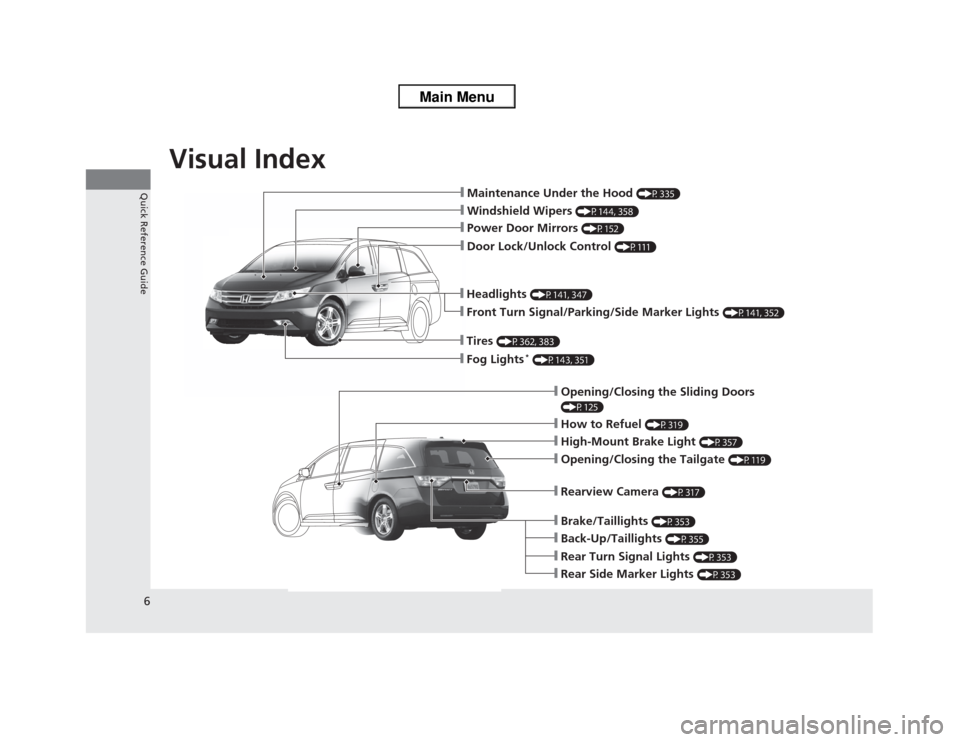
Visual Index
6Quick Reference Guide
❙Maintenance Under the Hood
(P335)
❙Windshield Wipers
(P144, 358)
❙Door Lock/Unlock Control
(P111)
❙Power Door Mirrors
(P152)
❙Headlights
(P141, 347)
❙Front Turn Signal/Parking/Side Marker Lights
(P141, 352)
❙Tires
(P362, 383)
❙Fog Lights
* (P143, 351)
❙How to Refuel
(P319)
❙High-Mount Brake Light
(P357)
❙Rearview Camera
(P317)
❙Opening/Closing the Tailgate
(P119)
❙Back-Up/Taillights
(P355)
❙Brake/Taillights
(P353)
❙Rear Turn Signal Lights
(P353)
❙Rear Side Marker Lights
(P353)
❙Opening/Closing the Sliding Doors (P125)
Page 9 of 433

8Quick Reference Guide
Instrument Panel
(P71)
U. S.Canada
U. S.
Canada
U. S.
Canada
Canada
U. S.
U. S.
Canada
System Indicators
Malfunction
Indicator Lamp
Low Oil Pressure
Indicator
Charging System
Indicator
Anti-lock Brake System
(ABS) Indicator Vehicle Stability
Assist (VSA®) System
Indicator
VSA® OFF Indicator
Low Tire Pressure
Indicator
*/
Low Tire Pressure/
TPMS Indicator
*
Security System Alarm
Indicator
*
Lights Reminders
Lights On Indicator
High Beam Indicator
Fog Light Indicator
*
Immobilizer System
IndicatorSeat Belt Reminder
Indicator
System Indicators
Starter System
Indicator
*
System Message
Indicator
*
Parking Brake
and Brake System
IndicatorSupplemental
Restraint System
Indicator
Side Airbag Off
Indicator
Door and Tailgate Open Indicator/
Parking Sensor IndicatorCruise Main Indicator TachometerInformation Display
*/
Multi-Information Display
*
Speedometer
Fuel Gauge
Shift Lever
Position Indicator
Power Sliding Door
Indicator
*
Gauges
(P86)
/Information Display
* (P87)
/
Multi-Information Display
* (P98)
/System Indicators
(P72)
Power Tailgate
Indicator
*
Fuel Economy
Indicator
TPMS Indicator
*
Turn Signal and
Hazard Warning
Indicators
Maintenance Minder
Indicator
*
Daytime Running
Lights Indicator
Washer Level
Indicator
*
Blind Spot Information
System Indicator
*
Cruise Control
Indicator
Temperature
Gauge
Low Fuel
Indicator
Page 78 of 433

77
uuIndicatorsu
Instrument Panel
Door and Tailgate
Open Indicator
●Comes on for a few seconds when
you turn the ignition switch to ON (w
, then goes off.
●Comes on if any door or the tailgate
is not completely closed.●The beeper sounds and the indicator
comes on if any door or the tailgate
is opened while driving.
●Goes off when all doors and tailgate are
closed.
Parking Sensor
Indicator
*
●Comes on for a few seconds when
you turn the ignition switch to ON (w
, then goes off.
●A corresponding indicator comes on
when an obstacle is detected while
parking.●Comes on if there is a problem with
the parking sensor system. The
beeper sounds.
●Comes on without any obstacles or
when you are not parking - Check if
the area around the sensor(s) is covered
with mud, ice, snow, etc. If the
indicator(s) stays on even after you
clean the area, have the system checked
by a dealer.
—
Daytime Running
Lights Indicator
*
●Comes on for a few seconds when
you turn the ignition switch to ON (w
, then goes off.
●Comes on if there is a problem with
the DRL system.
●Have your vehicle checked by a dealer.
2Daytime Running Lights P. 143
Indicator
Name
On/Blinking
Explanation
Message
*
* Not available on all models
Page 105 of 433
104
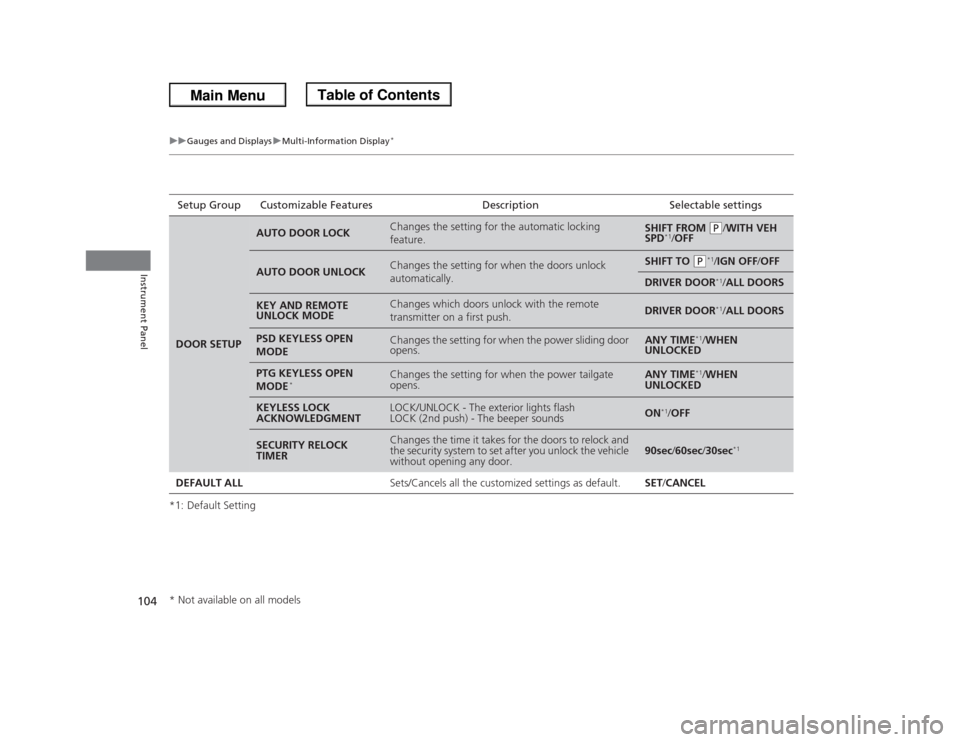
uuGauges and DisplaysuMulti-Information Display
*
Instrument Panel
*1: Default SettingSetup Group Customizable Features Description Selectable settingsDOOR SETUP
AUTO DOOR LOCK
Changes the setting for the automatic locking
feature.
SHIFT FROM
(P
/WITH VEH
SPD
*1/OFF
AUTO DOOR UNLOCK
Changes the setting for when the doors unlock
automatically.
SHIFT TO
(P
*1/IGN OFF/OFF
DRIVER DOOR
*1/ALL DOORS
KEY AND REMOTE
UNLOCK MODE
Changes which doors unlock with the remote
transmitter on a first push.
DRIVER DOOR
*1/ALL DOORS
PSD KEYLESS OPEN
MODE
Changes the setting for when the power sliding door
opens.
ANY TIME
*1/WHEN
UNLOCKED
PTG KEYLESS OPEN
MODE
*
Changes the setting for when the power tailgate
opens.
ANY TIME
*1/WHEN
UNLOCKED
KEYLESS LOCK
ACKNOWLEDGMENT
LOCK/UNLOCK - The exterior lights flash
LOCK (2nd push) - The beeper sounds
ON
*1/OFF
SECURITY RELOCK
TIMER
Changes the time it takes for the doors to relock and
the security system to set after you unlock the vehicle
without opening any door.
90sec/60sec/30sec
*1
DEFAULT ALLSets/Cancels all the customized settings as default. SET/CANCEL* Not available on all models
Page 108 of 433

107
Controls
This chapter explains how to operate the various controls necessary for driving.
Setting the Clock.............................. 108
Locking and Unlocking the Doors
Key Types and Functions .................. 109
Locking/Unlocking the Doors from the
Outside .......................................... 111
Locking/Unlocking the Doors from the
Inside ............................................. 113
Childproof Door Locks ..................... 114
Auto Door Locking/Unlocking .......... 115
Opening and Closing the Tailgate... 119Opening and Closing the Sliding Doors
...... 125
Security System................................ 133
Immobilizer System .......................... 133
Security System Alarm
*.................... 133
Opening and Closing the Windows.... 136Opening and Closing the Moonroof
*...... 139
Operating the Switches Around the
Steering Wheel
Ignition Switch ................................. 140
Turn Signals ..................................... 141
Light Switches.................................. 141
Fog Lights
*...................................... 143
Daytime Running Lights ................... 143
Wipers and Washers ........................ 144
Brightness Control ........................... 146
Rear Defogger/Heated Door Mirror
*
Button ........................................... 147
Driving Position Memory System
*.... 148
Adjusting the Steering Wheel........... 150Adjusting the Mirrors....................... 151
Interior Rearview Mirror ................... 151
Power Door Mirrors ......................... 152
Adjusting the Seats.......................... 153
Adjusting the Seat Positions ............. 153
Interior Lights/Interior Convenience
Items................................................ 168
Interior Lights .................................. 168
Interior Convenience Items .............. 170
Heating and Cooling
*....................... 182
Using Vents, Heating and A/C.......... 182
Climate Control System*.................. 186
Using Automatic Climate Control .... 186
Automatic Climate Control Sensors . 191
* Not available on all models
Page 110 of 433
109
Continued
Controls
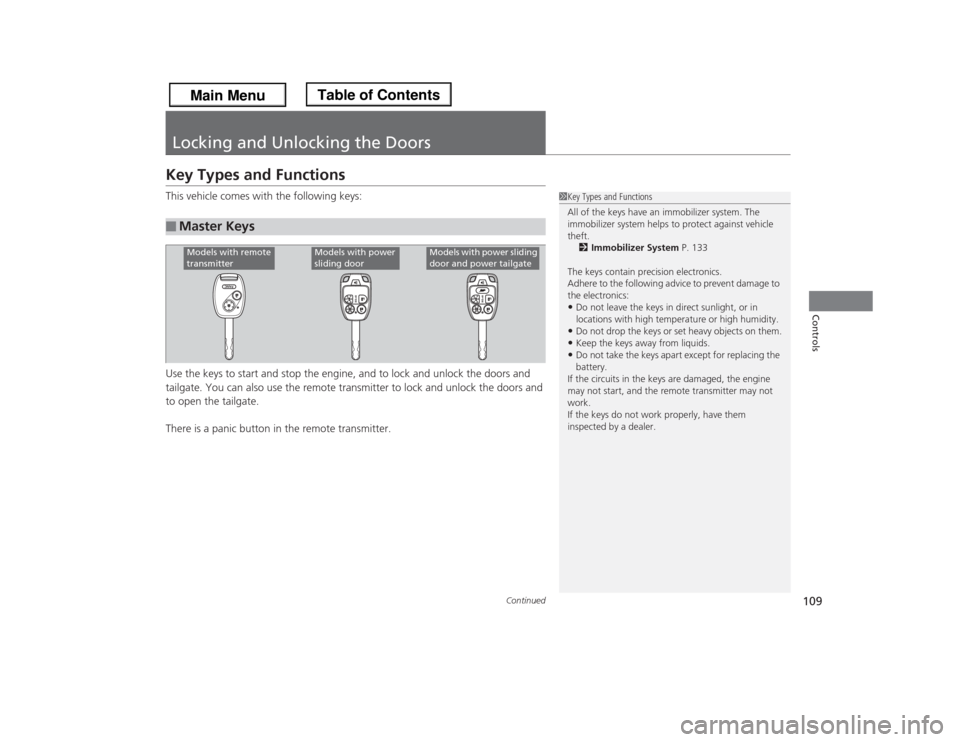
Locking and Unlocking the DoorsKey Types and FunctionsThis vehicle comes with the following keys:
Use the keys to start and stop the engine, and to lock and unlock the doors and
tailgate. You can also use the remote transmitter to lock and unlock the doors and
to open the tailgate.
There is a panic button in the remote transmitter.■
Master Keys
1Key Types and Functions
All of the keys have an immobilizer system. The
immobilizer system helps to protect against vehicle
theft.
2Immobilizer System P. 133
The keys contain precision electronics.
Adhere to the following advice to prevent damage to
the electronics:•Do not leave the keys in direct sunlight, or in
locations with high temperature or high humidity.•Do not drop the keys or set heavy objects on them.•Keep the keys away from liquids.•Do not take the keys apart except for replacing the
battery.
If the circuits in the keys are damaged, the engine
may not start, and the remote transmitter may not
work.
If the keys do not work properly, have them
inspected by a dealer.
Models with remote
transmitter
Models with power
sliding door
Models with power sliding
door and power tailgate
Page 112 of 433
111
uuLocking and Unlocking the DoorsuLocking/Unlocking the Doors from the Outside
Continued
Controls
Locking/Unlocking the Doors from the Outside
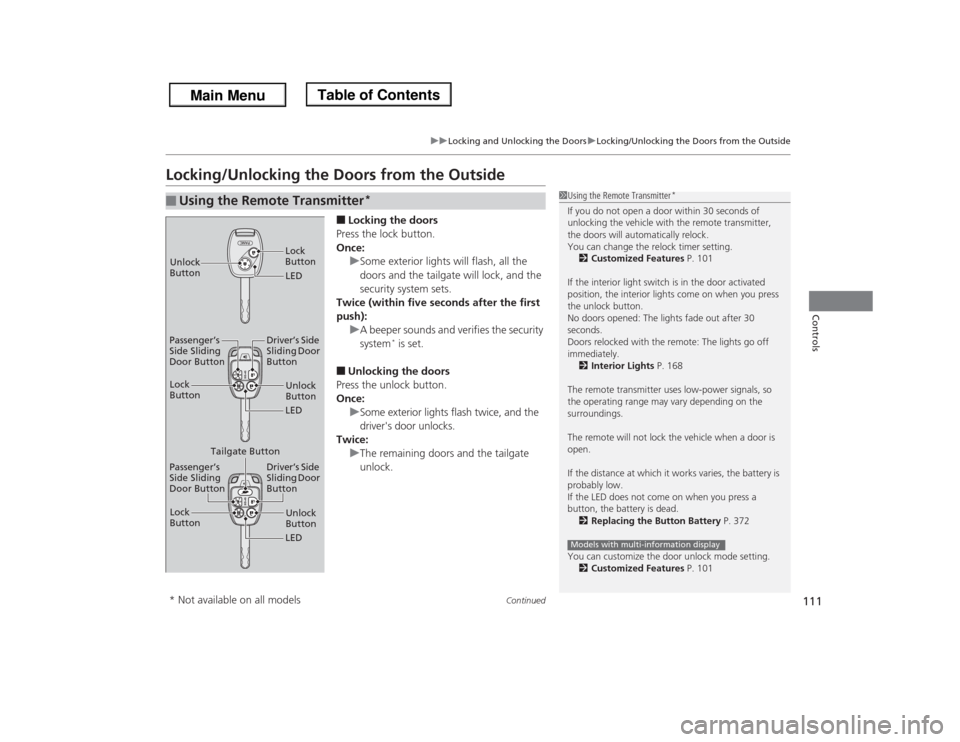
■Locking the doors
Press the lock button.
Once:
uSome exterior lights will flash, all the
doors and the tailgate will lock, and the
security system sets.
Twice (within five seconds after the first
push):
uA beeper sounds and verifies the security
system
* is set.
■Unlocking the doors
Press the unlock button.
Once:
uSome exterior lights flash twice, and the
driver's door unlocks.
Twice:
uThe remaining doors and the tailgate
unlock.
■
Using the Remote Transmitter
*
1Using the Remote Transmitter
*
If you do not open a door within 30 seconds of
unlocking the vehicle with the remote transmitter,
the doors will automatically relock.
You can change the relock timer setting.
2Customized Features P. 101
If the interior light switch is in the door activated
position, the interior lights come on when you press
the unlock button.
No doors opened: The lights fade out after 30
seconds.
Doors relocked with the remote: The lights go off
immediately.
2Interior Lights P. 168
The remote transmitter uses low-power signals, so
the operating range may vary depending on the
surroundings.
The remote will not lock the vehicle when a door is
open.
If the distance at which it works varies, the battery is
probably low.
If the LED does not come on when you press a
button, the battery is dead.
2Replacing the Button Battery P. 372
You can customize the door unlock mode setting.
2Customized Features P. 101Models with multi-information display
LED Unlock
ButtonLock
ButtonUnlock
Button
LED Lock
Button
Passenger’s
Side Sliding
Door ButtonDriver’s Side
Sliding Door
Button
Unlock
Button
LED Lock
Button
Passenger’s
Side Sliding
Door ButtonDriver’s Side
Sliding Door
Button
Tailgate Button
* Not available on all models