Page 103 of 433
102
uuGauges and DisplaysuMulti-Information Display
*
Instrument Panel
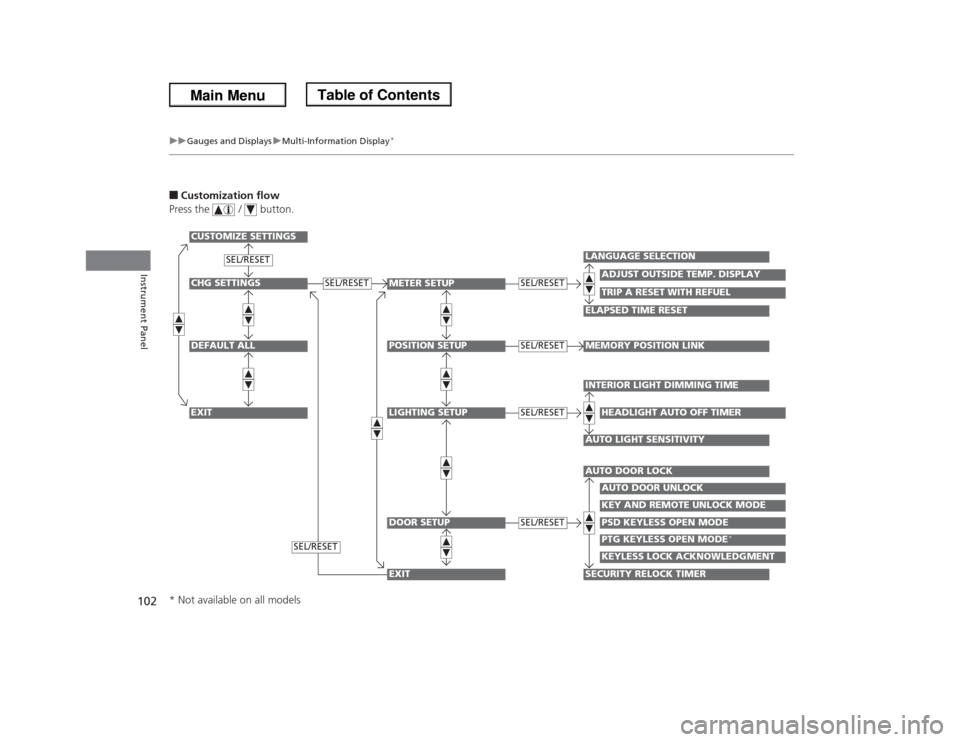
■Customization flow
Press the / button.CHG SETTINGSDEFAULT ALLEXIT
METER SETUPPOSITION SETUPLIGHTING SETUPDOOR SETUP
ADJUST OUTSIDE TEMP. DISPLAY
LANGUAGE SELECTIONELAPSED TIME RESET
TRIP A RESET WITH REFUEL
MEMORY POSITION LINKINTERIOR LIGHT DIMMING TIMEAUTO LIGHT SENSITIVITY
HEADLIGHT AUTO OFF TIMER
AUTO DOOR LOCKSECURITY RELOCK TIMER
AUTO DOOR UNLOCKKEY AND REMOTE UNLOCK MODEPSD KEYLESS OPEN MODE
SEL/RESET
SEL/RESETSEL/RESETSEL/RESETSEL/RESET
CUSTOMIZE SETTINGS
PTG KEYLESS OPEN MODE
*
KEYLESS LOCK ACKNOWLEDGMENT
SEL/RESET
SEL/RESET
EXIT
* Not available on all models
Page 104 of 433
103
uuGauges and DisplaysuMulti-Information Display
*
Continued
Instrument Panel
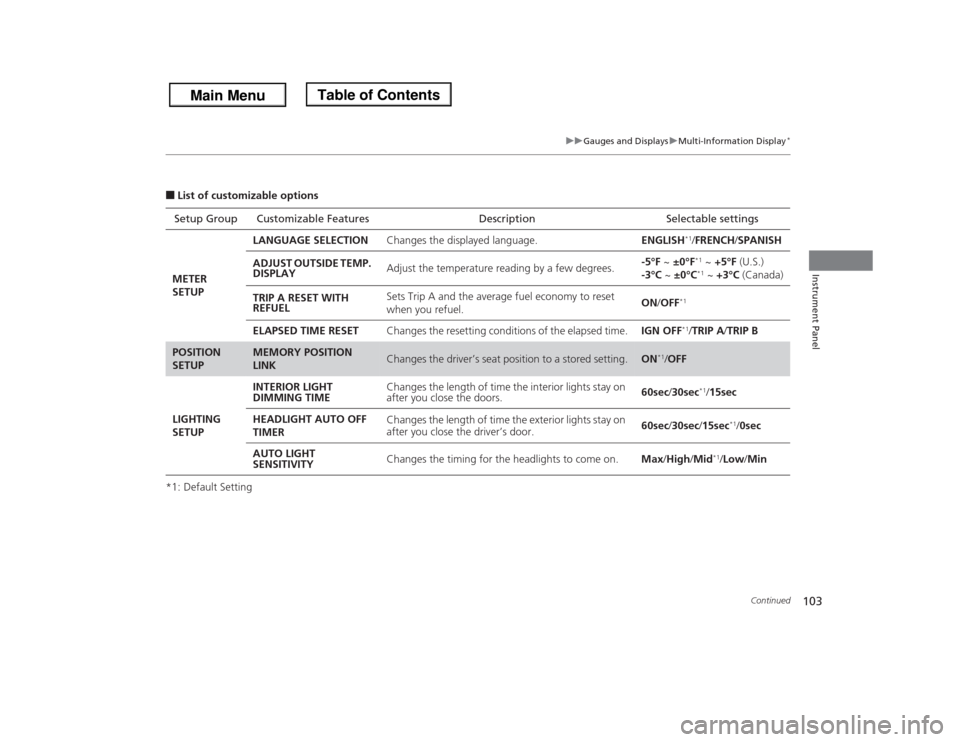
■List of customizable options
*1: Default SettingSetup Group Customizable Features Description Selectable settings
METER
SETUPLANGUAGE SELECTIONChanges the displayed language.ENGLISH
*1/FRENCH/SPANISH
ADJUST OUTSIDE TEMP.
DISPLAYAdjust the temperature reading by a few degrees.-5°F ~ ±0°F*1 ~ +5°F (U.S.)
-3°C ~ ±0°C*1 ~ +3°C (Canada)
TRIP A RESET WITH
REFUELSets Trip A and the average fuel economy to reset
when you refuel.ON/OFF
*1
ELAPSED TIME RESETChanges the resetting conditions of the elapsed time.IGN OFF
*1/TRIP A/TRIP B
POSITION
SETUP
MEMORY POSITION
LINK
Changes the driver’s seat position to a stored setting.
ON
*1/OFF
LIGHTING
SETUPINTERIOR LIGHT
DIMMING TIMEChanges the length of time the interior lights stay on
after you close the doors.60sec/30sec
*1/15sec
HEADLIGHT AUTO OFF
TIMERChanges the length of time the exterior lights stay on
after you close the driver’s door.60sec/30sec/15sec
*1/0sec
AUTO LIGHT
SENSITIVITYChanges the timing for the headlights to come on.Max/High/Mid
*1/Low/Min
Page 106 of 433
105
uuGauges and DisplaysuMulti-Information Display
*
Continued
Instrument Panel
■Example of customization settings
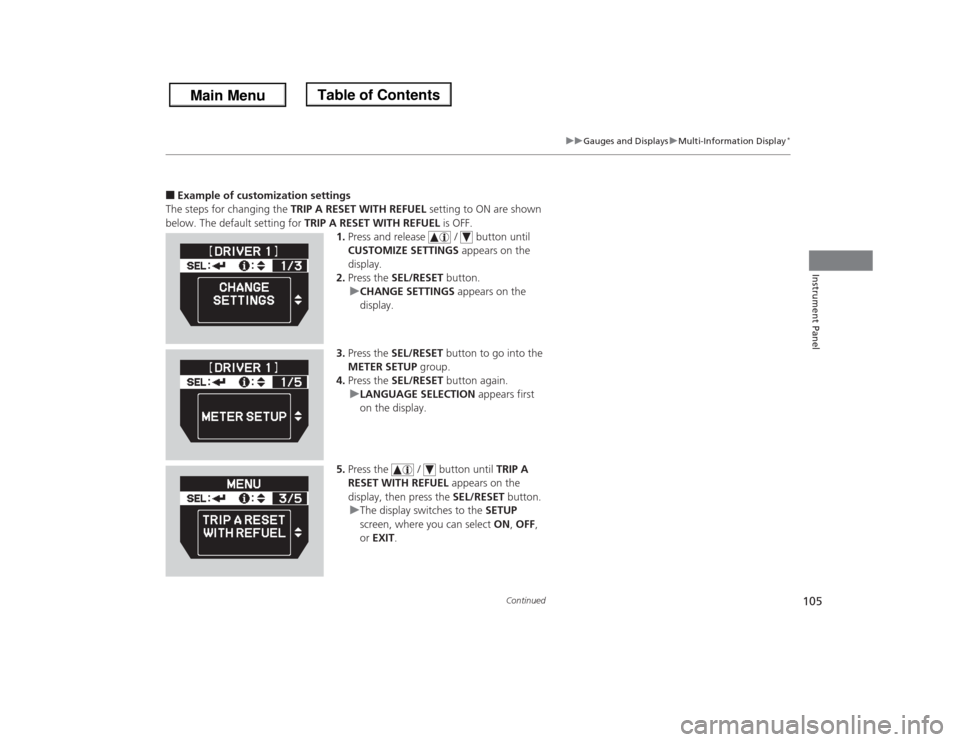
The steps for changing the TRIP A RESET WITH REFUEL setting to ON are shown
below. The default setting for TRIP A RESET WITH REFUEL is OFF.
1.Press and release / button until
CUSTOMIZE SETTINGS appears on the
display.
2.Press the SEL/RESET button.
uCHANGE SETTINGS appears on the
display.
3.Press the SEL/RESET button to go into the
METER SETUP group.
4.Press the SEL/RESET button again.
uLANGUAGE SELECTION appears first
on the display.
5.Press the / button until TRIP A
RESET WITH REFUEL appears on the
display, then press the SEL/RESET button.
uThe display switches to the SETUP
screen, where you can select ON, OFF,
or EXIT.
Page 239 of 433
238
uuRear Entertainment System
*uOperating the System
Features
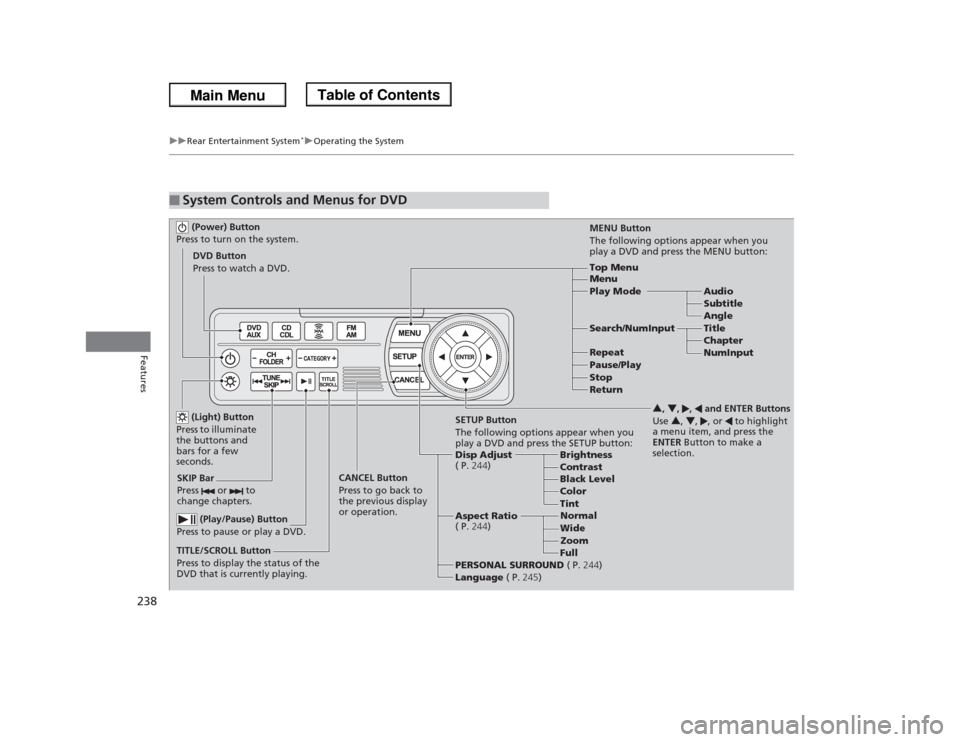
■
System Controls and Menus for DVD (Power) Button
Press to turn on the system.DVD Button
Press to watch a DVD.
(Light) Button
Press to illuminate
the buttons and
bars for a few
seconds.
SKIP Bar
Press or to
change chapters.
(Play/Pause) Button
Press to pause or play a DVD.
TITLE/SCROLL Button
Press to display the status of the
DVD that is currently playing.MENU Button
The following options appear when you
play a DVD and press the MENU button:
Top Menu
Menu
Play Mode Audio
Subtitle
Angle
Search/NumInput Title
Chapter
NumInput Repeat
Pause/Play
Stop
Return
SETUP Button
The following options appear when you
play a DVD and press the SETUP button:
Disp Adjust
( P.244)Brightness
Contrast
Black Level
Color CANCEL Button
Press to go back to
the previous display
or operation.3, 4, , and ENTER Buttons
Use 3, 4, , or to highlight
a menu item, and press the
ENTER Button to make a
selection.
Tint
Normal
Wide
Zoom
Full Aspect Ratio
( P.244)
PERSONAL SURROUND ( P.244)
Language ( P.245)
Page 240 of 433
Continued
239
uuRear Entertainment System
*uOperating the System
Features
■Playing a DVD
•Insert a DVD into the lower slot of the front audio unit.
uThe system automatically starts the DVD.
•To fast forward, press and hold the (SEEK/SKIP) bar, and to reverse, press and
hold the bar on the front panel or the remote.
•To go to the next chapter, press the bar, and to go to the beginning of the
current chapter, press the bar on the front panel or the remote. Quickly press
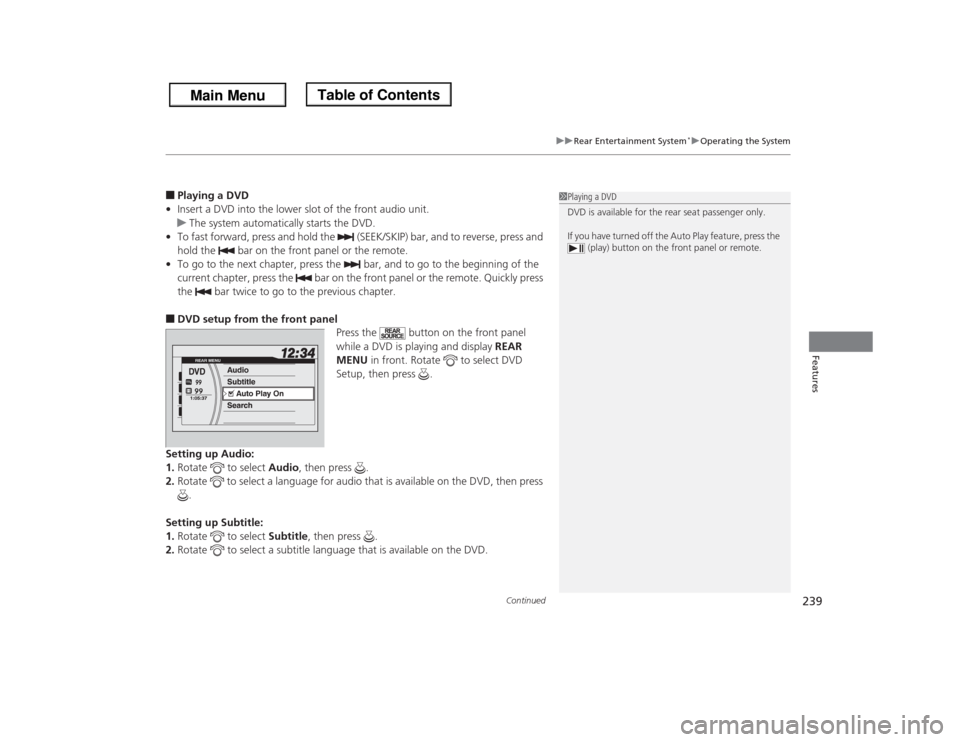
the bar twice to go to the previous chapter.■DVD setup from the front panel
Press the button on the front panel
while a DVD is playing and display REAR
MENU in front. Rotate to select DVD
Setup, then press .
Setting up Audio:
1.Rotate to select Audio, then press .
2.Rotate to select a language for audio that is available on the DVD, then press
.
Setting up Subtitle:
1.Rotate to select Subtitle, then press .
2.Rotate to select a subtitle language that is available on the DVD.
1Playing a DVD
DVD is available for the rear seat passenger only.
If you have turned off the Auto Play feature, press the
(play) button on the front panel or remote.
Page 242 of 433
241
uuRear Entertainment System
*uOperating the System
Continued
Features
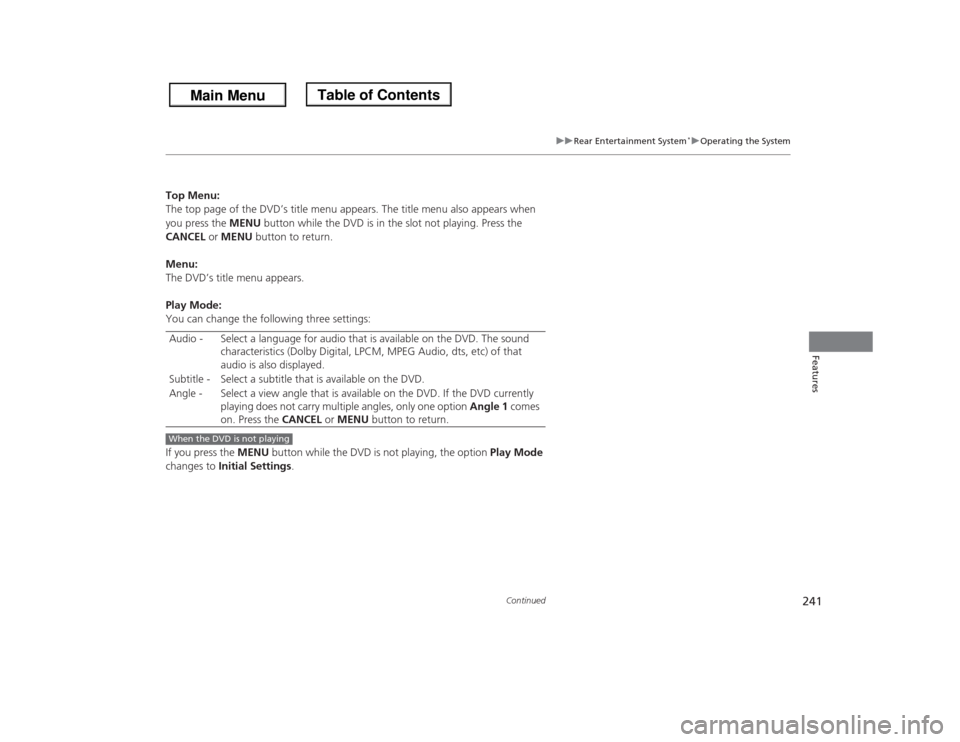
Top Menu:
The top page of the DVD’s title menu appears. The title menu also appears when
you press the MENU button while the DVD is in the slot not playing. Press the
CANCEL or MENU button to return.
Menu:
The DVD’s title menu appears.
Play Mode:
You can change the following three settings:
If you press the MENU button while the DVD is not playing, the option Play Mode
changes to Initial Settings. Audio - Select a language for audio that is available on the DVD. The sound
characteristics (Dolby Digital, LPCM, MPEG Audio, dts, etc) of that
audio is also displayed.
Subtitle - Select a subtitle that is available on the DVD.
Angle - Select a view angle that is available on the DVD. If the DVD currently
playing does not carry multiple angles, only one option Angle 1 comes
on. Press the CANCEL or MENU button to return.When the DVD is not playing
Page 243 of 433
uuRear Entertainment System
*uOperating the System
242Features
Initial Settings:
You can configure the initial Language, Dynamic Range, and Angle Mark settings
before playing DVD.
1.Select the language setting.
2.Select the language from English, French, Spanish, Arabic, German, Italian,
Dutch, Chinese, Korean, Thai, Japanese, and other.
3.If you select other, you need to enter the four digit language code number to
configure the language that is not listed. Select Yes to go to the number input
screen.
uTo return to the language Setting screen, select No.
4.Press the ENTER button each time you input digit.
uIf you want to delete a number, select DEL.
5.The cursor automatically goes to ENT after you input four digits. Press the ENTER
button to command. Language
Settings -Select the language for the DVD’s displayed menus (Menu Language),
the DVD’s audio (Audio Language), and the DVD’s subtitle (Subtitle
Language).
Dynamic
Range -The feature reduces the difference between the loud and quiet sound
levels. Select ON or OFF.
Angle
Mark -You can select whether to display the angle mark appearing in the
upper right corner of the screen when you change the view angle while
the DVD is playing. Select ON or OFF.
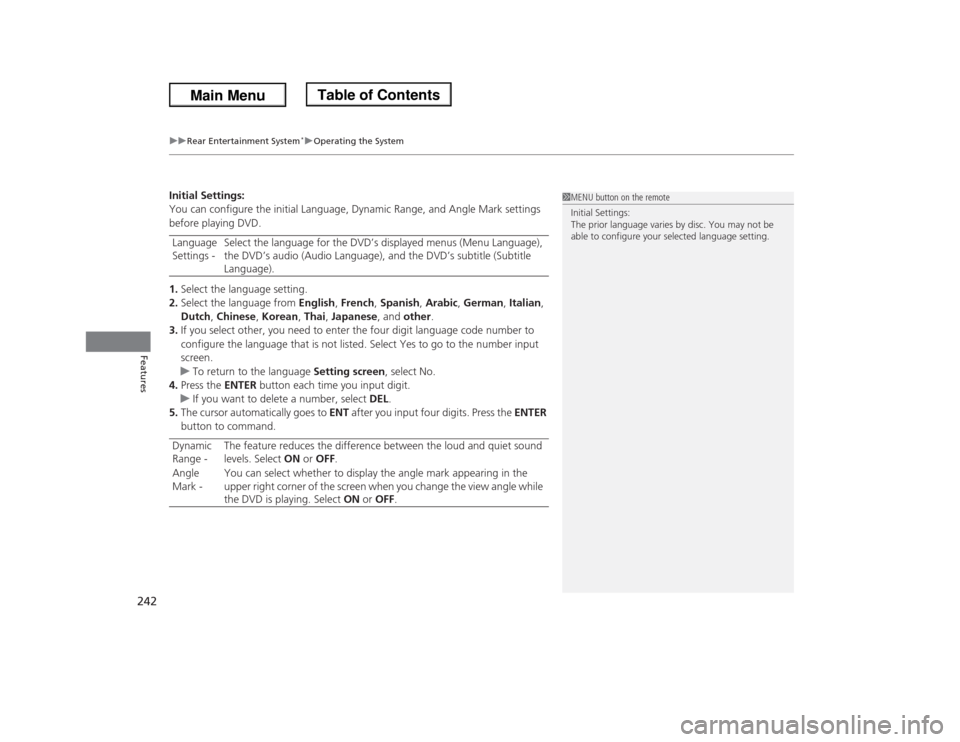
1MENU button on the remote
Initial Settings:
The prior language varies by disc. You may not be
able to configure your selected language setting.
Page 246 of 433
245
uuRear Entertainment System
*uOperating the System
Continued
Features
Language:
You can select the display language from English, French, and Spanish.
You can select the audio language from English, French, and Spanish.
Appearance:
You can select the screen color from white, black, blue, brown, and red. When the DVD is not playing