Page 190 of 433
189
uuClimate Control System
*uRear Climate Control System
Continued
Controls
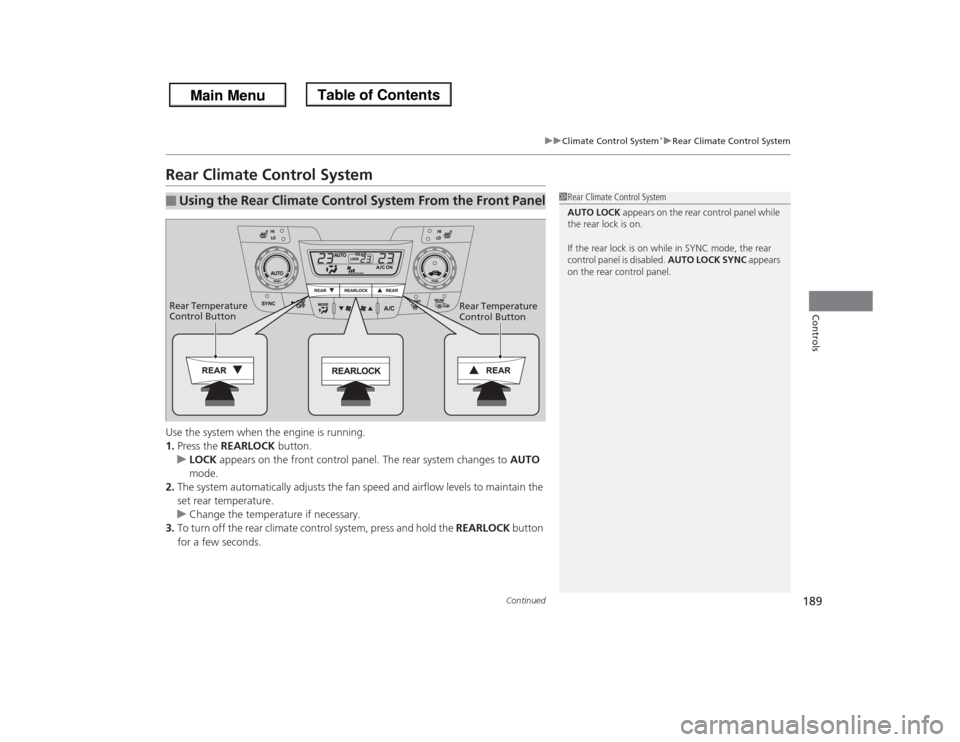
Rear Climate Control SystemUse the system when the engine is running.
1.Press the REARLOCK button.
uLOCK appears on the front control panel. The rear system changes to AUTO
mode.
2.The system automatically adjusts the fan speed and airflow levels to maintain the
set rear temperature.
uChange the temperature if necessary.
3.To turn off the rear climate control system, press and hold the REARLOCK button
for a few seconds.■
Using the Rear Climate Control System From the Front Panel
1Rear Climate Control System
AUTO LOCK appears on the rear control panel while
the rear lock is on.
If the rear lock is on while in SYNC mode, the rear
control panel is disabled. AUTO LOCK SYNC appears
on the rear control panel.
Rear Temperature
Control Button Rear Temperature
Control Button
Page 191 of 433
uuClimate Control System
*uRear Climate Control System
190Controls
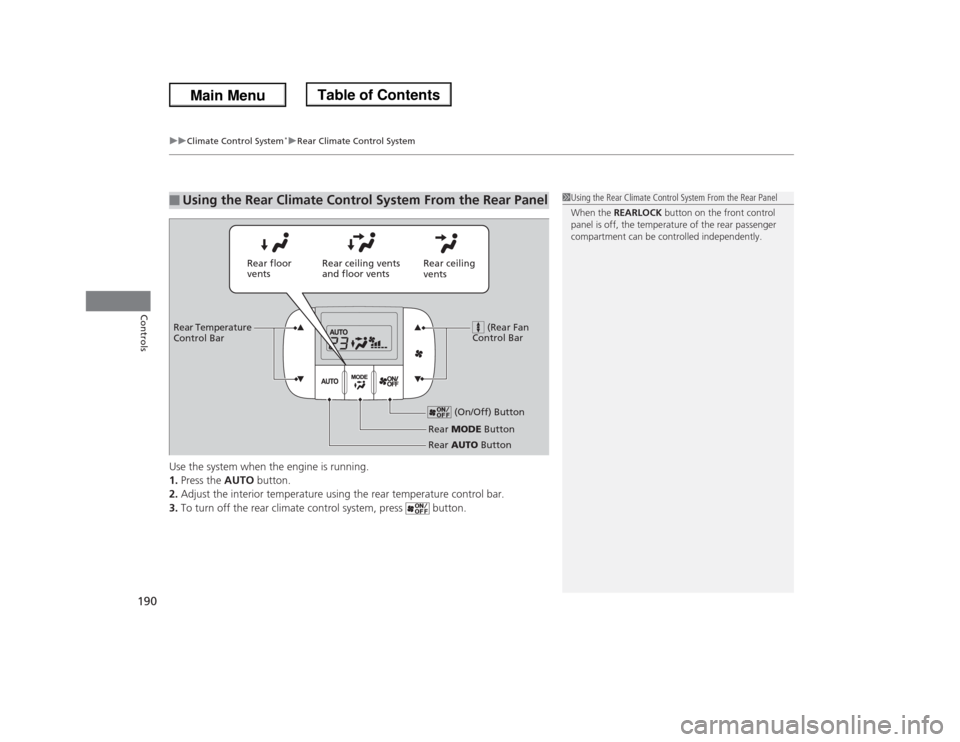
Use the system when the engine is running.
1.Press the AUTO button.
2.Adjust the interior temperature using the rear temperature control bar.
3.To turn off the rear climate control system, press button.■
Using the Rear Climate Control System From the Rear Panel
1Using the Rear Climate Control System From the Rear Panel
When the REARLOCK button on the front control
panel is off, the temperature of the rear passenger
compartment can be controlled independently.
Rear ceiling
vents Rear floor
ventsRear ceiling vents
and floor vents
(Rear Fan
Control Bar
Rear Temperature
Control Bar
(On/Off) Button
Rear MODE Button
Rear AUTO Button
Page 251 of 433
250
uuRear Entertainment System
*uPlayable Discs
Features
Playable Discs
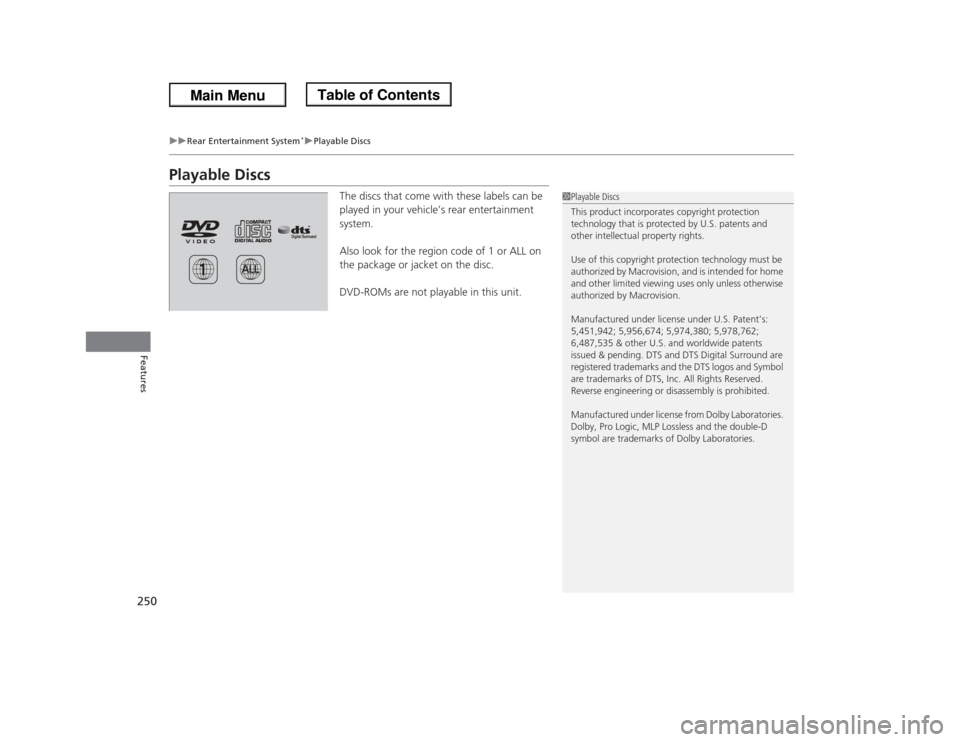
The discs that come with these labels can be
played in your vehicle’s rear entertainment
system.
Also look for the region code of 1 or ALL on
the package or jacket on the disc.
DVD-ROMs are not playable in this unit.
1Playable Discs
This product incorporates copyright protection
technology that is protected by U.S. patents and
other intellectual property rights.
Use of this copyright protection technology must be
authorized by Macrovision, and is intended for home
and other limited viewing uses only unless otherwise
authorized by Macrovision.
Manufactured under license under U.S. Patent’s:
5,451,942; 5,956,674; 5,974,380; 5,978,762;
6,487,535 & other U.S. and worldwide patents
issued & pending. DTS and DTS Digital Surround are
registered trademarks and the DTS logos and Symbol
are trademarks of DTS, Inc. All Rights Reserved.
Reverse engineering or disassembly is prohibited.
Manufactured under license from Dolby Laboratories.
Dolby, Pro Logic, MLP Lossless and the double-D
symbol are trademarks of Dolby Laboratories.
Page 280 of 433

279
Driving
This chapter discusses driving, refueling, and information on items such as accessories.
Before Driving
Driving Preparation .......................... 280
Maximum Load Limit........................ 283
Towing a Trailer
Towing Preparation .......................... 285
Driving Safely with a Trailer .............. 289
Towing Your Vehicle ........................ 290
When Driving
Starting the Engine .......................... 291
Precautions While Driving................. 293
Automatic Transmission ................... 294
Shifting ............................................ 295Cruise Control ................................. 297
VSA
® (Vehicle Stability Assist), aka ESC
(Electronic Stability Control), System ...... 300
TPMS (Tire Pressure Monitoring System) ... 302
Tire Pressure Monitoring System (TPMS) -
Required Federal Explanation ......... 303BSI (Blind Spot Information) System
*.... 306
Braking
Brake System ................................... 308
ABS (Anti-lock Brake System) ........... 310
Brake Assist System.......................... 311Parking Your Vehicle
When Stopped ................................ 312
Parking Sensor System
*................... 313
Rearview Camera............................. 317
Refueling
Fuel Information .............................. 318
How to Refuel ................................. 319
Fuel Economy.................................... 321
Improving Fuel Economy .................. 321
Accessories and Modifications
Accessories ...................................... 322
Modifications................................... 322
* Not available on all models
Page 281 of 433

280Driving
Before DrivingDriving PreparationCheck the following items before you start driving.
•Make sure there are no obstructions on the windows, door mirrors, exterior
lights, or other parts of the vehicle.
uRemove any frost, snow, or ice.
uRemove any snow on the roof, as this can slip down and obstruct your field of
vision while driving. If frozen solid, remove ice once it has softened.
uWhen removing ice from around the wheels, be sure not to damage the wheel
or wheel components.
•Make sure the hood is securely closed.
uIf the hood opens while driving, your front view will be blocked.
•Make sure the tires are in good condition.
uCheck air pressure, and check for damage and excessive wear.
2Checking and Maintaining Tires P. 362
•Make sure there are no people or objects behind or around the vehicle.
uThere are blind spots from the inside.■
Exterior Checks
1Exterior ChecksNOTICEWhen doors are frozen shut, use warm water around
the door edges to melt any ice. Do not try to force
them open, as this can damage the rubber trim
around the doors. When done, wipe dry to avoid
further freezing.
Do not pour warm water into the key cylinder.
You will be unable to insert key if the water freezes in
the hole.
Heat from the engine and exhaust can ignite
flammable materials left under the hood, causing a
fire. If you've parked your vehicle for an extended
period, inspect and remove any debris that may have
collected, such as dried grass and leaves that have
fallen or have been carried in for use as a nest by a
small animal.
Also check under the hood for leftover flammable
materials after you or someone else has performed
maintenance on your vehicle.
Page 286 of 433
285
Continued
Driving
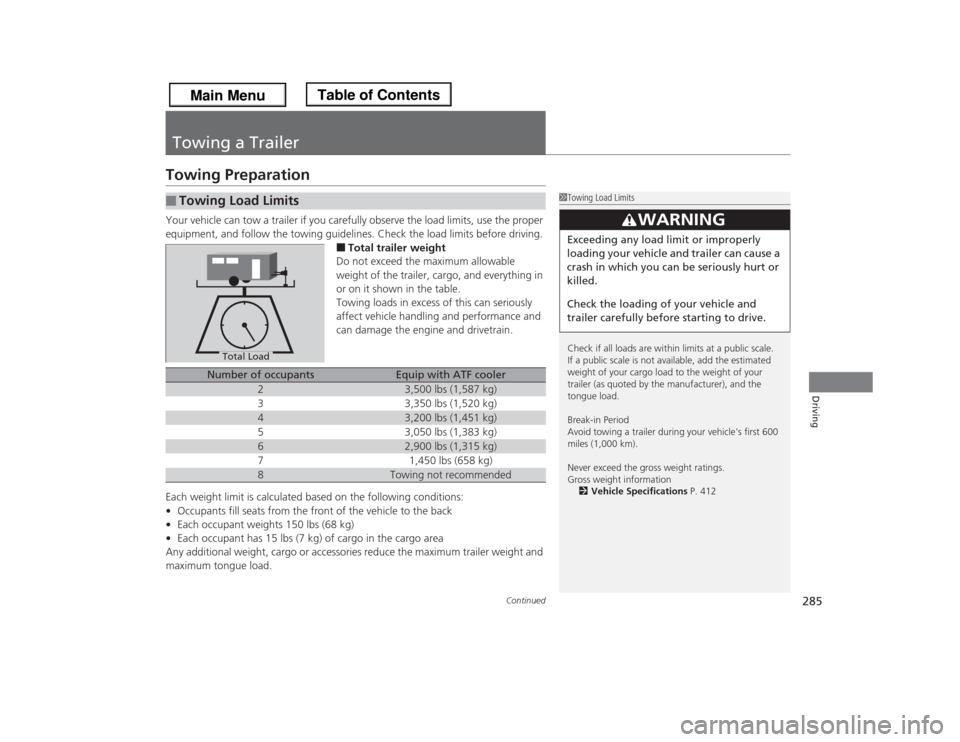
Towing a TrailerTowing PreparationYour vehicle can tow a trailer if you carefully observe the load limits, use the proper
equipment, and follow the towing guidelines. Check the load limits before driving.
■Total trailer weight
Do not exceed the maximum allowable
weight of the trailer, cargo, and everything in
or on it shown in the table.
Towing loads in excess of this can seriously
affect vehicle handling and performance and
can damage the engine and drivetrain.
Each weight limit is calculated based on the following conditions:
•Occupants fill seats from the front of the vehicle to the back
•Each occupant weights 150 lbs (68 kg)
•Each occupant has 15 lbs (7 kg) of cargo in the cargo area
Any additional weight, cargo or accessories reduce the maximum trailer weight and
maximum tongue load.
■
Towing Load Limits
1Towing Load Limits
Check if all loads are within limits at a public scale.
If a public scale is not available, add the estimated
weight of your cargo load to the weight of your
trailer (as quoted by the manufacturer), and the
tongue load.
Break-in Period
Avoid towing a trailer during your vehicle's first 600
miles (1,000 km).
Never exceed the gross weight ratings.
Gross weight information
2Vehicle Specifications P. 412
3
WARNING
Exceeding any load limit or improperly
loading your vehicle and trailer can cause a
crash in which you can be seriously hurt or
killed.
Check the loading of your vehicle and
trailer carefully before starting to drive.
Total Load
Number of occupants
Equip with ATF cooler
2
3,500 lbs (1,587 kg)
3
3,350 lbs (1,520 kg)
4
3,200 lbs (1,451 kg)
5
3,050 lbs (1,383 kg)
6
2,900 lbs (1,315 kg)
7
1,450 lbs (658 kg)
8
Towing not recommended
Page 291 of 433
290
uuTowing a TraileruTowing Your Vehicle
Driving
•Monitor your temperature gauge. If it nears the red (Hot) mark, turn off the
heating and cooling system
*/climate control system
* and reduce speed. Pull to the
side of the road safely to cool down the engine if necessary.
•Shift to the
(d
or position (depending on models) if the transmission shifts
frequently.
Towing Your VehicleYour vehicle is not designed to be towed behind a motor home. If your vehicle needs
to be towed in an emergency, refer to the emergency towing information.2Emergency Towing P. 409■
Driving in Hilly Terrain
D4
* Not available on all models
Page 292 of 433

291
Continued
Driving
When DrivingStarting the Engine
1.Make sure the parking brake is applied.
2.Check that the shift lever is in
(P
, then
depress the brake pedal.
uAlthough it is possible to start the vehicle
in
(N
, it is safer to start it in
(P
.
1Starting the Engine
Keep your foot firmly on the brake pedal when
starting the engine.
The engine is harder to start in cold weather and in
thinner air found at altitudes above 8,000 feet (2,400
meters).
When starting the engine in cold weather, turn off all
electrical accessories such as the lights, heating and
cooling system
*/climate control system
*, and rear
defogger in order to reduce battery drain.
If you live in a region where winter is extremely cold,
an engine block heater will improve starting and
warming of the engine. If temperatures consistently
below -22
°F (-30
°C) are expected, the coolant
mixture should be charged to a higher concentration
to prevent freezing. Consult a dealer for details.
If the exhaust system sounds abnormal or you can
smell exhaust gas inside the vehicle, have your vehicle
checked by a dealer. There may be a problem with
the engine or exhaust system.
Brake Pedal
* Not available on all models