2013 HONDA ODYSSEY radio
[x] Cancel search: radioPage 247 of 433
246
uuRear Entertainment System
*uOperating the System
Features
■
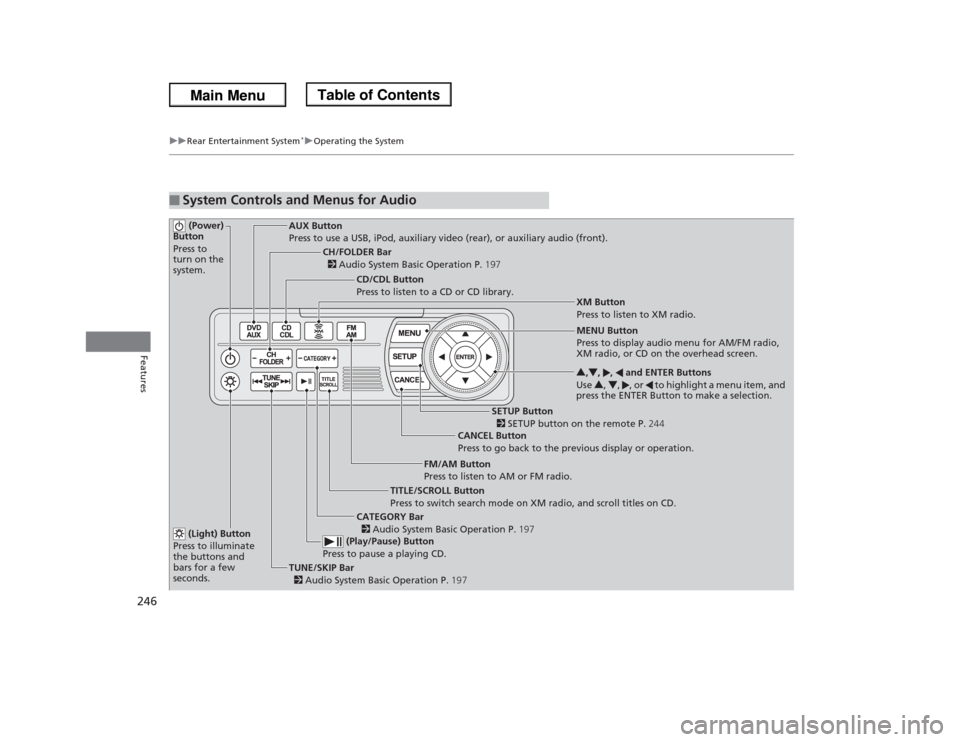
System Controls and Menus for Audio (Power)
Button
Press to
turn on the
system.
AUX Button
Press to use a USB, iPod, auxiliary video (rear), or auxiliary audio (front).
(Light) Button
Press to illuminate
the buttons and
bars for a few
seconds.TUNE/SKIP Bar
2 Audio System Basic Operation P.197 (Play/Pause) Button
Press to pause a playing CD.
TITLE/SCROLL Button
Press to switch search mode on XM radio, and scroll titles on CD.CANCEL Button
Press to go back to the previous display or operation.3,4, , and ENTER Buttons
Use 3, 4, , or to highlight a menu item, and
press the ENTER Button to make a selection.
CATEGORY Bar
2 Audio System Basic Operation P.197
CH/FOLDER Bar
2 Audio System Basic Operation P.197
CD/CDL Button
Press to listen to a CD or CD library.
FM/AM Button
Press to listen to AM or FM radio.
SETUP Button
2 SETUP button on the remote P.244 XM Button
Press to listen to XM radio.
MENU Button
Press to display audio menu for AM/FM radio,
XM radio, or CD on the overhead screen.
Page 248 of 433
Continued
247
uuRear Entertainment System
*uOperating the System
Features
■Playing AM/FM radio in the rear
Press the AM/FM button.
When you press the MENU button while the radio is playing, the audio menu
appears on the overhead screen. The available functions are the same as those of
the front audio system. The TUNE/SKIP bar on the control panel works the same as
the TUNE or SKIP bar on the front panel for AM/FM radio operation.2Playing the AM/FM Radio P. 200■Playing XM radio in the rear
Press the XM button.
When you press the MENU button while the radio is playing, the audio menu
appears on the overhead screen. The available functions are the same as those of
the front audio system. The TUNE/SKIP bar on the control panel works the same as
the TUNE or SKIP bar on the front panel for XM radio operation.2Playing the XM® Radio
* P. 204
To change the mode between category and channel, press and hold the TITLE/
SCROLL button for five seconds.
1System Controls and Menus for Audio
If you press the button on the front panel, you
can operate the rear entertainment system from the
front display.
2 button on the front panel P. 237
* Not available on all models
Page 250 of 433
249
uuRear Entertainment System
*uAudio Sources for Front and Rear Seats
Features
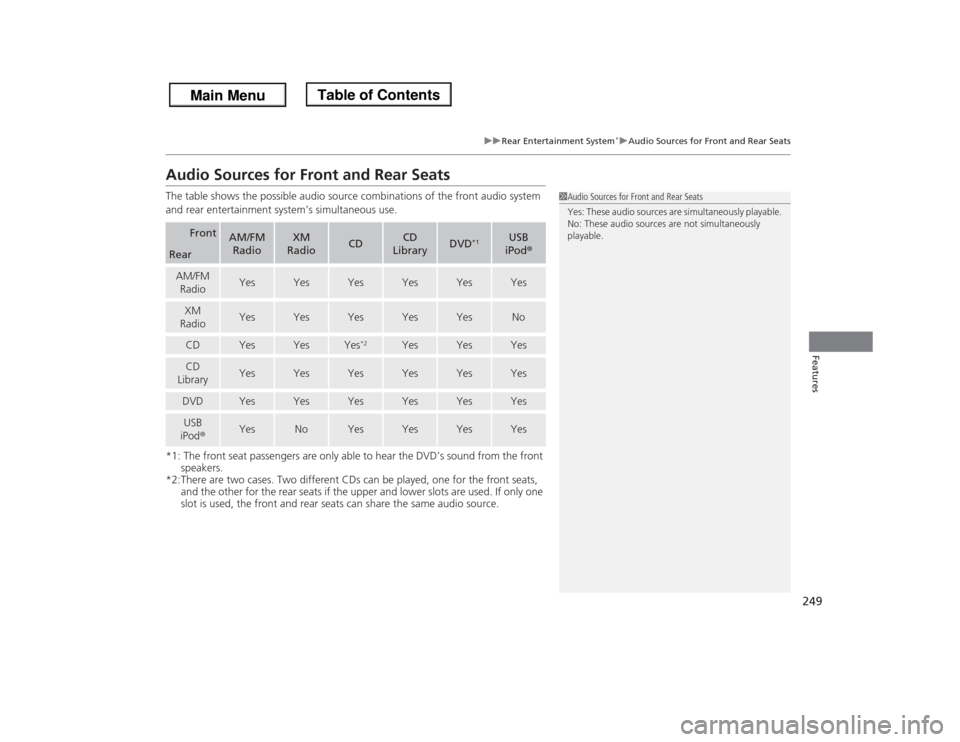
Audio Sources for Front and Rear SeatsThe table shows the possible audio source combinations of the front audio system
and rear entertainment system’s simultaneous use.
*1: The front seat passengers are only able to hear the DVD’s sound from the front
speakers.
*2:There are two cases. Two different CDs can be played, one for the front seats,
and the other for the rear seats if the upper and lower slots are used. If only one
slot is used, the front and rear seats can share the same audio source.
Front
AM/FM
Radio
XM
Radio
CD
CD
Library
DVD
*1
USB
iPod®
RearAM/FM
Radio
Yes
Yes
Yes
Yes
Yes
Yes
XM
Radio
Yes
Yes
Yes
Yes
Yes
No
CD
Yes
Yes
Yes
*2
Yes
Yes
Yes
CD
Library
Yes
Yes
Yes
Yes
Yes
Yes
DVD
Yes
Yes
Yes
Yes
Yes
Yes
USB
iPod®
Yes
No
Yes
Yes
Yes
Yes
1Audio Sources for Front and Rear Seats
Yes: These audio sources are simultaneously playable.
No: These audio sources are not simultaneously
playable.
Page 308 of 433

307
uuWhen DrivinguBSI (Blind Spot Information) System
*
Driving
Press the BSI OFF button until you hear a beep to turn on and off the system. A
message on the multi-information display appears for five seconds and indicates
that the system is on or off.
When BSI is off, the BSI indicator in the instrument panel stays on.
BSI is in the previously selected on or off setting each time you start the engine.■
BSI On and Off
1BSI (Blind Spot Information) System
*
Turn the system off when towing a trailer. The system
does not work properly for the following reasons:•The added mass tilts the vehicle and changes the
radar coverage.•The trailer itself can be detected by the radar
sensors, causing the BSI alert indicators to come
on.
BSI may be adversely affected when:•Objects (guard rails, poles, trees, etc,.) are
detected.•An object that does not reflect radio waves well,
such as a motorcycle, is in the alert zone.•Driving on a curved road.•A vehicle is moving from a far lane to the adjacent
lane.•The system picks up external electrical interference.•The rear bumper or the sensors have been
improperly repaired or the rear bumper has been
deformed.•The orientation of the sensors has been changed.•In bad weather (Heavy rain, snow, and fog).
For a proper BSI use:•Always keep the rear bumper corner area clean.•Do not cover the rear bumper corner area with
labels or stickers of any kind. •Take your vehicle to a dealer if you need the rear
bumper corner area or the radar sensors to be
repaired, or the rear bumper corner area is strongly
impacted.
BSI
IndicatorMulti-information
display
BSI OFF Button* Not available on all models
Page 404 of 433

403
Continued
Handling the Unexpected
FusesFuse LocationsIf any electrical devices are not working,
turn the ignition switch to LOCK
(0
and
check to see if any applicable fuse is blown.
Fuse locations are shown on the fuse box
cover. Locate the fuse in question by the
fuse number and box cover number.
Located on the passenger’s side, near the
windshield washer reservoir. Push the tabs
to open the box.
■
Engine Compartment Fuse Box
(Primary)
■Circuit protected and fuse rating
Circuit Protected
Amps
1
−
−
2− −
3
ACG FR
15 A
4 Washer 15 A
5
VB SOL
7.5 A
6 ECU FR 7.5 A
7
−
−
8FI Sub 15A
9
DBW
15 A
10 FI Main 15 A11
Ignition Coil
15 A
12 − −13
FI ECU
7.5 A
14 − −15
Radio
20 A
16 Back Up 10 A17
MG Clutch
7.5 A
18 Front Fog Lights
*
20 A
19
−
−
20 Right Headlight High Beam 10 A
21
−
−
22 Small Lights 10 A
23
−
−
24 Left Headlight High Beam 10 A
25
−
−
26 Right Headlight Low Beam 15 A27
Left Headlight Low Beam
15 A
28 IGPS Oil Level 7.5 A
29
Cooling Fan
30 A
30 Sub Fan 30 A
31
Wiper Main
30 A
Circuit Protected
Amps
* Not available on all models
Page 412 of 433
411
Information
This chapter includes your vehicle's specifications, locations of identification numbers, and other
information required by regulation.
Specifications.................................... 412
Identification NumbersVehicle Identification Number (VIN) ...... 414Engine Number and Transmission
Number...................................... 414Devices that Emit Radio Waves....... 415
Reporting Safety Defects................. 416Emissions Testing
Testing of Readiness Codes.............. 417
Warranty Coverages........................ 419
Authorized Manuals......................... 421
Customer Service Information......... 422
Gracenote® End User License
Agreement................................... 423
Page 416 of 433

415Information
Devices that Emit Radio WavesThe following products and systems on your vehicle emit radio waves when in operation.Each of the above complies with the appropriate requirements or the required
standards of FCC (Federal Communications Commission) and Industry Canada
Standard, described below:As required by the FCC:
This device complies with Part 15 of the FCC rules. Operation is
subject to the following two conditions: (1) This device may not
cause harmful interference, and (2) this device must accept any
interference received, including interference that may cause
undesired operation.
Changes or modifications not expressly approved by the party
responsible for compliance could void the user's authority to
operate the equipment.This device complies with Industry Canada Standard RSS-Gen/210/310. Operation is
subject to the following two conditions: (1) this device may not cause interference,
and (2) this device must accept any interference, including interference that may
cause undesired operation of the device.Audio SystemBluetooth® AudioBluetooth® HandsFreeLink®HomeLink® Universal TransceiverImmobilizer SystemParking Sensor System (Canadian models only)Remote TransmitterTire Pressure Monitoring System (TPMS)Rear Entertainment System Remote ControlModels with Rear Entertainment System
Page 426 of 433

Index
425Index
Index
AABS (Anti-lock Brake System).................. 310
AC Power Outlet...................................... 176
Accessories and Modifications................ 322
Accessory Power Sockets......................... 175
Additives
Coolant .................................................. 342
Engine Oil ............................................... 337
Washer ................................................... 346
Additives, Engine Oil............................... 337
Adjusting
Armrest .................................................. 167
Front Seats.............................................. 153
Head Restraints ....................................... 156
Mirrors.................................................... 151
Rear Seats ............................................... 161
Steering Wheel ....................................... 150
Temperature ........................................... 100
Air Conditioning System
(Climate Control System)....................... 186
Changing the Mode................................ 186
Defrosting the Windshield
and Windows........................................ 187
Dust and Pollen Filter .............................. 376
Recirculation/Fresh Air Mode................... 186
Sensors ................................................... 191
Using Automatic Climate Control............ 186
Air Conditioning System
(Heating and Cooling System)............... 182
Cooling................................................... 184Defrosting the Windshield
and Windows ........................................ 184
Dust and Pollen Filter ............................... 376
Heating ................................................... 183
Air Pressure....................................... 363, 413
Airbags........................................................ 39
Advanced Airbags ..................................... 45
After a Collision......................................... 43
Airbag Care ............................................... 53
Event Data Recorder .................................. 22
Front Airbags (SRS) .................................... 42
Indicator ........................................ 50, 76, 80
Passenger Airbag Off Indicator .................. 51
Sensors...................................................... 39
Side Airbag Cutoff System ......................... 48
Side Airbag Off Indicator ........................... 52
Side Airbags .............................................. 46
Side Curtain Airbags .................................. 49
AM/FM Radio............................................ 200
Anti-lock Brake System (ABS).................. 310
Indicator .................................................... 75
Armrest..................................................... 167
Audio Remote Controls............................ 198
Audio System............................................ 194
Adjusting the Sound ................................ 199
Auxiliary Input Jack .................................. 195
Error Messages ........................................ 230
General Information ................................ 232
MP3/WMA/AAC ...................................... 221
Reactivating............................................. 196
Recommended CDs ................................. 233Recommended Devices............................ 235
Remote Controls ..................................... 198
Security Code .......................................... 196
Theft Protection ...................................... 196
USB Adapter Cable.................................. 195
USB Flash Drives ...................................... 235
Audio/Information Display........................ 91
Authorized Manuals................................ 421
Auto Door Locking/Unlocking................. 115
Customize ............................................... 116
Automatic Lighting.................................. 142
Automatic Transmission........................... 294
Creeping ................................................. 294
Fluid ........................................................ 344
Kickdown ................................................ 294
Operating the Shift Lever................... 16, 296
Shift Lever Does Not Move ...................... 395
Shifting ................................................... 295
Auxiliary Input Jack.................................. 195
Average Fuel Economy.................. 88, 92, 99
Average Speed................................... 92, 100
BBattery...................................................... 371
Charging System Indicator................. 73, 398
Jump Starting .......................................... 393
Maintenance (Checking the Battery) ........ 371
Maintenance (Replacing) ................. 372, 374
Belts (Seat).................................................. 30
Beverage Holders..................................... 173