Page 187 of 433
186Controls
Climate Control System
*
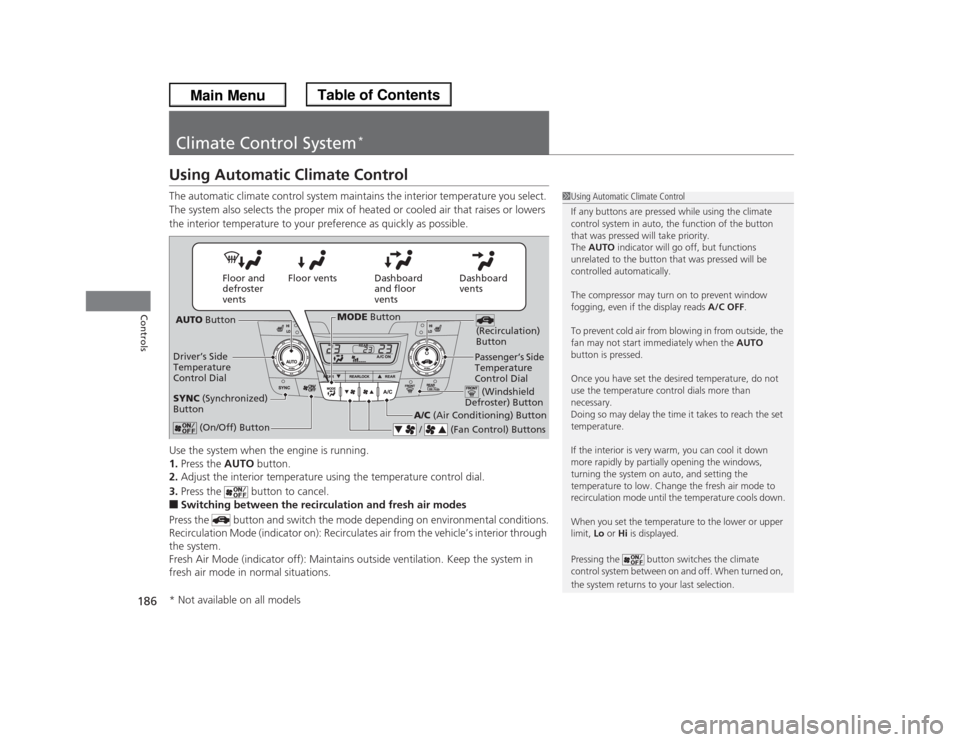
Using Automatic Climate ControlThe automatic climate control system maintains the interior temperature you select.
The system also selects the proper mix of heated or cooled air that raises or lowers
the interior temperature to your preference as quickly as possible.
Use the system when the engine is running.
1.Press the AUTO button.
2.Adjust the interior temperature using the temperature control dial.
3.Press the button to cancel.■Switching between the recirculation and fresh air modes
Press the button and switch the mode depending on environmental conditions.
Recirculation Mode (indicator on): Recirculates air from the vehicle’s interior through
the system.
Fresh Air Mode (indicator off): Maintains outside ventilation. Keep the system in
fresh air mode in normal situations.
1Using Automatic Climate Control
If any buttons are pressed while using the climate
control system in auto, the function of the button
that was pressed will take priority.
The AUTO indicator will go off, but functions
unrelated to the button that was pressed will be
controlled automatically.
The compressor may turn on to prevent window
fogging, even if the display reads A/C OFF.
To prevent cold air from blowing in from outside, the
fan may not start immediately when the AUTO
button is pressed.
Once you have set the desired temperature, do not
use the temperature control dials more than
necessary.
Doing so may delay the time it takes to reach the set
temperature.
If the interior is very warm, you can cool it down
more rapidly by partially opening the windows,
turning the system on auto, and setting the
temperature to low. Change the fresh air mode to
recirculation mode until the temperature cools down.
When you set the temperature to the lower or upper
limit, Lo or Hi is displayed.
Pressing the button switches the climate
control system between on and off. When turned on,
the system returns to your last selection.
Dashboard
vents Dashboard
and floor
vents Floor vents Floor and
defroster
vents
AUTO Button
Driver’s Side
Temperature
Control Dial
A/C (Air Conditioning) Button
/ (Fan Control) Buttons
(Recirculation)
Button
(On/Off) Button
SYNC (Synchronized)
Button
Passenger’s Side
Temperature
Control Dial (Windshield
Defroster) Button
MODE Button
* Not available on all models
Page 198 of 433
197Features
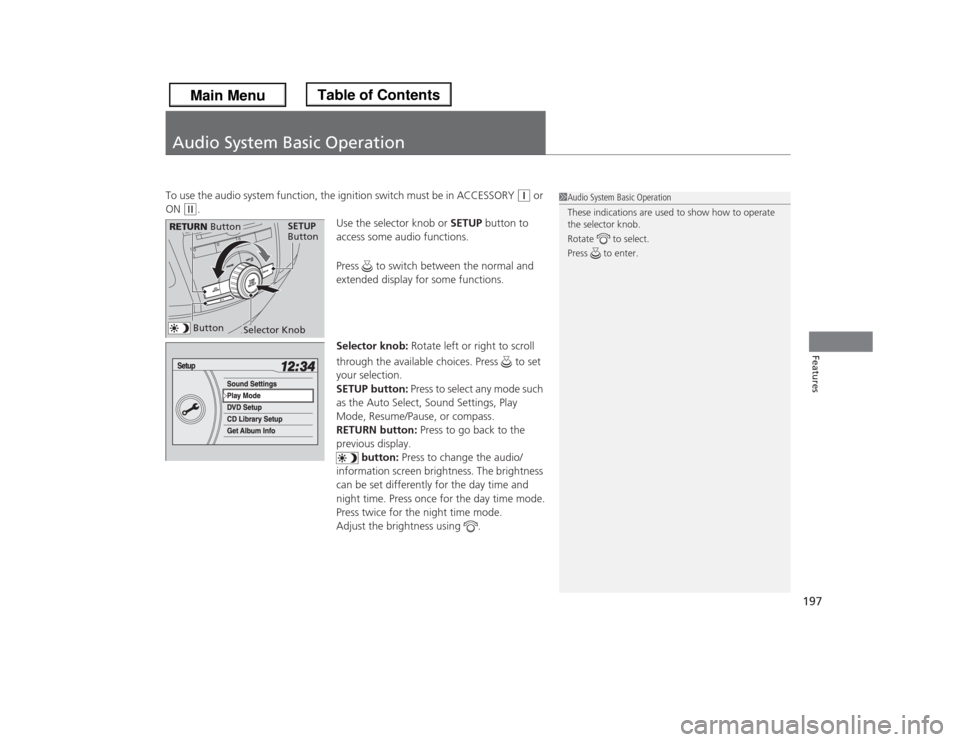
Audio System Basic OperationTo use the audio system function, the ignition switch must be in ACCESSORY
(q
or
ON
(w
.
Use the selector knob or SETUP button to
access some audio functions.
Press to switch between the normal and
extended display for some functions.
Selector knob: Rotate left or right to scroll
through the available choices. Press to set
your selection.
SETUP button: Press to select any mode such
as the Auto Select, Sound Settings, Play
Mode, Resume/Pause, or compass.
RETURN button: Press to go back to the
previous display.
button: Press to change the audio/
information screen brightness. The brightness
can be set differently for the day time and
night time. Press once for the day time mode.
Press twice for the night time mode.
Adjust the brightness using .
1Audio System Basic Operation
These indications are used to show how to operate
the selector knob.
Rotate to select.
Press to enter.
Selector Knob
SETUP
Button
RETURN Button
Button
Page 208 of 433
207
uuAudio System Basic OperationuPlaying a CD
Continued
Features
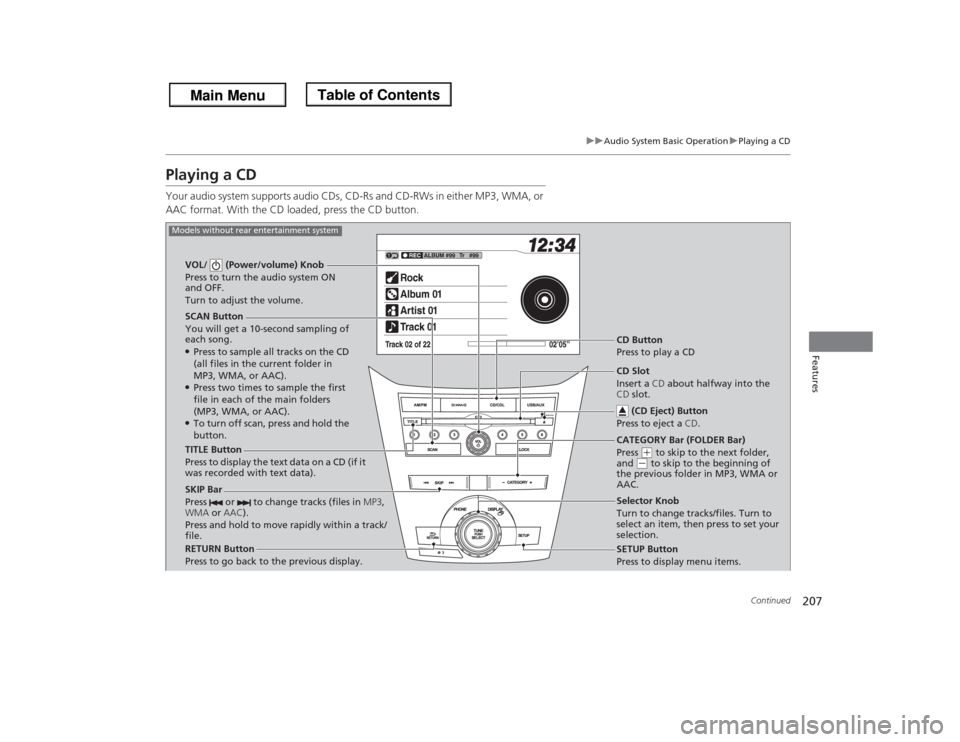
Playing a CDYour audio system supports audio CDs, CD-Rs and CD-RWs in either MP3, WMA, or
AAC format. With the CD loaded, press the CD button.
SCAN Button
You will get a 10-second sampling of
each song.●Press to sample all tracks on the CD
(all files in the current folder in
MP3, WMA, or AAC).●Press two times to sample the first
file in each of the main folders
(MP3, WMA, or AAC).●To turn off scan, press and hold the
button. VOL/ (Power/volume) Knob
Press to turn the audio system ON
and OFF.
Turn to adjust the volume.
CD Button
Press to play a CD
TITLE Button
Press to display the text data on a CD (if it
was recorded with text data).
RETURN Button
Press to go back to the previous display.Selector Knob
Turn to change tracks/files. Turn to
select an item, then press to set your
selection.
SETUP Button
Press to display menu items.
Models without rear entertainment system
CD Slot
Insert a CD about halfway into the
CD slot.
(CD Eject) Button
Press to eject a CD.
SKIP Bar
Press or to change tracks (files in MP3,
WMA or AAC).
Press and hold to move rapidly within a track/
file.
CATEGORY Bar (FOLDER Bar)
Press
(+ to skip to the next folder,
and
(- to skip to the beginning of
the previous folder in MP3, WMA or
AAC.
Page 209 of 433
208
uuAudio System Basic OperationuPlaying a CD
Features
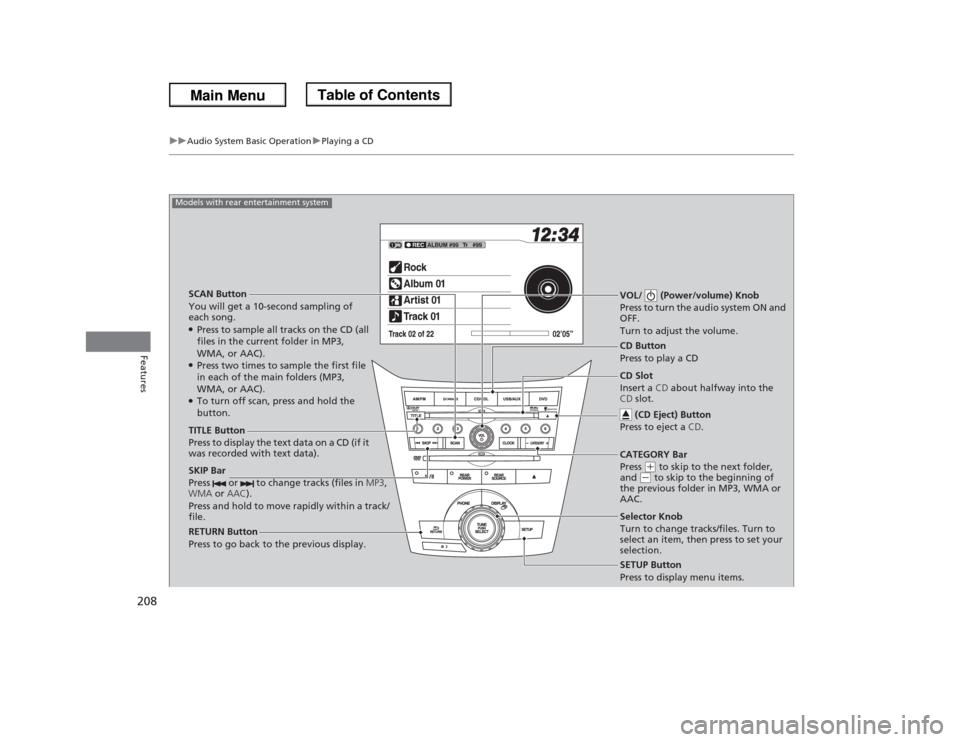
SCAN Button
You will get a 10-second sampling of
each song.●Press to sample all tracks on the CD (all
files in the current folder in MP3,
WMA, or AAC).●Press two times to sample the first file
in each of the main folders (MP3,
WMA, or AAC).●To turn off scan, press and hold the
button.VOL/ (Power/volume) Knob
Press to turn the audio system ON and
OFF.
Turn to adjust the volume.SKIP Bar
Press or to change tracks (files in MP3,
WMA or AAC).
Press and hold to move rapidly within a track/
file.TITLE Button
Press to display the text data on a CD (if it
was recorded with text data).
RETURN Button
Press to go back to the previous display.
SETUP Button
Press to display menu items.
Models with rear entertainment system
CD Button
Press to play a CD
Selector Knob
Turn to change tracks/files. Turn to
select an item, then press to set your
selection. CD Slot
Insert a CD about halfway into the
CD slot.
(CD Eject) Button
Press to eject a CD.CATEGORY Bar
Press
(+ to skip to the next folder,
and
(- to skip to the beginning of
the previous folder in MP3, WMA or
AAC.
Page 212 of 433
211
uuAudio System Basic OperationuPlaying CD Library
Continued
Features
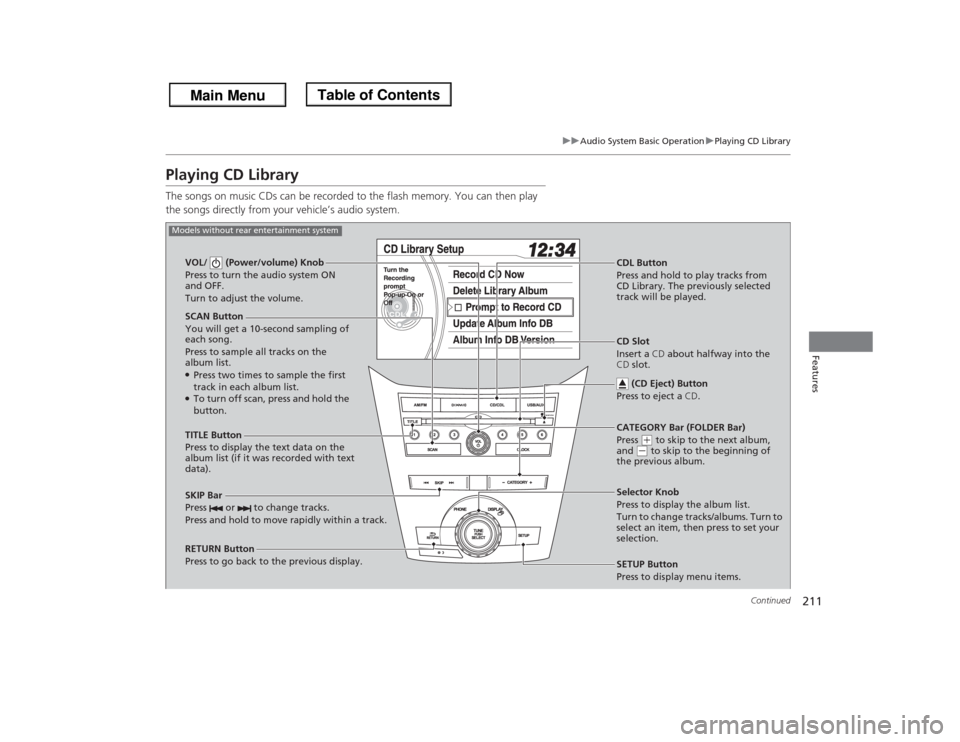
Playing CD LibraryThe songs on music CDs can be recorded to the flash memory. You can then play
the songs directly from your vehicle’s audio system.
SCAN Button
You will get a 10-second sampling of
each song.
Press to sample all tracks on the
album list.●Press two times to sample the first
track in each album list.●To turn off scan, press and hold the
button. VOL/ (Power/volume) Knob
Press to turn the audio system ON
and OFF.
Turn to adjust the volume.
CDL Button
Press and hold to play tracks from
CD Library. The previously selected
track will be played.
TITLE Button
Press to display the text data on the
album list (if it was recorded with text
data).
RETURN Button
Press to go back to the previous display.Selector Knob
Press to display the album list.
Turn to change tracks/albums. Turn to
select an item, then press to set your
selection.
SETUP Button
Press to display menu items.
Models without rear entertainment system
CD Slot
Insert a CD about halfway into the
CD slot.
(CD Eject) Button
Press to eject a CD.
SKIP Bar
Press or to change tracks.
Press and hold to move rapidly within a track.
CATEGORY Bar (FOLDER Bar)
Press
(+ to skip to the next album,
and
(- to skip to the beginning of
the previous album.
Page 213 of 433
212
uuAudio System Basic OperationuPlaying CD Library
Features
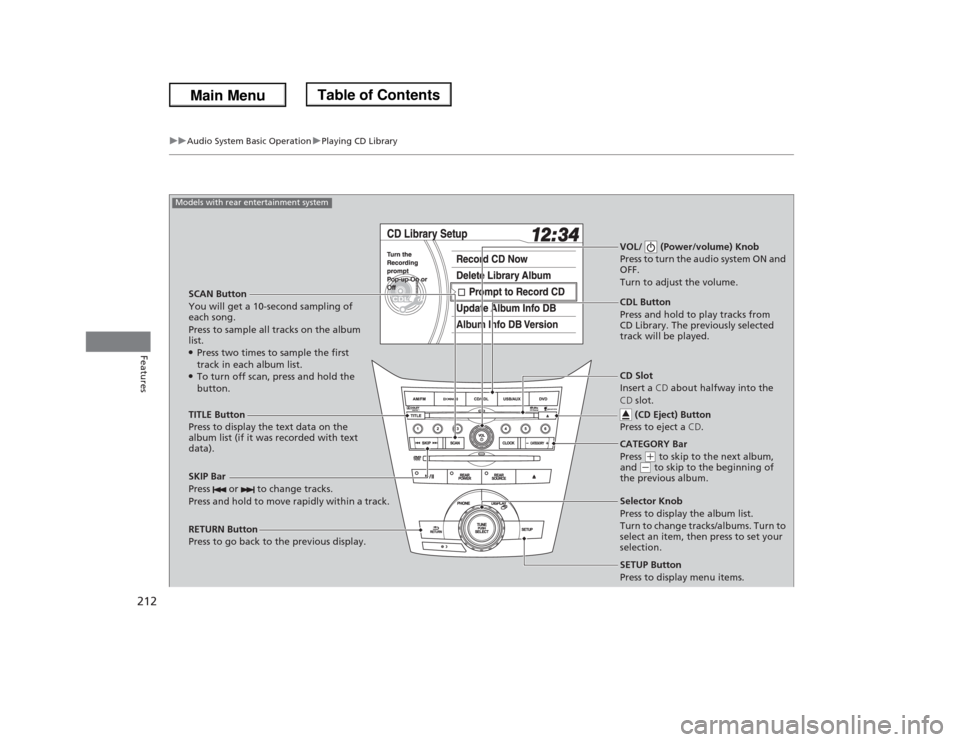
SCAN Button
You will get a 10-second sampling of
each song.
Press to sample all tracks on the album
list.●Press two times to sample the first
track in each album list.●To turn off scan, press and hold the
button.VOL/ (Power/volume) Knob
Press to turn the audio system ON and
OFF.
Turn to adjust the volume.SKIP Bar
Press or to change tracks.
Press and hold to move rapidly within a track.TITLE Button
Press to display the text data on the
album list (if it was recorded with text
data).
RETURN Button
Press to go back to the previous display.
SETUP Button
Press to display menu items.
Models with rear entertainment system
CDL Button
Press and hold to play tracks from
CD Library. The previously selected
track will be played.
Selector Knob
Press to display the album list.
Turn to change tracks/albums. Turn to
select an item, then press to set your
selection. CD Slot
Insert a CD about halfway into the
CD slot.
(CD Eject) Button
Press to eject a CD.CATEGORY Bar
Press
(+ to skip to the next album,
and
(- to skip to the beginning of
the previous album.
Page 214 of 433
Continued
213
uuAudio System Basic OperationuPlaying CD Library
Features
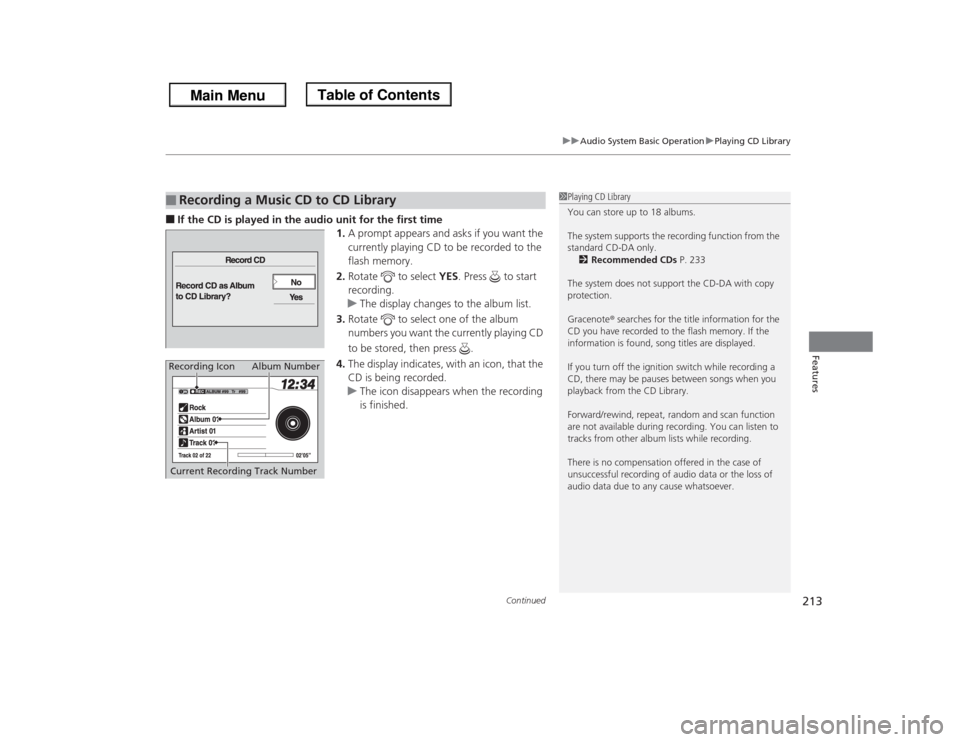
■If the CD is played in the audio unit for the first time
1.A prompt appears and asks if you want the
currently playing CD to be recorded to the
flash memory.
2.Rotate to select YES. Press to start
recording.
uThe display changes to the album list.
3.Rotate to select one of the album
numbers you want the currently playing CD
to be stored, then press .
4.The display indicates, with an icon, that the
CD is being recorded.
uThe icon disappears when the recording
is finished.■
Recording a Music CD to CD Library
1Playing CD Library
You can store up to 18 albums.
The system supports the recording function from the
standard CD-DA only.
2Recommended CDs P. 233
The system does not support the CD-DA with copy
protection.
Gracenote® searches for the title information for the
CD you have recorded to the flash memory. If the
information is found, song titles are displayed.
If you turn off the ignition switch while recording a
CD, there may be pauses between songs when you
playback from the CD Library.
Forward/rewind, repeat, random and scan function
are not available during recording. You can listen to
tracks from other album lists while recording.
There is no compensation offered in the case of
unsuccessful recording of audio data or the loss of
audio data due to any cause whatsoever.
Album Number
Current Recording Track Number
Recording Icon
Page 215 of 433
214
uuAudio System Basic OperationuPlaying CD Library
Features
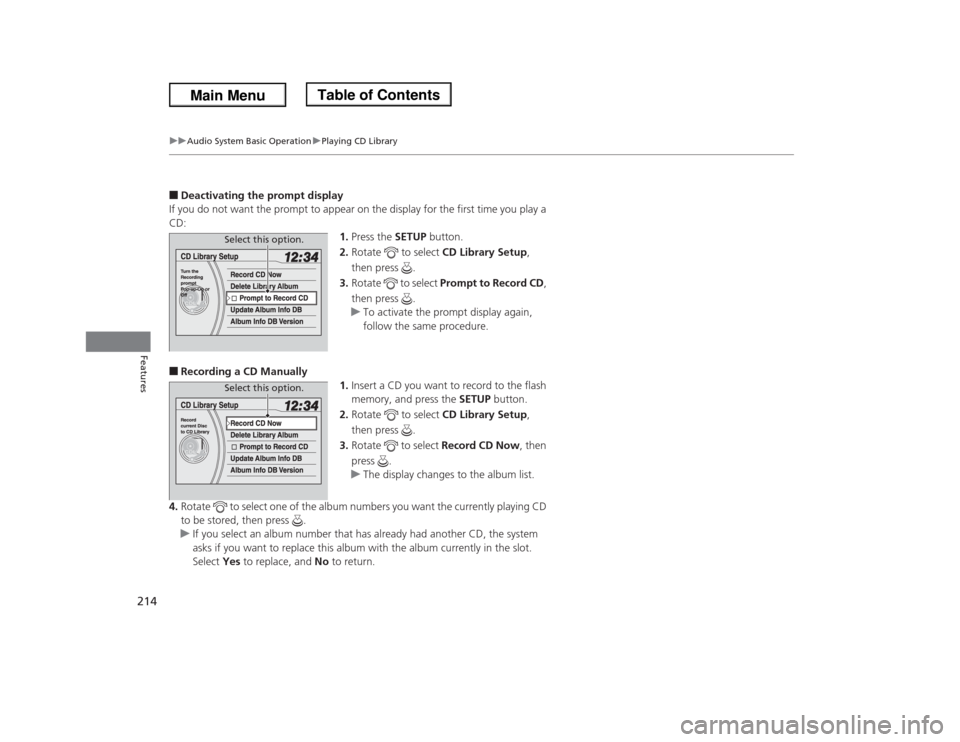
■Deactivating the prompt display
If you do not want the prompt to appear on the display for the first time you play a
CD:
1.Press the SETUP button.
2.Rotate to select CD Library Setup,
then press .
3.Rotate to select Prompt to Record CD,
then press .
uTo activate the prompt display again,
follow the same procedure.■Recording a CD Manually
1.Insert a CD you want to record to the flash
memory, and press the SETUP button.
2.Rotate to select CD Library Setup,
then press .
3.Rotate to select Record CD Now, then
press .
uThe display changes to the album list.
4.Rotate to select one of the album numbers you want the currently playing CD
to be stored, then press .
uIf you select an album number that has already had another CD, the system
asks if you want to replace this album with the album currently in the slot.
Select Yes to replace, and No to return.
Select this option.Select this option.