2013 HONDA CROSSTOUR start stop button
[x] Cancel search: start stop buttonPage 127 of 573
126
uuOperating the Switches Around the Steering WheeluRear Defogger/Heated Door Mirror Button
Controls
Rear Defogger/Heated Door Mirror Button
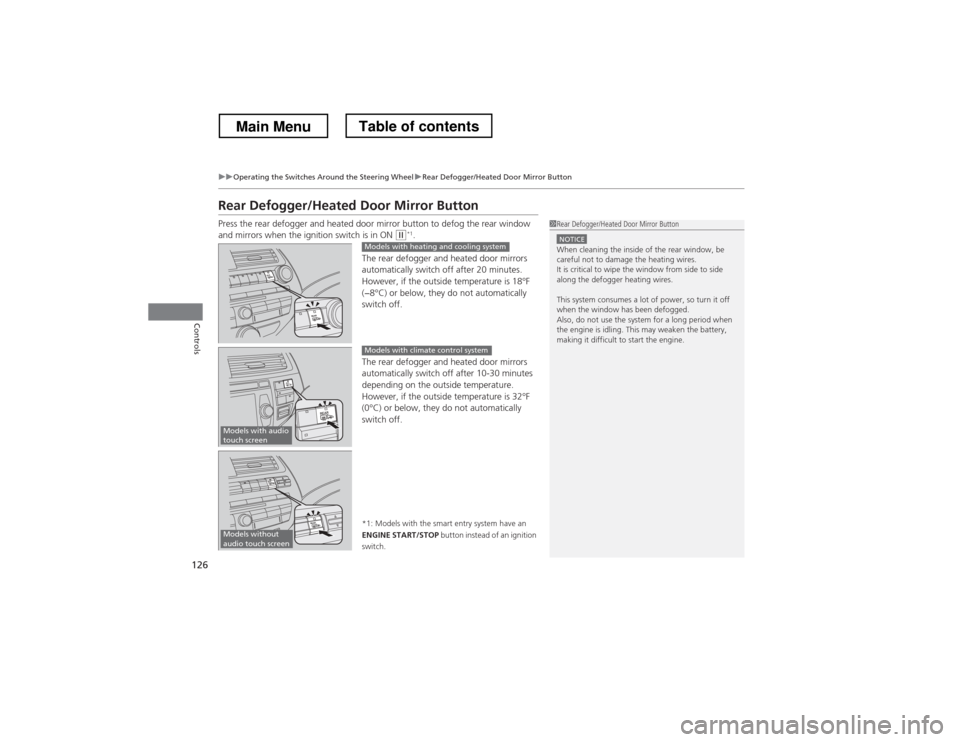
Press the rear defogger and heated door mirror button to defog the rear window
and mirrors when the ignition switch is in ON
(w*1
.
The rear defogger and heated door mirrors
automatically switch off after 20 minutes.
However, if the outside temperature is 18°F
(−8°C) or below, they do not automatically switch off.
The rear defogger and heated door mirrors
automatically switch off after 10-30 minutes
depending on the outside temperature.
However, if the outside temperature is 32°F
(0°C) or below, they do not automatically switch off.
*1: Models with the smart entry system have an
ENGINE START/STOP button instead of an ignition
switch.1Rear Defogger/Heated Door Mirror Button
NOTICEWhen cleaning the inside of the rear window, be careful not to damage the heating wires.
It is critical to wipe the window from side to side
along the defogger heating wires.
This system consumes a lot of power, so turn it off
when the window has been defogged.
Also, do not use the system for a long period when
the engine is idling. This may weaken the battery,
making it difficult to start the engine.Models with heating and cooling system
Models with audio
touch screen
Models with climate control system
Models without
audio touch screen
Main MenuTable of contents
Page 129 of 573
uuOperating the Switches Around the Steering WheeluDriving Position Memory System*
128
Controls
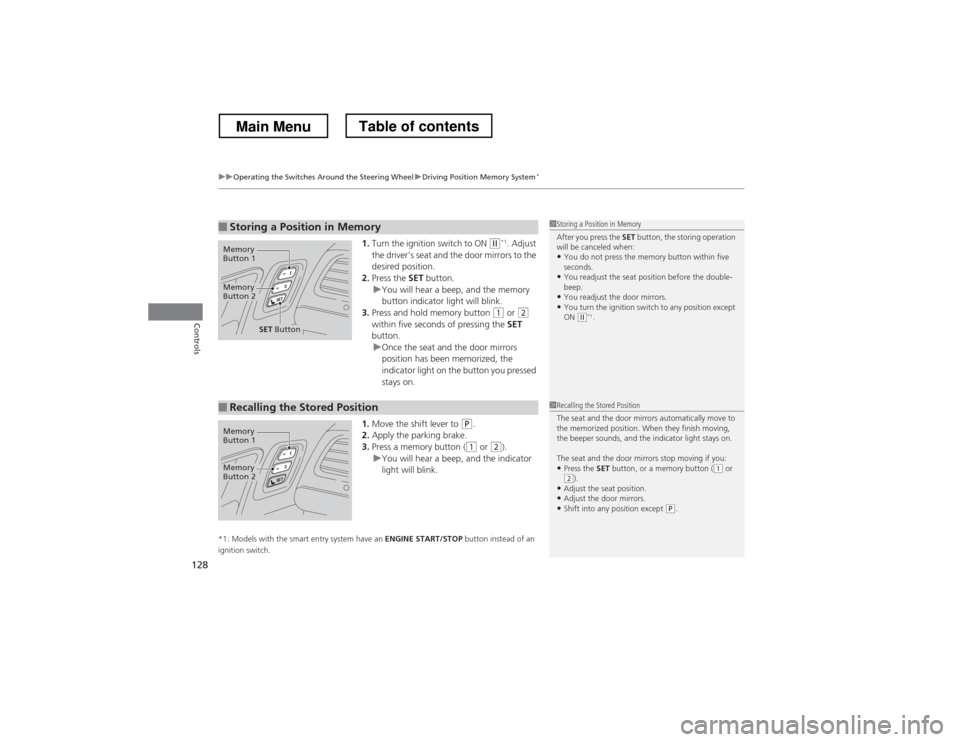
1. Turn the ignition switch to ON (w *1
. Adjust
the driver’s seat and the door mirrors to the
desired position.
2. Press the SET button.
uYou will hear a beep, and the memory
button indicator light will blink.
3. Press and hold memory button
(1 or (2
within five seconds of pressing the SET
button.
uOnce the seat and the door mirrors
position has been memorized, the
indicator light on the button you pressed stays on.
1. Move the shift lever to
(P .
2. Apply the parking brake.
3. Press a memory button (
(1 or (2).uYou will hear a beep, and the indicator
light will blink.
*1: Models with the smart entry system have an ENGINE START/STOP button instead of an
ignition switch.
■Storing a Position in Memory1Storing a Position in Memory
After you press the SET button, the storing operation
will be canceled when:
• You do not press the memory button within five
seconds.
• You readjust the seat position before the double-beep.
• You readjust the door mirrors.
• You turn the ignition switch to any position except
ON
(w *1
.
Memory
Button 1
Memory
Button 2
SET Button
■Recalling the Stored Position1Recalling the Stored Position
The seat and the door mirrors automatically move to
the memorized position. When they finish moving,
the beeper sounds, and the indicator light stays on.
The seat and the door mirrors stop moving if you:
• Press the SET button, or a memory button (
(1 or (2).
• Adjust the seat position.
• Adjust the door mirrors.
• Shift into any position except
(P .
Memory
Button 1
Memory
Button 2
Main MenuTable of contents
Page 132 of 573
131
uuAdjusting the MirrorsuPower Door Mirrors
Continued
Controls
Power Door MirrorsYou can adjust the door mirrors when the
ignition switch is in ON
(w*1
.
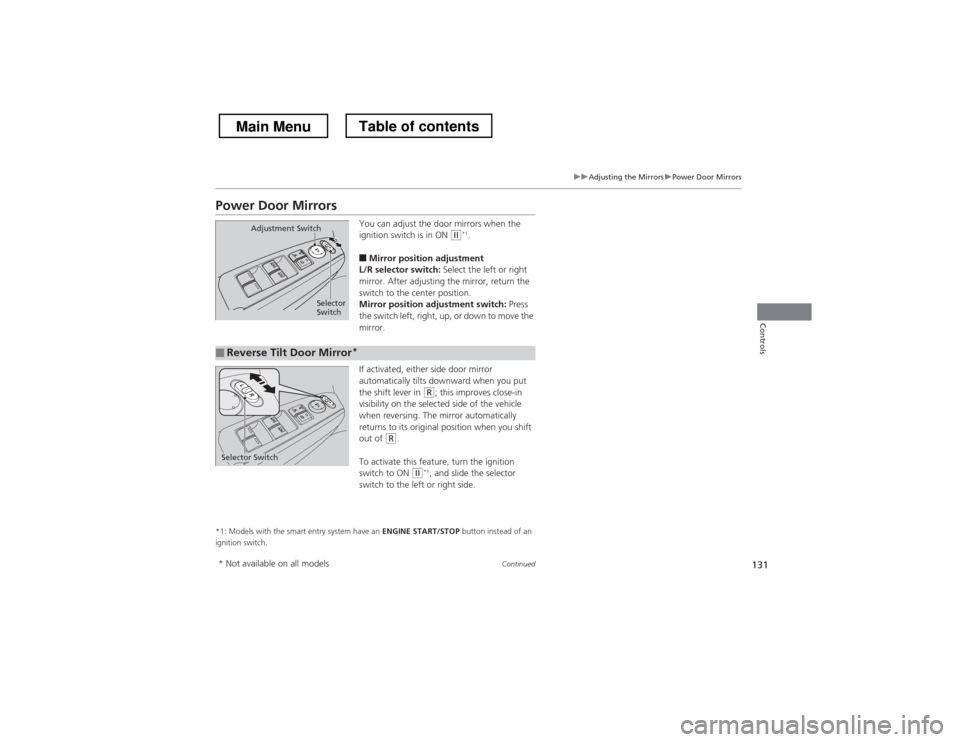
■ Mirror position adjustment
L/R selector switch: Select the left or right
mirror. After adjusting the mirror, return the
switch to the center position.
Mirror position adjustment switch: Press
the switch left, right, up, or down to move the
mirror.
If activated, either side door mirror
automatically tilts downward when you put
the shift lever in
(R ; this improves close-in
visibility on the selected side of the vehicle
when reversing. The mirror automatically
returns to its original position when you shift
out of
(R .
To activate this feature, turn the ignition
switch to ON
(w *1
, and slide the selector
switch to the left or right side.
*1: Models with the smart entry system have an ENGINE START/STOP button instead of an
ignition switch.
Selector
Switch
Adjustment Switch
■Reverse Tilt Door Mirror
*
Selector Switch
* Not available on all models
Main MenuTable of contents
Page 143 of 573
142
Controls
Interior Lights/Interior Convenience Items
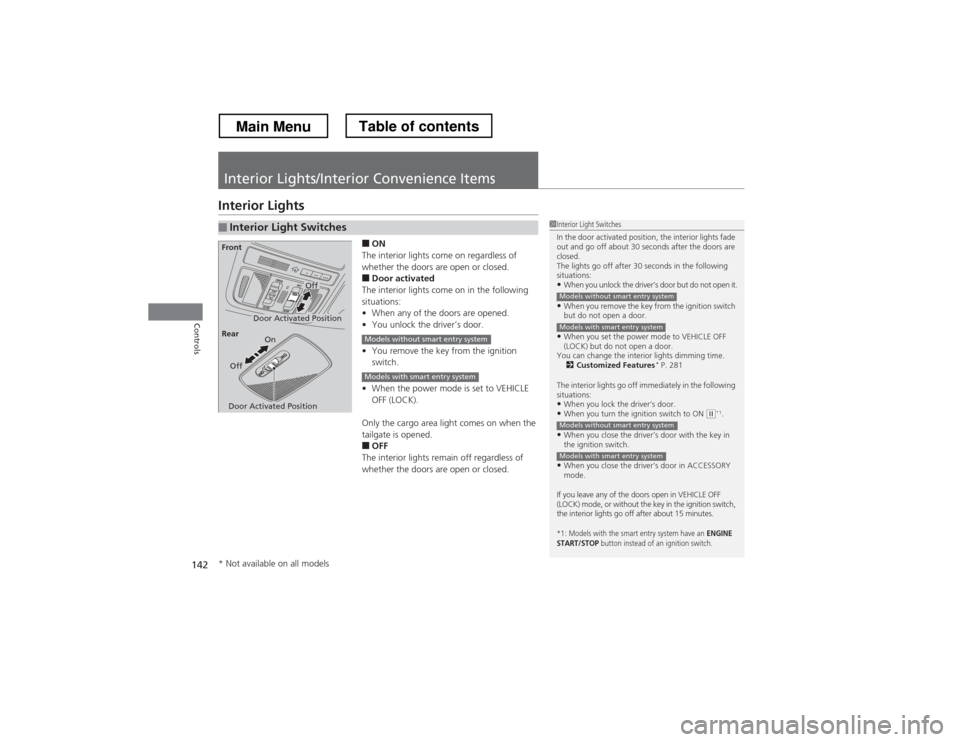
Interior Lights■ON
The interior lights come on regardless of
whether the doors are open or closed. ■ Door activated
The interior lights come on in the following
situations: • When any of the doors are opened.
• You unlock the driver’s door.
• You remove the key from the ignition
switch.
• When the power mode is set to VEHICLE
OFF (LOCK).
Only the cargo area light comes on when the
tailgate is opened. ■ OFF
The interior lights remain off regardless of
whether the doors are open or closed.
■Interior Light Switches1Interior Light Switches
In the door activated position, the interior lights fade
out and go off about 30 seconds after the doors are closed.
The lights go off after 30 seconds in the following
situations:
• When you unlock the driver’s door but do not open it.
• When you remove the key from the ignition switch
but do not open a door.
• When you set the power mode to VEHICLE OFF
(LOCK) but do not open a door.
You can change the interior lights dimming time. 2 Customized Features *
P. 281
The interior lights go off immediately in the following
situations: • When you lock the driver’s door.
• When you turn the ignition switch to ON
(w *1
.
• When you close the driver’s door with the key in
the ignition switch.
• When you close the driver’s door in ACCESSORY
mode.
If you leave any of the doors open in VEHICLE OFF
(LOCK) mode, or without the key in the ignition switch,
the interior lights go off after about 15 minutes.
*1: Models with the smart entry system have an ENGINE
START/STOP button instead of an ignition switch.
Models without smart entry system
Models with smart entry system
Models without smart entry system
Models with smart entry system
Door Activated Position
Off
Front
Door Activated Position On
Off
Rear
Models without smart entry system
Models with smart entry system
* Not available on all models
Main MenuTable of contents
Page 148 of 573
Continued147
uuInterior Lights/Interior Convenience ItemsuInterior Convenience Items
Controls
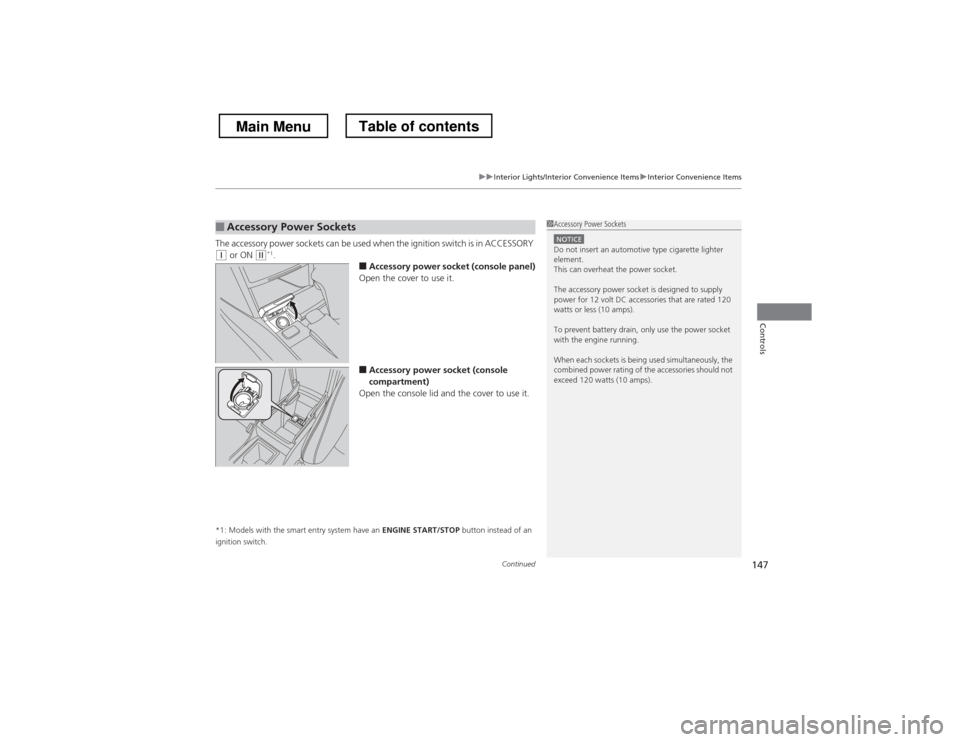
The accessory power sockets can be used when the ignition switch is in ACCESSORY (q or ON (w *1
.
■Accessory power socket (console panel)
Open the cover to use it.
■ Accessory power socket (console
compartment)
Open the console lid and the cover to use it.
*1: Models with the smart entry system have an ENGINE START/STOP button instead of an
ignition switch.
■Accessory Power Sockets1Accessory Power Sockets
NOTICEDo not insert an automotive type cigarette lighter
element.
This can overheat the power socket.
The accessory power socket is designed to supply
power for 12 volt DC accessories that are rated 120
watts or less (10 amps).
To prevent battery drain, only use the power socket
with the engine running.
When each sockets is being used simultaneously, the
combined power rating of the accessories should not exceed 120 watts (10 amps).
Main MenuTable of contents
Page 154 of 573
153
uuInterior Lights/Interior Convenience ItemsuInterior Convenience Items
Controls
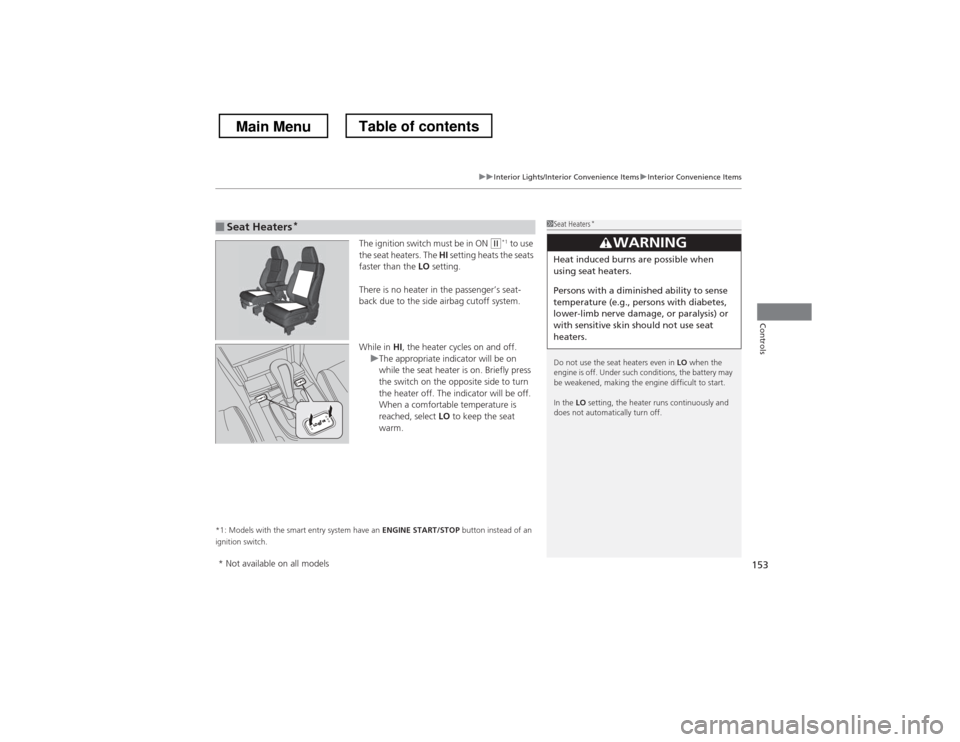
The ignition switch must be in ON (w*1
to use
the seat heaters. The HI setting heats the seats
faster than the LO setting.
There is no heater in the passenger’s seat-
back due to the side airbag cutoff system.
While in HI, the heater cycles on and off.
uThe appropriate indicator will be on
while the seat heater is on. Briefly press
the switch on the opposite side to turn
the heater off. The indicator will be off.
When a comfortable temperature is
reached, select LO to keep the seat
warm.
*1: Models with the smart entry system have an ENGINE START/STOP button instead of an
ignition switch.
■Seat Heaters *1Seat Heaters
*
Do not use the seat heaters even in LO when the
engine is off. Under such conditions, the battery may
be weakened, making the engine difficult to start. In the LO setting, the heater runs continuously and
does not automatically turn off.
3WARNING
Heat induced burns are possible when
using seat heaters.
Persons with a diminish ed ability to sense
temperature (e.g., persons with diabetes,
lower-limb nerve damage, or paralysis) or
with sensitive skin should not use seat
heaters.
* Not available on all models
Main MenuTable of contents
Page 167 of 573
166
uuAudio SystemuAudio System Theft Protection
Features
Audio System Theft Protection
The audio system is disabled when it is disconnected from the power source, such as
when the battery is disconnected or goes dead. ■Reactivating the audio system
1. Turn the ignition switch to ON
(w , and turn on the audio system.uIf you turn the ignition switch to ACCESSORY (q, you will be requested to
enter the audio security code.
2. Enter the audio security code using the preset buttons.
1. Turn the ignition switch to ON
(w *1
, and turn on the audio system.uIf you turn the ignition switch to ACCESSORY (q *1
, you will be requested to
enter the audio security code. See step 3.
2. Press and hold the VOL/ (power/volume) button again for more than two
seconds.
uThe audio system is reactivated when the system’s control unit recognizes that
the system is in your vehicle.
If the control unit fails to recognize, Enter code/Enter PIN Code appears on
the audio/information screen.
3. Enter the audio security code using the touch screen.
If you enter an incorrect digit, continue to the last digit, then try again. If you do not
enter the code correctly after 10 tries, leave the system for one hour before trying
again, or visit a dealer to have the system reset. *1: Models with the smart entry system have an ENGINE START/STOP button instead of an
ignition switch.
1Audio System Theft Protection
Find the audio system’s security code and serial
number label in your owner’s manual kit.
We recommend that you write down the serial
number in this owner’s manual.
Do not store the label in your vehicle. If you lose the
label, you must first retrieve the serial number, and
then obtain the code.
You can find out about your serial number and
security code from a dealer.
You can register the security code at Owner Link ( owners.honda.com. ), and find information on how
to retrieve the serial number and obtain the code at
radio-navicode.honda.com .
U.S. models
Audio system without touch screen
Audio system with touch screen
All models
Main MenuTable of contents
Page 183 of 573
182
Features
Audio System Basic Operation
To use the audio system function, the ignition switch must be in ACCESSORY (q or
ON (w *1
.
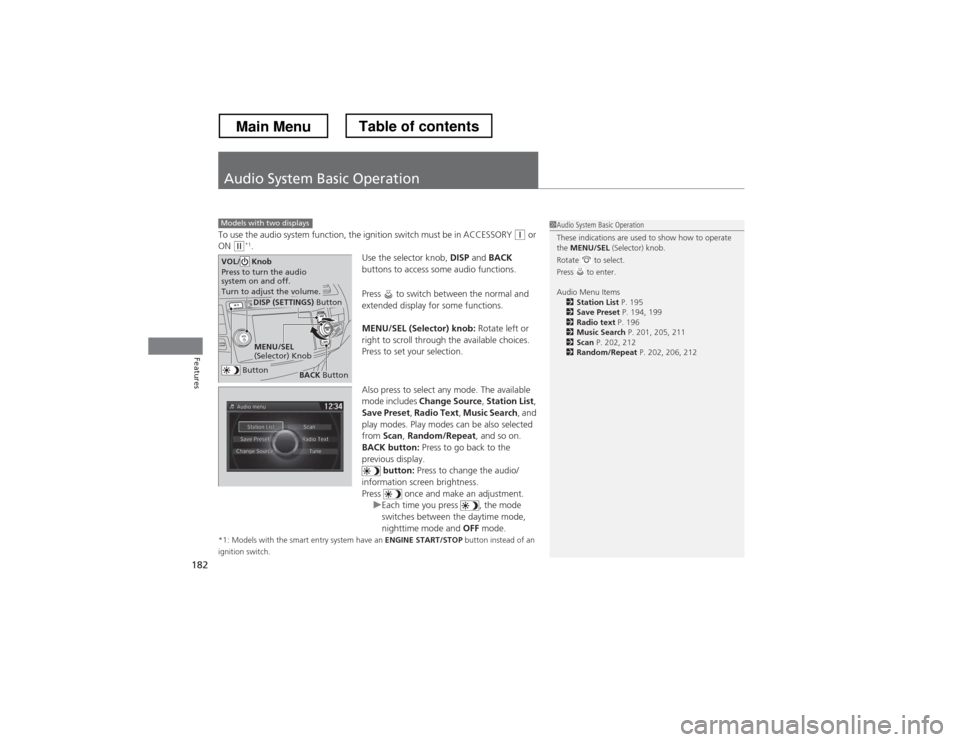
Use the selector knob, DISP and BACK
buttons to access some audio functions.
Press to switch between the normal and
extended display for some functions.
MENU/SEL (Selector) knob: Rotate left or
right to scroll through the available choices.
Press to set your selection.
Also press to select any mode. The available
mode includes Change Source , Station List ,
Save Preset , Radio Text , Music Search , and
play modes. Play modes can be also selected from Scan, Random/Repeat , and so on.
BACK button: Press to go back to the
previous display. button: Press to change the audio/
information screen brightness.
Press once and make an adjustment.
uEach time you press , the mode
switches between the daytime mode,
nighttime mode and OFF mode.
*1: Models with the smart entry system have an ENGINE START/STOP button instead of an
ignition switch.
Models with two displays1Audio System Basic Operation
These indications are used to show how to operate the MENU/SEL (Selector) knob.
Rotate to select.
Press to enter.
Audio Menu Items 2 Station List P. 195
2 Save Preset P. 194, 199
2 Radio text P. 196
2 Music Search P. 201, 205, 211
2 Scan P. 202, 212
2 Random/Repeat P. 202, 206, 212
Button
MENU/SEL
(Selector) Knob
DISP (SETTINGS) Button
BACK Button
VOL/ Knob
Press to turn the audio
system on and off.
Turn to adjust the volume.
Main MenuTable of contents