Page 376 of 573
Continued375
uuBluetooth® HandsFreeLink ®uHFL Menus
Features
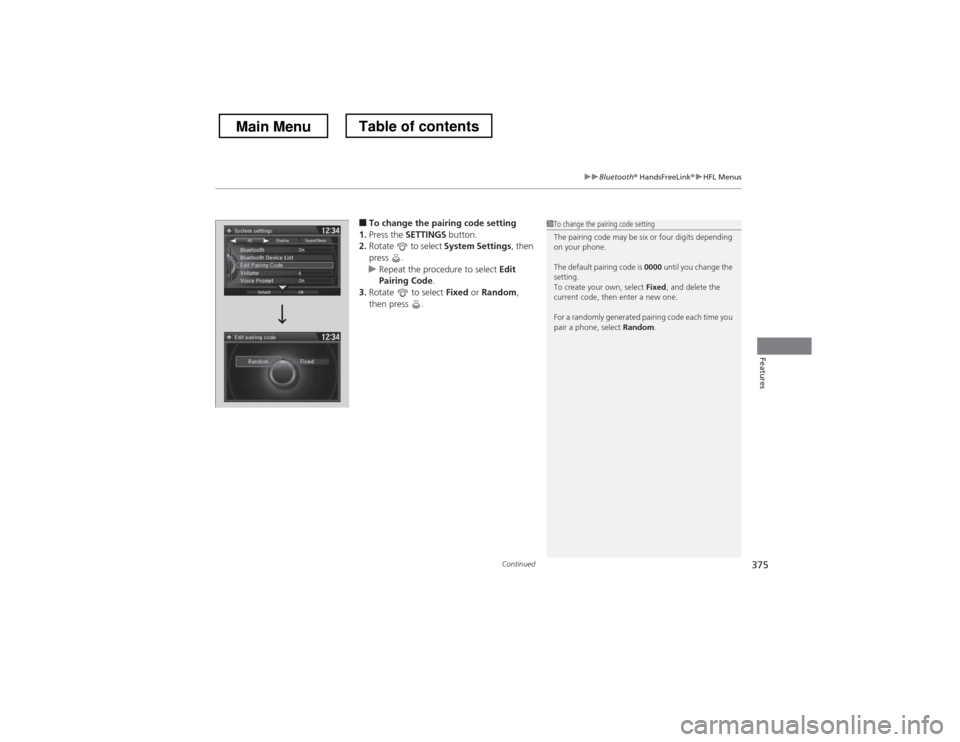
■To change the pairing code setting
1. Press the SETTINGS button.
2. Rotate to select System Settings, then
press .
uRepeat the procedure to select Edit
Pairing Code .
3. Rotate to select Fixed or Random ,
then press .
1To change the pairing code setting
The pairing code may be six or four digits depending
on your phone.
The default pairing code is 0000 until you change the
setting.
To create your own, select Fixed, and delete the
current code, then enter a new one.
For a randomly generated pairing code each time you
pair a phone, select Random.
Main MenuTable of contents
Page 456 of 573
455
Driving
Multi-View Rear Camera
About Your Multi-View Rear Camera
The audio/information screen can display your vehicle’s rear view. The display
automatically changes to the rear view when the shift lever is moved to
(R.
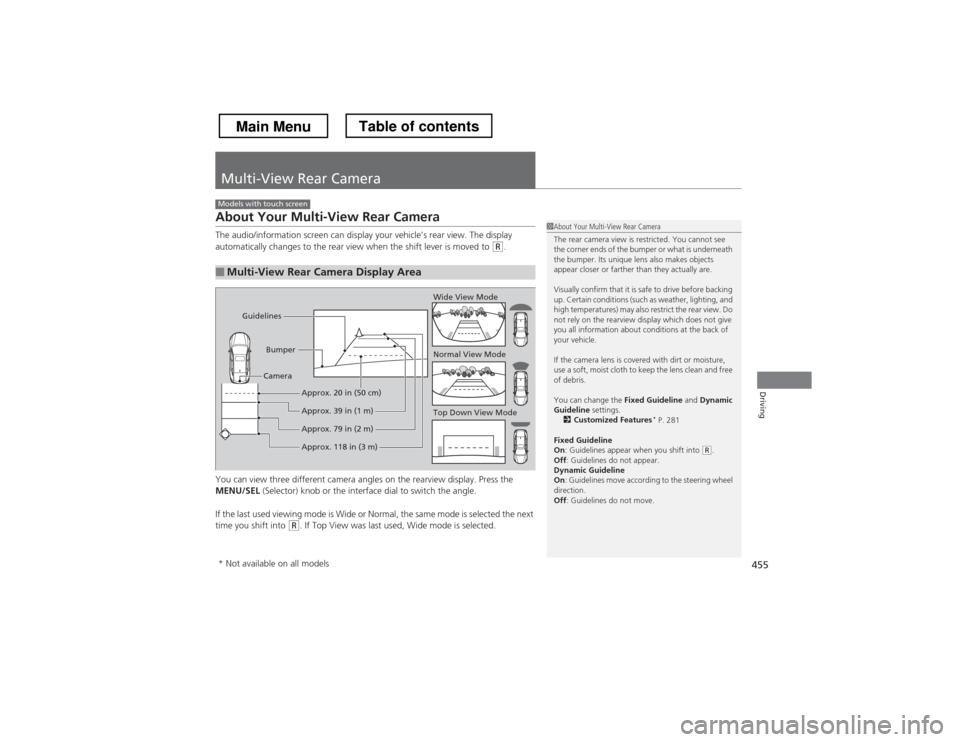
You can view three different camera angles on the rearview display. Press the
MENU/SEL (Selector) knob or the interface dial to switch the angle.
If the last used viewing mode is Wide or Normal, the same mode is selected the next
time you shift into
(R . If Top View was last used, Wide mode is selected.
■Multi-View Rear Camera Display Area
Models with touch screen
1About Your Multi-View Rear Camera
The rear camera view is restricted. You cannot see
the corner ends of the bumper or what is underneath
the bumper. Its unique lens also makes objects
appear closer or farther than they actually are.
Visually confirm that it is safe to drive before backing
up. Certain conditions (such as weather, lighting, and
high temperatures) may also restrict the rear view. Do
not rely on the rearview display which does not give
you all information about conditions at the back of your vehicle.
If the camera lens is covered with dirt or moisture,
use a soft, moist cloth to keep the lens clean and free
of debris.
You can change the Fixed Guideline and Dynamic
Guideline settings.
2 Customized Features *
P. 281
Fixed Guideline On : Guidelines appear when you shift into
(R.
Off : Guidelines do not appear.
Dynamic Guideline On : Guidelines move according to the steering wheel
direction. Off : Guidelines do not move.
Top Down View Mode
Normal View Mode
Wide View Mode
Guidelines
Bumper
Camera
Approx. 118 in (3 m)
Approx. 79 in (2 m)
Approx. 39 in (1 m)
Approx. 20 in (50 cm)
* Not available on all models
Main MenuTable of contents
Page 479 of 573
478
uuMaintenance Under the HooduEngine Coolant
Maintenance
Engine Coolant
This coolant is premixed with 50% antifreeze and 50% water. Do not add any
straight antifreeze or water.
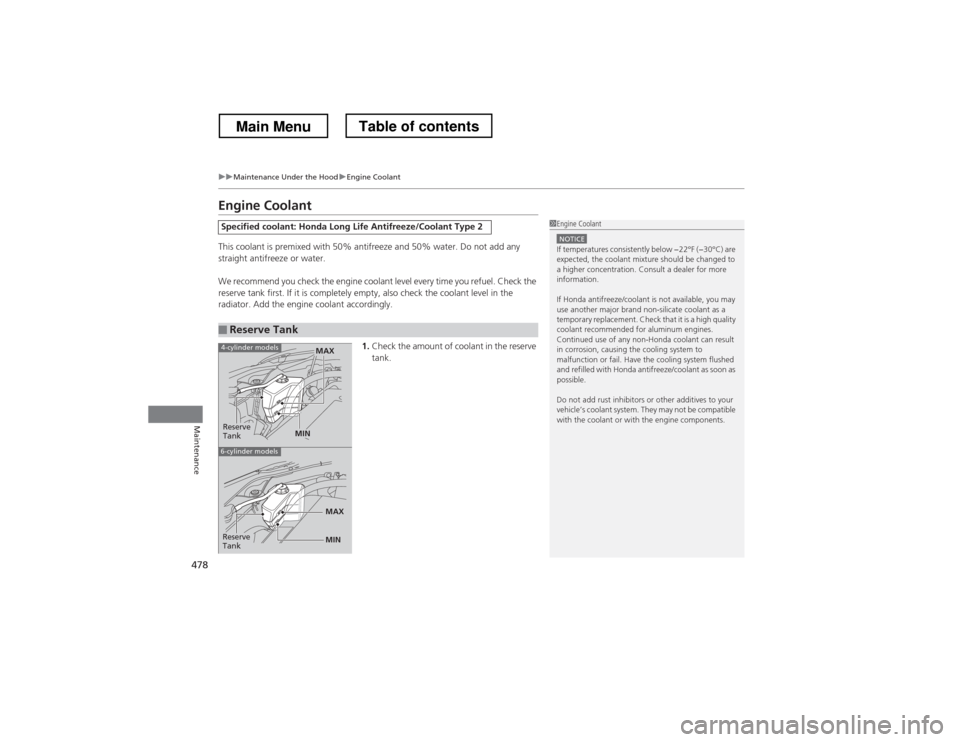
We recommend you check the engine coolant level every time you refuel. Check the
reserve tank first. If it is completely empty, also check the coolant level in the
radiator. Add the engine coolant accordingly.1.Check the amount of coolant in the reserve tank.
Specified coolant: Honda Long Life Antifreeze/Coolant Type 2
■Reserve Tank
1Engine Coolant
NOTICEIf temperatures consistently below −22°F (−30°C) are
expected, the coolant mixture should be changed to
a higher concentration. Consult a dealer for more information.
If Honda antifreeze/coolant is not available, you may
use another major brand non-silicate coolant as a
temporary replacement. Check that it is a high quality
coolant recommended for aluminum engines.
Continued use of any non-Honda coolant can result
in corrosion, causing the cooling system to
malfunction or fail. Have the cooling system flushed
and refilled with Honda antifreeze/coolant as soon as
possible.
Do not add rust inhibitors or other additives to your
vehicle’s coolant system. They may not be compatible
with the coolant or with the engine components.
Reserve
Tank
MAX
MIN
4-cylinder models
6-cylinder models
MIN
MAXReserve
Tank
Main MenuTable of contents
Page 528 of 573
527
uuEngine Does Not StartuEmergency Engine Stop
Handling the Unexpected
Emergency Engine Stop
If you cannot stop the engine by pressing the ENGINE START/STOP button, do
either of the following operations: • Press and hold the ENGINE START/STOP button for about two seconds.
• Firmly press the ENGINE START/STOP button two times.
The steering wheel will not lock.
The power mode changes to VEHICLE OFF with the shift lever in
(P , and to
ACCESSORY with the shift lever in any position other than (P .
Models with smart entry system
1Emergency Engine Stop
Do not press the button while driving unless it is
absolutely necessary for the engine to be switched off.
Main MenuTable of contents
Page 561 of 573
560
uuCustomer Service Informationu
Information
Gracenote reserves all rights in Gracenote
Data, the Gracenote Software, and the
Gracenote Servers, including all ownership
rights. Under no circumstances will
Gracenote become liable for any payment
to you for any information that you provide.
You agree that Gracenote, Inc. may enforce
its rights under this Agreement against you
directly in its own name.
The Gracenote service uses a unique
identifier to track queries for statistical
purposes. The purpose of a randomly
assigned numeric identifier is to allow the
Gracenote service to count queries without
knowing anything about who you are. For
more information, see the web page for the
Gracenote Privacy Policy for the Gracenote
service.
The Gracenote Software and each item of
Gracenote Data are licensed to you “AS IS.”
Gracenote makes no representations or
warranties, express or implied, regarding
the accuracy of any Gracenote Data from in
the Gracenote Servers. Gracenote reserves
the right to delete data from the Gracenote
Servers or to change data categories for any cause that Gracenote deems sufficient. No
warranty is made that the Gracenote
Software or Gracenote Servers are error-
free or that functioning of Gracenote
Software or Gracenote Servers will be
uninterrupted.
Gracenote is not obligated to provide you
with new enhanced or additional data types
or categories that Gracenote may provide in
the future and is free to discontinue its
services at any time.
GRACENOTE DISCLAIMS ALL WARRANTIES
EXPRESS OR IMPLIED, INCLUDING, BUT
NOT LIMITED TO, IMPLIED WARRANTIES OF
MERCHANTABILITY, FITNESS FOR A
PARTICULAR PURPOSE, TITLE, AND
NONINFRINGEMENT. GRACENOTE DOES
NOT WARRANT THE RESULTS THAT WILL BE
OBTAINED BY YOUR USE OF THE
GRACENOTE SOFTWARE OR ANY
GRACENOTE SERVER. IN NO CASE WILL
GRACENOTE BE LIABLE FOR ANY
CONSEQUENTIAL OR INCIDENTAL
DAMAGES OR FOR ANY LOST PROFITS OR
LOST REVENUES.
copyright © 2000 to present Gracenote
Requirements to access Pandora
®
• Latest version of the Pandora app
installed on your Android, Blackberry, or
iPhone.
• Registered Pandora account (you can
create a free account at
www.pandora.com
www.pandora.com/ > or on your
smartphone)
• Connection to the internet via WiFi or
cellular data network.■Disclaimer of Pandora ®
Main MenuTable of contents