Page 189 of 573
188
uuAudio System Basic OperationuAudio/Information Screen
Features
■Info
Shows the Trip Computer or Clock/Wallpaper information.
Press , rotate to select an item, then press .
Info menu items
Current Drive (Trip computer)
Shows the range, and instant and average fuel economy of the current trip, as well
as the average fuel economy from your last trip.
History of Trip A (Trip computer)
Shows the range, average fuel economy and distance traveled for the current trip,
as well as the average fuel economy and distances traveled during the last three
driving cycles.
Each time you reset the trip meter A, the information on the display updates. The
history of the previous three driving cycles is kept.
Delete History 1. Rotate to select Delete History, then press .
2. You will receive a confirmation message on the screen. Rotate to select Yes,
then press .
Clock/Wallpaper
Shows the current clock type and wallpaper
Clock/Wallpaper Change
Enters the clock and wallpaper setting menu screen.
Main MenuTable of contents
Page 190 of 573
Continued189
uuAudio System Basic OperationuAudio/Information Screen
Features
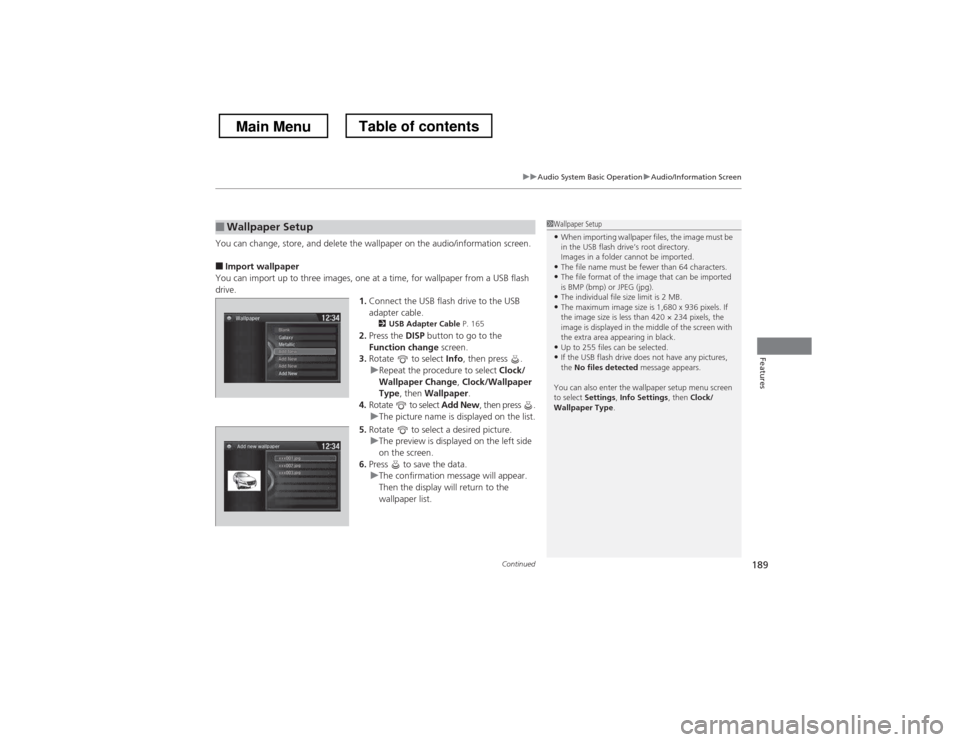
You can change, store, and delete the wallpaper on the audio/information screen. ■Import wallpaper
You can import up to three images, one at a time, for wallpaper from a USB flash drive. 1.Connect the USB flash drive to the USB
adapter cable.
2 USB Adapter Cable P. 165
2. Press the DISP button to go to the
Function change screen.
3. Rotate to select Info, then press .
uRepeat the procedure to select Clock/
Wallpaper Change , Clock/Wallpaper
Type , then Wallpaper .
4. Rotate to select Add New, then press .
uThe picture name is displayed on the list.
5. Rotate to select a desired picture.
uThe preview is displayed on the left side
on the screen.
6. Press to save the data.
uThe confirmation message will appear.
Then the display will return to the
wallpaper list.
■Wallpaper Setup1Wallpaper Setup
• When importing wallpaper files, the image must be
in the USB flash drive’s root directory.
Images in a folder cannot be imported.
• The file name must be fewer than 64 characters.
• The file format of the image that can be imported
is BMP (bmp) or JPEG (jpg).
• The individual file size limit is 2 MB.
• The maximum image size is 1,680 x 936 pixels. If
the image size is less than 420 × 234 pixels, the
image is displayed in the middle of the screen with
the extra area appearing in black.
• Up to 255 files can be selected.
• If the USB flash drive does not have any pictures, the No files detected message appears.
You can also enter the wallpaper setup menu screen
to select Settings , Info Settings , then Clock/
Wallpaper Type .
Main MenuTable of contents
Page 196 of 573
Continued195
uuAudio System Basic OperationuPlaying AM/FM Radio
Features
Provides text data information related to your selected RDS-capable FM station. ■To find an RDS station from Station List
1. Press to switch to the Audio menu screen while listening to an FM station.
2. Rotate to select Station List, then press .
3. Rotate to select the station, then press .
■ Manual update
Updates your available station list at any time. 1. Press to switch to the Audio menu screen while listening to an FM station.
2. Rotate to select Station List, then press .
3. Rotate to select UPDATE LIST, then press .
■Radio Data System (RDS)1Radio Data System (RDS)
When you select an RDS-capable FM station, the RDS
automatically turns on, and the frequency display
changes to the station name. However, when the
signals of that station become weak, the display
changes from the station name to the frequency.
Main MenuTable of contents
Page 216 of 573
215
Features
Audio System Basic Operation
To use the audio system function, the ignition switch must be in ACCESSORY (q or
ON (w *1
.
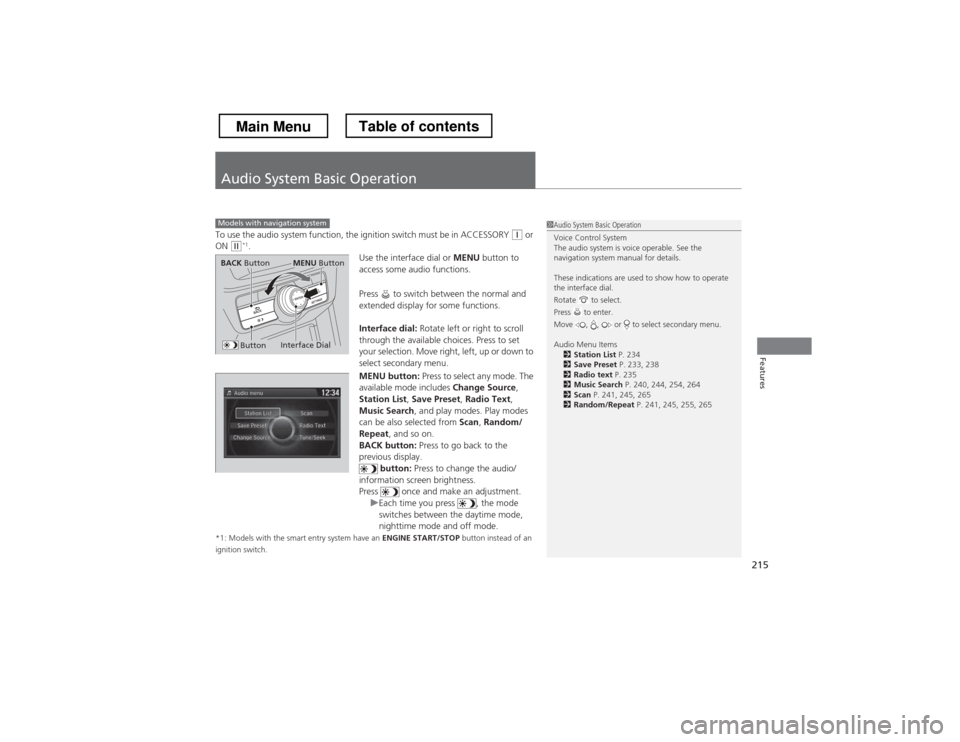
Use the interface dial or MENU button to
access some audio functions.
Press to switch between the normal and
extended display for some functions.
Interface dial: Rotate left or right to scroll
through the available choices. Press to set
your selection. Move right, left, up or down to
select secondary menu.
MENU button: Press to select any mode. The
available mode includes Change Source,
Station List , Save Preset , Radio Text ,
Music Search , and play modes. Play modes
can be also selected from Scan, Random/
Repeat , and so on.
BACK button: Press to go back to the
previous display. button: Press to change the audio/
information screen brightness.
Press once and make an adjustment.
uEach time you press , the mode
switches between the daytime mode,
nighttime mode and off mode.
*1: Models with the smart entry system have an ENGINE START/STOP button instead of an
ignition switch.
Models with navigation system1Audio System Basic Operation
Voice Control System
The audio system is voice operable. See the
navigation system manual for details.
These indications are used to show how to operate the interface dial.
Rotate to select.
Press to enter.
Move , , or to select secondary menu.
Audio Menu Items 2 Station List P. 234
2 Save Preset P. 233, 238
2 Radio text P. 235
2 Music Search P. 240, 244, 254, 264
2 Scan P. 241, 245, 265
2 Random/Repeat P. 241, 245, 255, 265
Interface Dial
MENU ButtonBACK Button
Button
Main MenuTable of contents
Page 218 of 573
217
uuAudio System Basic OperationuAudio with Touch Screen
Features
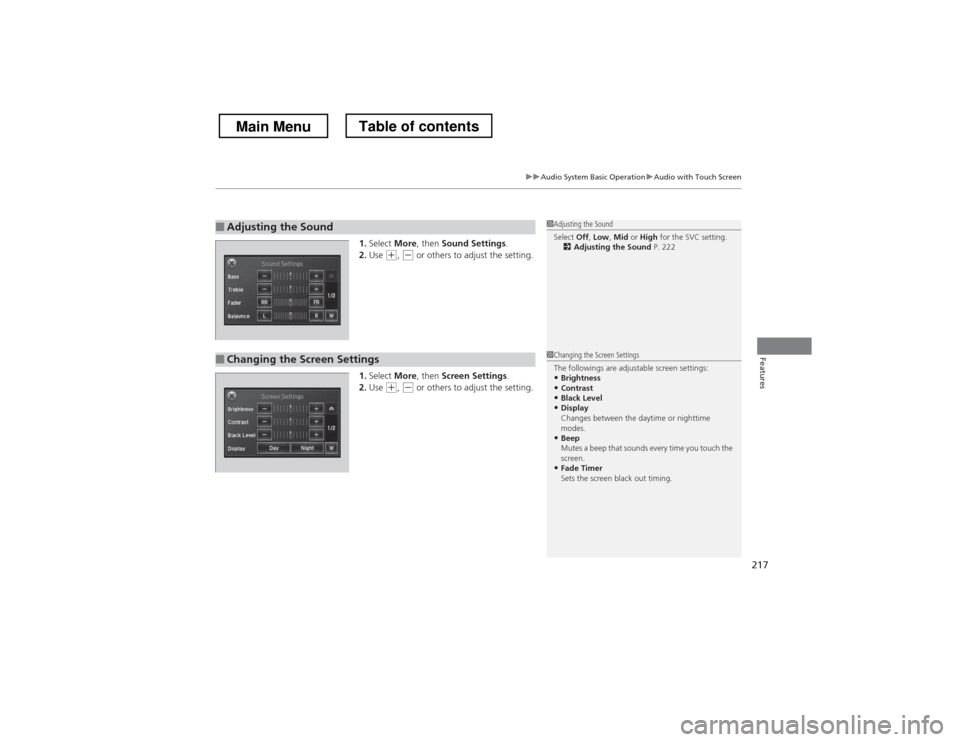
1.Select More, then Sound Settings .
2. Use (+ , (- or others to adjust the setting.
1. Select More, then Screen Settings .
2. Use
(+ , (- or others to adjust the setting.
■Adjusting the Sound1Adjusting the Sound
Select Off, Low , Mid or High for the SVC setting.
2 Adjusting the Sound P. 222
■Changing the Screen Settings1Changing the Screen Settings
The followings are adjustable screen settings:
• Brightness
• Contrast
• Black Level
• Display
Changes between the daytime or nighttime
modes.
• Beep
Mutes a beep that sounds every time you touch the
screen.
• Fade Timer
Sets the screen black out timing.
Main MenuTable of contents
Page 221 of 573
uuAudio System Basic OperationuAudio/Information Screen
220
Features
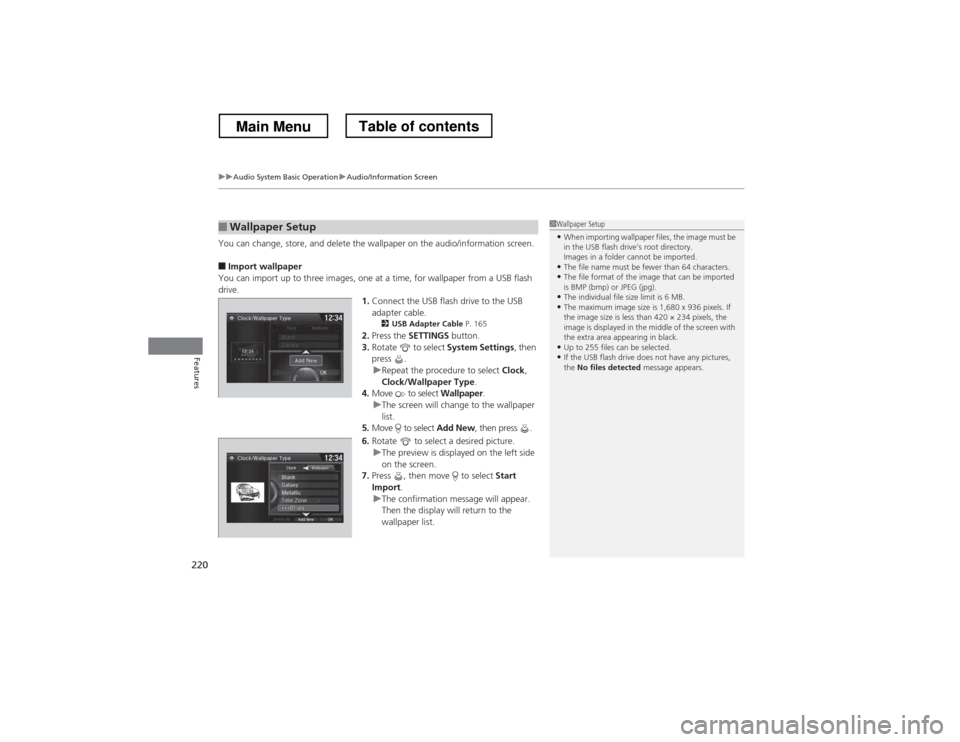
You can change, store, and delete the wallpaper on the audio/information screen. ■ Import wallpaper
You can import up to three images, one at a time, for wallpaper from a USB flash
drive. 1.Connect the USB flash drive to the USB adapter cable.
2 USB Adapter Cable P. 165
2. Press the SETTINGS button.
3. Rotate to select System Settings, then
press .
uRepeat the procedure to select Clock,
Clock/Wallpaper Type .
4. Move to select Wallpaper.
uThe screen will change to the wallpaper
list.
5. Move to select Add New, then press .
6. Rotate to select a desired picture.
uThe preview is displayed on the left side
on the screen.
7. Press , then move to select Start
Import .
uThe confirmation message will appear.
Then the display will return to the
wallpaper list.
■Wallpaper Setup1Wallpaper Setup
• When importing wallpaper files, the image must be
in the USB flash drive’s root directory.
Images in a folder cannot be imported.
• The file name must be fewer than 64 characters.
• The file format of the image that can be imported
is BMP (bmp) or JPEG (jpg).
• The individual file size limit is 6 MB.
• The maximum image size is 1,680 x 936 pixels. If
the image size is less than 420 × 234 pixels, the
image is displayed in the middle of the screen with
the extra area appearing in black.
• Up to 255 files can be selected.
• If the USB flash drive does not have any pictures, the No files detected message appears.
Main MenuTable of contents
Page 235 of 573
uuAudio System Basic OperationuPlaying AM/FM Radio
234
Features
Provides text data information related to your selected RDS-capable FM station. ■ To find an RDS station from Station List
1. Press the MENU button while listening to an FM station.
2. Rotate to select Station List, then press .
3. Rotate to select the station, then press .
■ Manual update
Updates your available station list at any time. 1. Press the MENU button while listening to an FM station.
2. Rotate to select Station List, then press .
3. Rotate to select Refresh, then press .
■Radio Data System (RDS)1Radio Data System (RDS)
When you select an RDS-capable FM station, the RDS
automatically turns on, and the frequency display
changes to the station name. However, when the
signals of that station become weak, the display
changes from the station name to the frequency.
Main MenuTable of contents
Page 298 of 573
297
uuCustomized Features*u
Continued
Features
*1:Default SettingSetup
Group Customizable Features Description Selectable Settings
Vehicle
Settings Keyless
Access
Setup
Door Unlock Mode
Changes which doors unlock when you grab the
driver’s door handle. Driver Door Only
*1
/
All Doors
Keyless Access Light Flash Causes some exterior lights to blink when you
unlock/lock the doors.
On
*1
/Off
Keyless Access Beep Sets the beeper sound or not when you grab
either front door handle. On
*1
/Off
Lighting Setup Interior Light Dimming
Time
Changes the length of time the interior lights stay
on after you close the doors. 60seconds
/
30seconds *1
/
15seconds
Headlight Auto Off Timer Changes the length of time the exterior lights
stay on after you close the driver’s door. 60seconds
/
30seconds /
15seconds *1
/
0seconds
Auto Light Sensitivity Changes the timing for the headlights to come on. Max
/High /Mid *1
/
Low /Min
Main MenuTable of contents