2013 HONDA CROSSTOUR climate control
[x] Cancel search: climate controlPage 421 of 573

420
Driving
When Driving
Starting the Engine1.Make sure the parking brake is applied.
2. Check that the shift lever is in
(P , then
depress the brake pedal.
uAlthough it is possible to start the vehicle
in (N , it is safer to start it in (P.
Models without smart entry system
1Starting the Engine
Keep your foot firmly on the brake pedal when
starting the engine.
The engine is harder to start in cold weather and in
thinner air found at altitudes above 8,000 feet (2,400 meters).
When starting the engine in cold weather, turn off all
electrical accessories such as the lights, heating and
cooling system *
/climate control system *
, and rear
defogger in order to reduce battery drain.
If you live in a region where winter is extremely cold,
an engine block heater will improve starting and
warming of the engine. If temperatures consistently
below -22°F (-30°C) are expected, the coolant
mixture should be charged to a higher concentration
to prevent freezing. Consult a dealer for details.
If the exhaust system sounds abnormal or you can
smell exhaust gas inside the vehicle, have your vehicle
checked by a dealer. There may be a problem with
the engine or exhaust system.
Brake Pedal
* Not available on all models
Main MenuTable of contents
Page 423 of 573

422
uuWhen DrivinguStarting the Engine
Driving
Starting the Engine1.Make sure the parking brake is applied.
2. Check that the shift lever is in
(P , then
depress the brake pedal.
uAlthough it is possible to start the vehicle
in (N , it is safer to start it in (P.
Models with smart entry system
1Starting the Engine
Keep your foot firmly on the brake pedal when
starting the engine.
The engine is harder to start in cold weather and in
thinner air found at altitudes above 8,000 feet (2,400 meters).
When starting the engine in cold weather, turn off all
electrical accessories such as the lights, climate
control system, and rear defogger in order to reduce battery drain.
If you live in a region where winter is extremely cold,
an engine block heater will improve starting and
warming of the engine. If temperatures consistently
below -22°F (-30°C) are expected, the coolant
mixture should be changed to a higher concentration
to prevent freezing. Consult a dealer for details.
If the exhaust system sounds abnormal or you can
smell exhaust gas inside the vehicle, have your vehicle
checked by a dealer. There may be a problem with
the engine or exhaust system.
The immobilizer system protects your vehicle from theft.
If an improperly coded device is used, the engine’s
fuel system is disabled.
2 Immobilizer System P. 107
Brake Pedal
Main MenuTable of contents
Page 438 of 573
Continued437
uuWhen DrivinguForward Collision Warning (FCW)*
Driving
■
Automatic shutoff
FCW may automatically shut itself off and the FCW indicator comes and stays on
when: • The temperature inside the system is high.
• The windshield is blocked by di rt, mud, leaves, wet snow, etc.
Once the conditions that caused FCW to shut off improve or are addressed (e.g.,
cleaning), the system comes back on.1Automatic shutoff
To help reduce the likelihood that high interior
temperatures will cause the camera system to shut
off, when parking, find a shady area or face the front
of the vehicle away from the sun. Also, do not use a
reflective sunshade that can concentrate heat on the camera.
If the CAMERA HOT message appears:
• Use the climate control system to cool down the
interior and, if necessary, the defroster mode when
windows are fogged.
• Start driving the vehicle to lower the windshield
temperature, which cools down the area around
the FCW system.
Main MenuTable of contents
Page 441 of 573
uuWhen DrivinguLane Departure Warning (LDW)*
440
Driving
The system begins to search for lane markings when all the following conditions are met: • The vehicle is traveling between at 40-90 mph (64-145 km/h).
• The vehicle is on a straight or slightly curved road.
• The turn signals are off.
• The brake pedal is not pressed.
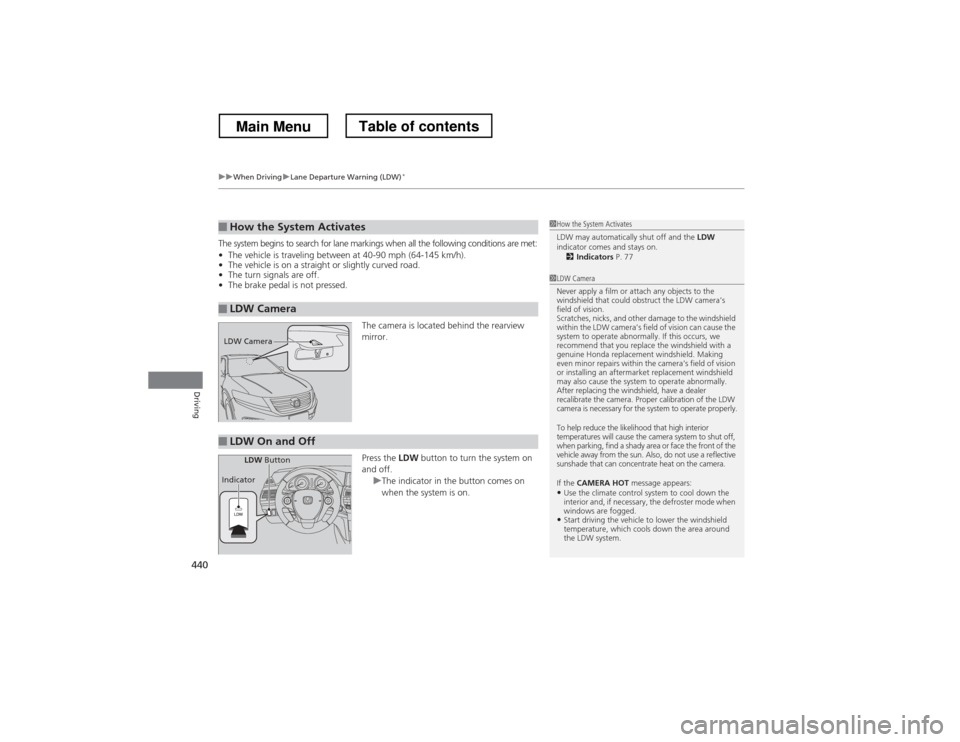
The camera is located behind the rearview mirror. Press the LDW button to turn the system on
and off.
uThe indicator in the button comes on
when the system is on.
■How the System Activates
■LDW Camera
1How the System Activates
LDW may automatically shut off and the LDW
indicator comes and stays on.
2 Indicators P. 77
1LDW Camera
Never apply a film or attach any objects to the
windshield that could obstruct the LDW camera’s
field of vision.
Scratches, nicks, and other damage to the windshield
within the LDW camera’s field of vision can cause the
system to operate abnormally. If this occurs, we
recommend that you replace the windshield with a
genuine Honda replacement windshield. Making
even minor repairs within the camera’s field of vision
or installing an aftermarket replacement windshield
may also cause the system to operate abnormally.
After replacing the windshield, have a dealer
recalibrate the camera. Proper calibration of the LDW
camera is necessary for the system to operate properly.
To help reduce the likelihood that high interior
temperatures will cause the camera system to shut off,
when parking, find a shady area or face the front of the
vehicle away from the sun. Also, do not use a reflective
sunshade that can concentrate heat on the camera.
If the CAMERA HOT message appears:
• Use the climate control system to cool down the
interior and, if necessary, the defroster mode when
windows are fogged.
• Start driving the vehicle to lower the windshield
temperature, which cools down the area around
the LDW system.
LDW Camera
■LDW On and Off
LDW Button
Indicator
Main MenuTable of contents
Page 501 of 573
500
uuChecking and Maintaining TiresuDOT Tire Quality Grading (U.S. Vehicles)
Maintenance
DOT Tire Quality Grading (U.S. Vehicles)
The tires on your vehicle meet all U.S. Federal Safety
Requirements. All tires are also graded for treadwear, traction,
and temperature performance according to Department of Transportation (DOT) standards. The following explains these
gradings.
Quality grades can be found where applicable on the tire sidewall
between tread shoulder and maximum section width.
The treadwear grade is a comparative rating based on the wear
rate of the tire when tested under controlled conditions on a
specified government test course. For exampl e, a tire graded 150
would wear one and one-half (1 1/2) times as well on the
government course as a tire graded 100. The relative performance
of tires depends upon the actual conditions of their use, however,
and may depart significantly from the norm due to variations in
driving habits, service practices and differences in road
characteristics and climate.
■Uniform Tire Quality Grading
■Treadwear
1Uniform Tire Quality Grading
For example:
Treadwear 200Traction AA
Temperature A
All passenger car tires must conform
to Federal Safety Requirements in addition to these grades.
Main MenuTable of contents
Page 510 of 573
509
Maintenance
Heating and Cooling System*/Climate Control System* Maintenance
Dust and Pollen Filter
The heating and cooling system*
/climate control system *
is equipped with a dust
and pollen filter that collects pollen, dust, and other debris in the air. The
Maintenance Minder TM
messages will let you know when to replace the filter.
We recommend that you replace the dust and pollen filter sooner when using your
vehicle in areas with high concentrations of dust.
1Dust and Pollen Filter
If the airflow from the heating and cooling system *
/
climate control system *
deteriorates noticeably, and
the windows fog up easily, the filter may need to be
replaced. Please contact a dealer for replacement.
* Not available on all models
Main MenuTable of contents
Page 535 of 573

534
Handling the Unexpected
Indicator, Coming On/Blinking
If the Low Oil Pressure Indicator Comes On■Reasons for the indicator to come on
Comes on when the engine oil pressure is low. ■ What to do as soon as the indicator comes on
1. Immediately park the vehicle in a safe place.
2. If necessary, turn the hazard warning lights on.
■ What to do after parking the vehicle
1. Stop the engine and let it sit for about one minute.
2. Open the hood and check the oil level.
uAdd oil as necessary.
3. Start the engine and check the low oil pressure indicator.
uThe light goes out: Start driving again.uThe light does not go out within 10 seconds: Stop the engine and
contact a dealer for repairs immediately.
If the Charging System Indicator Comes On
■Reasons for the indicator to come on
Comes on when the battery is not being charged. ■ What to do when the indicator comes on
Turn off the heating and cooling system *
/climate control system *
, rear
defogger, and other electrical systems, and immediately contact a dealer for repairs.
1If the Low Oil Pressure Indicator Comes On
NOTICERunning the engine with low oil pressure can cause
serious mechanical damage almost immediately.
1If the Charging System Indicator Comes On
If you need to stop temporarily, do not turn off the
engine. Restarting the engine may rapidly discharge the battery.
* Not available on all models
Main MenuTable of contents
Page 564 of 573

563
Index
Bluetooth® Audio ............................. 213, 266
Bluetooth ® HandsFreeLink ®.... 320, 332, 367
Booster Seats (For Children) ...................... 65
Brake System ............................................ 449
Anti-lock Brake System (ABS) .................. 451
Brake Assist System................................. 452
Fluid ....................................................... 481
Foot Brake .............................................. 450
Indicator ........................................... 70, 536
Parking Brake.......................................... 449
Brightness Control (Instrument Panel) ... 125
Bulb Replacement .................................... 484
Brake Light, Taillight, Back-Up Light,
Rear Turn Signal Light and Lower Rear
Side Marker Light ................................ 490
Fog Lights ............................................... 486
Front Turn Signal/Parking Light ............... 489
Headlights .............................................. 484
High-Mount Brake Light........ .................. 492
Rear License Plate Light ........................... 492
Side Marker Lights .................................. 488
Bulb Specifications ........................... 546, 548
C
Carbon Monoxide Gas ............................... 66
Cargo Hook .............................................. 149
Carrying Cargo ................................. 411, 413
CD Player .................................. 173, 200, 239
Center Pocket ........................................... 152
Certification Label ................................... 550 Changing Bulbs
......................................... 484
Charging System Indicator ................. 71, 534
Child Safety ................................................. 54
Childproof Door Locks ............................. 100
Child Seat .................................................... 54
Booster Seats............................................. 65
Child Seat for Infants ................................. 56
Child Seat for Small Children ..................... 57
Installing a Child Seat with a Lap/ Shoulder Seat Belt ................................... 61
Larger Children.......................................... 64
Rear-facing Child Seat ............................... 56
Selecting a Child Seat ................................ 58
Childproof Door Locks ............................. 100
Cleaning the Exterior ............................... 512
Cleaning the Interior ................................ 510
Climate Control System ............................ 157
Changing the Mode ................................ 157
Defrosting the Windshield and
Windows ............................................... 159
Dust and Pollen Filter ............................... 509
Recirculation and Fresh Air Mode ............ 158
Recirculation/Fresh Air Mode ................... 157
Sensors.................................................... 162
Synchronized Mode ................................. 161
Using Automatic Climate Control ............ 157
Clock ............................................................ 88
Coat Hook ................................................. 148
Compact Spare Tire .................. 517, 547, 549
Compass ............................................ 405, 407
Console Compartment ............................. 145 Controls
....................................................... 87
Coolant (Engine) ...................................... 478
Adding to the Radiator ............................ 479
Adding to the Reserve Tank..................... 478
Overheating ............................................ 532
Creeping (Automatic Transmission) ........ 425
Cruise Control ........................................... 432
Indicator.................................................... 81
Cup Holders .............................................. 146
Customer Service Information ................. 558
Customized Features ................................ 281
D
Daytime Running Lights .......................... 122
Dead Battery ............................................. 528
Defrosting the Windshield and Windows ......................................... 156, 159
Devices that Emit Radio Waves ............... 551
Dimming
Headlights ............................................... 119
Rearview Mirror....................................... 130
Dipstick (Engine Oil) ................................. 473
Directional Signals (Turn Signal) ............. 119
Display Button .................................. 186, 218
Door Mirrors ............................................. 131
Doors ........................................................... 91
Auto Door Locking .................................. 101
Auto Door Unlocking .............................. 101
Door and Trunk Open Indicator ................. 74
Door Open Indicator.................................. 31
Main Menu