2013 HONDA CROSSTOUR buttons
[x] Cancel search: buttonsPage 320 of 573
319
uuHomeLink® Universal Transceiver *uTraining HomeLink
Features
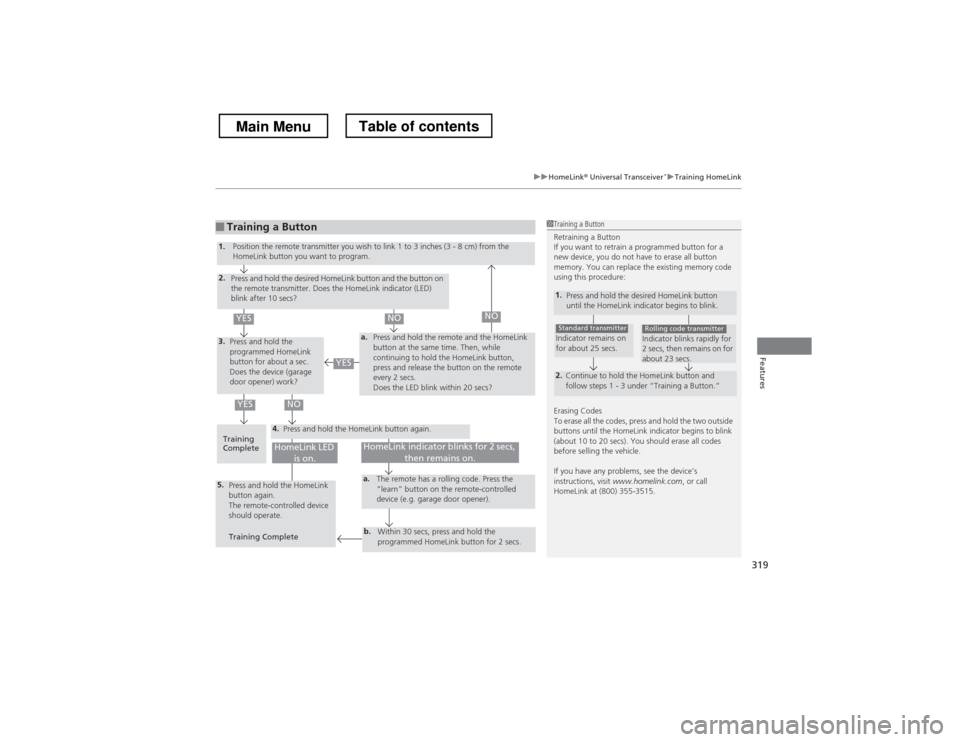
■Training a Button1Training a Button
Retraining a Button
If you want to retrain a programmed button for a
new device, you do not have to erase all button
memory. You can replace the existing memory code
using this procedure:
1.
Press and hold the desired HomeLink button
until the HomeLink indicator begins to blink.
2.
Continue to hold the HomeLink button and
follow steps 1 - 3 under “Training a Button.”
Indicator remains on
for about 25 secs.Standard transmitterIndicator blinks rapidly for
2 secs, then remains on for
about 23 secs.Rolling code transmitter
Erasing Codes
To erase all the codes, press and hold the two outside
buttons until the HomeLink indicator begins to blink
(about 10 to 20 secs). You should erase all codes
before selling the vehicle.
If you have any problems, see the device’s instructions, visit www.homelink.com , or call
HomeLink at (800) 355-3515.
4.
a.3.
2.
5.a.
b.
1. Position the remote transmitter you wish to link 1 to 3 inches (3 - 8 cm) from the
HomeLink button you want to program.
Press and hold the desired HomeLink button and the button on
the remote transmitter. Does the HomeLink indicator (LED)
blink after 10 secs?
Press and hold the
programmed HomeLink
button for about a sec.
Does the device (garage
door opener) work? Press and hold the remote and the HomeLink
button at the same time. Then, while
continuing to hold the HomeLink button,
press and release the button on the remote
every 2 secs.
Does the LED blink within 20 secs?
Training
Complete Press and hold the HomeLink button again.
Press and hold the HomeLink
button again.
The remote-controlled device
should operate. Training Complete The remote has a rolling code. Press the
“learn” button on the remote-controlled
device (e.g. garage door opener).
Within 30 secs, press and hold the
programmed HomeLink button for 2 secs.
HomeLink indicator blinks for 2 secs, then remains on.HomeLink LED is on.
YESNO
YES
YESNONO
Main MenuTable of contents
Page 321 of 573
320
Features
Bluetooth® HandsFreeLink ®
Bluetooth® HandsFreeLink ® (HFL) allows you to place and receive phone calls using
your vehicle’s audio system, without handling your cell phone.
Using HFL
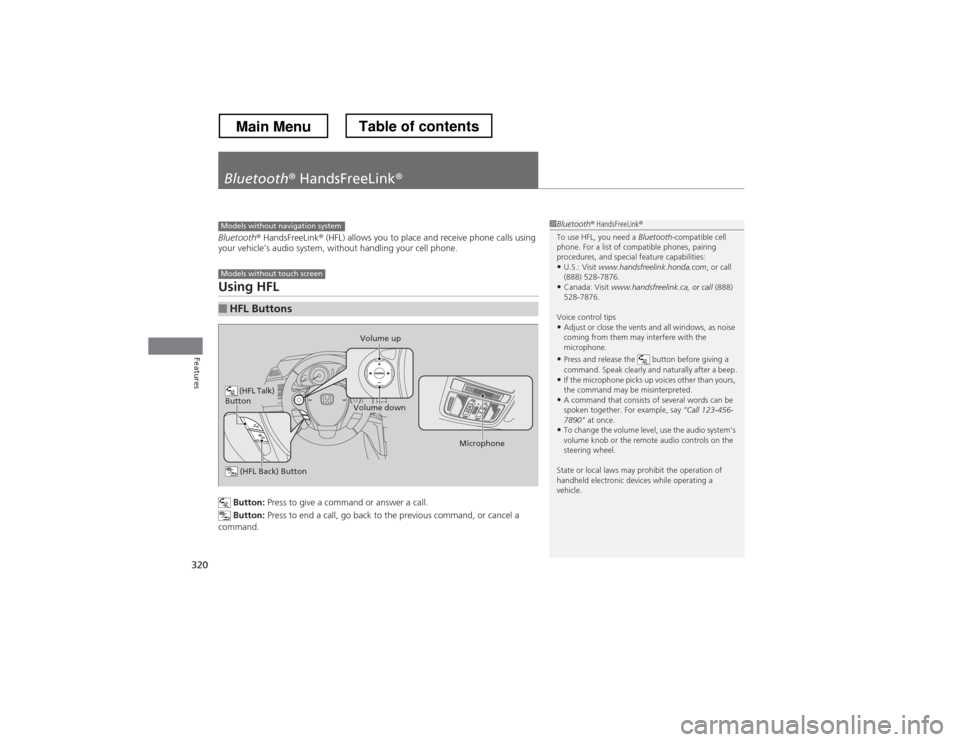
Button: Press to give a command or answer a call.
Button: Press to end a call, go back to the previous command, or cancel a
command.
■HFL Buttons
1Bluetooth ® HandsFreeLink ®
To use HFL, you need a Bluetooth-compatible cell
phone. For a list of compatible phones, pairing
procedures, and special feature capabilities:
• U.S.: Visit www.handsfreelink.honda.com , or call
(888) 528-7876.
• Canada: Visit www.handsfreelink.ca, or call (888)
528-7876.
Voice control tips • Adjust or close the vents and all windows, as noise
coming from them may interfere with the
microphone.
• Press and release the button before giving a
command. Speak clearly and naturally after a beep.
• If the microphone picks up voices other than yours,
the command may be misinterpreted.
• A command that consists of several words can be
spoken together. For example, say “Call 123-456-
7890” at once.
• To change the volume level, use the audio system’s
volume knob or the remote audio controls on the
steering wheel.
State or local laws may prohibit the operation of
handheld electronic devices while operating a
vehicle.Models without navigation system
Models without touch screen
(HFL Talk)
Button
Volume up
Microphone
(HFL Back) Button
Volume down
Main MenuTable of contents
Page 333 of 573
332
Features
Bluetooth® HandsFreeLink ®
Bluetooth® HandsFreeLink ® (HFL) allows you to place and receive phone calls using
your vehicle’s audio system, without handling your cell phone.
Using HFL
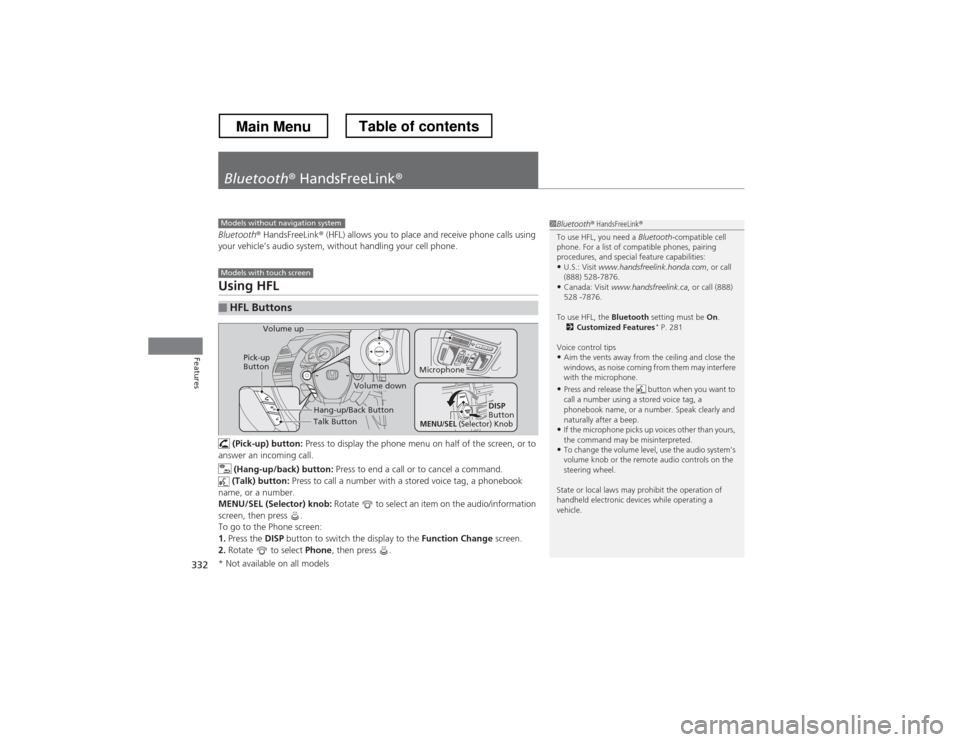
(Pick-up) button: Press to display the phone menu on half of the screen, or to
answer an incoming call.
(Hang-up/back) button: Press to end a call or to cancel a command.
(Talk) button: Press to call a number with a stored voice tag, a phonebook
name, or a number.
MENU/SEL (Selector) knob: Rotate to select an item on the audio/information
screen, then press .
To go to the Phone screen:1. Press the DISP button to switch the display to the Function Change screen.
2. Rotate to select Phone, then press .
■HFL Buttons
1Bluetooth ® HandsFreeLink ®
To use HFL, you need a Bluetooth-compatible cell
phone. For a list of compatible phones, pairing
procedures, and special feature capabilities:
• U.S.: Visit www.handsfreelink.honda.com , or call
(888) 528-7876.
• Canada: Visit www.handsfreelink.ca , or call (888)
528 -7876.
To use HFL, the Bluetooth setting must be On.
2 Customized Features *
P. 281
Voice control tips • Aim the vents away from the ceiling and close the
windows, as noise coming from them may interfere
with the microphone.
• Press and release the button when you want to
call a number using a stored voice tag, a
phonebook name, or a number. Speak clearly and
naturally after a beep.
• If the microphone picks up voices other than yours,
the command may be misinterpreted.
• To change the volume level, use the audio system’s
volume knob or the remote audio controls on the
steering wheel.
State or local laws may prohibit the operation of
handheld electronic devices while operating a
vehicle.Models without navigation system
Models with touch screen
Talk Button
Volume up
Microphone
Hang-up/Back Button
Pick-up
Button
Volume down
DISP
Button
MENU/SEL (Selector) Knob
* Not available on all models
Main MenuTable of contents
Page 368 of 573
367
Continued
Features
Bluetooth
® HandsFreeLink ®
Bluetooth® HandsFreeLink ® (HFL) allows you to place and receive phone calls using
your vehicle’s navigation system, without handling your cell phone.
Using HFL
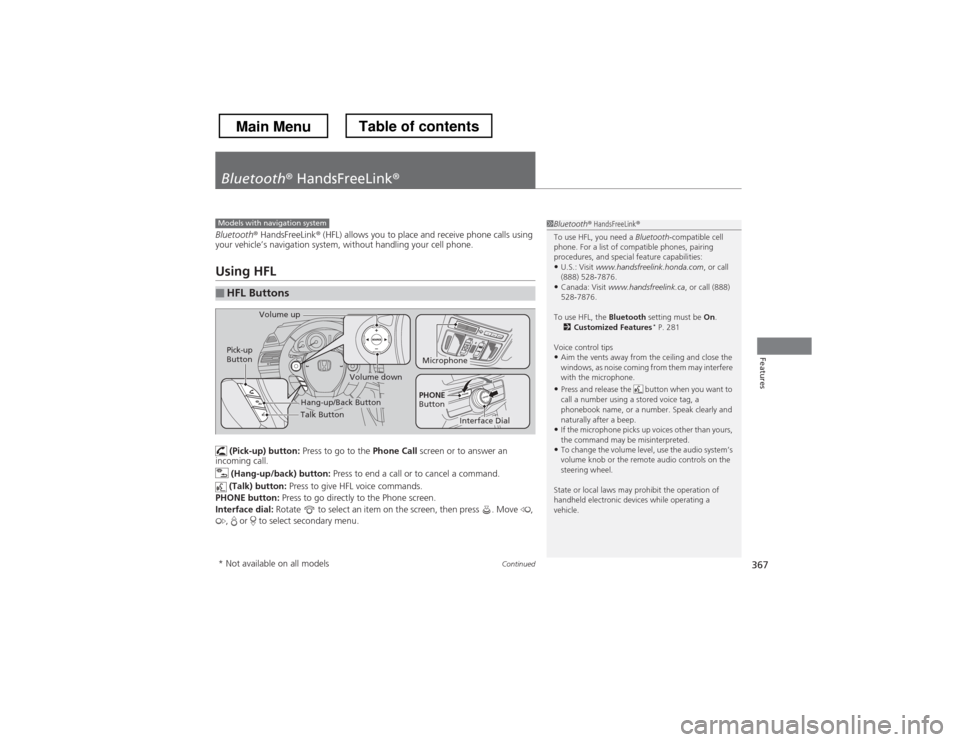
(Pick-up) button: Press to go to the Phone Call screen or to answer an
incoming call.
(Hang-up/back) button: Press to end a call or to cancel a command.
(Talk) button: Press to give HFL voice commands.
PHONE button: Press to go directly to the Phone screen.
Interface dial: Rotate to select an item on the screen, then press . Move ,
, or to select secondary menu.
■HFL Buttons
1Bluetooth ® HandsFreeLink ®
To use HFL, you need a Bluetooth-compatible cell
phone. For a list of compatible phones, pairing
procedures, and special feature capabilities:
• U.S.: Visit www.handsfreelink.honda.com , or call
(888) 528-7876.
• Canada: Visit www.handsfreelink.ca , or call (888)
528-7876.
To use HFL, the Bluetooth setting must be On.
2 Customized Features *
P. 281
Voice control tips • Aim the vents away from the ceiling and close the
windows, as noise coming from them may interfere
with the microphone.
• Press and release the button when you want to
call a number using a stored voice tag, a
phonebook name, or a number. Speak clearly and
naturally after a beep.
• If the microphone picks up voices other than yours,
the command may be misinterpreted.
• To change the volume level, use the audio system’s
volume knob or the remote audio controls on the
steering wheel.
State or local laws may prohibit the operation of
handheld electronic devices while operating a
vehicle.Models with navigation system
Talk Button
Volume up
Microphone
Hang-up/Back Button
Pick-up
Button
Volume down
Interface Dial
PHONE
Button
* Not available on all models
Main MenuTable of contents
Page 435 of 573
uuWhen DrivinguCruise Control
434
Driving
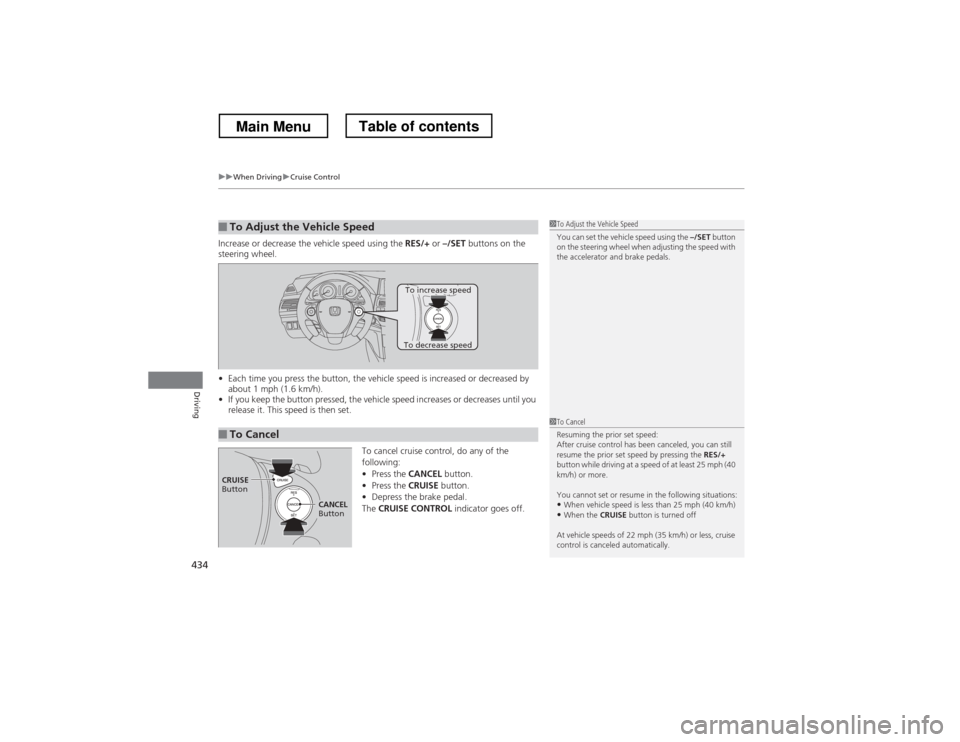
Increase or decrease the vehicle speed using the RES/+ or –/SET buttons on the
steering wheel. • Each time you press the button, the vehicle speed is increased or decreased by
about 1 mph (1.6 km/h).
• If you keep the button pressed, the vehicle speed increases or decreases until you
release it. This speed is then set.
To cancel cruise control, do any of the
following:•Press the CANCEL button.
• Press the CRUISE button.
• Depress the brake pedal.
The CRUISE CONTROL indicator goes off.
■To Adjust the Vehicle Speed1To Adjust the Vehicle Speed
You can set the vehicle speed using the –/SET button
on the steering wheel when adjusting the speed with
the accelerator and brake pedals.
■To Cancel
To decrease speed
To increase speed
1To Cancel
Resuming the prior set speed:
After cruise control has been canceled, you can still
resume the prior set speed by pressing the RES/+
button while driving at a speed of at least 25 mph (40
km/h) or more.
You cannot set or resume in the following situations:
• When vehicle speed is less than 25 mph (40 km/h)
• When the CRUISE button is turned off
At vehicle speeds of 22 mph (35 km/h) or less, cruise
control is canceled automatically.
CRUISE
Button
CANCEL
Button
Main MenuTable of contents
Page 509 of 573
508
uuRemote Transmitter CareuReplacing the Button Battery
Maintenance
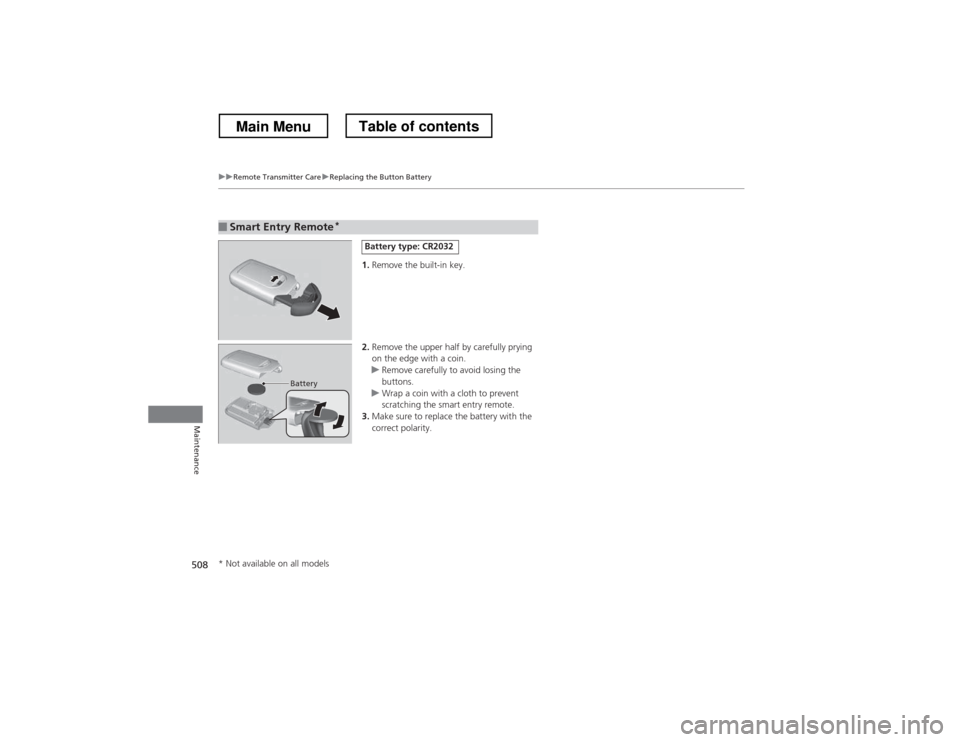
1.Remove the built-in key.
2. Remove the upper half by carefully prying
on the edge with a coin.
uRemove carefully to avoid losing the
buttons.
uWrap a coin with a cloth to prevent
scratching the smart entry remote.
3. Make sure to replace the battery with the
correct polarity.
■Smart Entry Remote *
Battery type: CR2032
Battery
* Not available on all models
Main MenuTable of contents
Page 527 of 573
526
uuEngine Does Not StartuIf the Smart Entry Remote Battery is Weak
Handling the Unexpected
If the Smart Entry Remote Battery is Weak
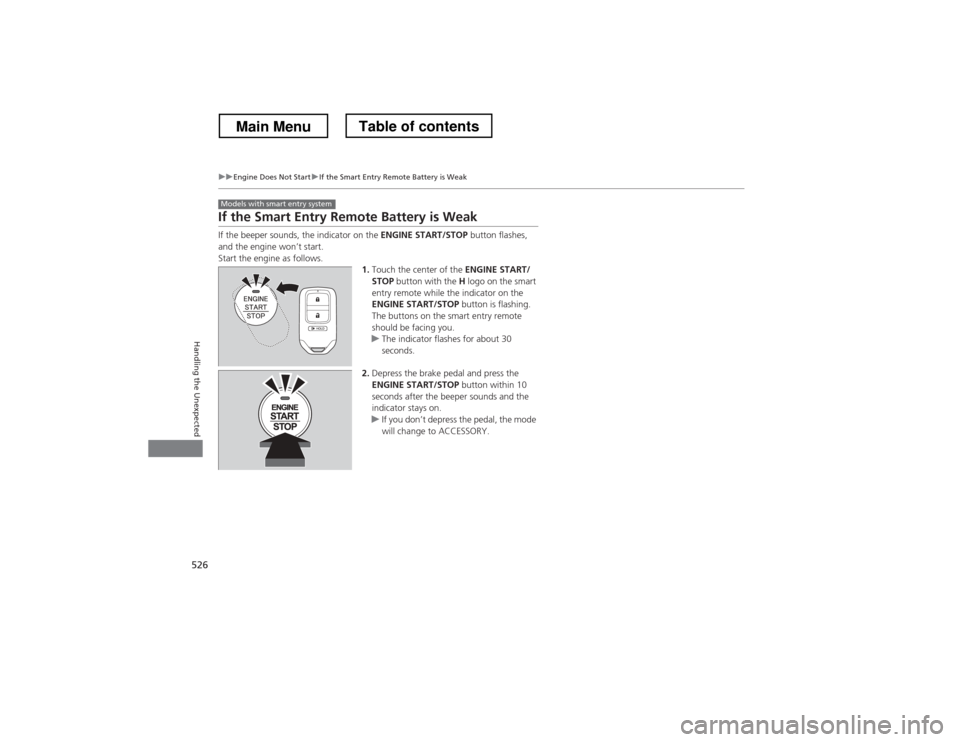
If the beeper sounds, the indicator on the ENGINE START/STOP button flashes,
and the engine won’t start.
Start the engine as follows.
1.Touch the center of the ENGINE START/
STOP button with the H logo on the smart
entry remote while the indicator on the
ENGINE START/STOP button is flashing.
The buttons on the smart entry remote
should be facing you.
uThe indicator flashes for about 30
seconds.
2. Depress the brake pedal and press the
ENGINE START/STOP button within 10
seconds after the beeper sounds and the
indicator stays on.
uIf you don’t depress the pedal, the mode
will change to ACCESSORY.
Models with smart entry system
Main MenuTable of contents
Page 566 of 573
565
Index
Glass (care)............................................... 513
Glove Box ................................................. 144
H
Halogen Bulbs .......................................... 486
Handling the Unexpected ....................... 515
HandsFreeLink ® (HFL) .............. 320, 332, 367
Auto Answer .................................. 347, 382
Automatic Import of Cellular
Phonebook and Call History .......... 349, 384
Automatic Transferring ................... 347, 382
Displaying Messages ....................... 362, 401
Editing User Name .................................. 381
HFL Buttons ............................ 320, 332, 367
HFL Menus.............................. 322, 334, 369
HFL Status Display ................... 321, 333, 368
Limitations for Manual Operation.... 333, 368
Making a Call ................................. 353, 393
Options During a Call...................... 359, 398
Phone Setup ........................... 324, 339, 373
Phonebook Phonetic Modification........... 388
Receiving a Call............................... 358, 397
Receiving a Text Message/E-mail ..... 360, 399
Ring Tone ....................................... 348, 383
Selecting a Mail Account................. 361, 400
Speed Dial ...................................... 350, 385
To Create a Security PIN .................. 346, 380
To Set Up a Text Message/E-mail Options ......................................... 344, 378
Hard Disc Drive (HDD) Audio .................. 242Hazard Warning Button
............................... 2
Head Restraints ......................................... 136
Headlights ................................................. 119
Aiming .................................................... 484
Automatic Operation ............................... 120
Dimming ......................................... 119, 122
Operating ................................................ 119
Heaters (Seat) ........................................... 153
Heating and Cooling System ................... 154
Cooling ................................................... 156
Defrosting the Windshield and Windows ............................................... 156
Dust and Pollen Filter ............................... 509
Heating ................................................... 155
HFL (HandsFreeLink ®)............... 320, 332, 367
High Beam Indicator .................................. 79
HomeLink ® Universal Transceiver ............ 318
I
Identification Numbers Engine and Transmission ......................... 550
Vehicle Identification ............................... 550
Ignition Switch .......................................... 114
Illumination Control ................................. 125
Knob ....................................................... 125
Immobilizer System .................................. 107
Indicator .................................................... 80
Indicators .................................................... 70
ABS (Anti-lock Brake System) ..................... 73
Charging System ............................... 71, 534 CRUISE CONTROL ............................. 81, 433
CRUISE MAIN .................................... 81, 432
Door and Trunk Open ............................... 74
Door Open ................................................ 31
EPS (Electric Power Steering) System .. 74, 536
Fog Light ................................................... 79
Forward Collision Warning (FCW) .............. 76
High Beam ................................................ 79
Immobilizer System ................................... 80
Lane Departure Warning (LDW) ................. 77
Lights On .................................................. 79
Low Fuel ................................................... 72
Low Oil Pressure ................................ 70, 534
Low Tire Pressure ...................... 75, 446, 447
Maintenance Minder ......................... 81, 465
Malfunction Indicator Lamp............... 71, 535
Parking Brake and Brake System ........ 70, 536
Seat Belt Reminder .............................. 33, 71
Security System Alarm ............................... 80
Side Airbag Off ................................... 52, 79
Smart Entry System ................................... 78
Starter System ........................................... 78
Supplemental Restraint System ............ 50, 73
TPMS ................................................ 75, 448
Transmission ............................................. 72
Turn Signal ................................................ 78
VSA
® (Vehicle Stability Assist)
System ............................................ 73, 442
VSA ® OFF .......................................... 73, 443
Washer Level ............................................. 81
Information .............................................. 545
Main Menu