2013 HONDA CROSSTOUR light
[x] Cancel search: lightPage 51 of 573

uuAirbagsuAirbag System Indicators
50
Safe Driving
■ When side curtain airbags deploy in a frontal collision
One or both side curtain airbags may inflate in a moderate-to-severe angled frontal
collision.
In this case, the side curtain airbags will deploy slightly after the front airbags.
Airbag System Indicators
If a problem occurs in the airbag system, the SRS indicator will come on.
■When the ignition switch is turned to ON
(w *1
The indicator comes on for a few seconds,
then goes off. This tells you the system is
working properly.
If the indicator comes on at any other time, or does not come on at all, have the
system checked by a dealer as soon as possible. If you don’t, your airbags and seat
belt tensioners may not work properly when they are needed. *1: Models with the smart entry system have an ENGINE START/STOP button instead of an
ignition switch.
■SRS (Supplemental Restraint System) Indicator
1SRS (Supplemental Restraint System) Indicator
3WARNING
Ignoring the SRS indicator can result in
serious injury or death if the airbag systems
or tensioners do not work properly.
Have your vehicle checked by a dealer as
soon as possible if the SRS indicator alerts
you to a possible problem.
Main MenuTable of contents
Page 79 of 573

78
uuIndicatorsu
Instrument Panel
IndicatorNameOn/BlinkingExplanation
Smart Entry
System Indicator*
●
Comes on for a few seconds when you
change the power mode to ON.
● Comes on as soon as a problem is detected
in the smart entry system or push button
starting system.●Have your vehicle checked by a dealer.
Starter System
Indicator *
●
Comes on for a few seconds when you set
the power mode to ON, then goes off.
● Comes on if the starting system has a
problem.●As a temporary measure, press and hold the ENGINE
START/STOP button for 15 seconds while pressing
the brake pedal and manually start the engine. Have
the vehicle checked by a dealer.
Turn Signal and Hazard Warning Indicators
● The turn signal indicators blink when you
operate the turn signal lever.
● If you press the hazard warning button, both
indicators and all turn signals blink at the
same time.●Does not blink or blinks rapidly - A turn signal
light bulb has blown. Change the bulb immediately. 2Replacing Light Bulbs P. 489, 490
U.S.
Canada
* Not available on all models
Main MenuTable of contents
Page 80 of 573

79
uuIndicatorsu
Continued
Instrument Panel
*1:Models with the smart entry system have an ENGINE START/STOP button instead of an ignition switch.
IndicatorNameOn/BlinkingExplanation
High Beam
Indicator●
Comes on when the high beam headlights are on.—
Lights On
Indicator
●Comes on whenever the light switch is on, or in AUTO when the exterior lights are on.●
If you remove the key from the ignition switch or set
the power mode to ACCESSORY or VEHICLE OFF
(LOCK) while the exterior lights are on, a chime
sounds when the driver’s door is opened.
Fog Light
Indicator● Comes on when the fog lights are on.—
Daytime Running
Lights Indicator
●Comes on for a few seconds when you turn
the ignition switch to ON
(w *1
, then goes
off.
● Comes on if there is a problem with the DRL system.
●Have your vehicle checked by a dealer.
2Daytime Running Lights P. 122
Side Airbag Off
Indicator
●
Comes on for a few seconds when you turn
the ignition switch to ON
(w *1
, then goes
off.
● Comes on when the passenger side airbag
system is automatically shut off.
●It does not mean there is a problem with your side airbags.
● Comes on when nobody is sitting in the
passenger seat - Have the vehicle checked by a
dealer.
● Comes on when someone is sitting in the seat -
Have the passenger sit properly.U.S.
Canada
Main MenuTable of contents
Page 88 of 573
87
Controls
This chapter explains how to operate the various controls necessary for driving.
Setting the Clock ................................ 88
Locking and Unlocking the Doors Key Types and Functions ... ................. 91
Low Smart Entry Remote Signal Strength*.. 93Locking/Unlocking the Doors from the
Outside ............................................ 94
Locking/Unlocking the Doors from the
Inside ............................................... 99
Childproof Door Locks ..................... 100
Auto Door Locking/Unlocking .......... 101
Opening and Closing the Tailgate ... 105
Security System ................................ 107
Immobilizer System .......................... 107
Security System Alarm ...................... 107
Opening and Closing the Windows ..... 110
Opening and Closing the Moonroof.. 113Operating the Switches Around the
Steering Wheel
Ignition Switch *
............................... 114
ENGINE START/STOP Button *
........... 115
Ignition Switch and Power Mode Comparison ................................... 118
Turn Signals ..................................... 119
Light Switches.................................. 119
Fog Lights ........................................ 122
Daytime Running Lights ................... 122
Wipers and Washers ........................ 123
Brightness Control ........................... 125
Rear Defogger/Heated Door Mirror Button.. 126Driving Position Memory System *
.... 127 Adjusting the Steering Wheel .......... 129
Adjusting the Mirrors ....................... 130
Interior Rearview Mirror ................... 130
Power Door Mirrors ......................... 131
Adjusting the Seats .......................... 133
Adjusting the Seat Positions ............. 133
Interior Lights/Interior Convenience Items ................................................ 142
Interior Lights .................................. 142
Interior Convenience Items .............. 144
Heating and Cooling System *
......... 154
Using Vents, Heating and A/C.......... 154
Climate Control System *
.................. 157
Using Automatic Climate Control .... 157
Automatic Climate Control Sensors ... 162
* Not available on all models
Main Menu
Page 92 of 573
91
Continued
Controls
Locking and Unlocking the Doors
Key Types and Functions
This vehicle comes with the following keys:
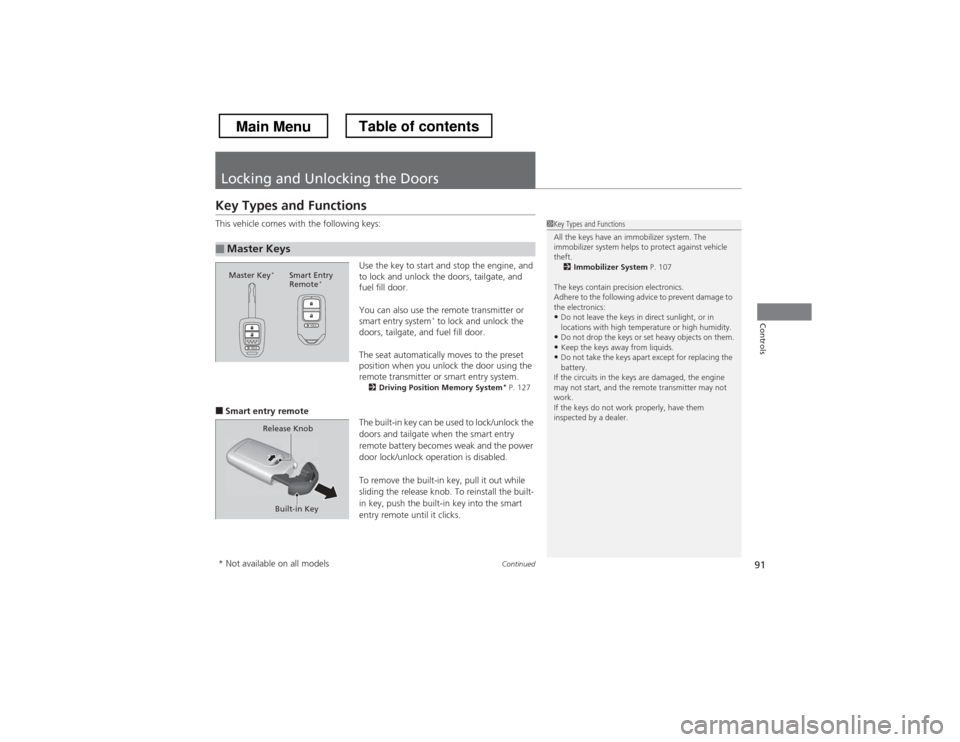
Use the key to start and stop the engine, and
to lock and unlock the doors, tailgate, and
fuel fill door.
You can also use the remote transmitter or
smart entry system*
to lock and unlock the
doors, tailgate, and fuel fill door.
The seat automatically moves to the preset
position when you unlock the door using the
remote transmitter or smart entry system. 2 Driving Posi tion Memory System *
P. 127
■ Smart entry remote
The built-in key can be used to lock/unlock the
doors and tailgate when the smart entry
remote battery becomes weak and the power
door lock/unlock operation is disabled.
To remove the built-in key, pull it out while
sliding the release knob. To reinstall the built-
in key, push the built-in key into the smart
entry remote until it clicks.
■Master Keys
1Key Types and Functions
All the keys have an immobilizer system. The
immobilizer system helps to protect against vehicle theft.2 Immobilizer System P. 107
The keys contain precision electronics.
Adhere to the following advice to prevent damage to the electronics: • Do not leave the keys in direct sunlight, or in
locations with high temperature or high humidity.
• Do not drop the keys or set heavy objects on them.
• Keep the keys away from liquids.
• Do not take the keys apart except for replacing the
battery.
If the circuits in the keys are damaged, the engine
may not start, and the remote transmitter may not work.
If the keys do not work properly, have them
inspected by a dealer.
Master Key *
Smart Entry
Remote *
Built-in Key
Release Knob
* Not available on all models
Main MenuTable of contents
Page 95 of 573
94
uuLocking and Unlocking the DoorsuLocking/Unlocking the Doors from the Outside
Controls
Locking/Unlocking the Doors from the Outside■Locking the doors
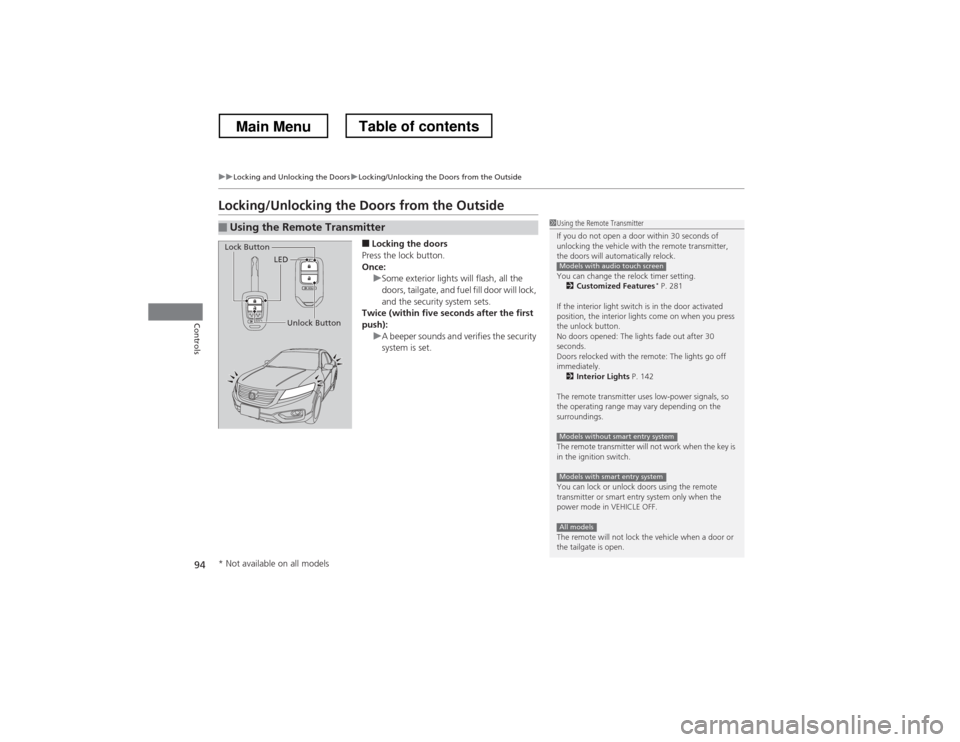
Press the lock button.
Once:
uSome exterior lights will flash, all the
doors, tailgate, and fuel fill door will lock,
and the security system sets.
Twice (within five seconds after the first
push):
uA beeper sounds and verifies the security
system is set.
■Using the Remote Transmitter1Using the Remote Transmitter
If you do not open a door within 30 seconds of
unlocking the vehicle with the remote transmitter,
the doors will automatically relock.
You can change the relock timer setting. 2 Customized Features *
P. 281
If the interior light switch is in the door activated
position, the interior lights come on when you press
the unlock button.
No doors opened: The lights fade out after 30
seconds.
Doors relocked with the remote: The lights go off immediately. 2 Interior Lights P. 142
The remote transmitter uses low-power signals, so
the operating range may vary depending on the
surroundings.
The remote transmitter will not work when the key is
in the ignition switch.
You can lock or unlock doors using the remote
transmitter or smart entry system only when the
power mode in VEHICLE OFF.
The remote will not lock the vehicle when a door or
the tailgate is open.
Models with audio touch screen
Models without smart entry system
Models with smart entry system
All models
LED
Unlock Button
Lock Button
* Not available on all models
Main MenuTable of contents
Page 96 of 573
Continued95
uuLocking and Unlocking the DoorsuLocking/Unlocking the Doors from the Outside
Controls
■Unlocking the doors
Press the unlock button.
Once:
uSome exterior lights flash twice, and the driver’s door and fuel fill door unlock.
Twice:
uThe remaining doors and tailgate unlock.
1Using the Remote Transmitter
If the distance at which it works varies, the battery is probably low.
If the LED does not come on when you press a
button, the battery is dead. 2 Replacing the Button Battery P. 507
You can customize the door unlock mode setting. 2 Customized Features *
P. 281
Models with audio touch screen
* Not available on all models
Main MenuTable of contents
Page 97 of 573
uuLocking and Unlocking the DoorsuLocking/Unlocking the Doors from the Outside
96
Controls
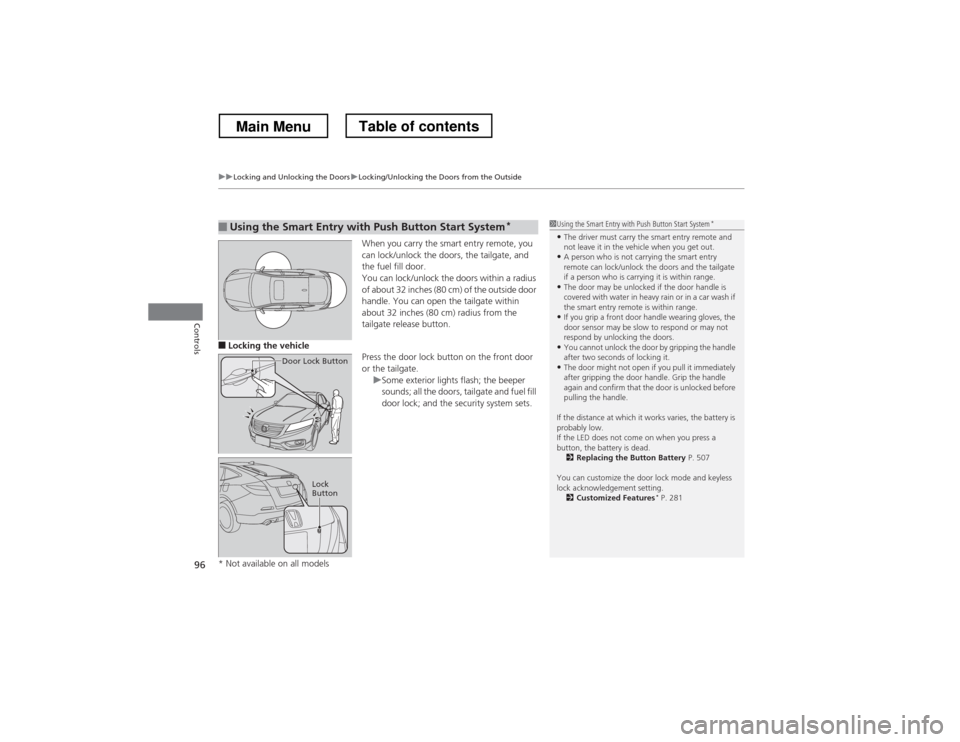
When you carry the smart entry remote, you
can lock/unlock the doors, the tailgate, and
the fuel fill door.
You can lock/unlock the doors within a radius
of about 32 inches (80 cm) of the outside door
handle. You can open the tailgate within
about 32 inches (80 cm) radius from the
tailgate release button.
■ Locking the vehicle
Press the door lock button on the front door
or the tailgate.
uSome exterior lights flash; the beeper
sounds; all the doors, tailgate and fuel fill
door lock; and the security system sets.
■Using the Smart Entry with Push Button Start System*
Door Lock Button
Lock
Button
1Using the Smart Entry with
Push Button Start System*
• The driver must carry the smart entry remote and
not leave it in the vehicle when you get out.
• A person who is not carrying the smart entry
remote can lock/unlock the doors and the tailgate
if a person who is carrying it is within range.
• The door may be unlocked if the door handle is
covered with water in heavy rain or in a car wash if
the smart entry remote is within range.
• If you grip a front door handle wearing gloves, the
door sensor may be slow to respond or may not
respond by unlocking the doors.
• You cannot unlock the door by gripping the handle
after two seconds of locking it.
• The door might not open if you pull it immediately
after gripping the door handle. Grip the handle
again and confirm that the door is unlocked before
pulling the handle.
If the distance at which it works varies, the battery is probably low.
If the LED does not come on when you press a
button, the battery is dead. 2 Replacing the Button Battery P. 507
You can customize the door lock mode and keyless
lock acknowledgement setting. 2 Customized Features *
P. 281
* Not available on all models
Main MenuTable of contents