Page 255 of 325

254
uuChecking and Maintaining TiresuTire and Loading Information Label
Maintenance
Tire and Loading Information Label
The label attached to the driver’s doorjamb provides necessary tire and loading
information.
Tire LabelingThe tires that came on your vehicle have a
number of markings. Those you should be
aware of are described below.
Whenever tires are replaced, they should be replaced with tires of the same size.
1Tire and Loading Information Label
The tire and loading information label attached to the driver’s doorjamb contains:
aThe number of people your vehicle can carry.
bThe total weight your vehicle can carry. Do not
exceed this weight.
cThe original tire sizes for front, rear, and spare.
dThe proper cold tire pressure for front, rear, and spare.
Label
Example
Example Tire Size
Tire Identification
Number (TIN)
Maximum
Tire Load
Maximum
Tire Pressure
Tire Size
■Tire Size
1Tire Size
Following is an example of tire size with an
explanation of what each component means. P195/55 R16 86V
P: Vehicle type (P indicates passenger vehicle).
195: Tire width in millimeters.
55: Aspect ratio (the tire’s section height as a percentage of its width).
R: Tire construction code (R indicates radial).
16: Rim diameter in inches.
86: Load index (a numerical code associated with the
maximum load the tire can carry).
V: Speed symbol (an alphabetical code indicating the maximum speed rating).
Main MenuTable of Contents
Page 256 of 325
255
uuChecking and Maintaining TiresuTire Labeling
Maintenance
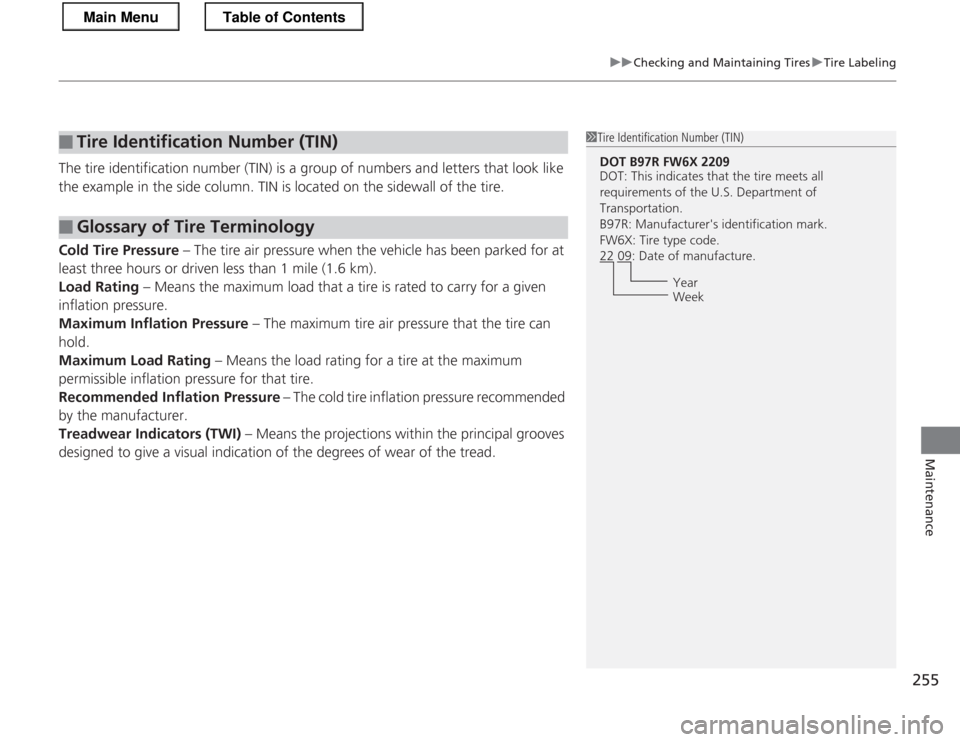
The tire identification number (TIN) is a group of numbers and letters that look like
the example in the side column. TIN is located on the sidewall of the tire.
Cold Tire Pressure – The tire air pressure when the vehicle has been parked for at
least three hours or driven less than 1 mile (1.6 km). Load Rating – Means the maximum load that a tire is rated to carry for a given
inflation pressure.
Maximum Inflation Pressure – The maximum tire air pressure that the tire can
hold.
Maximum Load Rating – Means the load rating for a tire at the maximum
permissible inflation pressure for that tire.Recommended Inflation Pressure – The cold tire inflation pressure recommended
by the manufacturer.
Treadwear Indicators (TWI) – Means the projections within the principal grooves
designed to give a visual indication of the degrees of wear of the tread.
■Tire Identification Number (TIN)
■Glossary of Tire Terminology
1Tire Identification Number (TIN)
DOT B97R FW6X 2209
DOT: This indicates that the tire meets all
requirements of the U.S. Department of
Transportation.
B97R: Manufacturer's identification mark.
FW6X: Tire type code.
22 09: Date of manufacture.
Year
Week
Main MenuTable of Contents
Page 259 of 325
258
uuChecking and Maintaining TiresuWear Indicators
Maintenance
Wear IndicatorsThe groove where the wear indicator is located is 1/16 inch (1.6 mm) shallower than
elsewhere on the tire. If the tread has worn so
that the indicator is exposed, replace the tire.
Worn out tires have poor traction on wet roads.
Tire Service Life
The life of your tires is dependent on many factors, including driving habits, road
conditions, vehicle loading, inflation pressure, maintenance history, speed, and
environmental conditions (even when the tires are not in use).
In addition to regular inspections and inflation pressure maintenance, it is
recommended that you have annual inspections performed once the tires reach five
years old. All tires, including the spare, should be removed from service after 10
years from the date of manufacture, regardless of their condition or state of wear.
Example of a Wear
Indicator mark
Main MenuTable of Contents
Page 260 of 325
259
uuChecking and Maintaining TiresuTire and Wheel Replacement
Maintenance
Tire and Wheel Replacement
Replace your tires with radials of the same size, load range, speed rating, and
maximum cold tire pressure rating (as shown on the tire’s sidewall). Using tires of a
different size or construction can cause the ABS and VSA® (vehicle stability assist)
system to work incorrectly.
It is best to replace all four tires at the same time. If that isn’t possible, replace the
front or rear tires in pairs.
Make sure that the wheel’s specifications match those of the original wheels.
If you replace a wheel, only use TPMS specified wheels approved for your vehicle.
1Tire and Wheel Replacement
3WARNING
Installing improper tires on your vehicle can
affect handling and stability. This can cause
a crash in which you can be seriously hurt or killed.
Always use the size and type of tires
recommended in this owner’s manual.
U.S. models only
Main MenuTable of Contents
Page 261 of 325
260
uuChecking and Maintaining TiresuTire Rotation
Maintenance
Tire Rotation
Rotating tires according to the maintenance messages on the multi-information
display helps to distribute wear more evenly and increase tire life. ■Tires without rotation marks
Rotate the tires as shown here.
■ Tires with rotation marks
Rotate the tires as shown here.
1Tire Rotation
Tires with directional tread patterns should only be
rotated front to back (not from one side to the other).
Directional tires should be mounted with the rotation
indication mark facing forward, as shown below.
When the tires are rotated, make sure the air
pressures are checked.
FRONT
Direction MarkFront
Front
Main MenuTable of Contents
Page 270 of 325

269
Handling the UnexpectedThis chapter explains how to handle unexpected troubles.
Tools
Types of Tools .................................. 270
If a Tire Goes Flat
Changing a Flat Tire *
....................... 271
Temporarily Repairing a Flat Tire....... 277
Engine Does Not Start
Checking the Engine ........................ 286
Jump Starting .................................... 287
Shift Lever Does Not Move .............. 289
Overheating
How to Handle Overheating ............. 290 Indicator, Coming On/Blinking
If the Low Oil Pressure Indicator Comes On ............................................. 292
If the Charging System Indicator Comes On ................................................. 293
If the Malfunction Indicator Lamp Comes
On or Blinks ................................... 294
If the Brake System Indicator (Red) Comes
On ................................................. 295
If the EPS System Indicator Comes On.. 295
If the IMA Indicator Comes On......... 296 If the Low Tire Pressure/TPMS Indicator
Comes On or Blinks ....................... 296
Fuses
Fuse Locations ................................. 297
Inspecting and Changing Fuses ........ 300
Emergency Towing ........................... 301
When You Cannot Open the Hatch ..... 303
* Not available on all models
Main Menu
Page 272 of 325

271
Continued
Handling the Unexpected
If a Tire Goes Flat
Changing a Flat Tire *
If a tire goes flat while driving, grasp the steering wheel firmly, and brake gradually
to reduce speed. Then, stop in a safe place. Replace the flat tire with a compact
spare tire. Go to a dealer as soon as possible to have the full-size tire repaired or
replaced. 1. Park the vehicle on firm, level, and non-slippery surface and apply the parking brake.
2. Move the shift lever to
(P .
2. Move the shift lever to
(R .
3. Turn on the hazard warning lights and turn the ignition switch to LOCK
(0 .
1Changing a Flat Tire *
Follow compact spare precautions:
Periodically check the tire pressure of the compact
spare. It should be set to the specified pressure.
Specified Pressure: 60 psi (420 kPa, 4.2 kgf/cm 2
)
When driving with the compact spare tire, keep the
vehicle speed under 50 mph (80 km/h). Replace with
a full-size tire as soon as possible.
The compact spare tire and wheel in your vehicle are
specifically for this model.
Do not use them with another vehicle.
Do not use another type of compact spare tire or
wheel with your vehicle.
Do not mount tire chains on a compact spare tire.
If a chain-mounted front tire goes flat, remove one of
the full-size rear tires and replace it with the compact
spare tire. Remove the flat front tire and replace it
with the full-size tire th at was removed from the rear.
Mount the tire chains on the front tire.
NOTICE
Do not use a puncture-repairing agent, other than
the one provided in the kit that came with your
vehicle. If used, you may permanently damage the
tire pressure sensor.
Automatic transmiss ion (CVT) models
Manual transmission models
All models
* Not available on all models
Main MenuTable of Contents
Page 277 of 325

uuIf a Tire Goes FlatuChanging a Flat Tire*
276
Handling the Unexpected
1. Remove the center cap.
2. Place the flat tire face down in the compact
spare tire well.
3. Remove the spacer cone from the wing
bolt, flip it over, and insert it back on the
bolt. Secure the flat tire with the wing bolt.
4. Securely put the jack and wheel nut wrench
back in the tool case in the cargo area.
If you replace a flat tire with the spare tire, the low tire pressure/TPMS indicator
comes on while you are driving. After driving for a few miles (kilometers), the
indicator will start blinking for a short time and then stay on. CHECK TPMS
SYSTEM appears on the multi-information display, but this is normal.
If you replace the tire with a specified regular tire, the warning message on the
multi-information display and the low tire pressure/TPMS indicator will go off after
a few miles (kilometers).
■Storing the Flat Tire1Storing the Flat Tire
3WARNING
Loose items can fly around the interior in a
crash and can seriously injure the
occupants.
Store the wheel, jack, and tools securely before driving.
Spacer
Cone
Wing
Bolt
For compact spare tire
For normal tire
■TPMS and the Compact Spare Tire1TPMS and the Compact Spare Tire
The system cannot monitor the pressure of the
compact spare tire. Manually check the compact
spare tire pressure to be sure that it is correct.
Use TPMS specific wheels. Each is equipped with a
tire pressure sensor mounted inside the tire behind
the valve stem.
U.S. models only
Main MenuTable of Contents


