Page 81 of 361
uuGauges and DisplaysuInformation Display
80
Instrument Panel
Shows the outside temperature in Fahrenheit (U.S.) or Celsius (Canada).
■Adjusting the outside temperature display
Adjust the temperature reading up to ±5°F or ±3°C if the temperature reading
seems incorrect.
■Outside Temperature1Outside Temperature
The temperature sensor is in the front bumper. Road
heat and exhaust from another vehicle can affect the
temperature reading when your vehicle speed is less
than 19 mph (30 km/h).
It may take several minutes for the display to be
updated after the temperature reading has stabilized.
Use the multi-information display's customized
features to correct the temperature.
2Customized Features P. 84
Page 83 of 361

uuGauges and DisplaysuMulti-Information Display
82
Instrument Panel
Shows the estimated average fuel economy of each trip meter in mpg (U.S.) or l/100
km (Canada). The display is updated at set intervals. When a trip meter is reset, the
average fuel economy is also reset.
Shows the estimated distance you can travel on the remaining fuel. This distance is
estimated from the fuel economy of your trips in the past.
Shows the time elapsed since the last time Trip A or Trip B was reset.
Shows the average speed in mph or km/h since the last time Trip A or Trip B was
reset.■Average Fuel Economy
■Range
■Elapsed Time
■Average Speed
1Average Fuel Economy
You can choose an item to be displayed in the fuel
consumption screen. Range, elapsed time, or average
speed can be selected.
2Customized Features P. 84
You can change the average fuel economy reset
criteria
2Customized Features P. 84
1Elapsed Time
You can change the elapsed time reset criteria.
2Customized Features P. 84
1Average Speed
You can change the average speed reset criteria.
2Customized Features P. 84
Page 88 of 361

87
uuGauges and DisplaysuMulti-Information Display
Continued
Instrument Panel
■List of customizable options
*1: Default Setting
*2: See the Navigation System ManualSetup Group Customizable Features Description Selectable settings
Vehicle
InformationMaintenance infoReset the Maintenance MinderTM.No/Yes
Adjust Clock*Selects the 12 hour or 24 hour clock display, and adjusts
the time.12 h*1/24 h
Customize
SettingsDisplay
Setup
Select
WallpaperSelects the full-size analogue clock or the wallpaper.Clock*1/Image 1/Image 2/
Image 3
Import
WallpaperImports an image file for a new wallpaper.Three images can be stored.2Importing wallpapers
from USB P. 90
Delete
WallpaperDeletes an image file for a wallpaper.Image 1/Image 2/Image 3
Trip Meter
Item to DisplaySelects an item to be displayed along with average
fuel economy.Range*1/Elapsed time/
Average speed
Welcome
ScreenSelects whether the welcome screen comes on or
not when you turn the ignition switch to ON (w.On*1/Off
Color ThemeChanges the color of the screen.Blue*1/Red/Amber/Gray
Turn by Turn
Display *, *2Select whether the turn-by-turn display comes on or
not during the route guidance.On*1/Off
Language
SelectionChanges the displayed language.English*1/Francais/Español
* Not available on all models
Page 89 of 361
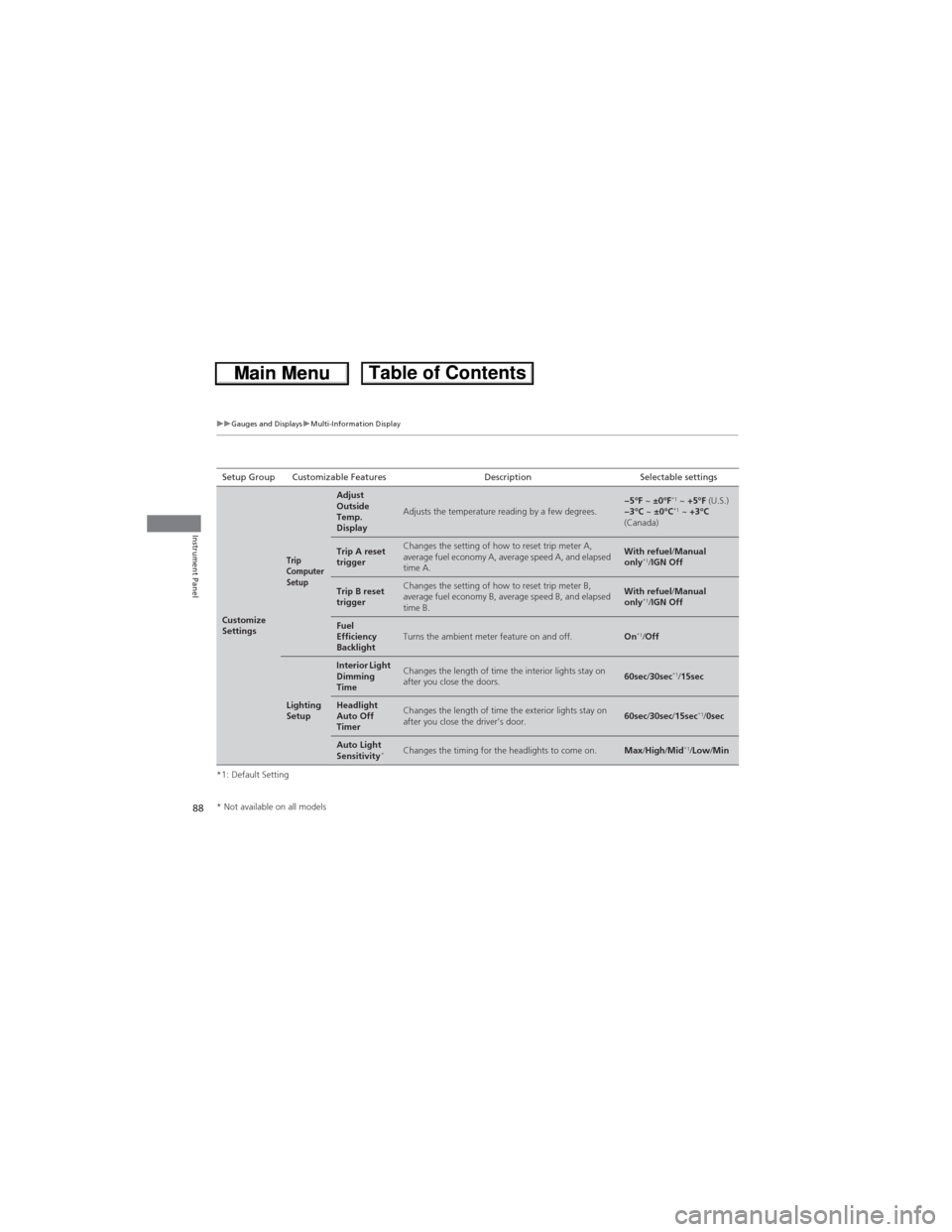
88
uuGauges and DisplaysuMulti-Information Display
Instrument Panel
*1: Default SettingSetup Group Customizable Features Description Selectable settings
Customize
Settings
Trip
Computer
Setup
Adjust
Outside
Temp.
Display
Adjusts the temperature reading by a few degrees.−5°F ~ ±0°F*1 ~ +5°F (U.S.)
−3°C ~ ±0°C*1 ~ +3°C
(Canada)
Trip A reset
triggerChanges the setting of how to reset trip meter A,
average fuel economy A, average speed A, and elapsed
time A.With refuel/Manual
only*1/IGN Off
Trip B reset
triggerChanges the setting of how to reset trip meter B,
average fuel economy B, average speed B, and elapsed
time B.With refuel/Manual
only*1/IGN Off
Fuel
Efficiency
BacklightTurns the ambient meter feature on and off.On*1/Off
Lighting
Setup
Interior Light
Dimming
TimeChanges the length of time the interior lights stay on
after you close the doors.60sec/30sec*1/15sec
Headlight
Auto Off
TimerChanges the length of time the exterior lights stay on
after you close the driver’s door.60sec/30sec/15sec*1/0sec
Auto Light
Sensitivity*Changes the timing for the headlights to come on.Max/High/Mid*1/Low/Min
* Not available on all models
Page 90 of 361

89
uuGauges and DisplaysuMulti-Information Display
Continued
Instrument Panel
*1:Default SettingSetup Group Customizable Features Description Selectable settings
Customize
Settings
Door
Setup
Auto Door
LockChanges the setting for the automatic locking
feature.Off/With Vehicle Speed*1/
Shift from P
Door Lock
ModeSets up either the driver’s door or all doors to unlock
on the first operation of the remote or ignition key.Driver Door*1/All Doors
Auto Door
UnlockChanges the setting for when the doors unlock
automatically.Off/Driver Door with Shift to
P*1/All Doors with Shift to P/
Driver Door with IGN Off/All
Doors with IGN Off
Keyless Lock
AcknowledgmentTurns on or off the keyless lock acknowledgment of:
LOCK/UNLOCK- The exterior lights flash.
LOCK (2nd push)- The beeper sounds.On*1/Off
Security
Relock TimerChanges the time it takes for the doors to relock and
the security system to set after you unlock the
vehicle without opening any door.90sec/60sec/30sec*1
Default
AllCancels/Resets all the customized settings as
default.Cancel
Reset All Defaults
Page 104 of 361
103
uuLocking and Unlocking the DoorsuAuto Door Locking/Unlocking
Controls
Auto Door Locking/Unlocking
Your vehicle locks all doors and unlocks the driver’s door automatically when a
certain condition is met.
■Drive lock modeAll doors and tailgate lock when the vehicle’s speed reaches about 10 mph (15 km/h).
■Park unlock mode
The driver’s door unlocks when the shift lever is moved into (P with the brake pedal
depressed.
■Auto Door Locking
■Auto Door Unlocking
1Auto Door Locking/Unlocking
You can turn off or change to another auto door
locking/unlocking setting using the multi-information
display.
2Customized Features P. 84
Page 116 of 361

115
uuOperating the Switches Around the Steering WheeluWipers and Washers
Continued
Controls
Wipers and Washers
The windshield wipers and washers can be
used when the ignition switch is in ON (w.
■MIST
The wipers run at high speed until you release
the lever.
■Wiper switch (OFF, INT, LO, HI)
Change the wiper switch setting according to
the amount of rain.
■Adjusting the delay*Turn the adjustment ring to adjust the wiper
delay.
■Washer
Sprays while you pull the lever toward you.
When you release the lever, the wipers make
two or three more sweeps before stopping.
■Windshield Wipers/Washers1Wipers and WashersNOTICEDo not use the wipers when the windshield is dry.
The windshield will get scratched, or the rubber
blades will get damaged.
NOTICEIn cold weather, the blades may freeze to the
windshield, becoming stuck.
Operating the wipers in this condition may damage
the wipers. Use the defroster to warm the
windshield, then turn the wipers on.
Turn the washers off if no washer fluid comes out.
The pump may get damaged.
If the vehicle speeds up while the wipers are
operating intermittently, the length of the wipe
interval shortens. When the vehicle starts moving, the
wipers make a single sweep.
When the vehicle speeds up, the wiper operation’s
shortest delay setting ( ) and the LO setting become
the same.
Models with intermittent time adjustment ring
Intermittent Time
Adjustment Ring*
MIST
INT: Low speed with
intermittent OFF
LO: Low speed wipe
HI: High speed wipePull to
use
washer.
Long delay
Short delay
* Not available on all models
Page 117 of 361

uuOperating the Switches Around the Steering WheeluWipers and Washers
116
Controls
The rear wiper and washer can be used when
the ignition switch is in ON (w.
■Wiper switch (OFF, INT, ON)
Change the wiper switch setting according to
the amount of rain.
■Washer ( )
Sprays while you rotate the switch to this
position.
Hold it to activate the wiper and to spray the
washer. Once released, it stops operating
after a few more sweeps.
■Operating in reverse
When you shift the transmission to (R with the windshield wipers activated, the rear
wiper operates automatically as follows even if its switch is off.
■Rear Wiper/Washer1Wipers and Washers
If the wiper stops operating due to any obstacle such
as the build-up of snow, park the vehicle in a safe
place. Rotate the wiper switch to OFF, and turn the
ignition switch to ACCESSORY
(q or LOCK (0, then
remove the obstacle.
The wiper motor is equipped with a breaker that may
stop motor operation temporarily to prevent an
overload. Wiper operation resumes within a few
minutes, once the circuit has returned to normal.
INT: Intermittent
OFF ON: Continuous wipe
Washer
Front Wiper PositionRear Wiper Operation
INT (Intermittent)Intermittent
LO (Low speed wipe)
HI (High speed wipe)Continuous

