93
uuGauges and intelligent Multi-Information Display (i-MID)uintelligent Multi-Information Display (i-MID)
Continued
Instrument Panel
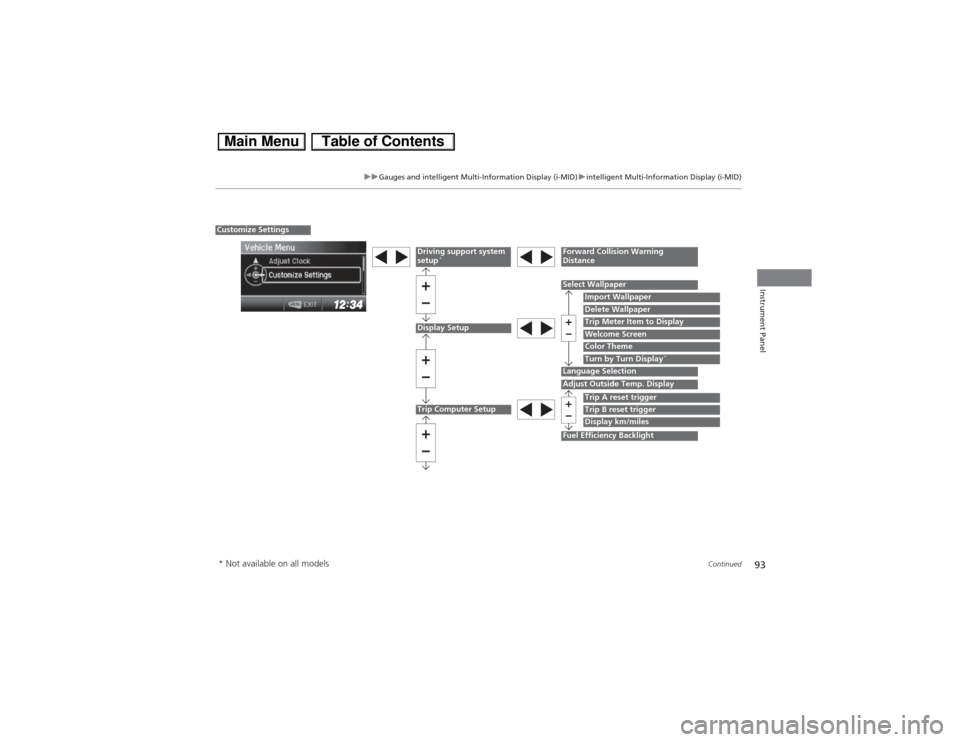
Display Setup
Select Wallpaper
Import WallpaperDelete Wallpaper
Language Selection
Trip Meter Item to DisplayWelcome ScreenColor Theme
Customize Settings
Turn by Turn Display
*
Driving support system
setup
*
Forward Collision Warning
Distance
Trip Computer Setup
Adjust Outside Temp. Display
Trip A reset triggerDisplay km/miles
Fuel Efficiency Backlight
Trip B reset trigger
* Not available on all models
97
uuGauges and intelligent Multi-Information Display (i-MID)uintelligent Multi-Information Display (i-MID)
Continued
Instrument Panel
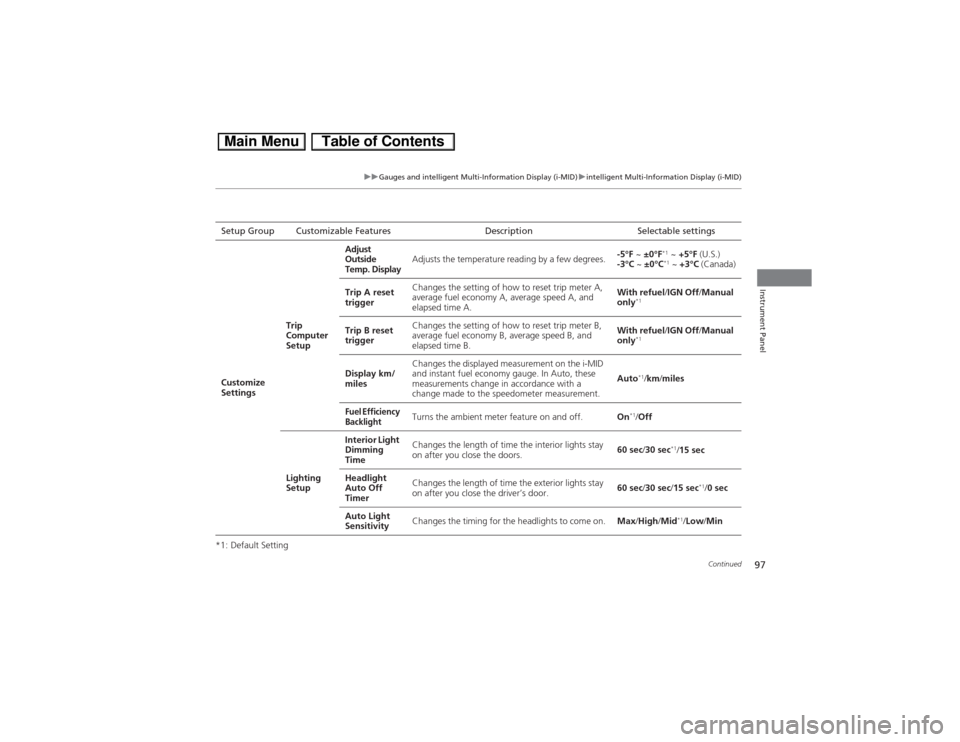
*1: Default SettingSetup Group Customizable Features Description Selectable settings
Customize
SettingsTrip
Computer
SetupAdjust
Outside
Temp. DisplayAdjusts the temperature reading by a few degrees.-5°F ~ ±0°F
*1 ~ +5°F (U.S.)
-3°C ~ ±0°C*1 ~ +3°C (Canada)
Trip A reset
triggerChanges the setting of how to reset trip meter A,
average fuel economy A, average speed A, and
elapsed time A.With refuel/IGN Off/Manual
only
*1
Trip B reset
triggerChanges the setting of how to reset trip meter B,
average fuel economy B, average speed B, and
elapsed time B.With refuel/IGN Off/Manual
only
*1
Display km/
milesChanges the displayed measurement on the i-MID
and instant fuel economy gauge. In Auto, these
measurements change in accordance with a
change made to the speedometer measurement.Auto
*1/km/miles
Fuel Efficiency
Backlight
Turns the ambient meter feature on and off.On
*1/Off
Lighting
SetupInterior Light
Dimming
TimeChanges the length of time the interior lights stay
on after you close the doors.60 sec/30 sec
*1/15 sec
Headlight
Auto Off
TimerChanges the length of time the exterior lights stay
on after you close the driver’s door.60 sec/30 sec/15 sec
*1/0 sec
Auto Light
SensitivityChanges the timing for the headlights to come on.Max/High/Mid
*1/Low/Min