Page 1 of 346

ContentsThis owner’s manual should be considered a permanent part of the
vehicle and should remain with the vehicle when it is sold.
This owner’s manual covers all models of your vehicle. You may find
descriptions of equipment and features that are not on your
particular model.
Images throughout this owner’s manual (including the front cover)
represent features and equipment that are available on some, but
not all, models. Your particular model may not have some of these
features.
This owner’s manual is for vehicles sold in the United States and
Canada.
The information and specifications included in this publication were
in effect at the time of approval for printing. Honda Motor Co., Ltd.
reserves the right, however, to discontinue or change specifications
or design at any time without notice and without incurring any
obligation.
2Safe Driving P. 27For Safe Driving P. 28 Seat Belts P. 32 Airbags P. 392Instrument Panel P. 67Indicators P. 68
Gauges and intelligent Multi-Information Display (i-MID) P. 82
2Controls P. 103Setting the Clock P. 104 Locking and Unlocking the Doors P. 105
Operating the Switches Around the Steering Wheel P. 119
Interior Lights/Interior Convenience Items P. 1342Features P. 143Audio System P. 144 Audio System Basic Operation P. 147
Bluetooth® HandsFreeLink® P. 1752Driving P. 207Before Driving P. 208 Towing a Trailer P. 213
Rearview Camera P. 245 Refueling P. 246 Fuel Economy P. 2492Maintenance P. 251Before Performing Maintenance P. 252 Maintenance Minder
TM P. 255
Checking and Maintaining Wiper Blades P. 277
Climate Control System Maintenance P. 290
2Handling the Unexpected P. 295Tools P. 296 If a Tire Goes Flat P. 297
Overheating P. 315 Indicator, Coming On/Blinking P. 3172Information P. 325Specifications P. 326 Identification Numbers P. 328
Emissions Testing P. 331 Warranty Coverages P. 333
Page 2 of 346

Contents
Child Safety P. 52 Exhaust Gas Hazard P. 64 Safety Labels P. 65Opening and Closing the Trunk P. 112 Security System P. 115 Opening and Closing the Windows P. 117
Adjusting the Mirrors P. 128 Adjusting the Seats P. 129
Climate Control System P. 140Audio Error Messages P. 168 General Information on the Audio System P. 171When Driving P. 214 Braking P. 240 Parking Your Vehicle P. 244
Accessories and Modifications P. 250Maintenance Under the Hood P. 259 Replacing Light Bulbs P. 271
Checking and Maintaining Tires P. 279 12 Volt Battery P. 288 Remote Transmitter Care P. 289
Cleaning P. 291Engine Does Not Start P. 311 Jump Starting P. 312 Shift Lever Does Not Move P. 314
Fuses P. 321 Emergency Towing P. 324Devices that Emit Radio Waves P. 329 Reporting Safety Defects P. 330
Authorized Manuals P. 335 Customer Service Information P. 336
Quick Reference Guide
P. 2
Safe Driving
P. 27
Instrument Panel
P. 67
Controls
P. 103
Features
P. 143
Driving
P. 207
Maintenance
P. 251
Handling the Unexpected
P. 295
Information
P. 325
Index
P. 337
Page 3 of 346
2Quick Reference Guide
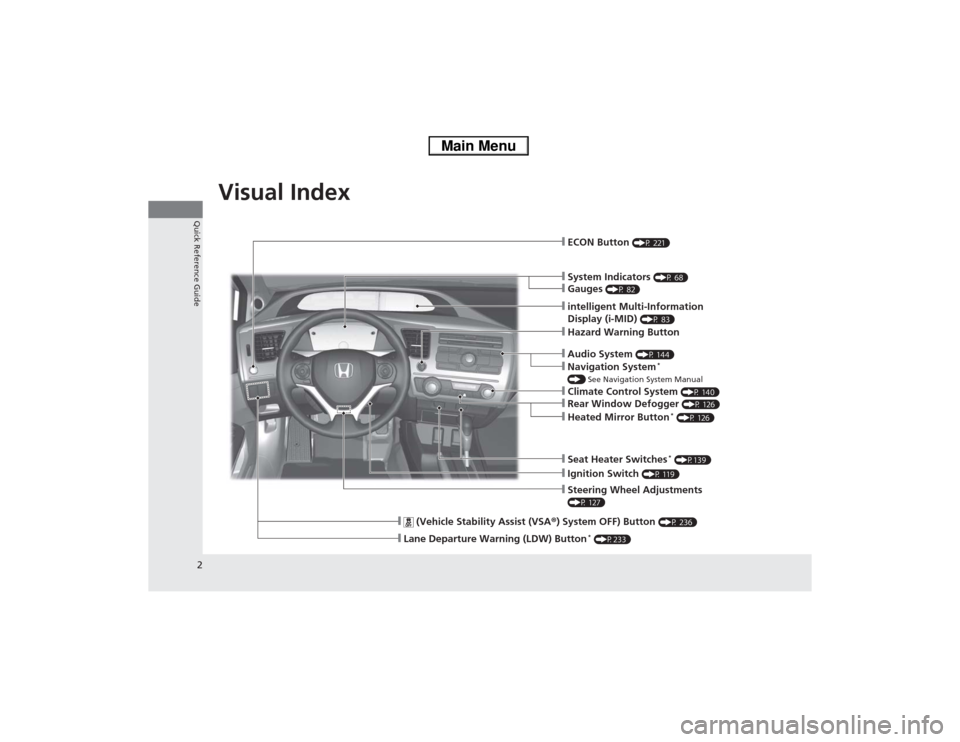
Quick Reference GuideVisual Index
❙Ignition Switch
(P 119)
❙Steering Wheel Adjustments (P 127)❙System Indicators
(P 68)
❙ECON Button
(P 221)
❙Hazard Warning Button
❙Lane Departure Warning (LDW) Button
* (P233)
❙
(Vehicle Stability Assist (VSA®) System OFF) Button
(P 236)
❙Gauges
(P 82)
❙intelligent Multi-Information
Display (i-MID)
(P 83)
❙Audio System
(P 144)
❙Navigation System
*
() See Navigation System Manual❙Heated Mirror Button
* (P 126)
❙Rear Window Defogger
(P 126)
❙Seat Heater Switches
* (P139)
❙Climate Control System
(P 140)
Page 11 of 346

10Quick Reference Guide
The Honda IMA SystemThe main power source for the Honda IMA system is the gasoline engine.
The electric motor assists the engine to improve fuel economy, based on
current operating conditions.
Tips to Improve Fuel Economy To help your vehicle’s fuel economy:
●Avoid aggressive acceleration/braking
●Monitor the ambient meter and the Eco drive bar
displayed on the intelligent multi-information
display.
It reflects your driving style. (P8, 88)
Start-up/Low speed cruise/
Aggressive acceleration
●The electric motor assists the
engine.Low speed cruise
●Only IMA motor is
powering the vehicle and
IMA battery is discharging.
Slow acceleration/High
speed cruise
●Only the engine powers
the vehicle.Deceleration
●The IMA system charges
the IMA battery.
Stop
●Auto Idle Stop is in
operation.
Vehicle
Speed
TimeEco Drive Bar
Display
IMA
SystemIMA
System IMA
System
IMA
System
IMA
System
Electric
Motor
AssistEngine
ONElectric
Motor
AssistElectric
Motor
OFF
Charging Engine
OFFEngine
ON
Engine
OFF
Engine
OFF
IMA
BatteryIMA
BatteryIMA
Battery
IMA
Battery
IMA
Battery FuelFuelFuel
Fuel
Fuel
Electric
Motor
OFF
Page 12 of 346
11Quick Reference Guide
To Keep the IMA Battery in Good Condition Drive your vehicle at least once a month, and drive for more than 30 minutes at a time. Parking your vehicle for an
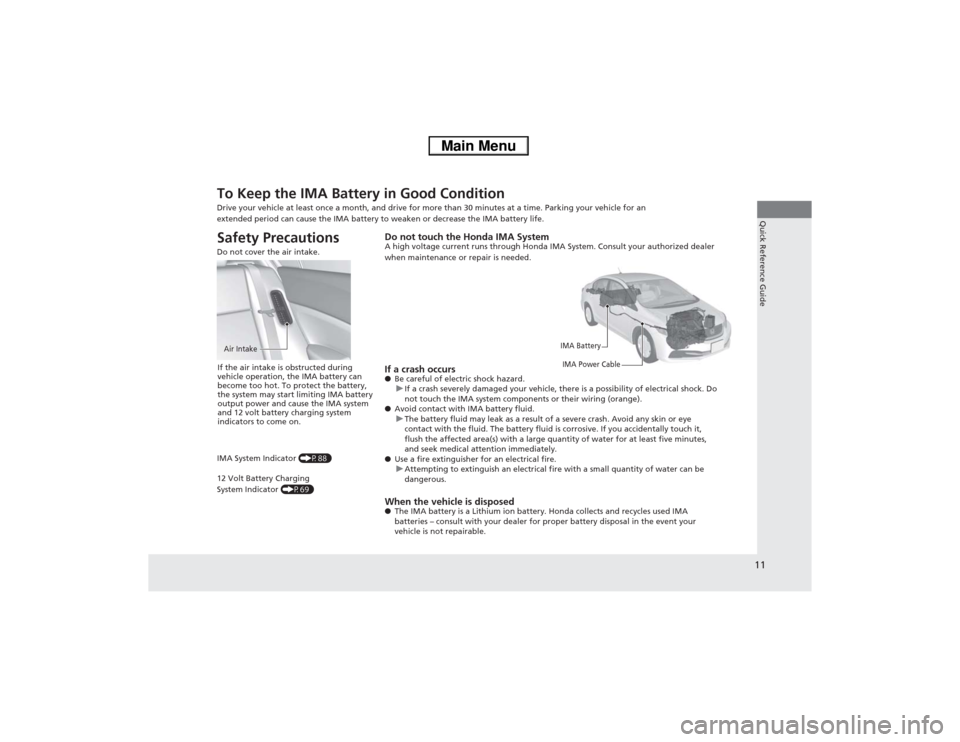
extended period can cause the IMA battery to weaken or decrease the IMA battery life.Safety Precautions Do not cover the air intake.Air IntakeIf the air intake is obstructed during
vehicle operation, the IMA battery can
become too hot. To protect the battery,
the system may start limiting IMA battery
output power and cause the IMA system
and 12 volt battery charging system
indicators to come on.
IMA System Indicator (P88)
12 Volt Battery Charging
System Indicator (P69)
Do not touch the Honda IMA SystemA high voltage current runs through Honda IMA System. Consult your authorized dealer
when maintenance or repair is needed.
IMA Battery
IMA Power Cable
If a crash occurs●Be careful of electric shock hazard.
uIf a crash severely damaged your vehicle, there is a possibility of electrical shock. Do
not touch the IMA system components or their wiring (orange).
●Avoid contact with IMA battery fluid.
uThe battery fluid may leak as a result of a severe crash. Avoid any skin or eye
contact with the fluid. The battery fluid is corrosive. If you accidentally touch it,
flush the affected area(s) with a large quantity of water for at least five minutes,
and seek medical attention immediately.
●Use a fire extinguisher for an electrical fire.
uAttempting to extinguish an electrical fire with a small quantity of water can be
dangerous.When the vehicle is disposed●The IMA battery is a Lithium ion battery. Honda collects and recycles used IMA
batteries – consult with your dealer for proper battery disposal in the event your
vehicle is not repairable.
Page 14 of 346
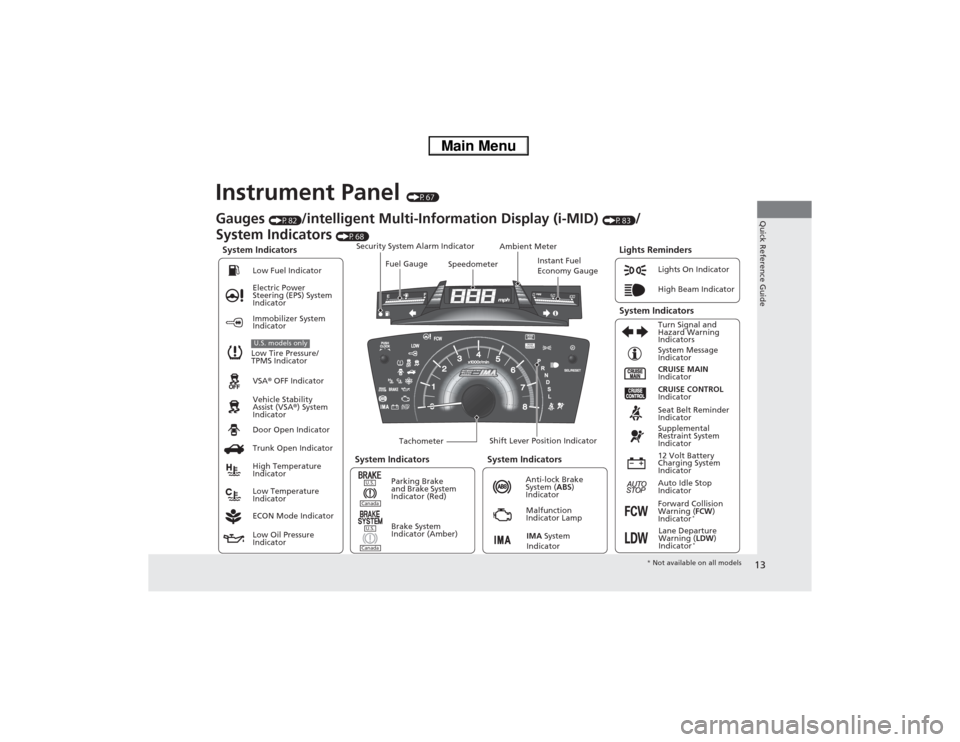
13Quick Reference Guide
Instrument Panel
(P67)
System Indicators
Malfunction
Indicator Lamp
Low Oil Pressure
IndicatorAnti-lock Brake
System (ABS)
Indicator Vehicle Stability
Assist (VSA®) System
Indicator VSA® OFF Indicator Electric Power
Steering (EPS) System
IndicatorLights On Indicator
High Beam Indicator
Immobilizer System
Indicator
Seat Belt Reminder
Indicator
Lights Reminders
CRUISE MAIN
Indicator System Message
Indicator
Brake System
Indicator (Amber)Supplemental
Restraint System
Indicator
Forward Collision
Warning (FCW)
Indicator
*
Door Open Indicator
TachometerInstant Fuel
Economy Gauge Speedometer Fuel Gauge Security System Alarm Indicator
Shift Lever Position Indicator Low Fuel Indicator
Gauges
(P82)
/intelligent Multi-Information Display (i-MID)
(P83)
/
System Indicators
(P68)
Trunk Open Indicator
ECON Mode IndicatorTurn Signal and
Hazard Warning
Indicators
High Temperature
Indicator
Low Temperature
IndicatorAmbient Meter
System Indicators System Indicators
Low Tire Pressure/
TPMS IndicatorU.S. models only
Parking Brake
and Brake System
Indicator (Red)
IMA System
Indicator
CRUISE CONTROL
Indicator
System Indicators
12 Volt Battery
Charging System
Indicator
Auto Idle Stop
Indicator
U.S.CanadaU.S.Canada
Lane Departure
Warning (LDW)
Indicator
*
* Not available on all models
Page 17 of 346
16Quick Reference Guide
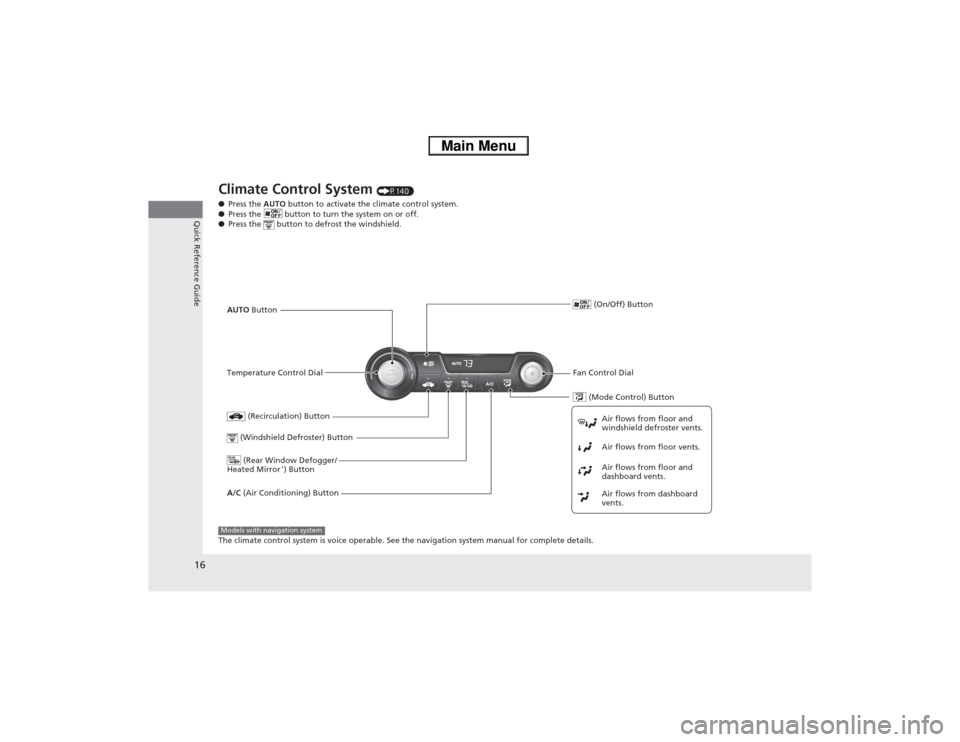
Climate Control System
(P140)
●Press the AUTO button to activate the climate control system.
●Press the button to turn the system on or off.
●Press the button to defrost the windshield.
The climate control system is voice operable. See the navigation system manual for complete details.
(Mode Control) Button
(Rear Window Defogger/
Heated Mirror
*) Button
(Windshield Defroster) ButtonA/C (Air Conditioning) ButtonAir flows from floor and
windshield defroster vents.
Air flows from floor vents.
Air flows from floor and
dashboard vents.
Air flows from dashboard
vents.
(Recirculation) Button
Temperature Control DialAUTO Button (On/Off) Button
Fan Control Dial
Models with navigation system
Page 19 of 346
18Quick Reference Guide
Driving
(P207)
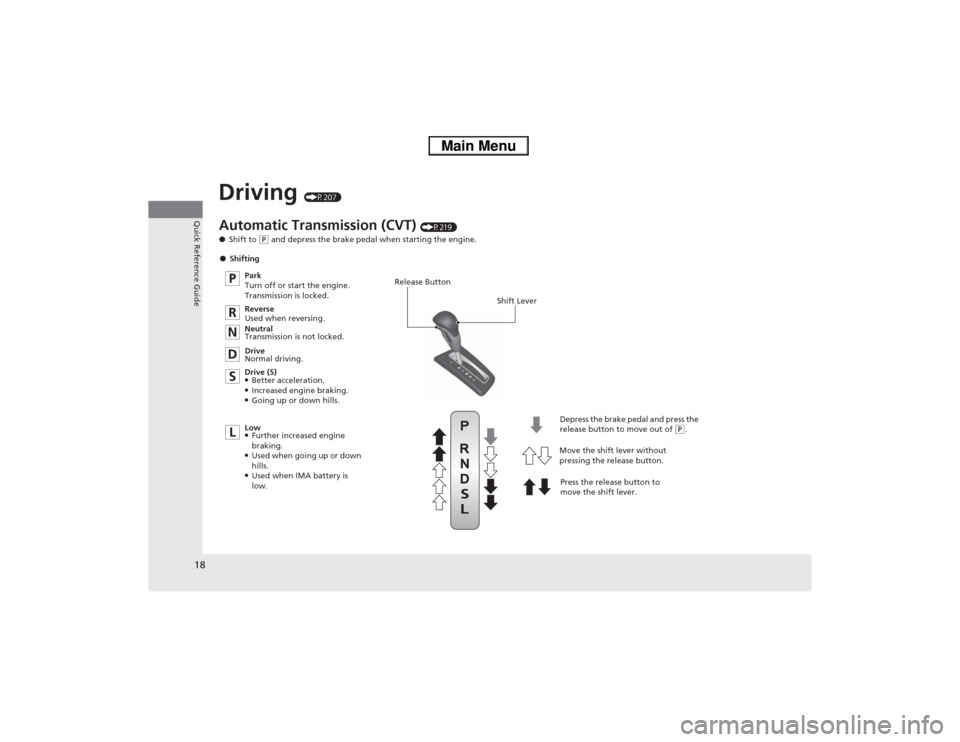
Release Button
Shift Lever
Depress the brake pedal and press the
release button to move out of
(P.
Move the shift lever without
pressing the release button.
Press the release button to
move the shift lever.
Automatic Transmission (CVT)
(P219)
●Shift to
(P and depress the brake pedal when starting the engine.
●Shifting
Park
Turn off or start the engine.
Transmission is locked.
Reverse
Used when reversing.
Neutral
Transmission is not locked.
Drive
Normal driving.
Drive (S)
●Better acceleration.●Increased engine braking.●Going up or down hills.
Low●Further increased engine
braking.●Used when going up or down
hills.●Used when IMA battery is
low.