2013 FORD TRANSIT CONNECT transmission
[x] Cancel search: transmissionPage 4 of 321

Seats 99
Sitting in the correct position.............................99
Head restraints.......................................100
Manual seats........................................102
Rear seats..........................................103
Auxiliary Power Points 106
Storage Compartments 107
Center console.......................................107
Overhead console.....................................107
Starting and Stopping the Engine 108
Ignition switch.......................................109
Engine block heater...................................110
Fuel and Refueling 112
Fuel quality.........................................113
Running out of fuel....................................114
Refueling...........................................114
Fuel consumption.....................................116
Transmission 121
Brakes 125
Brakes.............................................125
Hints on driving with anti-lock brakes......................126
Parking brake........................................126
Traction Control 127
TractionControl™ ....................................127
Stability Control 128
AdvanceTrac®.......................................129
Table of Contents3
2013 Transit Connect(tst)
Owners Guide gf, 2nd Printing, November 2012
USA(fus)
Page 6 of 321

Maintenance 172
General information...................................172
Opening and closing the hood............................173
Under hood overview..................................175
Engine oil dipstick....................................176
Engine oil check......................................176
Engine coolant check..................................177
Automatic transmission fluid check........................181
Power steering fluid check..............................184
Fuel filter...........................................184
Washer fluid check....................................185
Changing the vehicle battery.............................185
Checking the wiper blades..............................187
Changing the wiper blades..............................187
Air filter(s).........................................188
Adjusting the headlamps................................189
Changing a bulb......................................190
Removing a headlamp..................................191
Bulb replacement.....................................195
Bulb specification chart.................................200
Vehicle Care 201
Cleaning products.....................................201
Cleaning the exterior..................................201
Waxing.............................................203
Repairing minor paint damage............................203
Cleaning the engine...................................203
Cleaning the windows and wiper blades.....................204
Cleaning the interior...................................204
Cleaning the instrument panel and instrument cluster lens.......205
Cleaning leather seats..................................206
Cleaning the alloy wheels...............................206
Vehiclestorage.......................................207
Table of Contents5
2013 Transit Connect(tst)
Owners Guide gf, 2nd Printing, November 2012
USA(fus)
Page 7 of 321
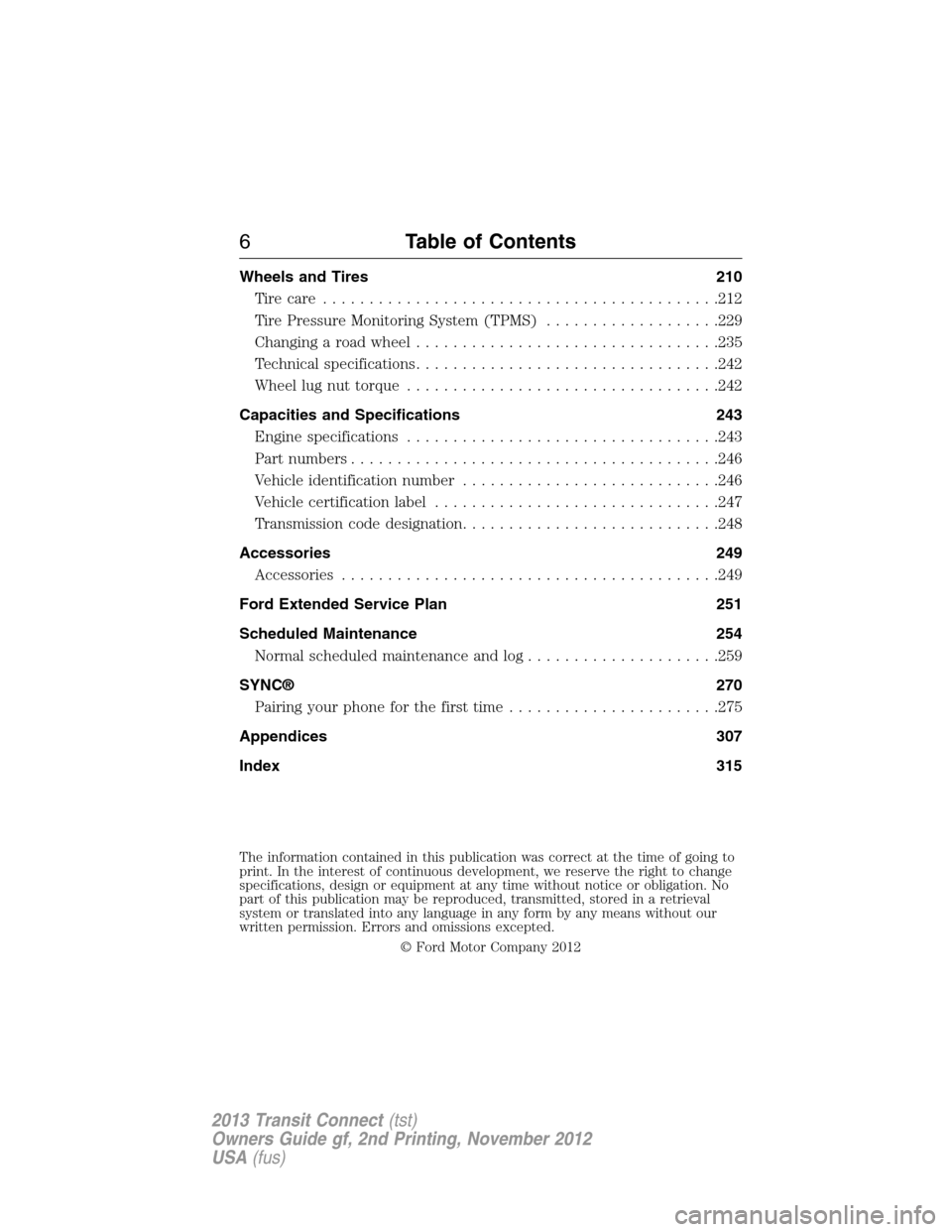
Wheels and Tires 210
Tirecare ...........................................212
Tire Pressure Monitoring System (TPMS)...................229
Changing a road wheel.................................235
Technical specifications.................................242
Wheel lug nut torque..................................242
Capacities and Specifications 243
Engine specifications..................................243
Part numbers........................................246
Vehicle identification number............................246
Vehicle certification label...............................247
Transmission code designation............................248
Accessories 249
Accessories.........................................249
Ford Extended Service Plan 251
Scheduled Maintenance 254
Normal scheduled maintenance and log.....................259
SYNC® 270
Pairing your phone for the first time.......................275
Appendices 307
Index 315
The information contained in this publication was correct at the time of going to
print. In the interest of continuous development, we reserve the right to change
specifications, design or equipment at any time without notice or obligation. No
part of this publication may be reproduced, transmitted, stored in a retrieval
system or translated into any language in any form by any means without our
written permission. Errors and omissions excepted.
© Ford Motor Company 2012
6Table of Contents
2013 Transit Connect(tst)
Owners Guide gf, 2nd Printing, November 2012
USA(fus)
Page 42 of 321

Deactivating and Activating the Belt-Minder® Feature
WARNING:While the design allows you to deactivate your
Belt-Minder®, this system is designed to improve your chances of
being safely belted and surviving an accident. We recommend you leave
the Belt-Minder system activated for yourself and others who may use
the vehicle. To reduce the risk of injury, do not deactivate or activate
the Belt-Minder feature while driving the vehicle.
Read Steps1-3thoroughly before proceeding with the programming
procedure.
The Belt-Minder feature can be deactivated and activated by performing
the following procedure:
Before following the procedure, make sure that:
•the parking brake is set.
•the transmission selector lever is in positionP.
•the ignition is off.
•the driver and front passenger safety belts are unbuckled.
1. Turn the ignition on. DO NOT START THE ENGINE.
2. Wait until the safety belt warning light turns off (about one to
two minutes).
•Step 3 must be completed within 50 seconds after the safety belt
warning light turns off.
3. Buckle then unbuckle the driver’s safety belt nine times at a moderate
speed, ending in the unbuckled state. As confirmation, the safety belt
warning light will flash three times.
•This will disable the Belt-Minder feature for that seating position if it
is currently enabled.
•This will enable the Belt-Minder feature for that seating position if it is
currently disabled.
Safety Belts41
2013 Transit Connect(tst)
Owners Guide gf, 2nd Printing, November 2012
USA(fus)
Page 56 of 321

GENERAL INFORMATION ON RADIO FREQUENCIES
This device control complies with part 15 of the FCC Rules and with
Industry Canada license-exempt RSS standard(s). Operation is subject
to the following two conditions: (1) This device may not cause harmful
interference, and (2) This device must accept any interference received,
including interference that may cause undesired operation.
Note:Changes or modifications not expressly approved by the party
responsible for compliance could void the user’s authority to operate
the equipment. The termICbefore the radio certification number only
signifies that Industry Canada technical specification were met.
The typical operating range for your transmitter is approximately 33 feet
(10 meters). A decrease in operating range could be caused by:
•weather conditions
•nearby radio towers
•structures around the vehicle
•other vehicles parked next to your vehicle.
The radio frequency used by your remote control can also be used by
other short distance radio transmissions, for example amateur radios,
medical equipment, wireless headphones, remote controls and alarm
systems. If the frequencies are jammed, you will not be able to use your
remote control. You can lock and unlock the doors with the key.
Note:Make sure your vehicle is locked before leaving it unattended.
Note:If you are in range, the remote control will operate if you press
any button unintentionally.
Keys and Remote Control55
2013 Transit Connect(tst)
Owners Guide gf, 2nd Printing, November 2012
USA(fus)
Page 83 of 321

Low Fuel Level
It will illuminate when the fuel level is low or near empty.
Refuel as soon as possible.
Low Tire Pressure Warning
It illuminates when your tire pressure is low. If the lamp
remains on with the engine running or when driving, check
your tire pressure as soon as possible.
The lamp also illuminates momentarily when you switch the ignition on
to confirm the lamp is functional. If it does not illuminate when you
switch the ignition on, or begins to flash at any time, have the system
checked by your authorized dealer.
Overdrive Cancel (if equipped)
It will illuminate when the overdrive function of the
transmission has been turned off.
Parking Lamps
It will illuminate when you switch the parking lamps on.
Powertrain Malfunction
Illuminates when a powertrain fault has been detected. Contact
your authorized dealer as soon as possible.
82Instrument Cluster
2013 Transit Connect(tst)
Owners Guide gf, 2nd Printing, November 2012
USA(fus)
Page 85 of 321

AUDIBLE WARNINGS AND INDICATORS
Key In Ignition Warning Chime:Sounds when the key is left in the
ignition in the off or accessory position and the driver’s door is opened.
Park Warning Chime:Sounds when the transmission is not in park, the
driver’s door is opened and the ignition is off or in accessory position.
Headlamps On Warning Chime:Sounds when the headlamps or
parking lamps are on and the driver’s door is opened.
Seatbelt Warning Chime:The seatbelt chime sounds when the driver’s
seatbelt is not fastened. When the ignition is in run and the seatbelt is
not fastened, the chime will chime for six seconds. The chime will turn
off if the driver’s seatbelt is fastened or if the ignition returns to off or
accessory position.
Belt-Minder® Warning Chime:This chime periodically sounds to
remind the driver and/or passenger that their seatbelt is unbuckled.
The seatbelt warning lamp in the cluster will also illuminate once vehicle
speed has exceeded 6 mph (10 km/h).
Airbag Secondary Warning Chime:This chime sounds to indicate a
fault with the supplemental restraint system in the event that the airbag
readiness warning light is not operating.
Door Ajar Warning Chime:The door ajar reminder chime informs the
driver that one or more doors are open while the ignition is in the run
position.
84Instrument Cluster
2013 Transit Connect(tst)
Owners Guide gf, 2nd Printing, November 2012
USA(fus)
Page 93 of 321

WARNING:Store the portable music player in a secure location,
such as the center console or the glove box, when your vehicle is
moving. Hard objects may become projectiles in a crash or sudden stop,
which may increase the risk of serious injury. The audio extension cable
must be long enough to allow the portable music player to be safely
stored while your vehicle is moving.
The auxiliary input jack allows you to connect and play music from your
portable music player through your vehicle speakers. You can use any
portable music player designed for use with headphones. Your audio
extension cable must have male
18-inch (3.5 millimeter) connectors at
each end.
1. Switch off the engine, radio and portable music player. Set the
parking brake and put the transmission in positionP.
2. Plug the extension cable from the portable music player into the
auxiliary input jack.
3. Switch the radio on. Select either a tuned FM station or a CD.
4. Adjust the volume as desired.
5. Switch your portable music player on and adjust its volume to half its
maximum level.
92Audio System
2013 Transit Connect(tst)
Owners Guide gf, 2nd Printing, November 2012
USA(fus)