2013 FORD TRANSIT CONNECT instrument cluster
[x] Cancel search: instrument clusterPage 83 of 321

Low Fuel Level
It will illuminate when the fuel level is low or near empty.
Refuel as soon as possible.
Low Tire Pressure Warning
It illuminates when your tire pressure is low. If the lamp
remains on with the engine running or when driving, check
your tire pressure as soon as possible.
The lamp also illuminates momentarily when you switch the ignition on
to confirm the lamp is functional. If it does not illuminate when you
switch the ignition on, or begins to flash at any time, have the system
checked by your authorized dealer.
Overdrive Cancel (if equipped)
It will illuminate when the overdrive function of the
transmission has been turned off.
Parking Lamps
It will illuminate when you switch the parking lamps on.
Powertrain Malfunction
Illuminates when a powertrain fault has been detected. Contact
your authorized dealer as soon as possible.
82Instrument Cluster
2013 Transit Connect(tst)
Owners Guide gf, 2nd Printing, November 2012
USA(fus)
Page 84 of 321

Service Engine Soon
If the service engine soon indicator light stays illuminated after
the engine is started, it indicates that the On Board Diagnostics
system (OBD-II) has detected a malfunction of the vehicle
emissions control system. Refer toOn board diagnostics (OBD-II)in the
Fuel and Refuelingchapter for more information about having your
vehicle serviced.
If the light is blinking, engine misfire is occurring which could damage your
catalytic converter. Drive in a moderate fashion (avoid heavy acceleration
and deceleration) and have your vehicle serviced immediately.
Note:Under engine misfire conditions, excessive exhaust temperatures
could damage the catalytic converter or other vehicle components.
The service engine soon indicator light illuminates when the ignition is
first turned on prior to engine start to check the bulb and to indicate
whether the vehicle is ready for Inspection/Maintenance (I/M) testing.
Normally, the service engine soon light will stay on until the engine is
cranked, then turn itself off if no malfunctions are present. However,
if after 15 seconds the service engine soon light blinks eight times, it
means that the vehicle is not ready for I/M testing. SeeReadiness for
Inspection/Maintenance (I/M) testingin theFuel and Refuelingchapter.
Stability Control System / Traction Control System (if equipped)
It will illuminate when you switch the ignition on to confirm it
is functional. If it remains illuminated or does not illuminate
when you switch the ignition on, this indicates a malfunction.
During a malfunction the system will switch off. Have the system
checked by your authorized dealer.
Instrument Cluster83
2013 Transit Connect(tst)
Owners Guide gf, 2nd Printing, November 2012
USA(fus)
Page 85 of 321

AUDIBLE WARNINGS AND INDICATORS
Key In Ignition Warning Chime:Sounds when the key is left in the
ignition in the off or accessory position and the driver’s door is opened.
Park Warning Chime:Sounds when the transmission is not in park, the
driver’s door is opened and the ignition is off or in accessory position.
Headlamps On Warning Chime:Sounds when the headlamps or
parking lamps are on and the driver’s door is opened.
Seatbelt Warning Chime:The seatbelt chime sounds when the driver’s
seatbelt is not fastened. When the ignition is in run and the seatbelt is
not fastened, the chime will chime for six seconds. The chime will turn
off if the driver’s seatbelt is fastened or if the ignition returns to off or
accessory position.
Belt-Minder® Warning Chime:This chime periodically sounds to
remind the driver and/or passenger that their seatbelt is unbuckled.
The seatbelt warning lamp in the cluster will also illuminate once vehicle
speed has exceeded 6 mph (10 km/h).
Airbag Secondary Warning Chime:This chime sounds to indicate a
fault with the supplemental restraint system in the event that the airbag
readiness warning light is not operating.
Door Ajar Warning Chime:The door ajar reminder chime informs the
driver that one or more doors are open while the ignition is in the run
position.
84Instrument Cluster
2013 Transit Connect(tst)
Owners Guide gf, 2nd Printing, November 2012
USA(fus)
Page 115 of 321

RUNNING OUT OF FUEL
Avoid running out of fuel because this situation may have an adverse
effect on powertrain components.
If you have run out of fuel:
•You may need to cycle the ignition from off to on several times after
refueling to allow the fuel system to pump the fuel from the tank to
the engine. On restarting, crank time will be a few seconds longer
than normal. With keyless ignition, just start the engine. Crank time
will be longer than usual.
•Normally, adding 1 gallon (3.8 liters) of fuel is enough to restart the
engine. If the vehicle is out of fuel and on a steep grade, more than
1 gallon (3.8 liters) may be required.
•The service engine soon indicator may come on. For more information
on the service engine soon indicator, seeWarning Lamps and
Indicatorsin theInstrument Clusterchapter.
REFUELING
WARNING:Fuel vapor burns violently and a fuel fire can cause
severe injuries. To help avoid injuries to you and others:
•Read and follow all the instructions on the pump island.
•Turn off your engine when you are refueling.
•Do not smoke if you are near fuel or refueling your vehicle.
•Keep sparks, flames and smoking materials away from fuel.
•Stay outside your vehicle and do not leave the fuel pump unattended
when refueling your vehicle - this is against the law in some places.
•
Keep children away from the fuel pump; never let children pump fuel.
•Do not use personal electronic devices while refueling.
Use the following guidelines to avoid electrostatic charge build-up when
filling an ungrounded fuel container:
•Place approved fuel container on the ground.
•DO NOT fill a fuel container while it is in the vehicle (including the
cargo area).
•Keep the fuel pump nozzle in contact with the fuel container while
filling.
•DO NOT use a device that would hold the fuel pump handle in the fill
position.
11 4Fuel and Refueling
2013 Transit Connect(tst)
Owners Guide gf, 2nd Printing, November 2012
USA(fus)
Page 123 of 321

D (Drive) with Overdrive
The normal driving position for the best fuel economy. Transmission
operates in gears one through four.
D (Drive) without Overdrive
Overdrive can be deactivated by pressing the transmission
control switch on the side of the gearshift lever.
•This position allows for all forward gears (1–3) except overdrive.
•Provides engine braking.
•Use when driving conditions cause excessive shifting from O/D to
other gears. Examples: hilly terrain, heavy loads, and when engine
braking is required.
•O/D OFF lamp in the instrument
cluster is illuminated.
•To return to O/D (overdrive mode), press the transmission control
switch. The O/D OFF lamp in the instrument cluster will not be
illuminated.
•
O/D (overdrive) is automatically returned each time the key is turned off.
2 (Second)
This position allows for second gear only.
•Provides engine braking.
•Use to start-up on slippery roads.
•To return to D (Overdrive), move the gearshift lever into the
D (Overdrive) position.
•Selecting 2 (Second) at higher speeds will cause the transmission to
downshift to second gear once the vehicle has slowed down to the
appropriate speed.
1 (First)
This position allows for first gear only.
•Provides maximum engine braking.
•
Selecting 1 (First) at higher speeds will cause the transmission to
downshift to first gear once the vehicle has slowed down to the
appropriate speed.
Note:2 (Second) and 1 (First) are not intended for use under extended
or normal driving conditions and results in lower fuel economy.
O/D
OFF
122Transmission
2013 Transit Connect(tst)
Owners Guide gf, 2nd Printing, November 2012
USA(fus)
Page 126 of 321

GENERAL INFORMATION
Note:Occasional brake noise is normal. If a metal-to-metal, continuous
grinding or continuous squeal sound is present, the brake linings may
be worn out and should be inspected by an authorized dealer. If your
vehicle has continuous vibration or shudder in the steering wheel while
braking, you should take it to an authorized dealer for inspection.
Note:Brake dust may accumulate on the wheels, even under normal
driving conditions. Some dust is inevitable as the brakes wear and does
not contribute to brake noise. See theVehicle Carechapter for wheel
cleaning instructions.
See theInstrument Clusterchapter for information on the
brake system warning light.
Wet brakes result in reduced braking efficiency. Gently press the brake
pedal a few times when driving from a car wash or standing water to dry
the brakes.
Brake Over Accelerator
If the accelerator pedal becomes stuck or entrapped, apply steady and firm
pressure to the brake pedal to slow your vehicle and reduce engine power.
If you experience this condition, apply the brakes and bring your vehicle to
a safe stop. Turn the engine off, shift to positionPand apply the parking
brake, then inspect the accelerator pedal for any interferences. If none are
found and the condition persists, have your vehicle towed to the nearest
authorized dealer.
Anti-Lock Brake System
This system helps you maintain steering control during emergency stops
by keeping the brakes from locking.
The anti-lock brake system lamp momentarily illuminates when
the ignition is turned on. If the light does not illuminate during
start-up, remains on or flashes, the anti-lock brake system may
be disabled and may need to be serviced.
If the anti-lock brake system is disabled, normal braking is still
effective. If the brake warning lamp illuminates with the parking
brake released, have your brake system serviced immediately.
Brakes125
2013 Transit Connect(tst)
Owners Guide gf, 2nd Printing, November 2012
USA(fus)
Page 135 of 321

PRINCIPLES OF OPERATION
Cruise control lets you maintain a set speed without keeping your foot
on the accelerator pedal.
USING CRUISE CONTROL (IF EQUIPPED)
WARNING:Do not use cruise control in heavy traffic or on
roads that are winding, slippery or unpaved.
Note:Vehicle speed may vary momentarily when driving up or down a
steep hill. Apply the brakes if your vehicle speed increases above the set
speed while driving downhill.
Note:Cruise control will disengage if your vehicle speed decreases more
than 10 mph (16 km/h) below your set speed while driving uphill.
The cruise controls are located on
the steering wheel.
Switching Cruise Control On
Press and releaseON.
Setting a Speed
1. Accelerate to the desired speed.
2. Press and releaseSET+.
3. Take your foot off the accelerator pedal.
The indicator will appear in the instrument cluster.
OFF ON
SETRES
134Cruise Control
2013 Transit Connect(tst)
Owners Guide gf, 2nd Printing, November 2012
USA(fus)
Page 170 of 321
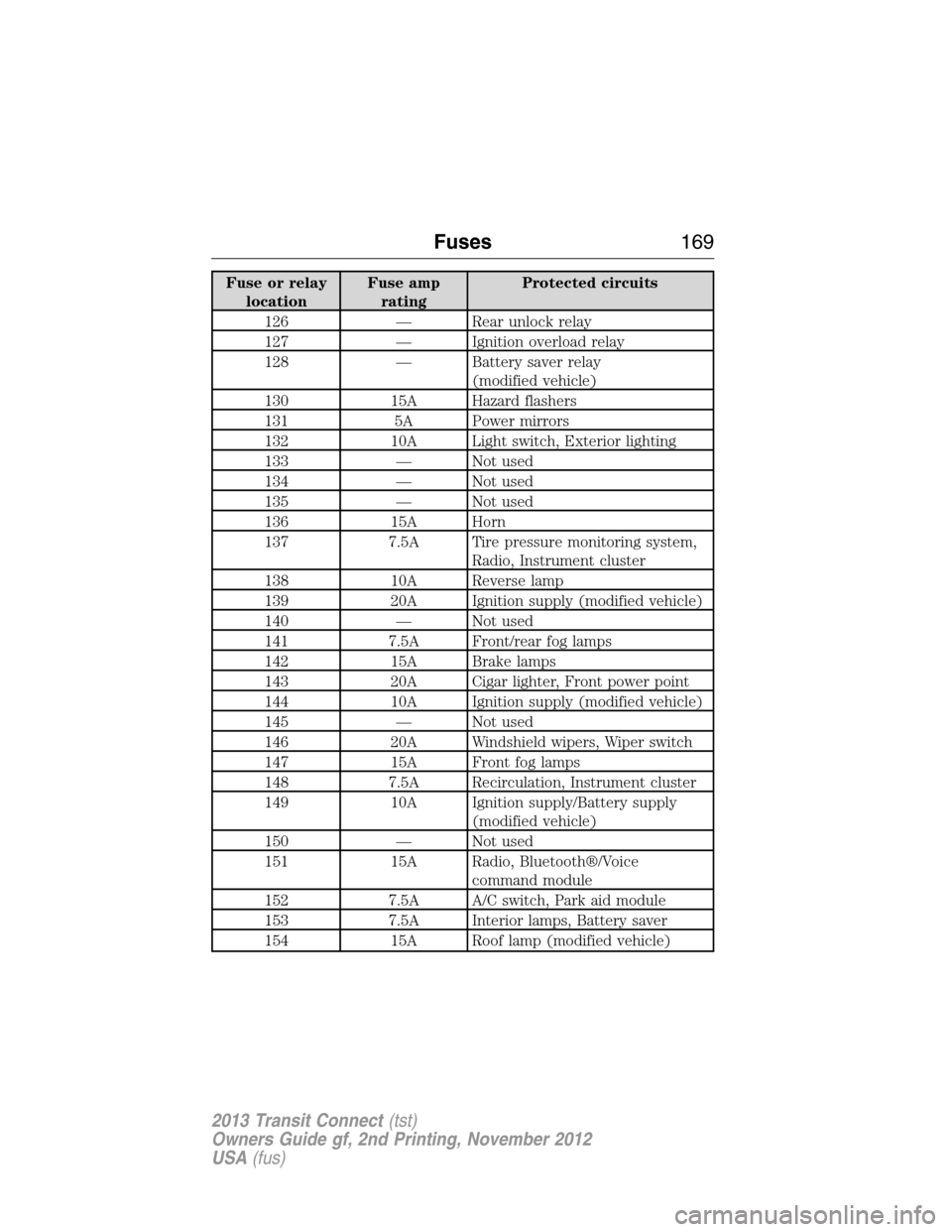
Fuse or relay
locationFuse amp
ratingProtected circuits
126 — Rear unlock relay
127 — Ignition overload relay
128 — Battery saver relay
(modified vehicle)
130 15A Hazard flashers
131 5A Power mirrors
132 10A Light switch, Exterior lighting
133 — Not used
134 — Not used
135 — Not used
136 15A Horn
137 7.5A Tire pressure monitoring system,
Radio, Instrument cluster
138 10A Reverse lamp
139 20A Ignition supply (modified vehicle)
140 — Not used
141 7.5A Front/rear fog lamps
142 15A Brake lamps
143 20A Cigar lighter, Front power point
144 10A Ignition supply (modified vehicle)
145 — Not used
146 20A Windshield wipers, Wiper switch
147 15A Front fog lamps
148 7.5A Recirculation, Instrument cluster
149 10A Ignition supply/Battery supply
(modified vehicle)
150 — Not used
151 15A Radio, Bluetooth®/Voice
command module
152 7.5A A/C switch, Park aid module
153 7.5A Interior lamps, Battery saver
154 15A Roof lamp (modified vehicle)
Fuses169
2013 Transit Connect(tst)
Owners Guide gf, 2nd Printing, November 2012
USA(fus)