Page 113 of 541
Inst Fuel Econ
Shows instantaneous fuel usage.
Average Fuel
Indicates the average fuel consumption since the function was last reset.
Compass (If Equipped)
Displays the vehicle’s heading direction.
To calibrate the compass: Enter the compass menu and select Calibrate.
Follow the prompts.
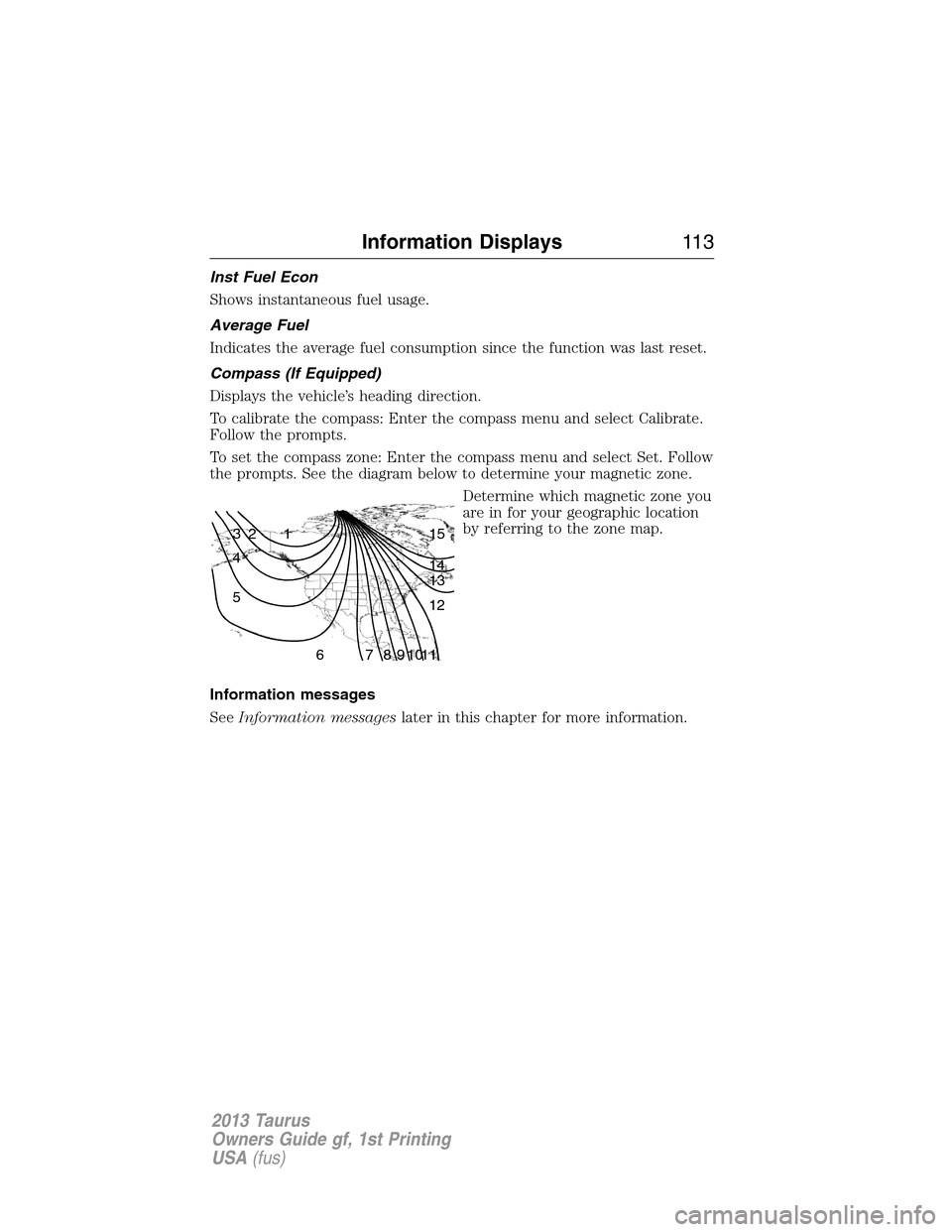
To set the compass zone: Enter the compass menu and select Set. Follow
the prompts. See the diagram below to determine your magnetic zone.
Determine which magnetic zone you
are in for your geographic location
by referring to the zone map.
Information messages
SeeInformation messageslater in this chapter for more information.
1 2 3
4
5
6 7 8 9 101112 13 14 15
Information Displays11 3
2013 Taurus
Owners Guide gf, 1st Printing
USA(fus)
Page 114 of 541
Information Display Controls (Type 2)
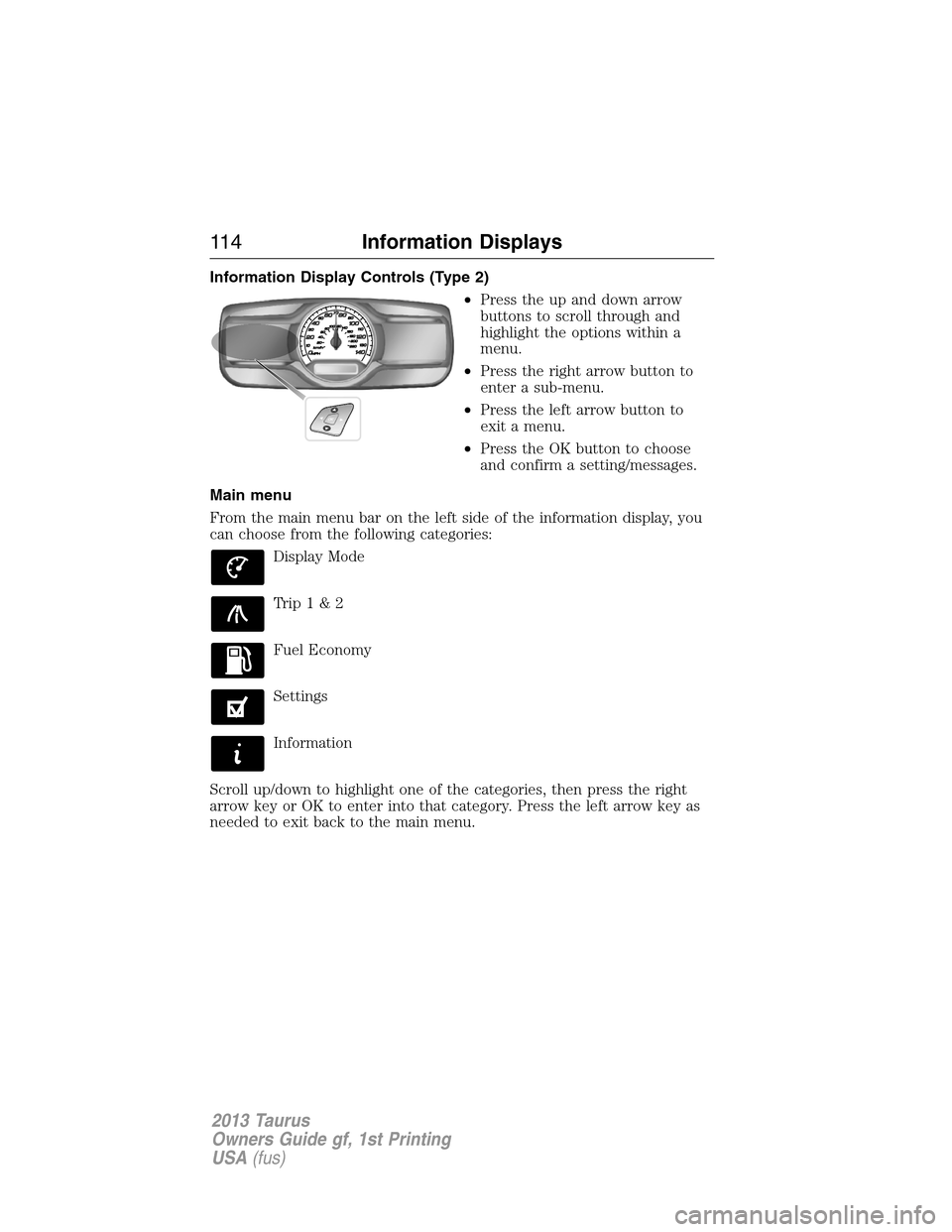
•Press the up and down arrow
buttons to scroll through and
highlight the options within a
menu.
•Press the right arrow button to
enter a sub-menu.
•Press the left arrow button to
exit a menu.
•Press the OK button to choose
and confirm a setting/messages.
Main menu
From the main menu bar on the left side of the information display, you
can choose from the following categories:
Display Mode
Trip1&2
Fuel Economy
Settings
Information
Scroll up/down to highlight one of the categories, then press the right
arrow key or OK to enter into that category. Press the left arrow key as
needed to exit back to the main menu.
11 4Information Displays
2013 Taurus
Owners Guide gf, 1st Printing
USA(fus)
Page 115 of 541
Display Mode
Use the up/down arrow buttons to choose between the
following display options.
Display mode †Option 1 Option 2 Option 3 †Option 4
XXX mi (km) to empty X
Fuel gaugeXXXX
Bar tachometer X X
Round tachometer X X
Engine coolant temp
gaugeX
Total odometer (lower
left corner)XXXX
†Vehicles with Intelligent AWD only. You can choose to have only the
fuel gauge show in this mode. Refer toDisplay>Gauge Display
found in the table under theSettingssection later in this chapter.
Regardless of display mode chosen, when SelectShift Automatic™
transmission (SST) is activated, the cluster will change to the round
tachometer if not already selected. After the round tachometer
displays, other display modes with the bar tachometer can also be
chosen.
•XXX mi (km) to empty: Shows approximate fuel level before the fuel
tank reaches empty. The value is dynamic and can change (raise or
lower) depending on driving style.
•Fuel gauge: Indicates approximately how much fuel is left in the fuel
tank. The fuel gauge may vary slightly when the vehicle is in motion or
on a grade. When the fuel level becomes low, the level indicator will
change to amber. When the fuel level becomes critical ly low, the level
indicator will change to red.
Note:When a MyKey�is in use, low fuel warnings will display earlier.
The fuel icon and arrow indicates which side of the vehicle the fuel
filler door is located.
•Bar/Round tachometer: Indicates the engine speed in revolutions per
minute. Driving with your tachometer pointer continuously at the top
of the scale may damage the engine. During SelectShift Automatic™
transmission (SST) use, the currently selected gear will appear in the
display.
Information Displays11 5
2013 Taurus
Owners Guide gf, 1st Printing
USA(fus)
Page 116 of 541
•Engine coolant temperature gauge: Indicates engine coolant
temperature. At normal operating temperature, the level indicator will
be in the normal range. If the engine coolant temperature exceeds the
normal range, stop the vehicle as soon as safely possible, switch off
the engine and let the engine cool.
•Intelligent AWD (if equipped): displays power distribution between the
front and rear wheels. More power to either front or rear wheels will
be displayed by more area filled in.
Trip1&2
Choose between the standard or enhanced trip display.
Trip1&2 Standard display†Enhanced
display
Trip distance X X
Elapsed trip time X X
Average fuel economy X
Estimated amount of fuel consumed X
Total odometer (lower left corner)
Press OK to pause the Trip 1 or 2 screen. Press again to un-pause.
Press and hold OK to reset the currently displayed trip information.
†When the vehicle is in P (Park), the enhanced display is always shown
regardless of setting.
•Trip distance — shows the accumulated trip distance.
•Elapsed trip time— timer stops when the vehicle is turned off and
restarts when the vehicle is restarted.
•Average fuel economy — shows the average fuel economy for a given
trip.
•Estimated amount of fuel consumed — shows the amount of fuel used
for a given trip.
•Elapsed trip time — timer stops when the vehicle is turned off and
restarts when the vehicle is restarted.
11 6Information Displays
2013 Taurus
Owners Guide gf, 1st Printing
USA(fus)
Page 117 of 541
Fuel Economy
Use the left/right arrow buttons to choose the desired fuel
economy display.
Fuel EconomyInst Fuel
EconomyXX. Min Fuel
History
Instantaneous fuel usage X
†Fuel usage over a 5, 10, or
30 minute time spanX
Total odometer (lower left corner)
Press and hold OK to reset the currently displayed fuel usage
information.
†To configure the fuel usage time span, press the right arrow button
when in this screen.
•Inst. Fuel Economy: This display shows a visual graph of your
instantaneous fuel economy.
•XX. Min Fuel History: This display shows a bar chart of your fuel
history.
Settings
In this mode, you can configure different driver setting choices.
Note:Some items are optional and may not appear.
Driver Assist
Traction Control On (default setting) / Off
Blindspot On (default on key cycle) / Off
Collision Warning Sensitivity High / Normal / Low
Chimes On (default on key cycle) / Off
Warn-ON On (default on key cycle) / Off
Cross Traffic On (default on key cycle) / Off
Cruise Control Adaptive or Normal
Driver Alert On (default on key cycle) / Off
Rear Park Aid On (default on key cycle) / Off
Information Displays11 7
2013 Taurus
Owners Guide gf, 1st Printing
USA(fus)
Page 119 of 541
*MyKey
Do Not Disturb Always On / User Selectable
Clear MyKeys Hold OK to Clear All MyKeys
*Some MyKey items will only appear if a MyKey is set.
Display
Gauge Display Fuel Gauge / Fuel + Tach
Language
Select your applicable language
Units
Distance Miles & GAL / L/100km / km/L
Temperature Fahrenheit (°F) / Celsius (°C)
Information
In this mode, you can view different vehicle system information
and perform a system check.
Warnings
XX Warnings Displays the number of warnings that need
immediate attention in red. You can only view the
warnings from the System Check menu. View them
immediately by pressing OK and then OK again to
enter system check. Use the up/down arrows to
scroll through the warnings.
MyKey
Admin Keys (Number of admin keys)
MyKeys (Number of MyKeys programmed)
MyKey Miles (km) (Distance traveled using a programmed MyKey)
Driver Alert
Displays the associated driver alert graphic.
System Check
All active warnings will display first if applicable. The system check
menu may appear different based upon equipment options and current
vehicle status. Use the up/down arrow buttons to scroll through the list.
Information Displays11 9
2013 Taurus
Owners Guide gf, 1st Printing
USA(fus)
Page 124 of 541
Collision Warning
System MessagesAction / Description
Collision Warning
MalfunctionDisplayed when there is a system malfunction
with the collision warning system. The system
will be disabled. Contact your authorized dealer
as soon as possible.
Collision Warning
Display FaultDisplayed when there is a system malfunction
with the collision warning system display. Contact
your authorized dealer as soon as possible.
Door Messages Action / Description
X Door Ajar Displayed when a door is not completely closed.
Trunk Ajar Displayed when the trunk is not completely
closed.
Fuel Messages Action / Description
Check Fuel Fill Inlet Displayed when the fuel fill inlet may not be
properly closed.
Fuel Level Low Displayed as an early reminder of a low fuel
condition.
Keys and Intelligent
Access MessagesAction / Description
No Key Detected Displayed if the intelligent access key is not
detected by the system in the following three
scenarios:
•When the start/stop button is pressed in an
attempt to either start the engine or cycle
through the ignition states.
•When the engine is running and a door is
opened then closed.
•When the vehicle’s speed exceeds 10 mph
(16 km/h) for the first time after starting.
Key Programmed x
Keys TotalDisplayed during spare key programming,
when an intelligent access key is programmed
to the system.
Max Number of Keys
ProgrammedDisplayed during spare key programming when
the maximum number of keys have been
programmed.
124Information Displays
2013 Taurus
Owners Guide gf, 1st Printing
USA(fus)
Page 182 of 541
SAFETY PRECAUTIONS
WARNING:Do not overfill the fuel tank. The pressure in an
overfilled tank may cause leakage and lead to fuel spray and fire.
WARNING:The fuel system may be under pressure. If you hear
a hissing sound near the fuel filler door (Easy Fuel�“no cap” fuel
system), do not refuel until the sound stops. Otherwise, fuel may spray
out, which could cause serious personal injury.
WARNING:Automotive fuels can cause serious injury or death if
misused or mishandled.
WARNING:The flow of fuel through a fuel pump nozzle can
produce static electricity, which can cause a fire if fuel is pumped
into an ungrounded fuel container.
WARNING:Fuel ethanol and gasoline may contain benzene,
which is a cancer-causing agent.
WARNING:When refueling always shut the engine off and never
allow sparks or open flames near the filler neck. Never smoke
while refueling. Fuel vapor is extremely hazardous under certain
conditions. Care should be taken to avoid inhaling excess fumes.
Observe the following guidelines when handling automotive fuel:
•Extinguish all smoking materials and any open flames before refueling
your vehicle.
•Always turn off the vehicle before refueling.
•Automotive fuels can be harmful or fatal if swallowed. Fuel such as
gasoline is highly toxic and if swallowed can cause death or permanent
injury. If fuel is swallowed, call a physician immediately, even if no
symptoms are immediately apparent. The toxic effects of fuel may not
be visible for hours.
•Avoid inhaling fuel vapors. Inhaling too much fuel vapor of any kind
can lead to eye and respiratory tract irritation. In severe cases,
excessive or prolonged breathing of fuel vapor can cause serious
illness and permanent injury.
182Fuel and Refueling
2013 Taurus
Owners Guide gf, 1st Printing
USA(fus)