2013 FORD SUPER DUTY key
[x] Cancel search: keyPage 479 of 563
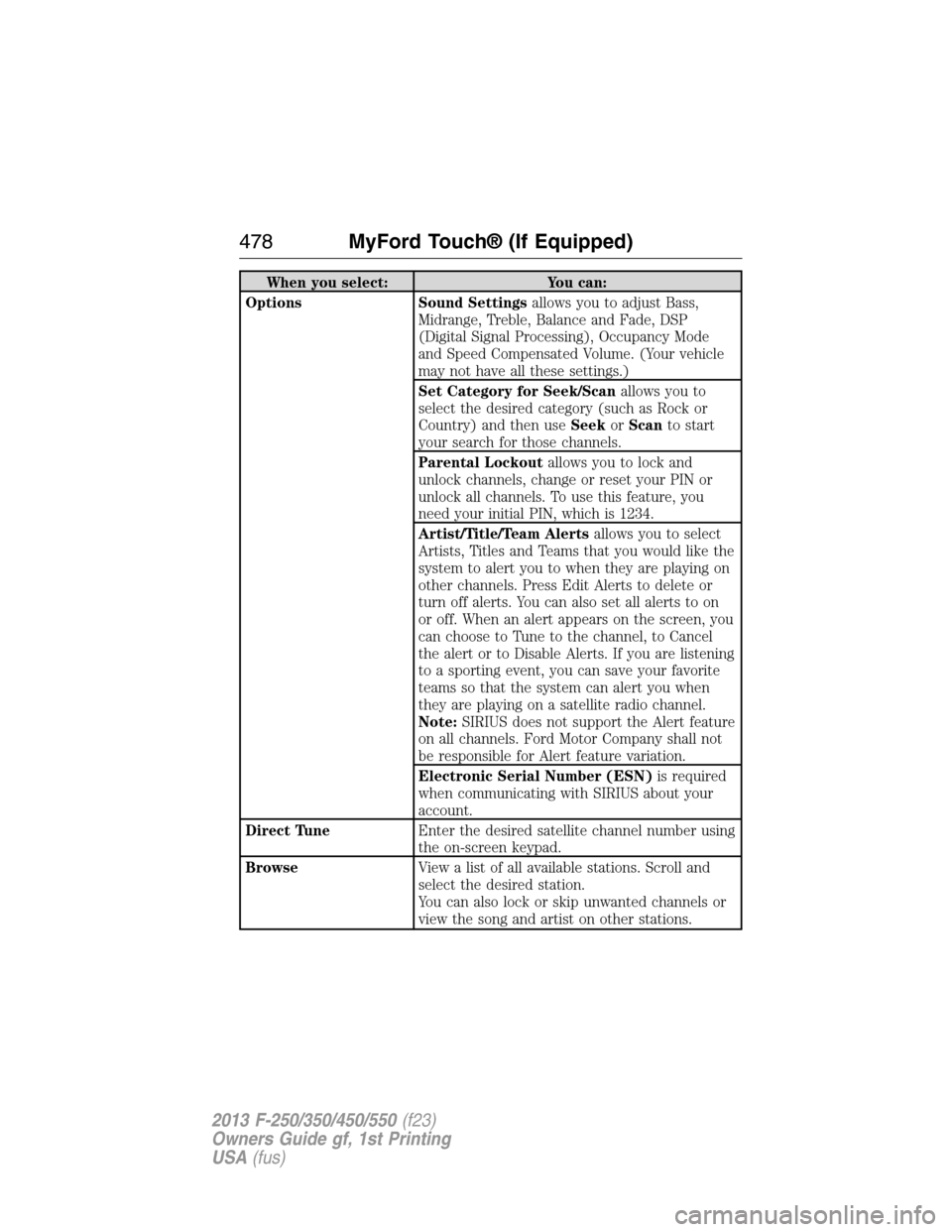
When you select: You can:
Options Sound Settingsallows you to adjust Bass,
Midrange, Treble, Balance and Fade, DSP
(Digital Signal Processing), Occupancy Mode
and Speed Compensated Volume. (Your vehicle
may not have all these settings.)
Set Category for Seek/Scanallows you to
select the desired category (such as Rock or
Country) and then useSeekorScanto start
your search for those channels.
Parental Lockoutallows you to lock and
unlock channels, change or reset your PIN or
unlock all channels. To use this feature, you
need your initial PIN, which is 1234.
Artist/Title/Team Alertsallows you to select
Artists, Titles and Teams that you would like the
system to alert you to when they are playing on
other channels. Press Edit Alerts to delete or
turn off alerts. You can also set all alerts to on
or off. When an alert appears on the screen, you
can choose to Tune to the channel, to Cancel
the alert or to Disable Alerts. If you are listening
to a sporting event, you can save your favorite
teams so that the system can alert you when
they are playing on a satellite radio channel.
Note:SIRIUS does not support the Alert feature
on all channels. Ford Motor Company shall not
be responsible for Alert feature variation.
Electronic Serial Number (ESN)is required
when communicating with SIRIUS about your
account.
Direct TuneEnter the desired satellite channel number using
the on-screen keypad.
BrowseView a list of all available stations. Scroll and
select the desired station.
You can also lock or skip unwanted channels or
view the song and artist on other stations.
478MyFord Touch® (If Equipped)
2013 F-250/350/450/550(f23)
Owners Guide gf, 1st Printing
USA(fus)
Page 482 of 563
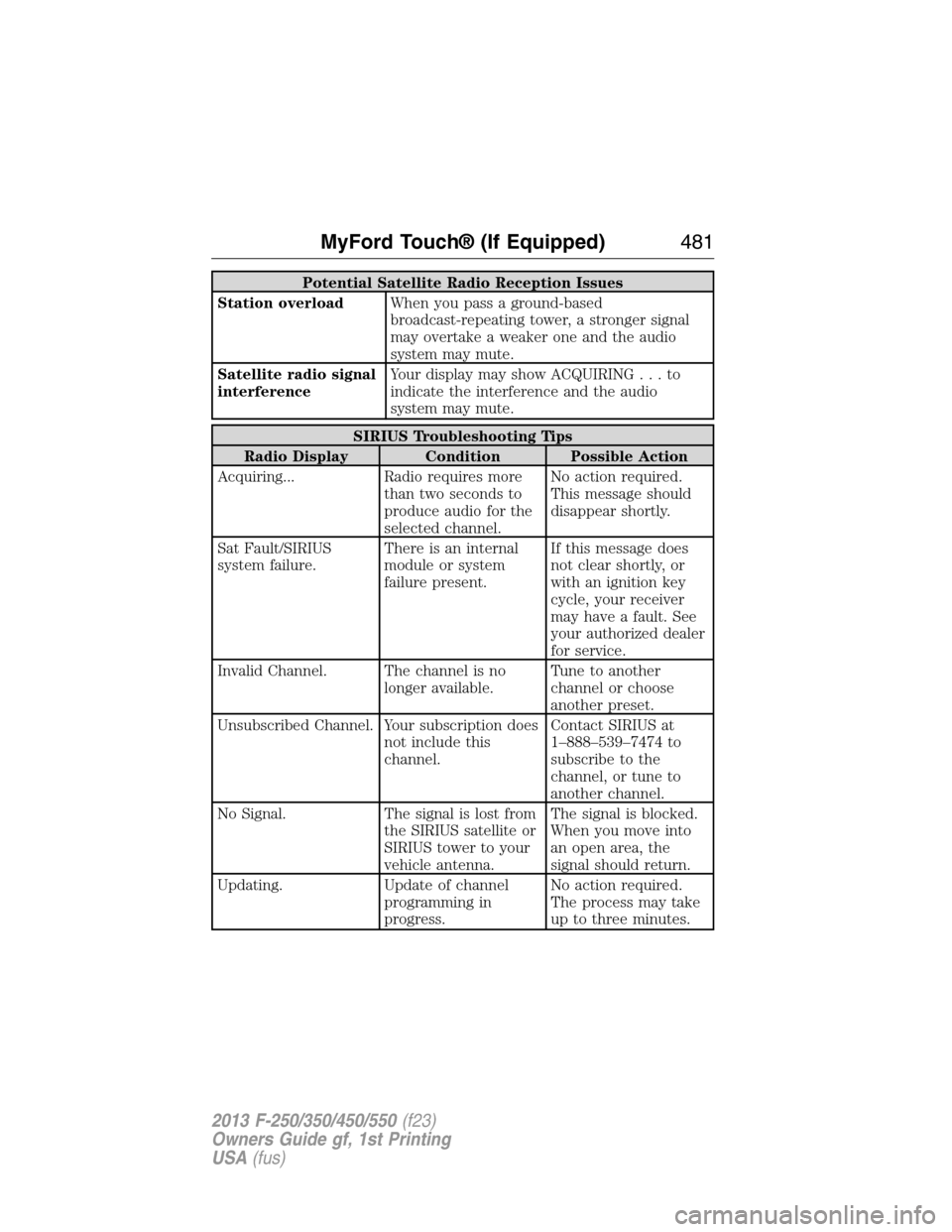
Potential Satellite Radio Reception Issues
Station overloadWhen you pass a ground-based
broadcast-repeating tower, a stronger signal
may overtake a weaker one and the audio
system may mute.
Satellite radio signal
interferenceYour display may show ACQUIRING...to
indicate the interference and the audio
system may mute.
SIRIUS Troubleshooting Tips
Radio Display Condition Possible Action
Acquiring... Radio requires more
than two seconds to
produce audio for the
selected channel.No action required.
This message should
disappear shortly.
Sat Fault/SIRIUS
system failure.There is an internal
module or system
failure present.If this message does
not clear shortly, or
with an ignition key
cycle, your receiver
may have a fault. See
your authorized dealer
for service.
Invalid Channel. The channel is no
longer available.Tune to another
channel or choose
another preset.
Unsubscribed Channel. Your subscription does
not include this
channel.Contact SIRIUS at
1–888–539–7474 to
subscribe to the
channel, or tune to
another channel.
No Signal. The signal is lost from
the SIRIUS satellite or
SIRIUS tower to your
vehicle antenna.The signal is blocked.
When you move into
an open area, the
signal should return.
Updating. Update of channel
programming in
progress.No action required.
The process may take
up to three minutes.
MyFord Touch® (If Equipped)481
2013 F-250/350/450/550(f23)
Owners Guide gf, 1st Printing
USA(fus)
Page 511 of 563

Uploading Photos for Your Home Screen Wallpaper
Note:You cannot load photos directly from your camera. You must
access the photos either from your USB mass storage device or from an
SD card.
Note:Photographs with extremely large dimensions (i.e., 2048 x 1536)
may not be compatible and appear as a blank (black) image on the
display.
Your system allows you to upload and view up to 32 photos.
To access, press theSettingsicon >Display>Edit Wallpaper,and
then follow the system prompts to upload your photographs.
Only the photograph(s), which meets the following conditions, display:
•Compatible file formats are as follows: .jpg, .gif, .png, .bmp.
•Each file must be 1.5 MB or less.
•Recommended dimensions: 800 x 384.
Sound
Press theSettingsicon >Sound,then select from the following:
Sound Settings
Bass THX Deep Note Demo*
Midrange DSP*
Treble Occupancy Mode*
Set Balance and Fade Speed Compensated Volume
*If equipped.
Vehicle
Press theSettingsicon >Vehicle,then select from the following:
•Active Park Assist
•Ambient Lighting
•Vehicle Health Report
•Door Keypad Code
•Rear View Camera
•Enable Valet Mode.
Active Park Assist
When activated, your system displays directions for you regarding the
active park assist process.
For complete information on this system, seeActive park assistin the
Driving Aidschapter.
510MyFord Touch® (If Equipped)
2013 F-250/350/450/550(f23)
Owners Guide gf, 1st Printing
USA(fus)
Page 512 of 563
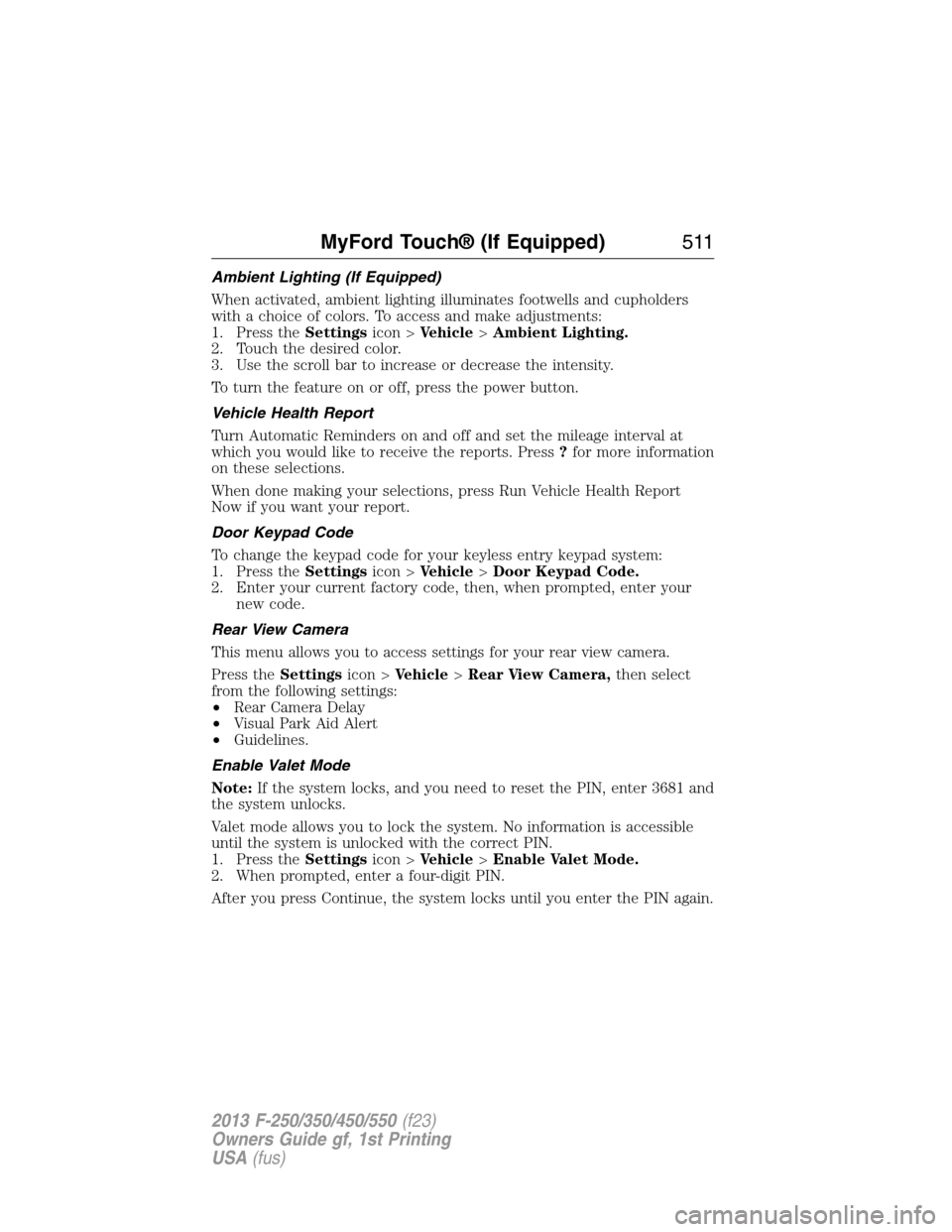
Ambient Lighting (If Equipped)
When activated, ambient lighting illuminates footwells and cupholders
with a choice of colors. To access and make adjustments:
1. Press theSettingsicon >Vehicle>Ambient Lighting.
2. Touch the desired color.
3. Use the scroll bar to increase or decrease the intensity.
To turn the feature on or off, press the power button.
Vehicle Health Report
Turn Automatic Reminders on and off and set the mileage interval at
which you would like to receive the reports. Press?for more information
on these selections.
When done making your selections, press Run Vehicle Health Report
Now if you want your report.
Door Keypad Code
To change the keypad code for your keyless entry keypad system:
1. Press theSettingsicon >Vehicle>Door Keypad Code.
2. Enter your current factory code, then, when prompted, enter your
new code.
Rear View Camera
This menu allows you to access settings for your rear view camera.
Press theSettingsicon >Vehicle>Rear View Camera,then select
from the following settings:
•Rear Camera Delay
•Visual Park Aid Alert
•Guidelines.
Enable Valet Mode
Note:If the system locks, and you need to reset the PIN, enter 3681 and
the system unlocks.
Valet mode allows you to lock the system. No information is accessible
until the system is unlocked with the correct PIN.
1. Press theSettingsicon >Vehicle>Enable Valet Mode.
2. When prompted, enter a four-digit PIN.
After you press Continue, the system locks until you enter the PIN again.
MyFord Touch® (If Equipped)511
2013 F-250/350/450/550(f23)
Owners Guide gf, 1st Printing
USA(fus)
Page 513 of 563
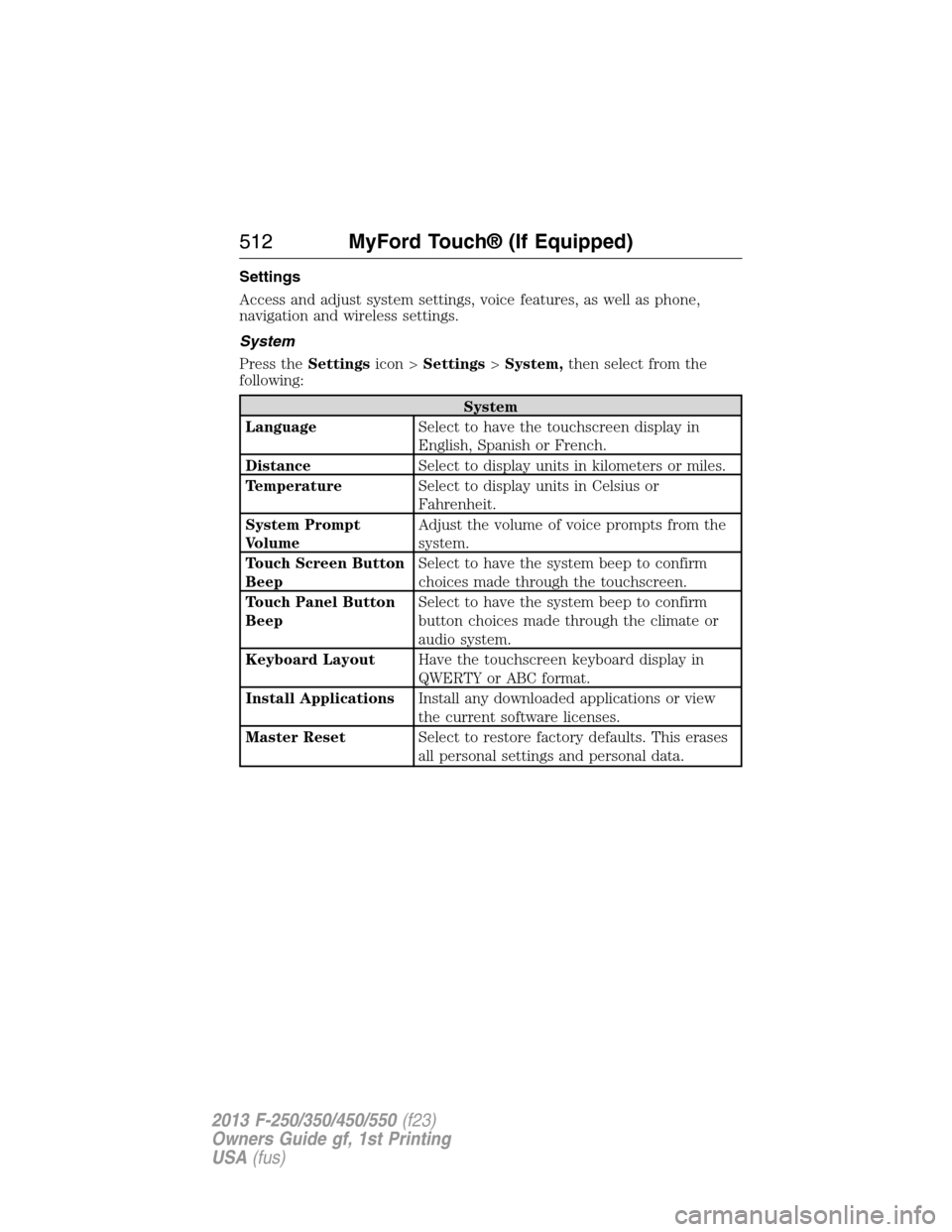
Settings
Access and adjust system settings, voice features, as well as phone,
navigation and wireless settings.
System
Press theSettingsicon >Settings>System,then select from the
following:
System
LanguageSelect to have the touchscreen display in
English, Spanish or French.
DistanceSelect to display units in kilometers or miles.
TemperatureSelect to display units in Celsius or
Fahrenheit.
System Prompt
VolumeAdjust the volume of voice prompts from the
system.
Touch Screen Button
BeepSelect to have the system beep to confirm
choices made through the touchscreen.
Touch Panel Button
BeepSelect to have the system beep to confirm
button choices made through the climate or
audio system.
Keyboard LayoutHave the touchscreen keyboard display in
QWERTY or ABC format.
Install ApplicationsInstall any downloaded applications or view
the current software licenses.
Master ResetSelect to restore factory defaults. This erases
all personal settings and personal data.
512MyFord Touch® (If Equipped)
2013 F-250/350/450/550(f23)
Owners Guide gf, 1st Printing
USA(fus)
Page 558 of 563

D
Daytime running lamps
(see Lamps) ................................85
Defrost ...............................145, 147
rear window ............................151
Dipstick
automatic transmission
fluid ..........................................306
engine oil .........................298, 300
Display settings .........................509
Drivebelt ....................................382
Driving under special
conditions ..................205, 215, 217
sand .........................................216
snow and ice ...........................218
through water .................216, 265
Dual automatic temperature
control (DATC) .........................147
E
Electronic message center .......102
Electronic stability control ......225
Emergencies, roadside
jump-starting ..........................274
running out of fuel .................190
Emergency Flashers .................273
Emission control system ..........194
End user license agreement ....537
Engine ................................298, 382
cleaning ...................................329
coolant .....................................301
fail-safe cooling .......................304
refill capacities ........................384
service points ..................298–299
Engine block heater .................185Engine oil
checking and adding ..............300
dipstick ....................................300
filter, specifications ................388
refill capacities ........................384
Event data recording ..................12
Exhaust fumes ..........................185
F
Fail safe cooling ........................304
Filter
fuel ...........................................311
Fleet MyKey programming ........66
Flexible Fuel Vehicle (FFV) ....187
Floor mats .................................266
Fluid capacities .........................384
Fog lamps ....................................86
Four-Wheel Drive vehicles .......207
driving off road .......................214
electronic shift ................207, 211
indicator light .........................208
lever operated shift ................209
manual locking hubs ..............207
Fuel
cap ...........................................192
capacity ...................................384
choosing the right fuel ...........189
filler funnel .............................190
filling your vehicle with fuel ..192
fuel pump shut-off ..................273
octane rating ...................190, 382
quality ......................................189
running out of fuel .................190
safety information relating to
automotive fuels .....................187
Fuel - flex fuel vehicle
(FFV) .................................187, 189
Index557
2013 F-250/350/450/550(f23)
Owners Guide gf, 1st Printing
USA(fus)
Page 559 of 563

Fuses ..........................285–286, 290
G
Garage door opener ..........167, 171
Gas cap (see Fuel cap) ............192
Gauges .........................................95
H
Hazard flashers .........................273
HD Radio™ ...............................472
Headlamps ...................................83
aiming ......................................319
autolamp system .......................84
bulb specifications ..................325
checking alignment ................319
daytime running lights .............85
flash to pass ..............................83
high beam .................................83
replacing bulbs .......................321
turning on and off ....................83
Head restraints .........................154
Heated steering wheel ..............522
Heating ..............................145, 147
Help ............................................521
Hill descent mode .....................227
Hill start assist ..........................206
Homelink wireless control
system ........................................171
Hood ..........................................297
How to use voice commands ...464
I
Ignition ...............................183, 382
Illuminated visor mirror .............93Information displays .................102
Inspection/maintenance (I/M)
testing ........................................196
Instrument panel
cleaning ...........................331–332
cluster ........................................97
lighting up panel and
interior .......................................85
J
Jack ............................................366
positioning ...............................366
storage .....................................366
Joining two calls
(multiparty/conference call) ....422
Jump-starting your vehicle ......274
K
Keyless entry system
autolock .....................................71
keypad .......................................73
locking and unlocking doors ....74
programming entry code .........73
Keys .......................................61, 75
positions of the ignition .........183
L
Lamps ..........................................83
autolamp system .......................84
bulb replacement
specifications chart ................325
daytime running light ...............85
fog lamps ...................................86
headlamps .................................83
headlamps, flash to pass ..........83
instrument panel, dimming .....85
interior lamps ...........................87
replacing bulbs .......321, 323–325
558Index
2013 F-250/350/450/550(f23)
Owners Guide gf, 1st Printing
USA(fus)
Page 560 of 563
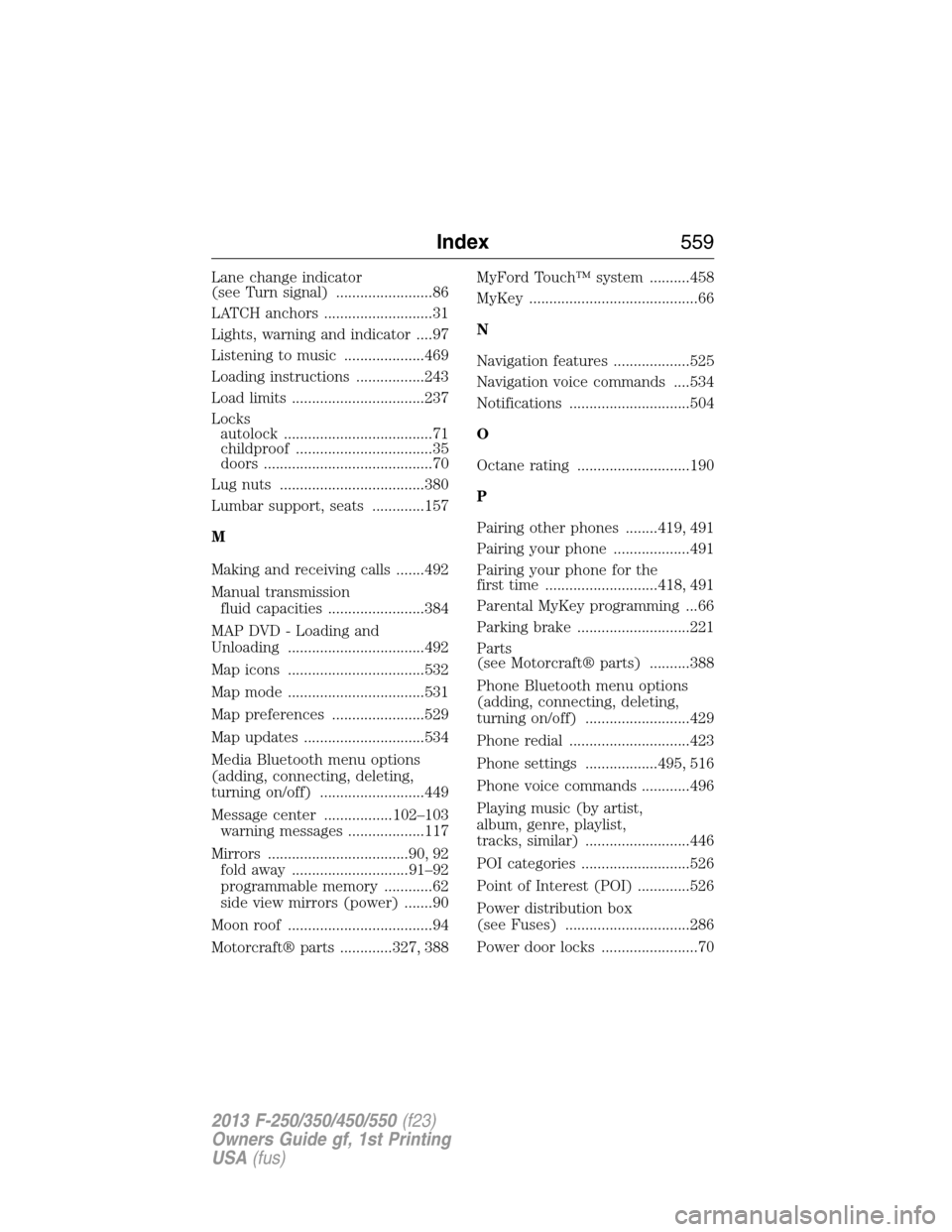
Lane change indicator
(see Turn signal) ........................86
LATCH anchors ...........................31
Lights, warning and indicator ....97
Listening to music ....................469
Loading instructions .................243
Load limits .................................237
Locks
autolock .....................................71
childproof ..................................35
doors ..........................................70
Lug nuts ....................................380
Lumbar support, seats .............157
M
Making and receiving calls .......492
Manual transmission
fluid capacities ........................384
MAP DVD - Loading and
Unloading ..................................492
Map icons ..................................532
Map mode ..................................531
Map preferences .......................529
Map updates ..............................534
Media Bluetooth menu options
(adding, connecting, deleting,
turning on/off) ..........................449
Message center .................102–103
warning messages ...................117
Mirrors ...................................90, 92
fold away .............................91–92
programmable memory ............62
side view mirrors (power) .......90
Moon roof ....................................94
Motorcraft® parts .............327, 388MyFord Touch™ system ..........458
MyKey ..........................................66
N
Navigation features ...................525
Navigation voice commands ....534
Notifications ..............................504
O
Octane rating ............................190
P
Pairing other phones ........419, 491
Pairing your phone ...................491
Pairing your phone for the
first time ............................418, 491
Parental MyKey programming ...66
Parking brake ............................221
Parts
(see Motorcraft® parts) ..........388
Phone Bluetooth menu options
(adding, connecting, deleting,
turning on/off) ..........................429
Phone redial ..............................423
Phone settings ..................495, 516
Phone voice commands ............496
Playing music (by artist,
album, genre, playlist,
tracks, similar) ..........................446
POI categories ...........................526
Point of Interest (POI) .............526
Power distribution box
(see Fuses) ...............................286
Power door locks ........................70
Index559
2013 F-250/350/450/550(f23)
Owners Guide gf, 1st Printing
USA(fus)