2013 FORD FUSION (AMERICAS) turn signal
[x] Cancel search: turn signalPage 412 of 458
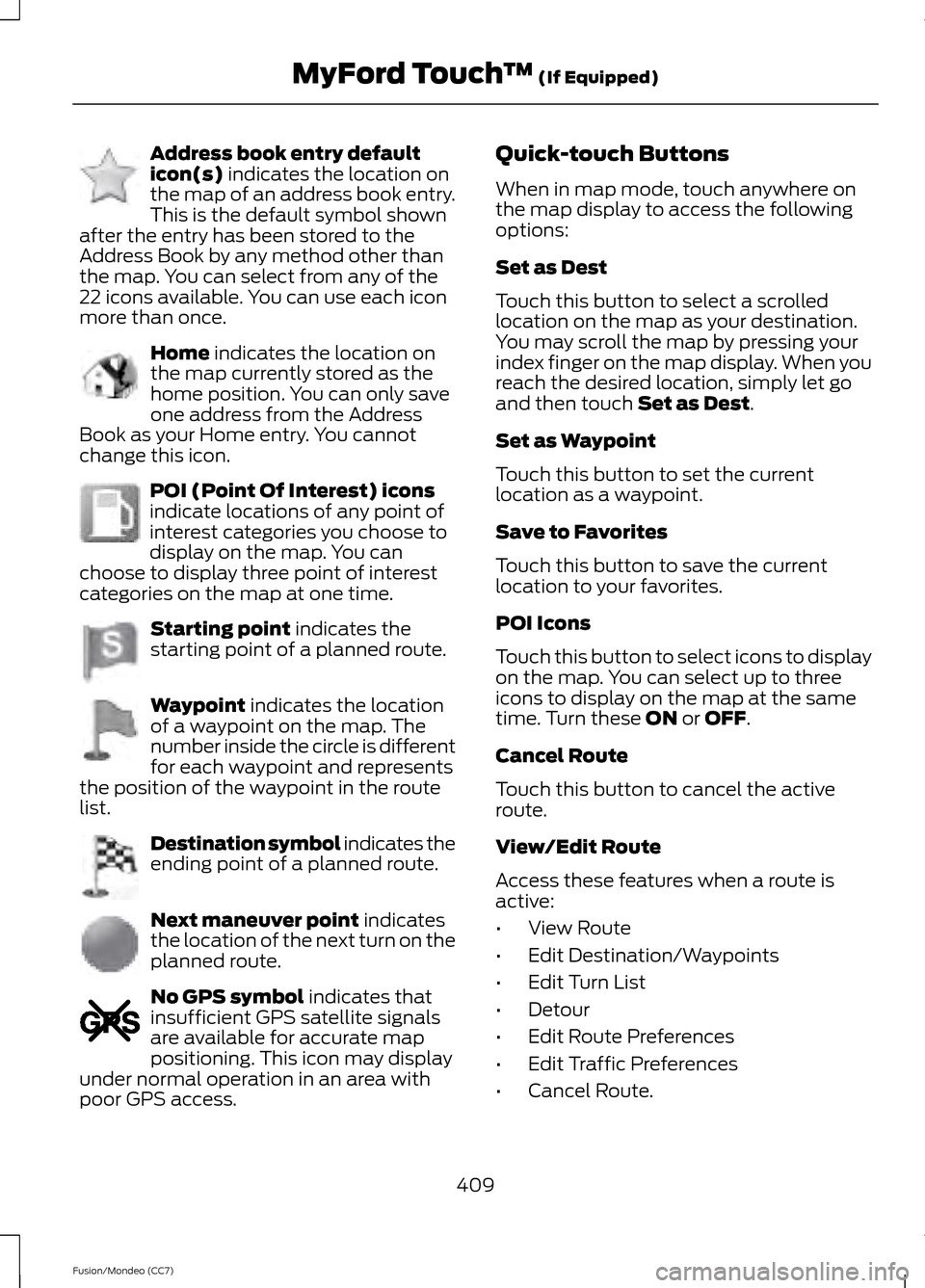
Address book entry default
icon(s) indicates the location on
the map of an address book entry.
This is the default symbol shown
after the entry has been stored to the
Address Book by any method other than
the map. You can select from any of the
22 icons available. You can use each icon
more than once. Home
indicates the location on
the map currently stored as the
home position. You can only save
one address from the Address
Book as your Home entry. You cannot
change this icon. POI (Point Of Interest) icons
indicate locations of any point of
interest categories you choose to
display on the map. You can
choose to display three point of interest
categories on the map at one time. Starting point
indicates the
starting point of a planned route. Waypoint
indicates the location
of a waypoint on the map. The
number inside the circle is different
for each waypoint and represents
the position of the waypoint in the route
list. Destination symbol indicates the
ending point of a planned route.
Next maneuver point
indicates
the location of the next turn on the
planned route. No GPS symbol
indicates that
insufficient GPS satellite signals
are available for accurate map
positioning. This icon may display
under normal operation in an area with
poor GPS access. Quick-touch Buttons
When in map mode, touch anywhere on
the map display to access the following
options:
Set as Dest
Touch this button to select a scrolled
location on the map as your destination.
You may scroll the map by pressing your
index finger on the map display. When you
reach the desired location, simply let go
and then touch
Set as Dest.
Set as Waypoint
Touch this button to set the current
location as a waypoint.
Save to Favorites
Touch this button to save the current
location to your favorites.
POI Icons
Touch this button to select icons to display
on the map. You can select up to three
icons to display on the map at the same
time. Turn these
ON or OFF.
Cancel Route
Touch this button to cancel the active
route.
View/Edit Route
Access these features when a route is
active:
• View Route
• Edit Destination/Waypoints
• Edit Turn List
• Detour
• Edit Route Preferences
• Edit Traffic Preferences
• Cancel Route.
409
Fusion/Mondeo (CC7) MyFord Touch
™
(If Equipped)E142648 E142649 E142650 E142651 E142652 E142653 E142654 E142655
Page 421 of 458
WARNING
Operating certain parts of this
system while driving can distract
your attention away from the road,
and possibly cause an accident or other
serious consequences. Do not change
system settings or enter data non-verbally
(using your hands) while driving. Stop the
vehicle in a safe and legal manner before
attempting these operations. This is
important since while setting up or
changing some functions you might be
required to distract your attention away
from the road and remove your hands from
the wheel. General Operation
Voice Command Control: Functions
within the Windows Automotive-based
system may be accomplished using only
voice commands. Using voice commands
while driving allows you to operate the
system without removing your hands from
the wheel.
Prolonged Views of Screen:
Do not
access any function requiring a prolonged
view of the screen while you are driving.
Pull over in a safe and legal manner before
attempting to access a function of the
system requiring prolonged attention. Even
occasional short scans to the screen may
be hazardous if your attention has been
diverted away from your driving task at a
critical time.
Volume Setting: Do not raise the volume
excessively. Keep the volume at a level
where you can still hear outside traffic and
emergency signals while driving. Driving
while unable to hear these sounds could
cause an accident. Use of Speech Recognition Functions:
Speech recognition software is inherently
a statistical process which is subject to
errors. It is your responsibility to monitor
any speech recognition functions included
in the system and address any errors.
Navigation Features:
Any navigation
features included in the system are
intended to provide turn by turn
instructions to get you to a desired
destination. Please make certain all
persons using this system carefully read
and follow instructions and safety
information fully.
Distraction Hazard:
Any navigation
features may require manual (non-verbal)
setup. Attempting to perform such set-up
or insert data while driving can seriously
distract your attention and could cause an
accident or other serious consequences.
Stop the vehicle in a safe and legal manner
before attempting these operations.
Let Your Judgment Prevail:
Any
navigation features are provided only as
an aid. Make your driving decisions based
on your observations of local conditions
and existing traffic regulations. Any such
feature is not a substitute for your personal
judgment. Any route suggestions made by
this system should never replace any local
traffic regulations or your personal
judgment or knowledge of safe driving
practices.
Route Safety:
Do not follow the route
suggestions if doing so would result in an
unsafe or illegal maneuver, if you would be
placed in an unsafe situation, or if you
would be directed into an area that you
consider unsafe. The driver is ultimately
responsible for the safe operation of the
vehicle and therefore, must evaluate
whether it is safe to follow the suggested
directions.
418
Fusion/Mondeo (CC7) Appendices
Page 449 of 458

Brake Fluid Check........................................250
Brakes.................................................................171
General Information............................................ 171
Breaking-In......................................................218
Bulb Specification Chart..........................260
C
Cabin Air Filter
................................................127
California Proposition 65..............................11
Capacities and Specifications................293 Technical Specifications................................. 297
Car Wash See: Cleaning the Exterior.............................. 262
Center Console
..............................................143
Changing a Bulb...........................................257 Lamp Assembly Condensation.................... 257
Replacing a Reverse Lamp Bulb.................. 258
Replacing the Headlamp Bulbs................... 258
Replacing the License Plate Lamp Bulb................................................................... 260
Replacing the Tail, Brake, High-Mount Brake Lamp, and Turn Signal Lamp
Bulbs.................................................................. 258
Changing a Fuse
............................................231
Fuses........................................................................\
231
Changing a Road Wheel
...........................288
Dissimilar Spare Wheel and Tire Assembly
Information..................................................... 288
Stowing the flat tire........................................... 291
Tire Change Procedure.................................... 289
Changing the 12V Battery
..........................251
Changing the Engine Air Filter.................253 ........................................................................\
.......... 254
2.5L Engine........................................................... 254
EcoBoost Engines.............................................. 253
Changing the Wiper Blades.....................252
Checking MyKey System Status..............50
Checking the Wiper Blades......................252
Child Restraint and Safety Belt Maintenance..................................................31
Child Safety
.......................................................13
General Information............................................. 13
Child Safety Locks..........................................23 Left-Hand Side...................................................... 24
Right-Hand Side................................................... 24
Child Seat Positioning
...................................15
Cleaning Leather Seats.............................266 Cleaning Products
.......................................262
Cleaning the Alloy Wheels.......................266
Cleaning the Engine
...................................264
Cleaning the Exterior..................................262 Cleaning Plastic Exterior Parts..................... 263
Exterior Chrome................................................. 262
Underbody........................................................... 263
Cleaning the Instrument Panel and Instrument Cluster Lens........................265
Cleaning the Interior...................................264
Cleaning the Windows and Wiper Blades...........................................................264
Clearing All MyKeys.......................................49
Climate...........................................................400 Climate Control Voice Commands..............401
Climate Control
..............................................118
Collision Warning System........................202 PRINCIPLE OF OPERATION.......................... 202
Coolant Check See: Engine Coolant Check............................ 247
Crash Sensors and Airbag Indicator.......40
Creating a MyKey
...........................................49
Programming/Changing Optional
Settings............................................................... 49
Cruise Control
..................................................63
Principle of Operation...................................... 186
Type 1........................................................................\
63
Type 2....................................................................... 63
Cruise control See: Using Cruise Control................................ 186
Customer Assistance..................................221
D
Data Recording
..................................................9
Event Data Recording........................................... 9
Service Data Recording........................................ 9
Daytime Running Lamps
............................68
Direction Indicators.......................................70
Driver Alert......................................................193
PRINCIPLE OF OPERATION........................... 193
USING DRIVER ALERT..................................... 193
Driver and Passenger Airbags...................34 Children and Airbags........................................... 35
Proper Driver and Front Passenger Seating Adjustment........................................................ 35
Driving Aids.....................................................193
Driving Hints
...................................................218
446
Fusion/Mondeo (CC7) Index