2013 FORD FUSION (AMERICAS) instrument panel
[x] Cancel search: instrument panelPage 123 of 458
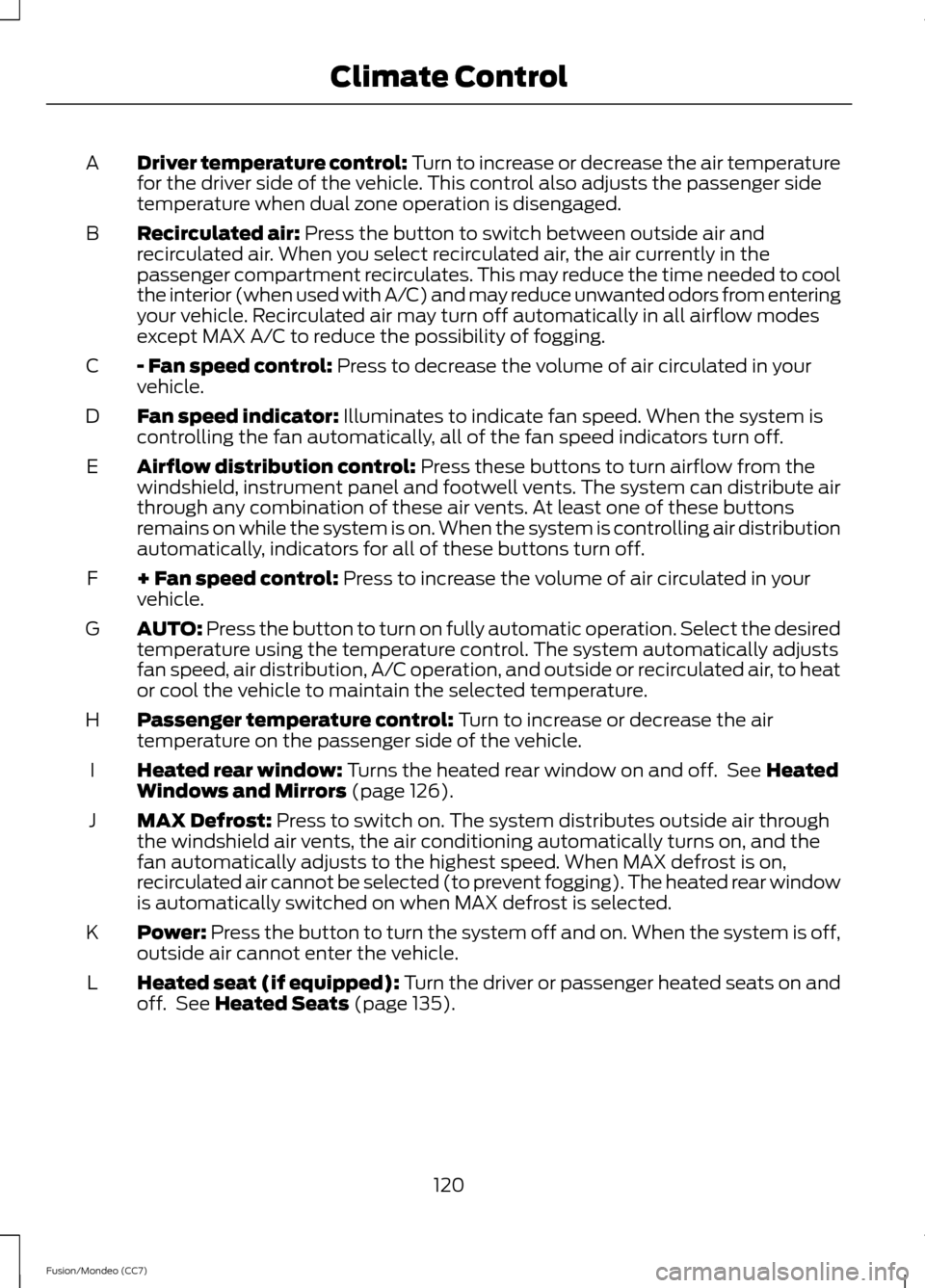
Driver temperature control: Turn to increase or decrease the air temperature
for the driver side of the vehicle. This control also adjusts the passenger side
temperature when dual zone operation is disengaged.
A
Recirculated air: Press the button to switch between outside air and
recirculated air. When you select recirculated air, the air currently in the
passenger compartment recirculates. This may reduce the time needed to cool
the interior (when used with A/C) and may reduce unwanted odors from entering
your vehicle. Recirculated air may turn off automatically in all airflow modes
except MAX A/C to reduce the possibility of fogging.
B
- Fan speed control:
Press to decrease the volume of air circulated in your
vehicle.
C
Fan speed indicator:
Illuminates to indicate fan speed. When the system is
controlling the fan automatically, all of the fan speed indicators turn off.
D
Airflow distribution control:
Press these buttons to turn airflow from the
windshield, instrument panel and footwell vents. The system can distribute air
through any combination of these air vents. At least one of these buttons
remains on while the system is on. When the system is controlling air distribution
automatically, indicators for all of these buttons turn off.
E
+ Fan speed control:
Press to increase the volume of air circulated in your
vehicle.
F
AUTO:
Press the button to turn on fully automatic operation. Select the desired
temperature using the temperature control. The system automatically adjusts
fan speed, air distribution, A/C operation, and outside or recirculated air, to heat
or cool the vehicle to maintain the selected temperature.
G
Passenger temperature control:
Turn to increase or decrease the air
temperature on the passenger side of the vehicle.
H
Heated rear window:
Turns the heated rear window on and off. See Heated
Windows and Mirrors (page 126).
I
MAX Defrost:
Press to switch on. The system distributes outside air through
the windshield air vents, the air conditioning automatically turns on, and the
fan automatically adjusts to the highest speed. When MAX defrost is on,
recirculated air cannot be selected (to prevent fogging). The heated rear window
is automatically switched on when MAX defrost is selected.
J
Power:
Press the button to turn the system off and on. When the system is off,
outside air cannot enter the vehicle.
K
Heated seat (if equipped): Turn the driver or passenger heated seats on and
off. See
Heated Seats (page 135).
L
120
Fusion/Mondeo (CC7) Climate Control
Page 127 of 458
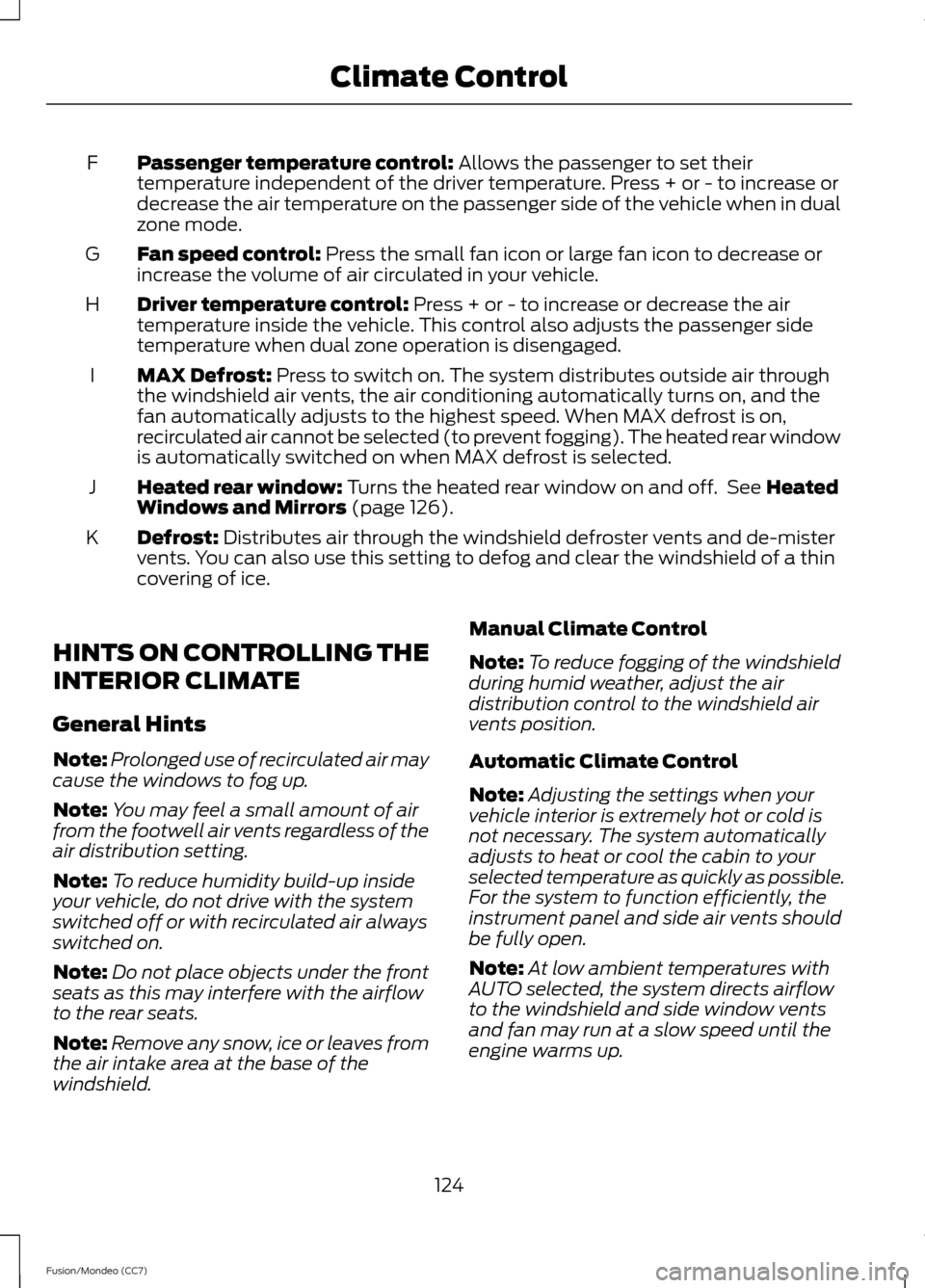
Passenger temperature control: Allows the passenger to set their
temperature independent of the driver temperature. Press + or - to increase or
decrease the air temperature on the passenger side of the vehicle when in dual
zone mode.
F
Fan speed control:
Press the small fan icon or large fan icon to decrease or
increase the volume of air circulated in your vehicle.
G
Driver temperature control:
Press + or - to increase or decrease the air
temperature inside the vehicle. This control also adjusts the passenger side
temperature when dual zone operation is disengaged.
H
MAX Defrost:
Press to switch on. The system distributes outside air through
the windshield air vents, the air conditioning automatically turns on, and the
fan automatically adjusts to the highest speed. When MAX defrost is on,
recirculated air cannot be selected (to prevent fogging). The heated rear window
is automatically switched on when MAX defrost is selected.
I
Heated rear window:
Turns the heated rear window on and off. See Heated
Windows and Mirrors (page 126).
J
Defrost:
Distributes air through the windshield defroster vents and de-mister
vents. You can also use this setting to defog and clear the windshield of a thin
covering of ice.
K
HINTS ON CONTROLLING THE
INTERIOR CLIMATE
General Hints
Note: Prolonged use of recirculated air may
cause the windows to fog up.
Note: You may feel a small amount of air
from the footwell air vents regardless of the
air distribution setting.
Note: To reduce humidity build-up inside
your vehicle, do not drive with the system
switched off or with recirculated air always
switched on.
Note: Do not place objects under the front
seats as this may interfere with the airflow
to the rear seats.
Note: Remove any snow, ice or leaves from
the air intake area at the base of the
windshield. Manual Climate Control
Note:
To reduce fogging of the windshield
during humid weather, adjust the air
distribution control to the windshield air
vents position.
Automatic Climate Control
Note: Adjusting the settings when your
vehicle interior is extremely hot or cold is
not necessary. The system automatically
adjusts to heat or cool the cabin to your
selected temperature as quickly as possible.
For the system to function efficiently, the
instrument panel and side air vents should
be fully open.
Note: At low ambient temperatures with
AUTO selected, the system directs airflow
to the windshield and side window vents
and fan may run at a slow speed until the
engine warms up.
124
Fusion/Mondeo (CC7) Climate Control
Page 129 of 458
Recommended Settings for Cooling
Vehicle With Automatic Climate Control
Vehicle With Manual Climate Control
Press the AUTO button.
Adjust the fan speed to the middle speed
setting.
1
Adjust the temperature to a comfortable
setting.
Adjust the temperature control to the
midway point of the cold settings.
2
Select the instrument panel air vents
using the air distribution buttons.
3
Side Window Defogging in Cold Weather Vehicle With Automatic Climate Control
Vehicle With Manual Climate Control
Press the defrost button.
Select the instrument panel and footwell
air vents positions through the air distri-
bution control.
1
Adjust the temperature control to the
desired setting.
Press the A/C button.
2
Adjust the temperature control to the
desired setting.
3
Adjust the fan speed to the highest
setting.
4
Direct the instrument panel side air vents
toward the side windows.
5
Close the instrument panel center vents.
6
HEATED WINDOWS AND
MIRRORS (IF EQUIPPED)
Heated Rear Window
Note: You must switch the ignition on to
use this feature. Press the button to clear the rear window
of thin ice and fog. Press the button again
within 10 minutes to switch it off. It
switches off automatically after 10
minutes, or when you switch the ignition
off.
Do not use razor blades or other sharp
objects to clean the inside of the rear
window or to remove decals from the
inside of the rear window. This may
cause damage to the heated grid lines.
Your warranty does not cover this
damage.
126
Fusion/Mondeo (CC7) Climate Control
Page 166 of 458
Upshifts when accelerating (recom-
mended for best fuel economy)
40 mph (64 km/h)
3 - 4
45 mph (72 km/h)
4 - 5
50 mph (80 km/h)
5 - 6
The instrument cluster will display the
selected gear that you are currently in.
SelectShift will automatically make some
shifts for you in the event that your engine
speed is running at too high, or to low an
RPM.
Note: Engine damage may occur if
excessive engine revving is held without
shifting.
Brake-Shift Interlock WARNINGS
Do not drive your vehicle until you
verify that the brake lamps are
working.
When doing this procedure, you will
be taking the vehicle out of park
which means the vehicle can roll
freely. To avoid unwanted vehicle
movement, always fully set the parking
brake prior to doing this procedure. Use
wheel chocks if appropriate. If the parking brake is fully released,
but the brake warning lamp remains
illuminated, the brakes may not be
working properly. See your authorized
dealer. Note:
See your authorized dealer as soon
as possible if this procedure is used.
Note: For some markets this feature will be
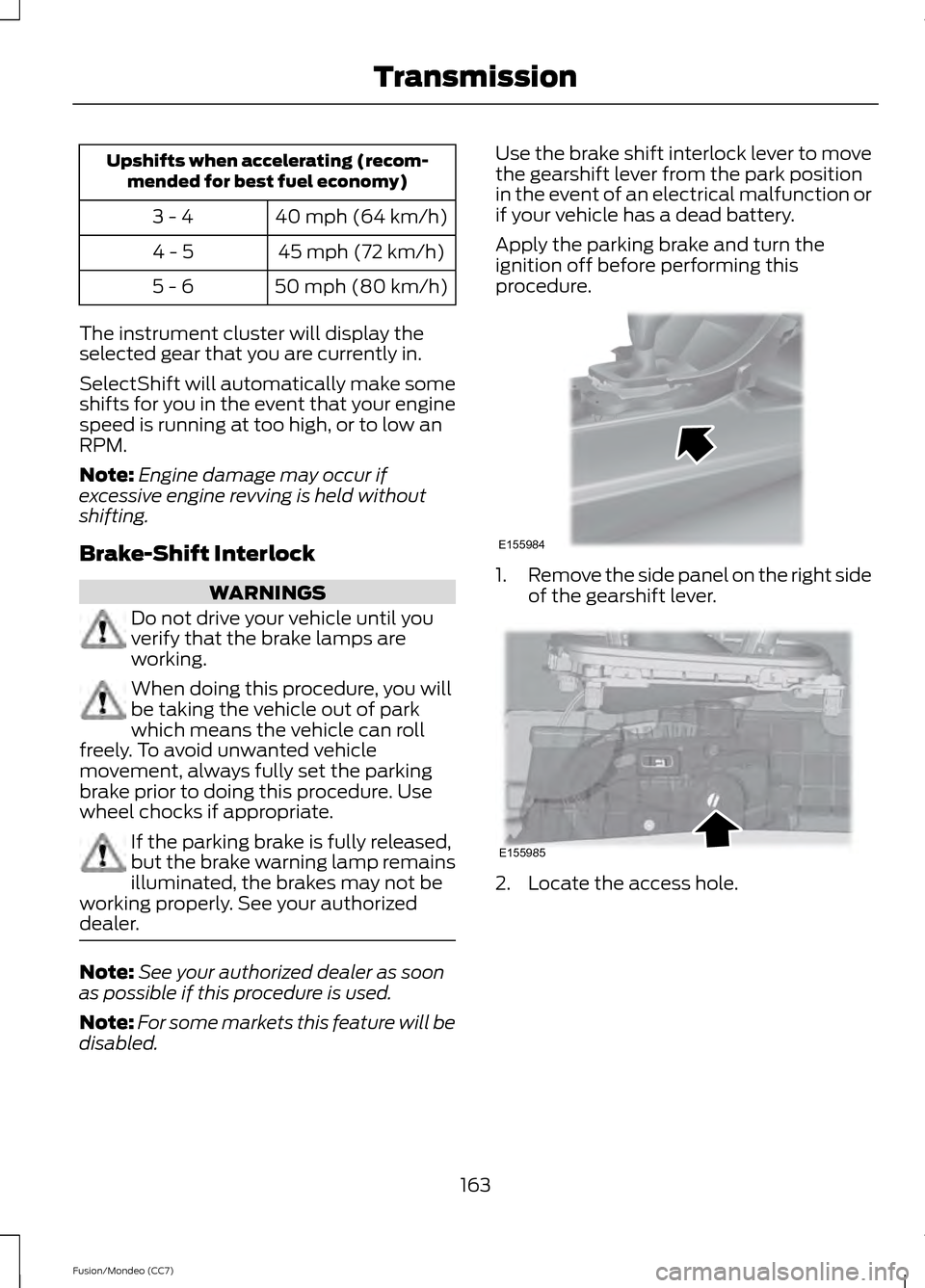
disabled. Use the brake shift interlock lever to move
the gearshift lever from the park position
in the event of an electrical malfunction or
if your vehicle has a dead battery.
Apply the parking brake and turn the
ignition off before performing this
procedure.
1.
Remove the side panel on the right side
of the gearshift lever. 2. Locate the access hole.
163
Fusion/Mondeo (CC7) TransmissionE155984 E155985
Page 185 of 458
![FORD FUSION (AMERICAS) 2013 2.G Owners Manual The system does not position the vehicle where I want in the space
The vehicle is rolling in the opposite direction of the transmission (i.e. rolling forward
when R [Reverse] is selected)
The transmis](/manual-img/11/5189/w960_5189-184.png "FORD FUSION (AMERICAS) 2013 2.G Owners Manual The system does not position the vehicle where I want in the space
The vehicle is rolling in the opposite direction of the transmission (i.e. rolling forward
when R [Reverse] is selected)
The transmis")
The system does not position the vehicle where I want in the space
The vehicle is rolling in the opposite direction of the transmission (i.e. rolling forward
when R [Reverse] is selected)
The transmission is in R (Reverse); the vehicle must be moving forward to detect a
parking space
An irregular curb along the parking space prevents the system from aligning the vehicle
properly
Vehicles or objects bordering the space may not be positioned correctly
The vehicle was pulled too far past the parking space. The system performs best when
you drive the same distance past the parking space
The tires may not be installed or maintained correctly (i.e. not inflated correctly, improper
size, or of different sizes)
A repair or alteration has changed detection capabilities
A parked vehicle has a high attachment (i.e. salt sprayer, snowplow, moving truck bed,
etc.)
The parking space length or position of parked objects changed after your vehicle passed
The temperature around your vehicle changes quickly (i.e. driving from a heated garage
into the cold, or after leaving a car wash)
REAR VIEW CAMERA (IF EQUIPPED) WARNINGS
The rear view camera system is a
reverse aid supplement device that
still requires the driver to use it in
conjunction with the interior and exterior
mirrors for maximum coverage. Objects that are close to either
corner of the bumper or under the
bumper, might not be seen on the
screen due to the limited coverage of the
camera system. Back up as slow as possible since
higher speeds might limit your
reaction time to stop the vehicle. WARNINGS
Use caution when using the rear
video camera and the trunk is ajar. If
the trunk is ajar, the camera will be
out of position and the video image may
be incorrect. All guidelines (if enabled)
have been removed when the trunk is ajar. Use caution when turning camera
features on or off while in R
(Reverse). Make sure the vehicle is
not moving. The rear view camera system provides a
video image of the area behind the vehicle.
The image will be displayed in either in the
rear view mirror or the display in the center
of the instrument panel.
182
Fusion/Mondeo (CC7) Parking Aids
Page 231 of 458
Canadian customers who need to obtain
roadside information, call
1-800-665-2006 or visit our website at
www.ford.ca.
HAZARD WARNING FLASHERS
Note:
If used when the engine is not
running, the battery will lose charge. There
may be insufficient power to restart your
engine. The hazard warning button is
located on the instrument panel.
Use it when your vehicle is
creating a safety hazard for other
motorists.
• Press the button to turn on the hazard
warning function, and the front and
rear direction indicators will flash.
• Press the button again to turn them
off.
FUEL SHUTOFF WARNING
Failure to inspect and, if necessary,
repair fuel leaks after a collision may
increase the risk of fire and serious
injury. Ford Motor Company recommends
that the fuel system be inspected by an
authorized dealer after any collision. In the event of a moderate to severe
collision, this vehicle is equipped with a
fuel pump shut-off feature that stops the
flow of fuel to the engine. Not every impact
will cause a shut-off.
Should your vehicle shut off after a
collision, you may restart your vehicle by
doing the following:
1. Turn the ignition off.
2. Turn the ignition to crank. 3. Turn the ignition off.
4.
Turn the ignition on again to re-enable
the fuel pump.
For vehicles equipped with a push button
start system:
1. Press the START/STOP button to
turn the ignition off.
2. Press the brake pedal and press the START/STOP
button (crank
attempt).
3. Remove your foot from the brake pedal
and press the
START/STOP button
(ignition off).
4. Press the
START/STOP button again
to re-enable the fuel system.
JUMP-STARTING THE VEHICLE WARNINGS
The gases around the battery can
explode if exposed to flames, sparks,
or lit cigarettes. An explosion could
result in injury or vehicle damage. Batteries contain sulfuric acid which
can burn skin, eyes and clothing, if
contacted.
Use only an adequate-sized cable
with insulated clamps.
Preparing Your Vehicle
Note:
Do not attempt to push-start your
automatic transmission vehicle. Automatic
transmissions do not have push-start
capability. Attempting to push-start a
vehicle with an automatic transmission may
cause transmission damage.
Note: Use only a 12-volt supply to start your
vehicle.
Note: Do not disconnect the battery of the
disabled vehicle as this could damage the
vehicle's electrical system.
228
Fusion/Mondeo (CC7) Roadside Emergencies
Page 241 of 458

Passenger Compartment Fuse
Panel
The fuse panel is located under the
instrument panel to the left of the steering
column.
Note:
It may be easier to access the fuse
panel if you remove the finish trim piece. The fuses are coded as follows:
Protected components
Fuse amp rating
Fuse or relay number
Lighting (ambient, glovebox, vanity, dome,
trunk)
10A
1
1
Memory seats, Lumbar, Power mirror
7.5A 1
2
Driver door unlock
20A 1
3
Not used (spare)
5A 1
4
Subwoofer amplifier
20A 1
5
Not used (spare)
10A 2
6
238
Fusion/Mondeo (CC7) FusesE145984
Page 244 of 458
GENERAL INFORMATION
Have your vehicle serviced regularly to help
maintain its roadworthiness and resale
value. There is a large network of Ford
authorized dealers that are there to help
you with their professional servicing
expertise. We believe that their specially
trained technicians are best qualified to
service your vehicle properly and expertly.
They are supported by a wide range of
highly specialized tools developed
specifically for servicing your vehicle.
To help you service your vehicle, we
provide scheduled maintenance
information which makes tracking routine
service easy. See Scheduled
Maintenance (page 428).
If your vehicle requires professional service,
your authorized dealer can provide the
necessary parts and service. Check your
warranty information to find out which
parts and services are covered.
Use only recommended fuels, lubricants,
fluids and service parts conforming to
specifications. Motorcraft® parts are
designed and built to provide the best
performance in your vehicle.
Precautions
• Do not work on a hot engine.
• Make sure that nothing gets caught in
moving parts.
• Do not work on a vehicle with the
engine running in an enclosed space,
unless you are sure you have enough
ventilation.
• Keep all open flames and other burning
material (such as cigarettes) away
from the battery and all fuel related
parts. Working with the Engine Off
1. Set the parking brake and shift to
P
(Park).
2. Turn off the engine and remove the key
(if equipped).
3. Block the wheels.
Working with the Engine On WARNING
To reduce the risk of vehicle damage
and/or personal burn injuries, do not
start your engine with the air cleaner
removed and do not remove it while the
engine is running. 1. Set the parking brake and shift to
P
(Park).
2. Block the wheels
OPENING AND CLOSING THE
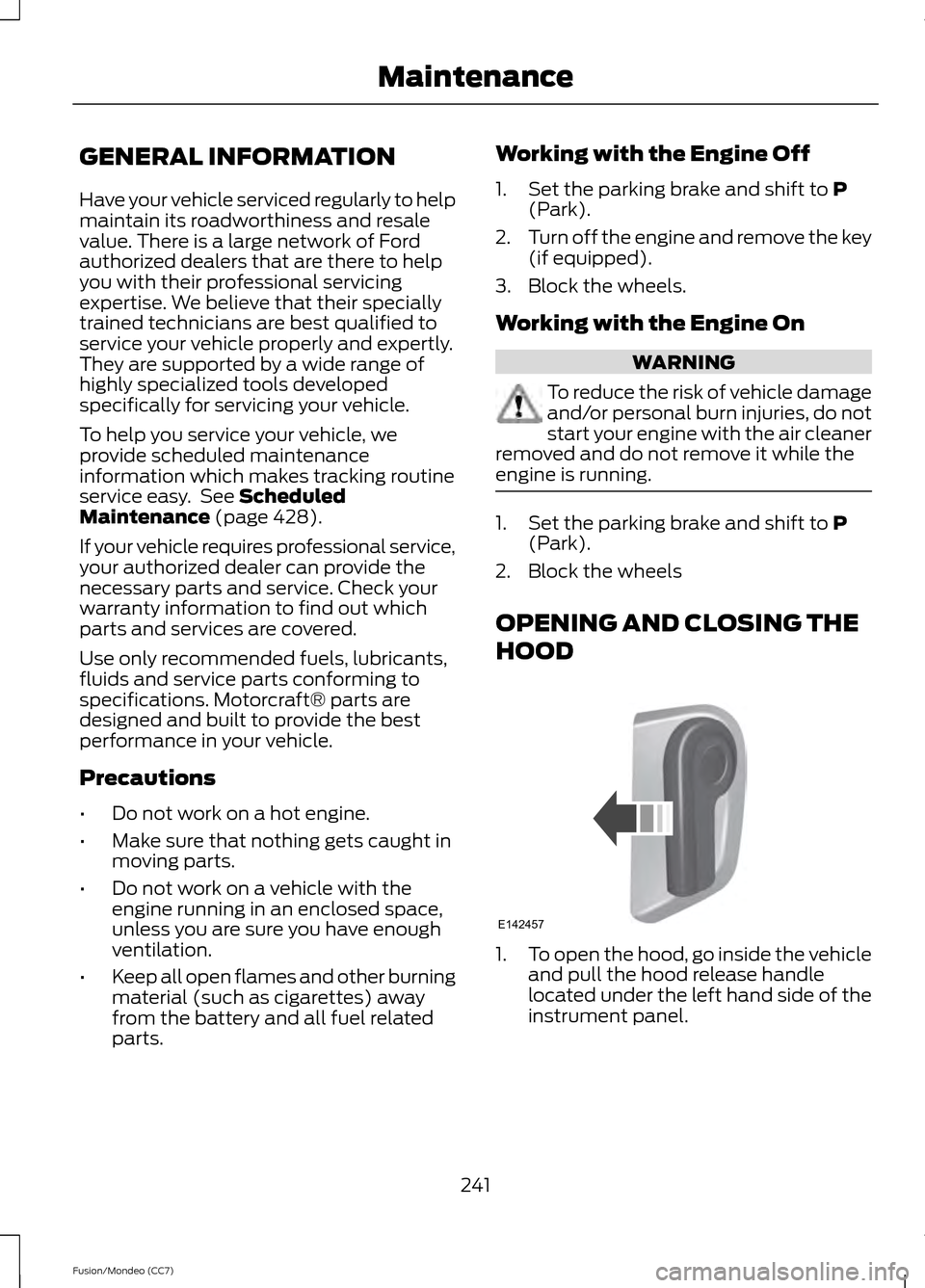
HOOD 1.
To open the hood, go inside the vehicle
and pull the hood release handle
located under the left hand side of the
instrument panel.
241
Fusion/Mondeo (CC7) MaintenanceE142457