2013 FORD FUSION (AMERICAS) brake sensor
[x] Cancel search: brake sensorPage 194 of 458
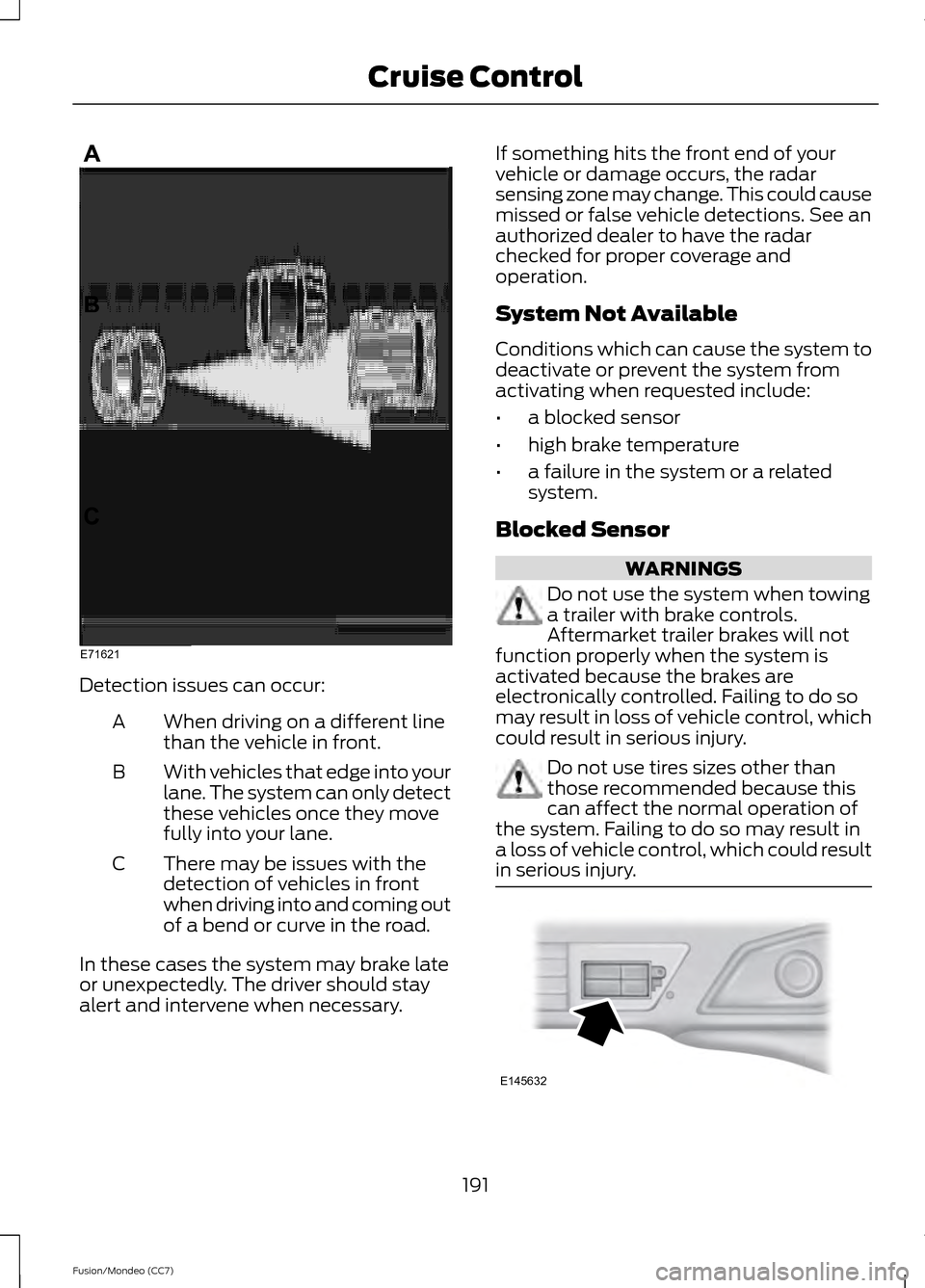
Detection issues can occur:
When driving on a different line
than the vehicle in front.
A
With vehicles that edge into your
lane. The system can only detect
these vehicles once they move
fully into your lane.
B
There may be issues with the
detection of vehicles in front
when driving into and coming out
of a bend or curve in the road.
C
In these cases the system may brake late
or unexpectedly. The driver should stay
alert and intervene when necessary. If something hits the front end of your
vehicle or damage occurs, the radar
sensing zone may change. This could cause
missed or false vehicle detections. See an
authorized dealer to have the radar
checked for proper coverage and
operation.
System Not Available
Conditions which can cause the system to
deactivate or prevent the system from
activating when requested include:
•
a blocked sensor
• high brake temperature
• a failure in the system or a related
system.
Blocked Sensor WARNINGS
Do not use the system when towing
a trailer with brake controls.
Aftermarket trailer brakes will not
function properly when the system is
activated because the brakes are
electronically controlled. Failing to do so
may result in loss of vehicle control, which
could result in serious injury. Do not use tires sizes other than
those recommended because this
can affect the normal operation of
the system. Failing to do so may result in
a loss of vehicle control, which could result
in serious injury. 191
Fusion/Mondeo (CC7) Cruise ControlE71621 E145632
Page 195 of 458

A message displays if something obstructs
the radar signals from the sensor. The
sensor is located behind a fascia cover
near the driver side of the lower grille. The
system cannot detect a vehicle ahead and
will not function when something obstructs
the radar signals. The following table lists
possible causes and actions for this
message displaying. Action
Cause
Clean the grille surface in front of the radaror remove the object causing the obstruc- tion.
The surface of the radar in the grille is dirty
or obstructed in some way.
Wait a short time. It may take several
minutes for the radar to detect that it is no longer obstructed
The surface of the radar in the grille is clean
but the message remains in the display.
Do not use the system in these conditionbecause it may not detect any vehicles ahead.
Heavy rain or snow is interfering with the
radar signals.
Do not use the system in these conditionbecause it may not detect any vehicles ahead.
Swirling water, or snow or ice on the surface
of the road may interfere with the radar signals.
Wait a short time or switch to normal cruisecontrol.
You are in a desert or remote area with no
other vehicles and no roadside objects.
Due to the nature of radar technology, it is
possible to get a blockage warning and not
be blocked. This can happen, for example,
when driving in sparse rural or desert
environments. A false blocked condition
will either self clear or clear after a key
cycle.
Switching to Normal Cruise
Control WARNING
Normal cruise control will not brake
due to slower vehicles. Always be
aware of which mode is selected and
apply the brakes when necessary. You can manually change from adaptive
cruise control to normal cruise control
through the information display. The cruise control indicator light
replaces the adaptive cruise
control indicator light if you
select normal cruise control. The gap
setting will not display, the system will not
automatically respond to lead vehicles and
automatic braking will activate. The
system defaults to adaptive cruise control
when you start the engine.
192
Fusion/Mondeo (CC7) Cruise ControlE71340
Page 206 of 458

If it is, a red warning light illuminates and
an audible warning chime sounds.
The brake support system assists the driver
in reducing the collision speed by charging
the brakes. If the risk of collision further
increases after the warning light
illuminates, the brake support prepares
the brake system for rapid braking. This
may be apparent to the driver. The system
does not automatically activate the brakes
but, if the brake pedal is pressed, full force
braking is applied even if the brake pedal
is lightly pressed.
Using the Collision Warning System
WARNING
The collision warning system
’s brake
support can only help reduce the
speed at which a collision occurs if
the driver applies the vehicle ’s brakes. The
brake pedal must be pressed just like any
typical braking situation. The warning system and chime can be
turned on and off separately; the warning
system sensitivity can be adjusted to one
of three possible settings by using the
information display control. See General
Information (page 83).
Note: If the system cannot be turned off in
a vehicle equipped with MyKey®, See
Principle of Operation
(page 48). Note:
If collision warnings are perceived as
being too frequent or disturbing then the
warning sensitivity can be reduced, though
the manufacturer recommends using the
highest sensitivity setting where possible.
Setting lower sensitivity would lead to fewer
and later system warnings. See
General
Information (page 83).
Blocked Sensors If a message regarding a blocked sensor
appears in the information display, the
radar signals from the sensor have been
obstructed. The sensors are located behind
a fascia cover near the driver side of the
lower grille. When the sensors are
obstructed, a vehicle ahead cannot be
detected and the collision warning system
does not function. The following table lists
possible causes and actions for this
message being displayed.
203
Fusion/Mondeo (CC7) Driving AidsE145632
Page 207 of 458
Action
Cause
Clean the grille surface in front of the radaror remove the object causing the obstruc- tion
The surface of the radar in the grille is dirty
or obstructed in some way
Wait a short time. It may take several
minutes for the radar to detect that it is no longer obstructed
The surface of the radar in the grille is clean
but the message remains in the display
The collision warning system is temporarily
disabled. Collision warning should automat-ically reactivate a short time after the weather conditions improve
Heavy rain, spray, snow, or fog is interfering
with the radar signals
The collision warning system is temporarily
disabled. Collision warning should automat-ically reactivate a short time after the weather conditions improve
Swirling water, or snow or ice on the surface
of the road may interfere with the radar signals
System Limitations WARNING
The collision warning system
’s brake
support can only help reduce the
speed at which a collision occurs if
the driver applies the vehicle ’s brakes. The
brake pedal must be pressed just like any
typical braking situation. Due to the nature of radar technology,
there may be certain instances where
vehicles do not provide a collision warning.
These include:
•
Stationary vehicles or vehicles moving
below 6 mph (10 km/h).
• Pedestrians or objects in the roadway.
• Oncoming vehicles in the same lane.
• Severe weather conditions (see
blocked sensor section).
• Debris build-up on the grille near the
headlamps (see blocked sensor
section).
• Small distance to vehicle ahead. •
Steering wheel and pedal movements
are large (very active driving style).
•
Certain conditions may reduce the visibility
of the warning lamp; therefore, it is
recommended to keep the audible warning
on.
If the front end of the vehicle is hit or
damaged, the radar sensing zone may be
altered causing missed or false collision
warnings. See your authorized dealer to
have your collision warning radar checked
for proper coverage and operation.
204
Fusion/Mondeo (CC7) Driving Aids
Page 291 of 458

CHANGING A ROAD WHEEL
WARNINGS
The use of tire sealants may damage
your tire pressure monitoring system
and should not be used. However, if
you must use a sealant, the tire pressure
monitoring system sensor and valve stem
on the wheel must be replaced by an
authorized Ford dealer. See Tire Pressure Monitoring
System (page 283). If the tire
pressure monitor sensor becomes
damaged, it will no longer function. Note:
The tire pressure monitoring system
indicator light will illuminate when the spare
tire is in use. To restore the full functionality
of the monitoring system, all road wheels
equipped with tire pressure monitoring
sensors must be mounted on the vehicle.
If you get a flat tire while driving, do not
apply the brake heavily. Instead, gradually
decrease your speed. Hold the steering
wheel firmly and slowly move to a safe
place on the side of the road.
Have a flat serviced by an authorized
dealer in order to prevent damage to the
tire pressure monitoring system sensors.
See
Tire Pressure Monitoring System
(page 283). Replace the spare tire with a
road tire as soon as possible. During
repairing or replacing of the flat tire, have
an authorized dealer inspect the tire
pressure monitoring system sensor for
damage.
Dissimilar Spare Wheel and Tire
Assembly Information WARNING
Failure to follow these guidelines
could result in an increased risk of
loss of vehicle control, injury or death. If you have a dissimilar spare wheel and
tire, then it is intended for temporary use
only. This means that if you need to use it,
you should replace it as soon as possible
with a road wheel and tire assembly that
is the same size and type as the road tires
and wheels that were originally provided
by Ford. If the dissimilar spare tire or wheel
is damaged, it should be replaced rather
than repaired.
A dissimilar spare wheel and tire assembly
is defined as a spare wheel and tire
assembly that is different in brand, size or
appearance from the road tires and wheels
and can be one of three types:
1.
T-type mini-spare:
This spare tire
begins with the letter T for tire size and
may have Temporary Use Only molded in
the sidewall.
2. Full-size dissimilar spare with label
on wheel:
This spare tire has a label on
the wheel that states: THIS WHEEL AND
TIRE ASSEMBLY FOR TEMPORARY USE
ONLY.
When driving with one of the dissimilar
spare tires listed above, do not:
• Exceed 50 mph (80 km/h)
• Load the vehicle beyond maximum
vehicle load rating listed on the Safety
Compliance Label.
• Tow a trailer.
• Use snow chains on the end of the
vehicle with the dissimilar spare tire.
• Use more than one dissimilar spare tire
at a time.
• Use commercial car washing
equipment.
• Try to repair the dissimilar spare tire.
288
Fusion/Mondeo (CC7) Wheels and Tires
Page 449 of 458

Brake Fluid Check........................................250
Brakes.................................................................171
General Information............................................ 171
Breaking-In......................................................218
Bulb Specification Chart..........................260
C
Cabin Air Filter
................................................127
California Proposition 65..............................11
Capacities and Specifications................293 Technical Specifications................................. 297
Car Wash See: Cleaning the Exterior.............................. 262
Center Console
..............................................143
Changing a Bulb...........................................257 Lamp Assembly Condensation.................... 257
Replacing a Reverse Lamp Bulb.................. 258
Replacing the Headlamp Bulbs................... 258
Replacing the License Plate Lamp Bulb................................................................... 260
Replacing the Tail, Brake, High-Mount Brake Lamp, and Turn Signal Lamp
Bulbs.................................................................. 258
Changing a Fuse
............................................231
Fuses........................................................................\
231
Changing a Road Wheel
...........................288
Dissimilar Spare Wheel and Tire Assembly
Information..................................................... 288
Stowing the flat tire........................................... 291
Tire Change Procedure.................................... 289
Changing the 12V Battery
..........................251
Changing the Engine Air Filter.................253 ........................................................................\
.......... 254
2.5L Engine........................................................... 254
EcoBoost Engines.............................................. 253
Changing the Wiper Blades.....................252
Checking MyKey System Status..............50
Checking the Wiper Blades......................252
Child Restraint and Safety Belt Maintenance..................................................31
Child Safety
.......................................................13
General Information............................................. 13
Child Safety Locks..........................................23 Left-Hand Side...................................................... 24
Right-Hand Side................................................... 24
Child Seat Positioning
...................................15
Cleaning Leather Seats.............................266 Cleaning Products
.......................................262
Cleaning the Alloy Wheels.......................266
Cleaning the Engine
...................................264
Cleaning the Exterior..................................262 Cleaning Plastic Exterior Parts..................... 263
Exterior Chrome................................................. 262
Underbody........................................................... 263
Cleaning the Instrument Panel and Instrument Cluster Lens........................265
Cleaning the Interior...................................264
Cleaning the Windows and Wiper Blades...........................................................264
Clearing All MyKeys.......................................49
Climate...........................................................400 Climate Control Voice Commands..............401
Climate Control
..............................................118
Collision Warning System........................202 PRINCIPLE OF OPERATION.......................... 202
Coolant Check See: Engine Coolant Check............................ 247
Crash Sensors and Airbag Indicator.......40
Creating a MyKey
...........................................49
Programming/Changing Optional
Settings............................................................... 49
Cruise Control
..................................................63
Principle of Operation...................................... 186
Type 1........................................................................\
63
Type 2....................................................................... 63
Cruise control See: Using Cruise Control................................ 186
Customer Assistance..................................221
D
Data Recording
..................................................9
Event Data Recording........................................... 9
Service Data Recording........................................ 9
Daytime Running Lamps
............................68
Direction Indicators.......................................70
Driver Alert......................................................193
PRINCIPLE OF OPERATION........................... 193
USING DRIVER ALERT..................................... 193
Driver and Passenger Airbags...................34 Children and Airbags........................................... 35
Proper Driver and Front Passenger Seating Adjustment........................................................ 35
Driving Aids.....................................................193
Driving Hints
...................................................218
446
Fusion/Mondeo (CC7) Index
Page 456 of 458

Using Adaptive Cruise Control.................187
Blocked Sensor.................................................... 191
Changing the Set Speed................................. 190
Detection Issues................................................. 190
Disengaging the System.................................. 189
Following a Vehicle............................................ 188
Hilly Condition Usage....................................... 190
Low Speed Automatic Cancellation...........190
Overriding the System...................................... 189
Resuming the Set Speed................................ 190
Setting a Speed................................................... 187
Setting the Gap Distance................................ 188
Switching the System Off............................... 190
Switching the System On................................ 187
Switching to Normal Cruise Control............192
System Not Available........................................ 191
Using All-Wheel Drive................................166 Driving In Special Conditions With
All-Wheel Drive (AWD)............................... 166
Using Cruise Control...................................186 Switching Cruise Control Off......................... 186
Switching Cruise Control On.......................... 186
Using MyKey With Remote Start Systems..........................................................50
Using Snow Chains.....................................287
Using Stability Control................................176 AdvanceTrac® ..................................................... 176
Using SYNC™ With Your Media Player............................................................329
Accessing Your Play Menu.............................. 333
Connecting Your Digital Media Player to the USB Port........................................................... 329
Media Menu Features....................................... 332
Media Voice Commands................................. 329
System Settings................................................. 335
What's Playing?................................................. 329
Using SYNC™ With Your Phone...........309 Accessing Features through the Phone
Menu................................................................... 314
Accessing Your Phone Settings..................... 317
Making Calls.......................................................... 312
Pairing a Phone for the First Time................310
Pairing Subsequent Phones........................... 310
Phone Options during an Active Call..........313
Phone Voice Commands................................. 310
Receiving Calls..................................................... 313
System Settings.................................................. 319
Text Messaging.................................................... 315Using Traction Control................................175
System Indicator Lights and
Messages........................................................... 175
Using Voice Recognition...........................307 Initiating a Voice Session................................ 307
System Interaction and Feedback.............308
Utilizing the Mediation/Arbitration Program (Canada Only).........................223
V
Vehicle Care
...................................................262
General Information......................................... 262
Vehicle Certification Label.......................295
Vehicle Identification Number................295
Vehicle Storage.............................................267 Battery.................................................................... 267
Body........................................................................\
267
Brakes.................................................................... 268
Cooling system................................................... 267
Engine..................................................................... 267
Fuel system.......................................................... 267
General................................................................... 267
Miscellaneous..................................................... 268
Removing Vehicle From Storage.................268
Tires........................................................................\
268
Ventilated Seats............................................135 Heated and ventilated seat air filter
replacement (if equipped)......................... 135
Ventilation See: Climate Control.......................................... 118
VIN See: Vehicle Identification Number............295
Voice Control
...................................................63
453
Fusion/Mondeo (CC7) Index