Page 368 of 558

If you are stowing the flat tire,
remove the L-shaped bolt from the
external pocket of the felt bag. With
the 3rd row seat in the raised
position, stand the flat tire in the rear
of the vehicle with the tire’s valve
stem facing the rear of the vehicle.
Fasten the flat tire to the vehicle by
inserting the L-shaped bolt through
one of the lug bolt holes in the wheel
and turning clockwise into the
threaded hole in the vehicle until the
tire is secured.
If you are stowing the temporary spare tire, place the tire over the jack
and secure it with the large wing nut.
TECHNICAL SPECIFICATIONS
Wheel Lug Nut Torque Specifications
Retighten the lug nuts to the specified torque within 100 miles (160 km)
after any wheel disturbance (rotation, flat tire, wheel removal, etc.).
Lug nut socket
size/Bolt sizeWheel lug nut torque*
ft-lb N•m
12x 20 100 135
* Torque specifications are for nut and bolt threads free of dirt and
rust. Use only Ford recommended replacement fasteners.
368Wheels and Tires
2013 Flex(471)
Owners Guide gf, 1st Printing
USA(fus)
Page 369 of 558
WARNING:When a wheel is installed, always remove any
corrosion, dirt or foreign materials present on the mounting
surfaces of the wheel or the surface of the wheel hub, brake drum or
brake disc that contacts the wheel. Ensure that any fasteners that
attach the rotor to the hub are secured so they do not interfere with
the mounting surfaces of the wheel. Installing wheels without correct
metal-to-metal contact at the wheel mounting surfaces can cause the
wheel nuts to loosen and the wheel to come off while the vehicle is in
motion, resulting in loss of control.
Note:Inspect the wheel pilot hole (1) and
mounting surface prior to installation.
Remove any visible corrosion or loose
particles.
Wheels and Tires369
2013 Flex(471)
Owners Guide gf, 1st Printing
USA(fus)
Page 379 of 558

Peace of mind
•Remote start•Wheel locks
•Locking fuel plug for capless fuel
systems•Vehicle security
•Full vehicle covers
•Bumper and hitch mounted parking sensors*
*Ford Licensed Accessories (FLA) are warranted by the accessory
manufacturer’s warranty. Ford Licensed Accessories are fully designed
and developed by the accessory manufacturer and have not been
designed or tested to Ford Motor Company engineering requirements.
Contact your Ford dealer for details regarding the manufacturer’s limited
warranty and/or a copy of the FLA product limited warranty offered by
the accessory manufacturer.
For maximum vehicle performance, keep the following information in
mind when adding accessories or equipment to your vehicle:
•When adding accessories, equipment, passengers and luggage to your
vehicle, do not exceed the total weight capacity of the vehicle or of
the front or rear axle (GVWR or GAWR as indicated on the Safety
Compliance Certification label). Consult your authorized dealer for
specific weight information.
•The Federal Communications Commission (FCC) and Canadian Radio
Telecommunications Commission (CRTC) regulate the use of mobile
communications systems — such as two-way radios, telephones and
theft alarms - that are equipped with radio transmitters. Any such
equipment installed in your vehicle should comply with FCC or CRTC
regulations and should be installed only by a qualified service
technician.
•Mobile communications systems may harm the operation of your
vehicle, particularly if they are not properly designed for automotive
use.
•To avoid interference with other vehicle functions, such as anti-lock
braking systems, amateur radio users who install radios and antennas
onto their vehicle should not locate the amateur radio antennas in the
area of the driver’s side hood.
•Any non-Ford custom electrical or electronic accessories or
components that are added to the vehicle by the authorized dealer or
the owner, may adversely affect battery performance and durability,
and may also adversely affect the performance of other electrical
systems in the vehicle.
Accessories379
2013 Flex(471)
Owners Guide gf, 1st Printing
USA(fus)
Page 382 of 558
PROTECT YOURSELF FROM THE RISING COST OF VEHICLE REPAIRS WITH A FORD EXTENDED SERVICE PLAN!
Name
To learn more, call our Ford ESP specialists at 800-367-3377, and don't forget to ask about our interest free payment
program, allowing you all the security and benefits Ford ESP has to offer wh i l e paying over time. Your pre-approved with
no credit checks,no hassles!
Or, complete the information below and mail this to:
Ford
ESPP.O. Box 8072
Royal Oak, MI 48068-9933
ADDRESS APT. #
STATE ZIP CITY
E-MAIL
(PLEASE PRINT)
382Ford Extended Service Plan
2013 Flex(471)
Owners Guide gf, 1st Printing
USA(fus)
Page 425 of 558

WARNING:Always place your phone in a secure location in the
vehicle so it does not become a projectile or get damaged in a
collision. Failure to do so may cause serious injury to someone or damage
the phone which could prevent 911 Assist™ from working properly.
Note:SYNC�911 Assist™ feature must be set on prior to the incident.
Note:Before setting this feature on, ensure that you read the 911
Assist™ privacy notice later in this section for important information.
Note:If 911 Assist™ is turned on or off by any user, that setting applies
for all paired phones. If 911 Assist™ is turned off, a voice message plays
and/or a display message/icon comes on when the vehicle is started after
a previously paired phone connects.
Note:Every phone operates differently. While SYNC�911 Assist™ works
with most cellular phones, some may have trouble using this feature.
If a crash deploys an airbag or activates the fuel pump shut-off, your
SYNC equipped vehicle may be able to contact emergency services by
dialing 911 through a paired and connectedBluetooth-enabled phone.
For more information about 911 Assist™, visit www.SYNCMyRide.com or
www.syncmaroute.ca.
•For information on airbag deployment, refer to theSupplementary
Restraints Systemchapter.
•For information on the fuel pump shut-off, refer to theRoadside
Emergencieschapter.
Setting 911 Assist™ On
Perform the following:
1. Press the phone button to enter the Phone Menu.
2. Scroll until 911 Assist is selected.
3. Press OK to confirm and enter the 911 Assist menu.
4. Scroll to select between On and Off selections.
5. Press OK when the desired option appears in the radio display. Set
On or Set Off appears in the display as confirmation.
Off selections include: Off with reminder and Off without reminder. Off
with reminder provides a display and voice reminder at phone connection
at vehicle start. Off without reminder provides a display reminder only
without a voice reminder at phone connection.
SYNC�425
2013 Flex(471)
Owners Guide gf, 1st Printing
USA(fus)
Page 445 of 558
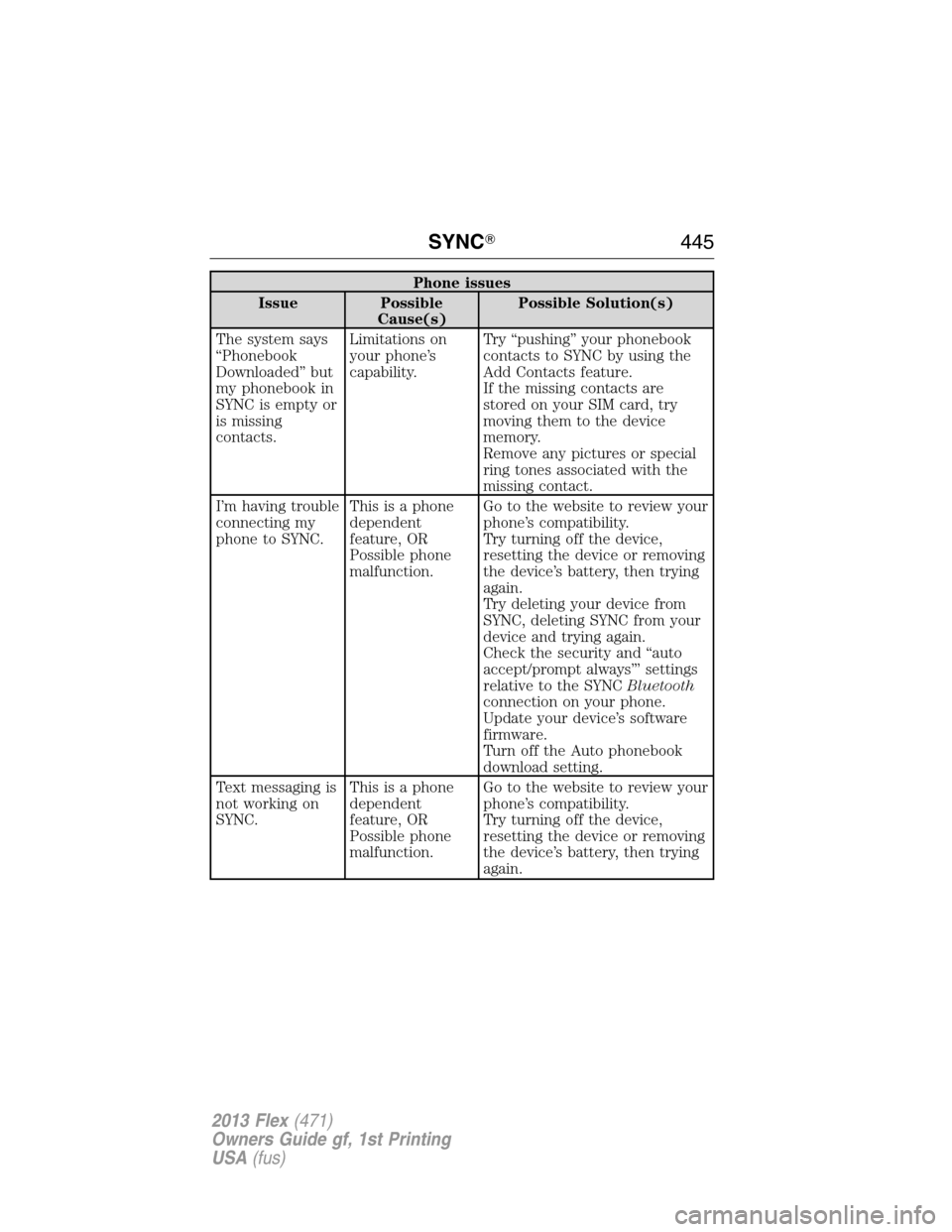
Phone issues
Issue Possible
Cause(s)Possible Solution(s)
The system says
“Phonebook
Downloaded” but
my phonebook in
SYNC is empty or
is missing
contacts.Limitations on
your phone’s
capability.Try “pushing” your phonebook
contacts to SYNC by using the
Add Contacts feature.
If the missing contacts are
stored on your SIM card, try
moving them to the device
memory.
Remove any pictures or special
ring tones associated with the
missing contact.
I’m having trouble
connecting my
phone to SYNC.This is a phone
dependent
feature, OR
Possible phone
malfunction.Go to the website to review your
phone’s compatibility.
Try turning off the device,
resetting the device or removing
the device’s battery, then trying
again.
Try deleting your device from
SYNC, deleting SYNC from your
device and trying again.
Check the security and “auto
accept/prompt always”’ settings
relative to the SYNCBluetooth
connection on your phone.
Update your device’s software
firmware.
Turn off the Auto phonebook
download setting.
Text messaging is
not working on
SYNC.This is a phone
dependent
feature, OR
Possible phone
malfunction.Go to the website to review your
phone’s compatibility.
Try turning off the device,
resetting the device or removing
the device’s battery, then trying
again.
SYNC�445
2013 Flex(471)
Owners Guide gf, 1st Printing
USA(fus)
Page 446 of 558
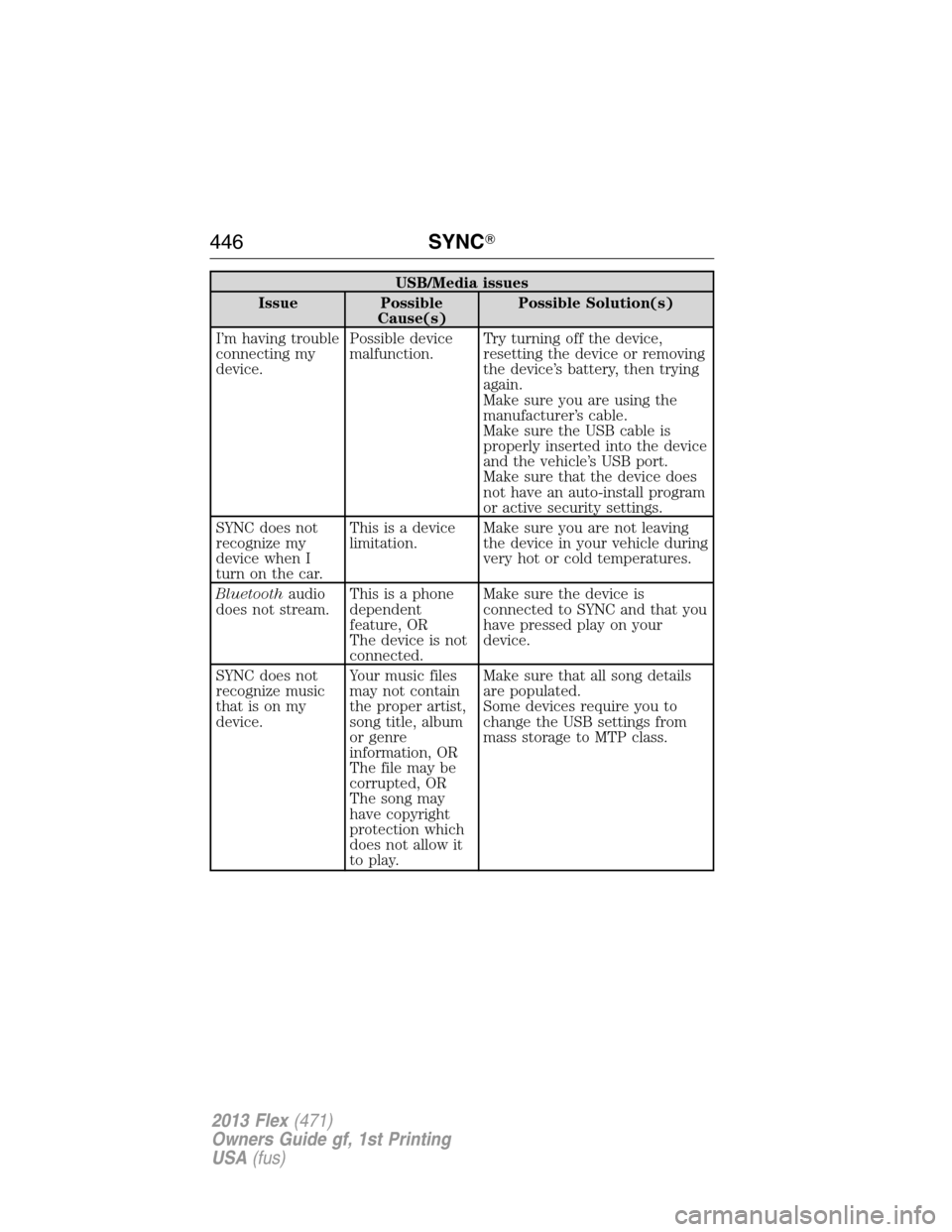
USB/Media issues
Issue Possible
Cause(s)Possible Solution(s)
I’m having trouble
connecting my
device.Possible device
malfunction.Try turning off the device,
resetting the device or removing
the device’s battery, then trying
again.
Make sure you are using the
manufacturer’s cable.
Make sure the USB cable is
properly inserted into the device
and the vehicle’s USB port.
Make sure that the device does
not have an auto-install program
or active security settings.
SYNC does not
recognize my
device when I
turn on the car.This is a device
limitation.Make sure you are not leaving
the device in your vehicle during
very hot or cold temperatures.
Bluetoothaudio
does not stream.This is a phone
dependent
feature, OR
The device is not
connected.Make sure the device is
connected to SYNC and that you
have pressed play on your
device.
SYNC does not
recognize music
that is on my
device.Your music files
may not contain
the proper artist,
song title, album
or genre
information, OR
The file may be
corrupted, OR
The song may
have copyright
protection which
does not allow it
to play.Make sure that all song details
are populated.
Some devices require you to
change the USB settings from
mass storage to MTP class.
446SYNC�
2013 Flex(471)
Owners Guide gf, 1st Printing
USA(fus)
Page 489 of 558

charged. You also need an audio extension cable with stereo male 1/8 in.
(3.5 mm) connectors at one end and a RCA jack at the other.
1. Begin with the vehicle parked and the radio and portable device are
turned off.
2. Attach one end of the audio extension cable to the headphone output
of your player and the other end into the adaptor in one of the two
left A/V input jacks (white or red) inside the center console.
3. Press the lower left corner on the touchscreen. Select either a tuned
station from the FM tab or the CD tab (if there is a CD already
loaded into the system.) Adjust the volume to a comfortable listening
level.
4. Turn the portable music player on and adjust the volume to 1/2 the
volume.
5. Press the lower left corner on the touchscreen. Select the A/V in tab.
(You should hear audio from your portable music player although it
may be low.)
6. Adjust the sound on your portable music player until it reaches the
level of the FM station or CD by switching back and forth between
the controls.
In order to playback video from your iPod�or iPhone�(if compatible),
you must have a special combination USB/RCA composite video cable
(available for purchase from Apple�). When the cable is connected to
your iPod�or iPhone�, plug the other end into both the RCA jacks and
the USB port.
Note:For safety reasons, connecting or adjusting the settings on your
portable music player should not be attempted while the vehicle is
moving. Also, the portable music player should be stored in a secure
location, such as the center console or the glove box, when the vehicle is
in motion. The audio extension cable must be long enough to allow the
portable music player to be safely stored while the vehicle is in motion.
MyFord Touch™489
2013 Flex(471)
Owners Guide gf, 1st Printing
USA(fus)

