Page 222 of 558

Maintenance and Modifications
The suspension and steering systems on your vehicle have been designed
and tested to provide predictable performance whether loaded or empty
and durable load carrying capability. For this reason, Ford Motor
Company strongly recommends that you do not make modifications such
as adding or removing parts (such as lift kits or stabilizer bars) or by
using replacement parts not equivalent to the original factory equipment.
Any modifications to a vehicle that raise the center of gravity can make it
more likely the vehicle will rollover as a result of a loss of control. Ford
Motor Company recommends that caution be used with any vehicle
equipped with a high load or device (such as ladder or luggage racks).
Failure to maintain your vehicle properly may void the warranty, increase
your repair cost, reduce vehicle performance and operational capabilities
and adversely affect driver and passenger safety. Frequent inspection of
vehicle chassis components is recommended if the vehicle is subjected to
off-highway usage.
222All-Wheel Drive
2013 Flex(471)
Owners Guide gf, 1st Printing
USA(fus)
Page 223 of 558

GENERAL INFORMATION
Note:Occasional brake noise is normal. If a metal-to-metal, continuous
grinding or continuous squeal sound is present, the brake linings may be
worn-out and should be inspected by an authorized dealer. If the vehicle
has continuous vibration or shudder in the steering wheel while braking,
the vehicle should be inspected by an authorized dealer.
Note:Brake dust may accumulate on the wheels, even under normal
driving conditions. Some dust is inevitable as the brakes wear and does
not contribute to brake noise. Refer to theVehicle Carechapter for
wheel cleaning instructions.
Refer to theInstrument Clusterchapter for information on the
brake system warning light.
Wet brakes result in reduced braking efficiency. Gently press the brake
pedal a few times when driving from a car wash or standing water to dry
the brakes.
Brake Over Accelerator
In the event the accelerator pedal becomes stuck or entrapped, apply
steady and firm pressure to the brake pedal to slow the vehicle and
reduce engine power. If you experience this condition, apply the brakes
and bring your vehicle to a safe stop. Turn the engine off, shift to P
(Park) and apply the parking brake, and then inspect the accelerator
pedal for any interferences. If none are found and the condition persists,
have your vehicle towed to the nearest authorized dealer.
Emergency Brake Assist
Emergency brake assist detects when you brake heavily by measuring the
rate at which you press the brake pedal. It provides maximum braking
efficiency as long as you press the pedal. Emergency brake assist can
reduce stopping distances in critical situations.
Brakes223
2013 Flex(471)
Owners Guide gf, 1st Printing
USA(fus)
Page 226 of 558

PRINCIPLES OF OPERATION
WARNING:Vehicle modifications involving braking system,
aftermarket roof racks, suspension, steering system, tire
construction and/or wheel/tire size may change the handling characteristics
of the vehicle and may adversely affect the performance of the
AdvanceTrac�system. In addition, installing any stereo loudspeakers may
interfere with and adversely affect the AdvanceTrac�system. Install any
aftermarket stereo loudspeaker as far as possible from the front center
console, the tunnel, and the front seats in order to minimize the risk of
interfering with the AdvanceTrac�sensors. Reducing the effectiveness of
the AdvanceTrac�system could lead to an increased risk of loss of vehicle
control, vehicle rollover, personal injury and death.
WARNING:Remember that even advanced technology cannot defy
the laws of physics. It’s always possible to lose control of a vehicle
due to inappropriate driver input for the conditions. Aggressive driving on
any road condition can cause you to lose control of your vehicle increasing
the risk of personal injury or property damage. Activation of the
AdvanceTrac�system is an indication that at least some of the tires have
exceeded their ability to grip the road; this could reduce the operator’s
ability to control the vehicle potentially resulting in a loss of vehicle
control, vehicle rollover, personal injury and death. If your AdvanceTrac�
system activates, SLOW DOWN.
The AdvanceTrac�system helps you keep control of your vehicle when
on a slippery surface. The electronic stability control (ESC) portion of
the system helps avoid skids and lateral slides and the traction control
system (TCS) helps avoid drive wheel spin and loss of traction. (For
details on TCS operation, see theTraction Controlchapter.)
226Stability Control
2013 Flex(471)
Owners Guide gf, 1st Printing
USA(fus)
Page 232 of 558

Automatic Steering into Parking Space
Note:If vehicle speed exceeds 6 mph (10 km/h), the system turns off and
you need to take full control of the vehicle.
Note:If a maneuver is interrupted before completion, the system turns
off. The steering wheel position will not indicate the actual position of
the steering and you have to full take control of the vehicle.
With hands off the wheel (and nothing obstructing its movement) and
the transmission in R (Reverse), the vehicle steers itself as instructions
to safely move the vehicle back and forward in the space are displayed in
the touch screen. While reversing, the touch screen displays a message
instructing the driver to check their surroundings (for safety reasons)
and to back-up slowly, accompanied by a corresponding graphic.
When you think the vehicle has enough space in front and behind it, or you
hear a solid tone from the parking aid, bring the vehicle to a complete stop.
When automatic steering is finished, the touch screen displays a message
indicating that the active park assist process is done. The driver is
responsible for checking the parking job and making any necessary
corrections before putting the transmission in P (Park).
232Parking Aids
2013 Flex(471)
Owners Guide gf, 1st Printing
USA(fus)
Page 233 of 558

Deactivating the Park Assist Feature
The system can be deactivated manually by:
•pressing the active park assist button
•grabbing the steering wheel
•driving above approximately 20 mph (35 km/h) for 30 seconds during
an active park search
•driving above 6 mph (10 km/h) during automatic steering
•turning off the traction control system.
Certain vehicle conditions can also deactivate the system:
•Traction control has activated on a slippery or loose surface.
•Anti-lock brake system activation or failure.
•Any door (except the driver’s) opens.
•Something touches the steering wheel.
If a problem occurs with the system, a warning message is displayed,
followed by a chime. Occasional active park assist messages may occur in
normal operation. For recurring or frequent active park assist faults,
contact an authorized dealer to have your vehicle serviced.
Troubleshooting the System
The system does not look for a space
The traction control system may be off
Any door (except the driver’s) may not be completely closed
The system does not offer a particular space
Something may be contacting the front bumper or side sensors
There is not enough room on both sides of the vehicle in order to park
There is not enough space for the parking maneuver on the opposite
side of the parking space
The vehicle is farther than 5 ft (1.5 m) from the parking space
The vehicle is closer than 16 in. (40 cm) from neighboring parked
vehicles
The transmission is in R (Reverse); the vehicle must be moving forward
to detect a parking space
Parking Aids233
2013 Flex(471)
Owners Guide gf, 1st Printing
USA(fus)
Page 237 of 558

A. Active guidelines
B. Centerline
C. Fixed guideline: Green zone
D. Fixed guideline: Yellow zone
E. Fixed guideline: Red zone
F. Rear bumper
Active guidelines are only shown with fixed guidelines. To use active
guidelines, turn the steering wheel to point the guidelines toward an
intended path. If the steering wheel position is changed while reversing,
the vehicle might deviate from the original intended path.
The fixed and active guidelines fade in and out depending on the
steering wheel position. When the steering wheel position is straight, the
active guidelines are not shown.
Always use caution while reversing. Objects in the red zone are closest to
your vehicle and objects in the green zone are further away. Objects are
getting closer to your vehicle as they move from the green zone to the
yellow or red zones. Use the side view mirrors and rear view mirror to
get better coverage on both sides and rear of the vehicle.
Selectable settings for this feature are ACTIVE + FIXED, FIXED and
OFF.
ABCD
F
E
Parking Aids237
2013 Flex(471)
Owners Guide gf, 1st Printing
USA(fus)
Page 239 of 558
PRINCIPLES OF OPERATION
Cruise control lets you maintain a set speed without keeping your foot on
the accelerator pedal.
USING CRUISE CONTROL
WARNING:Do not use cruise control in heavy traffic or on roads
that are winding, slippery or unpaved.
Note:Vehicle speed may vary momentarily when driving up or down a
steep hill. Apply the brakes if the vehicle speed increases above the set
speed while driving downhill.
Note:Cruise control will disengage if the vehicle speed decreases more
than 10 mph (16 km/h) below your set speed while driving uphill.
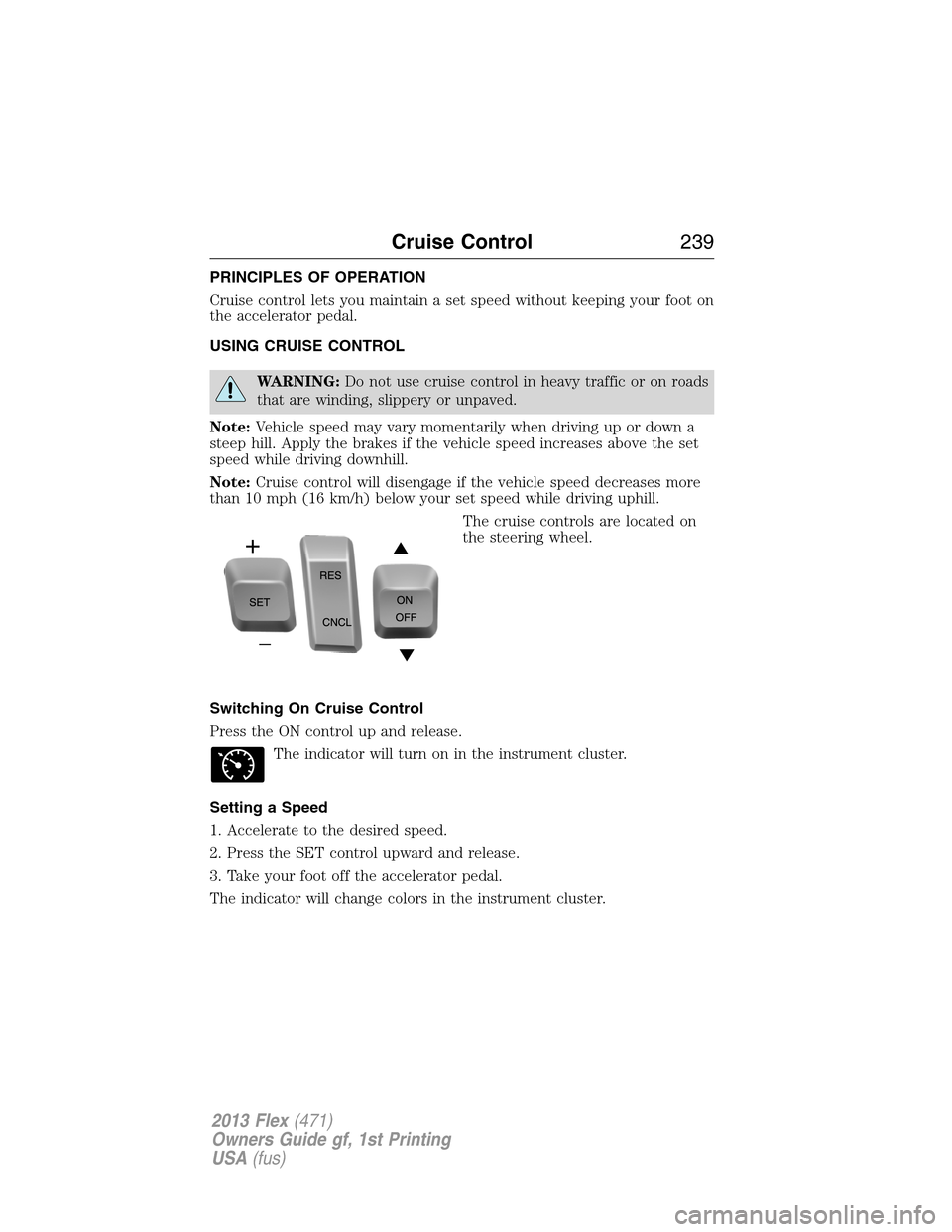
The cruise controls are located on
the steering wheel.
Switching On Cruise Control
Press the ON control up and release.
The indicator will turn on in the instrument cluster.
Setting a Speed
1. Accelerate to the desired speed.
2. Press the SET control upward and release.
3. Take your foot off the accelerator pedal.
The indicator will change colors in the instrument cluster.
Cruise Control239
2013 Flex(471)
Owners Guide gf, 1st Printing
USA(fus)
Page 241 of 558

WARNING:Do not use in poor visibility, specifically fog, rain, spray
or snow.
Note:It is the driver’s responsibility to stay alert, drive safely and be in
control of the vehicle at all times.
The system is designed to automatically adjust your speed to maintain a
proper distance between you and the vehicle in front of you in the same
lane. The driver can select from one of four GAP settings, the controls
are located on the steering wheel.
At startup, the system sets the gap to the last selected setting. Once
activated, the driver can deactivate the system at any time by pressing
the brake pedal, pressing the steering wheel ON/OFF control or pressing
the RES/CNCL control. In addition, the driver can temporarily increase
the vehicle speed above the current speed by manually pressing on the
accelerator pedal.
The controls for using your cruise
control are located on the steering
wheel.
SETRES
CNCL
ON
OFFGAP
Cruise Control241
2013 Flex(471)
Owners Guide gf, 1st Printing
USA(fus)