Page 324 of 341
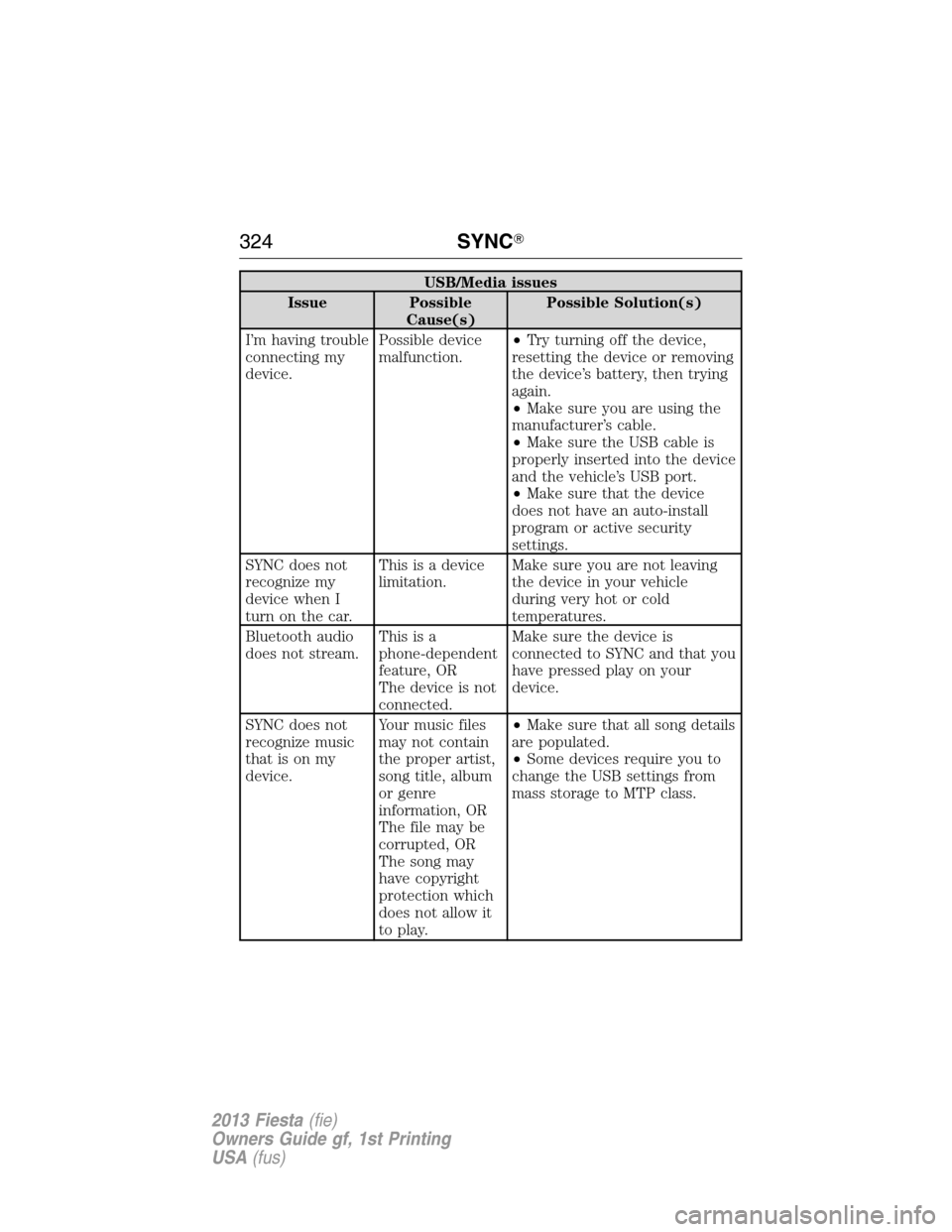
USB/Media issues
Issue Possible
Cause(s)Possible Solution(s)
I’m having trouble
connecting my
device.Possible device
malfunction.•Try turning off the device,
resetting the device or removing
the device’s battery, then trying
again.
•Make sure you are using the
manufacturer’s cable.
•Make sure the USB cable is
properly inserted into the device
and the vehicle’s USB port.
•Make sure that the device
does not have an auto-install
program or active security
settings.
SYNC does not
recognize my
device when I
turn on the car.This is a device
limitation.Make sure you are not leaving
the device in your vehicle
during very hot or cold
temperatures.
Bluetooth audio
does not stream.Thisisa
phone-dependent
feature, OR
The device is not
connected.Make sure the device is
connected to SYNC and that you
have pressed play on your
device.
SYNC does not
recognize music
that is on my
device.Your music files
may not contain
the proper artist,
song title, album
or genre
information, OR
The file may be
corrupted, OR
The song may
have copyright
protection which
does not allow it
to play.•Make sure that all song details
are populated.
•Some devices require you to
change the USB settings from
mass storage to MTP class.
324SYNC�
2013 Fiesta(fie)
Owners Guide gf, 1st Printing
USA(fus)
Page 325 of 341
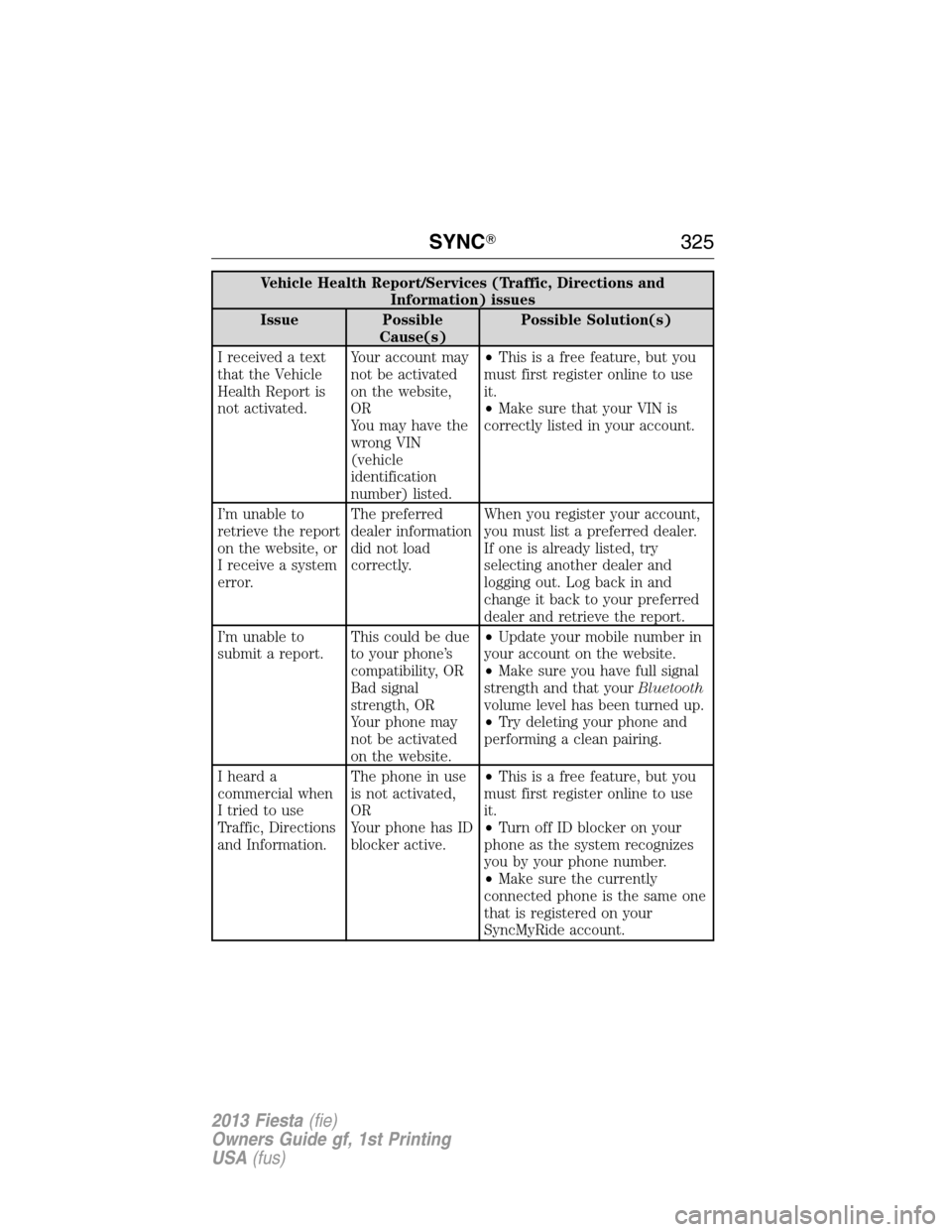
Vehicle Health Report/Services (Traffic, Directions and
Information) issues
Issue Possible
Cause(s)Possible Solution(s)
I received a text
that the Vehicle
Health Report is
not activated.Your account may
not be activated
on the website,
OR
You may have the
wrong VIN
(vehicle
identification
number) listed.•This is a free feature, but you
must first register online to use
it.
•Make sure that your VIN is
correctly listed in your account.
I’m unable to
retrieve the report
on the website, or
I receive a system
error.The preferred
dealer information
did not load
correctly.When you register your account,
you must list a preferred dealer.
If one is already listed, try
selecting another dealer and
logging out. Log back in and
change it back to your preferred
dealer and retrieve the report.
I’m unable to
submit a report.This could be due
to your phone’s
compatibility, OR
Bad signal
strength, OR
Your phone may
not be activated
on the website.•Update your mobile number in
your account on the website.
•Make sure you have full signal
strength and that yourBluetooth
volume level has been turned up.
•Try deleting your phone and
performing a clean pairing.
I heard a
commercial when
I tried to use
Traffic, Directions
and Information.The phone in use
is not activated,
OR
Your phone has ID
blocker active.•This is a free feature, but you
must first register online to use
it.
•Turn off ID blocker on your
phone as the system recognizes
you by your phone number.
•Make sure the currently
connected phone is the same one
that is registered on your
SyncMyRide account.
SYNC�325
2013 Fiesta(fie)
Owners Guide gf, 1st Printing
USA(fus)
Page 339 of 341

K
Keyless entry system
autolock .....................................65
Keys .............................................56
positions of the ignition .........129
L
Lamps
bulb replacement
specifications chart ................218
interior lamps ...........................79
replacing bulbs .......................211
LATCH anchors ...........................26
Lights, warning and indicator ....87
Load limits .................................161
Locks
autolock .....................................65
childproof ..................................31
Lubricant specifications ...........255
Lug nuts ....................................253
M
Manual transmission .................148
fluid capacities ........................255
lubricant specifications ..........255
reverse .....................................149
Media Bluetooth menu options
(adding, connecting, deleting,
turning on/off) ..........................318
Message center ...........................93
warning messages .....................95
Mirrors ...................................83–84
side view mirrors (power) .......83
Moon roof ....................................85
Motorcraft�parts ..............219, 258O
Octane rating ............................135
P
Pairing other phones ................287
Pairing your phone for the
first time ....................................286
Parking brake ............................153
Parts
(see Motorcraft�parts) ...........258
Phone Bluetooth menu options
(adding, connecting, deleting,
turning on/off) ..........................297
Phone redial ..............................291
Playing music (by artist,
album, genre, playlist, tracks,
similar) ......................................316
Power distribution box
(see Fuses) .......................189, 199
Power door locks ........................61
Power mirrors .............................83
Powerpoint ................................126
Power steering ..........................159
Power Windows ...........................81
Privacy information ..................283
Push button start system .........129
Putting a call on/off hold .........290
R
Radio ..................................101, 103
Single CD ........................101, 103
Radio reception ...........................99
Rear window defroster .............113
Index339
2013 Fiesta(fie)
Owners Guide gf, 1st Printing
USA(fus)