2013 FORD EXPEDITION AUX
[x] Cancel search: AUXPage 133 of 497
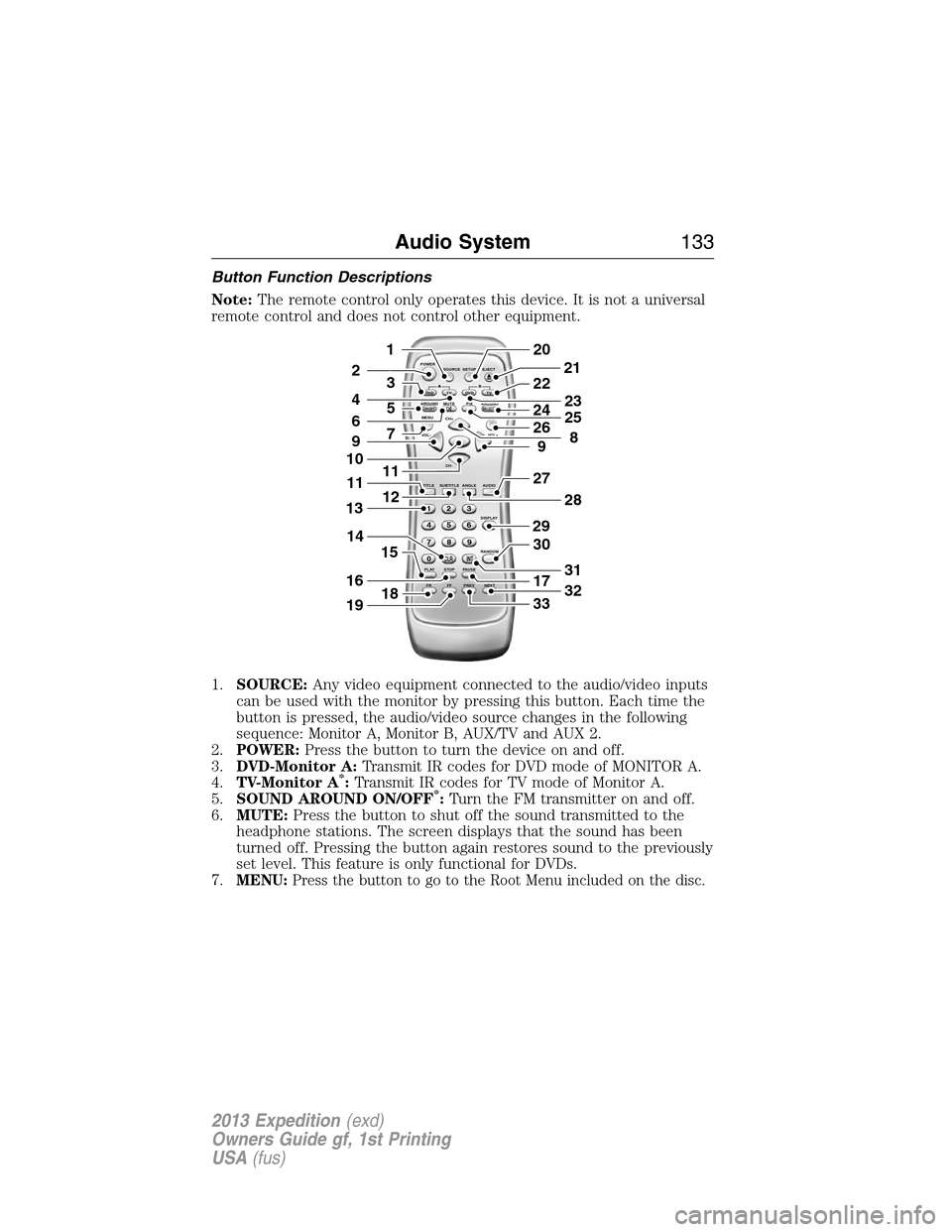
Button Function Descriptions
Note:The remote control only operates this device. It is not a universal
remote control and does not control other equipment.
1.SOURCE:Any video equipment connected to the audio/video inputs
can be used with the monitor by pressing this button. Each time the
button is pressed, the audio/video source changes in the following
sequence: Monitor A, Monitor B, AUX/TV and AUX 2.
2.POWER:Press the button to turn the device on and off.
3.DVD-Monitor A:Transmit IR codes for DVD mode of MONITOR A.
4.TV-Monitor A
*:Transmit IR codes for TV mode of Monitor A.
5.SOUND AROUND ON/OFF*:Turn the FM transmitter on and off.
6.MUTE:Press the button to shut off the sound transmitted to the
headphone stations. The screen displays that the sound has been
turned off. Pressing the button again restores sound to the previously
set level. This feature is only functional for DVDs.
7.
MENU:Press the button to go to the Root Menu included on the disc.
POWER
SOURCE
A
SOUND
AROUNDSOUND
AROUND MUTE
MENU REPEAT
CH+
CH-
TITLE SUBTITLE ANGLE AUDIO
DISPLAY
RANDOM
PLAY
123
6 5 4
789
0
CLR INT
FR FF PREV NEXTSTOP PAUSE VOL- VOL+PIX A
D
VD
ON/OFFSELECT
TV DVD TVSETUP EJECTB
5
9
29
27
30
17
33
28
32
31
201
2
7
11
12
4
3
15
21
22
24
2625
8
23
6
9
10
16
13
18
11
14
19
Audio System133
2013 Expedition(exd)
Owners Guide gf, 1st Printing
USA(fus)
Page 146 of 497

MANUAL HEATING AND AIR CONDITIONING SYSTEM WITHOUT
AUXILIARY CLIMATE CONTROL
A.Fan speed control:Controls the volume of air circulated in your
vehicle. Turn to select the desired fan speed or switch off. If you switch
the fan off, the windshield may fog up.
B.Temperature control:Controls the temperature of the air circulated
in your vehicle. Turn to select the desired temperature.
C.Air distribution control:Turn to set the air distribution to a
position listed below:
MAX A/C:Distributes recirculated air through the instrument panel
vents to cool the vehicle. This position is more economical and efficient
than normal A/C.
Distributes air through the instrument panel vents.
Distributes air through the instrument panel vents, floor vents,
and demister vents.
MAX
A/C
A/C
1
2
3
4
R
A
FED
BC
146Climate Control
2013 Expedition(exd)
Owners Guide gf, 1st Printing
USA(fus)
Page 148 of 497

MANUAL HEATING AND AIR CONDITIONING SYSTEM WITH
AUXILIARY CLIMATE CONTROL
A.Fan speed control:Controls the volume of air circulated in your
vehicle. Turn to select the desired fan speed or switch off. If you switch
the fan off, the windshield may fog up.
B.Temperature control:Controls the temperature of the air circulated
in your vehicle. Turn to select the desired temperature.
C.Air distribution control:Turn to set the air distribution to a
position listed below:
MAX A/C:Distributes recirculated air through the instrument panel
vents to cool the vehicle. This position is more economical and efficient
than normal A/C.
Distributes air through the instrument panel vents.
Distributes air through the instrument panel vents, floor vents,
and demister vents.
MAX
A/C
REAR R REAR
1
2
3
4
A/CR
A
IHGFED
BC
148Climate Control
2013 Expedition(exd)
Owners Guide gf, 1st Printing
USA(fus)
Page 149 of 497

O (Off):Turns the system on and off. When the system is off, outside
air is prevented from entering the vehicle.
Distributes air through the floor vents.
Distributes air through the windshield defroster vents, demister
vents and floor vents.
Distributes air through the windshield defroster vents and
demister vents. This setting can also be used to defog and clear
the windshield of a thin covering of ice.
D.Auxiliary climate control fan speed:Press to turn on the auxiliary
climate control system or to adjust the rear fan speed from the front
control.
E.REAR (on/off):Press to turn on the auxiliary climate controls in the
rear of the floor console (if equipped) or to turn on the auxiliary climate
control with the same settings as the front.
F.REAR (temperature control):Press to turn on the auxiliary climate
control system and to set the desired rear temperature with the front
control. The rear temperature is the same as the front temperature when
only the center rear temperature light (REAR) is lit. The rear
temperature is different from the front temperature when more than one
rear temperature light (REAR) is lit.
G.Rear defrost:Press to turn the heated windows and mirrors on and
off. SeeHeated windows and mirrorslater in this chapter for more
information.
H.Recirculated air:Press to switch between outside air and
recirculated air. When the LED on the button is lit, the air currently in
the passenger compartment is being recirculated. Using recirculated air
can reduce the time needed to cool the interior and reduce unwanted
odors from entering your vehicle.
I.A/C:Press to turn air conditioning on or off. Air conditioning cools the
vehicle using outside air. To improve air conditioning when starting your
vehicle, drive with the windows slightly open for two to three minutes.
Climate Control149
2013 Expedition(exd)
Owners Guide gf, 1st Printing
USA(fus)
Page 150 of 497

DUAL AUTOMATIC TEMPERATURE CONTROL SYSTEM WITHOUT
HEATED AND COOLED SEATS
A.AUTO:Press to turn on fully automatic operation. Select the desired
temperature using the temperature control. The system automatically
determines fan speed, air distribution, A/C operation, and outside or
recirculated air, to heat or cool the vehicle to maintain the selected
temperature.
B.EXT:Press to display the outside temperature. Press again to display
the interior temperature.
Note:The exterior temperature reading is more accurate when the
vehicle is moving.
C.REAR (on/off):Press to turn on the auxiliary climate controls in the
rear of the floor console. Press again to turn the auxiliary system off.
When this button is pressed, the display only shows the rear temperature
setting. After the rear setting changes are completed on the front
control, the display automatically shows both climate settings.
D.Defrost:Distributes air through the windshield defroster vents and
demister vents. This setting can also be used to defog and clear the
windshield of a thin covering of ice.
E.REAR (temperature control):Press to turn on the auxiliary
climate control system and to set the desired rear temperature with the
front control. The rear temperature is the same as the front temperature
when only the center rear temperature bar is lit. The rear temperature is
different from the front temperature when more than one rear
temperature bar is lit.
AUTO
OFF
EXT REAR
FA/C
R
R R
R
O
A
PNMLKJIH
DE
F
G
R
Q
BC
150Climate Control
2013 Expedition(exd)
Owners Guide gf, 1st Printing
USA(fus)
Page 151 of 497

When this button is pressed, the display only shows the rear temperature
setting. After the rear setting changes are completed on the front
control, the display automatically shows both climate settings.
F.Passenger temperature control:Press and turn to increase or
decrease the air temperature on the passenger side of the vehicle.
G.Rear defrost:Press to turn the heated windows and mirrors on and
off. SeeHeated windows and mirrorslater in this chapter for more
information.
H.Auxiliary climate control fan speed:Press to turn on the auxiliary
climate control system or to adjust the rear fan speed from the front
control.
I.Recirculated air:Press to switch between outside air and
recirculated air. Using recirculated air can reduce the time needed to
cool the interior and reduce unwanted odors from entering your vehicle.
J.A/C:Press to turn air conditioning on or off. Air conditioning cools the
vehicle using outside air. To improve air conditioning when starting your
vehicle, drive with the windows slightly open for two to three minutes.
K.Footwell/Defrost:Distributes air through the windshield defroster
vents, demister vents and floor vents.
L.Footwell:Distributes air through the floor vents.
M.Instrument panel/Footwell:Distributes air through the instrument
panel vents, floor vents, and demister vents.
N.Instrument panel:Distributes air through the instrument panel
vents.
O.Manual override controls:Press buttons I through P to override
automatic control (AUTO). To return to automatic operation, press
AUTO.
P.Front fan speed control:Controls the volume of air circulated in
your vehicle. Press to increase or decrease fan speed.
Q.OFF:Turn the climate control system off. When the system is off,
outside air is prevented from entering the vehicle.
R.Driver temperature control:Press to turn the climate control
system on and off. Turn to increase or decrease the air temperature for
the driver side of the vehicle.
This control also adjusts the passenger side temperature when dual zone
operation is disengaged.
Climate Control151
2013 Expedition(exd)
Owners Guide gf, 1st Printing
USA(fus)
Page 153 of 497
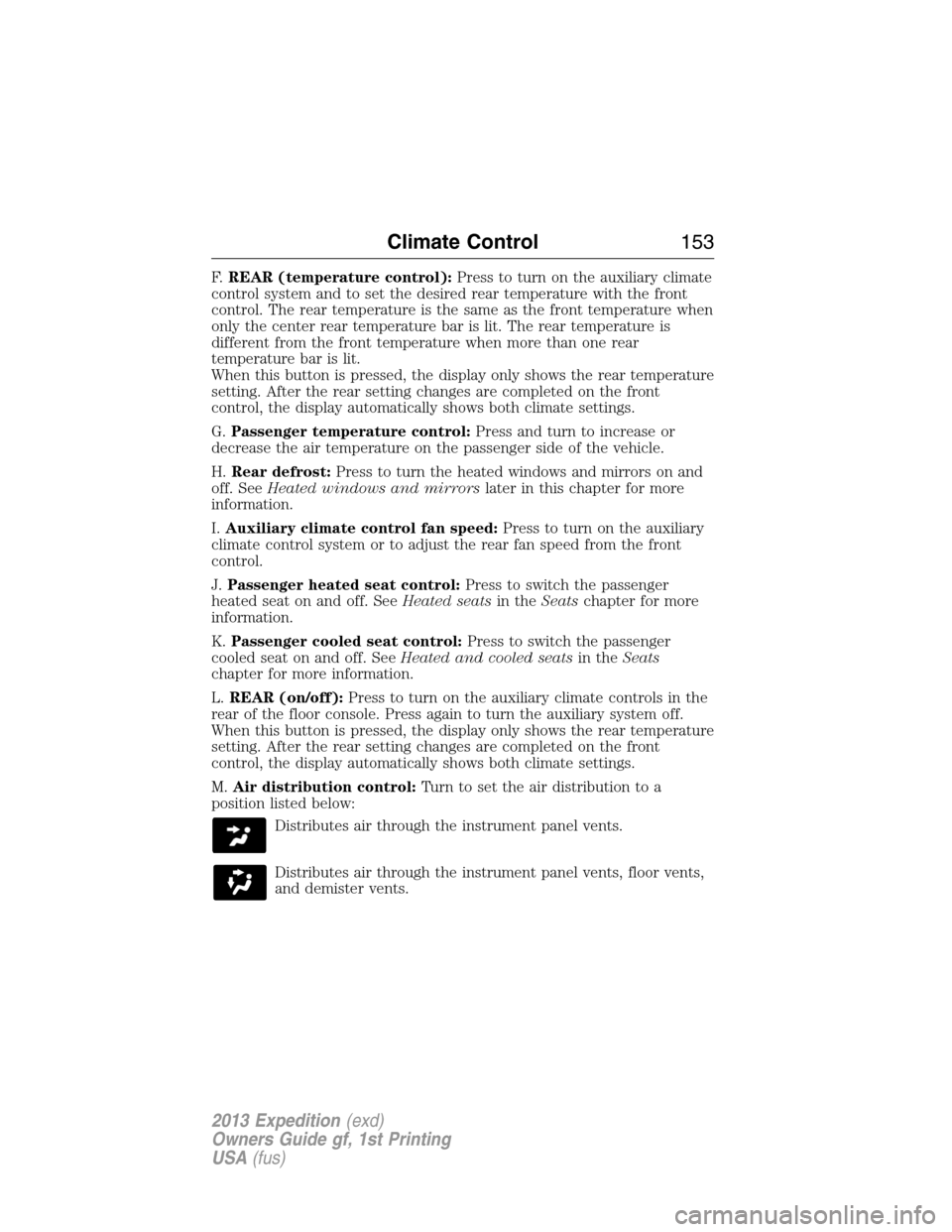
F.REAR (temperature control):Press to turn on the auxiliary climate
control system and to set the desired rear temperature with the front
control. The rear temperature is the same as the front temperature when
only the center rear temperature bar is lit. The rear temperature is
different from the front temperature when more than one rear
temperature bar is lit.
When this button is pressed, the display only shows the rear temperature
setting. After the rear setting changes are completed on the front
control, the display automatically shows both climate settings.
G.Passenger temperature control:Press and turn to increase or
decrease the air temperature on the passenger side of the vehicle.
H.Rear defrost:Press to turn the heated windows and mirrors on and
off. SeeHeated windows and mirrorslater in this chapter for more
information.
I.Auxiliary climate control fan speed:Press to turn on the auxiliary
climate control system or to adjust the rear fan speed from the front
control.
J.Passenger heated seat control:Press to switch the passenger
heated seat on and off. SeeHeated seatsin theSeatschapter for more
information.
K.Passenger cooled seat control:Press to switch the passenger
cooled seat on and off. SeeHeated and cooled seatsin theSeats
chapter for more information.
L.REAR (on/off):Press to turn on the auxiliary climate controls in the
rear of the floor console. Press again to turn the auxiliary system off.
When this button is pressed, the display only shows the rear temperature
setting. After the rear setting changes are completed on the front
control, the display automatically shows both climate settings.
M.Air distribution control:Turn to set the air distribution to a
position listed below:
Distributes air through the instrument panel vents.
Distributes air through the instrument panel vents, floor vents,
and demister vents.
Climate Control153
2013 Expedition(exd)
Owners Guide gf, 1st Printing
USA(fus)
Page 155 of 497
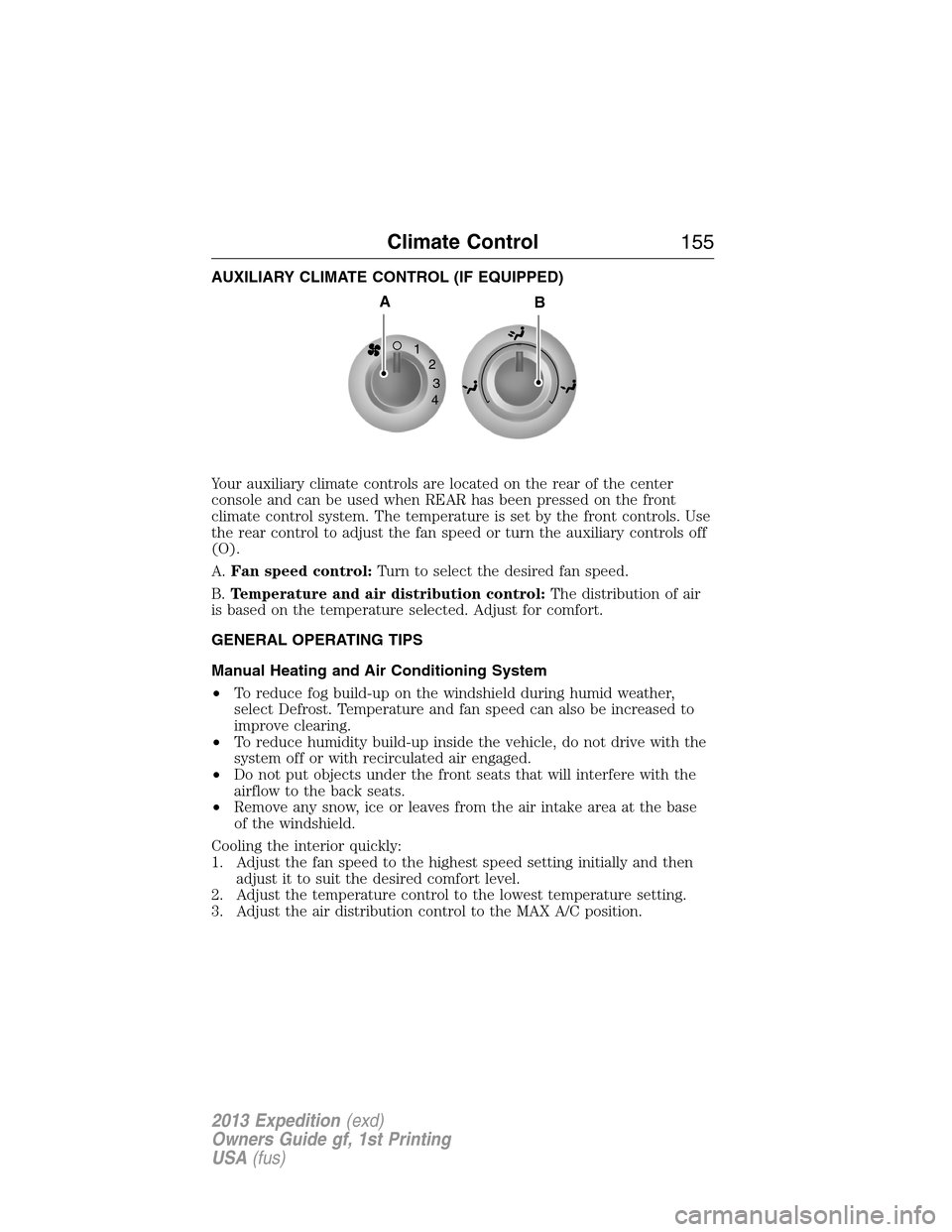
AUXILIARY CLIMATE CONTROL (IF EQUIPPED)
Your auxiliary climate controls are located on the rear of the center
console and can be used when REAR has been pressed on the front
climate control system. The temperature is set by the front controls. Use
the rear control to adjust the fan speed or turn the auxiliary controls off
(O).
A.Fan speed control:Turn to select the desired fan speed.
B.Temperature and air distribution control:The distribution of air
is based on the temperature selected. Adjust for comfort.
GENERAL OPERATING TIPS
Manual Heating and Air Conditioning System
•To reduce fog build-up on the windshield during humid weather,
select Defrost. Temperature and fan speed can also be increased to
improve clearing.
•To reduce humidity build-up inside the vehicle, do not drive with the
system off or with recirculated air engaged.
•Do not put objects under the front seats that will interfere with the
airflow to the back seats.
•Remove any snow, ice or leaves from the air intake area at the base
of the windshield.
Cooling the interior quickly:
1. Adjust the fan speed to the highest speed setting initially and then
adjust it to suit the desired comfort level.
2. Adjust the temperature control to the lowest temperature setting.
3. Adjust the air distribution control to the MAX A/C position.
1
2
3
4
AB
Climate Control155
2013 Expedition(exd)
Owners Guide gf, 1st Printing
USA(fus)