Page 211 of 526

Manual Zoom
WARNING:When manual zoom is on, the full area behind the
vehicle is not shown. Be aware of your surroundings when using
the manual zoom feature.
Note:Manual zoom is only available when the transmission is in R
(Reverse).
Note:When manual zoom is enabled, only the centerline is shown.
Allows the driver to get a closer view of an object behind the vehicle.
The zoomed image keeps the bumper in the image to provide a
reference. The zoom is only active while the transmission is in R
(Reverse), When the transmission is shifted out of R (Reverse), the
feature automatically turns off and must be reset when it is used again.
Selectable settings for this feature are OFF, Level 1, Level 2 or Level 3.
Press the up and down arrows to change the view. The selection level
appears between the buttons (i.e. Level 1). The default setting for the
manual zoom is OFF.
Rear Camera Delay
When shifting the transmission out of R (Reverse) and into any gear
other than P (Park), the camera image remains in the display until the
vehicle speed reaches 5 mph (8 km/h). This occurs when the rear
camera delay feature is on, or until a radio button is selected.
Selectable settings for this feature are ON and OFF. The default setting
for the rear camera delay is OFF.
Parking Aids211
2013 Edge(edg)
Owners Guide gf, 1st Printing
USA(fus)
Page 254 of 526

Vehicles sold in the U.S. : Using roadside assistance
Complete the roadside assistance identification card and place it in your
wallet for quick reference. This card is found in the owner’s information
portfolio in the glove compartment.
U.S. Ford vehicle customers who require Roadside Assistance, call
1-800-241-3673.
If you need to arrange roadside assistance for yourself, Ford Motor
Company will reimburse a reasonable amount for towing to the nearest
dealership within 35 miles (56 km). To obtain reimbursement
information, U.S. Ford vehicle customers call 1-800-241-3673. Customers
will be asked to submit their original receipts.
Vehicles sold in Canada : Getting roadside assistance
Canadian customers who require roadside assistance, call
1–800–665–2006.
Vehicles sold in Canada : Using roadside assistance
Complete the roadside assistance identification card and place it in your
wallet for quick reference. In Canada, the card is found in the Warranty
Guide in the glove box.
Canadian Roadside coverage and benefits may differ from the U.S.
coverage. Please refer to your Warranty Guide or visit our website at
www.ford.ca for information on Canadian services and benefits.
Canadian customers who need to obtain roadside information, call
1-800-665-2006 or visit our website at www.ford.ca.
HAZARD WARNING FLASHERS
The hazard flasher control is located on the instrument panel
by the radio. Use it when your vehicle is disabled and is
creating a safety hazard for other motorists.
•Press the flasher control and all front and rear direction signals will
flash.
•Press the flasher control again to turn them off.
Note:With extended use, the flashers may run down your battery.
254Roadside Emergencies
2013 Edge(edg)
Owners Guide gf, 1st Printing
USA(fus)
Page 273 of 526
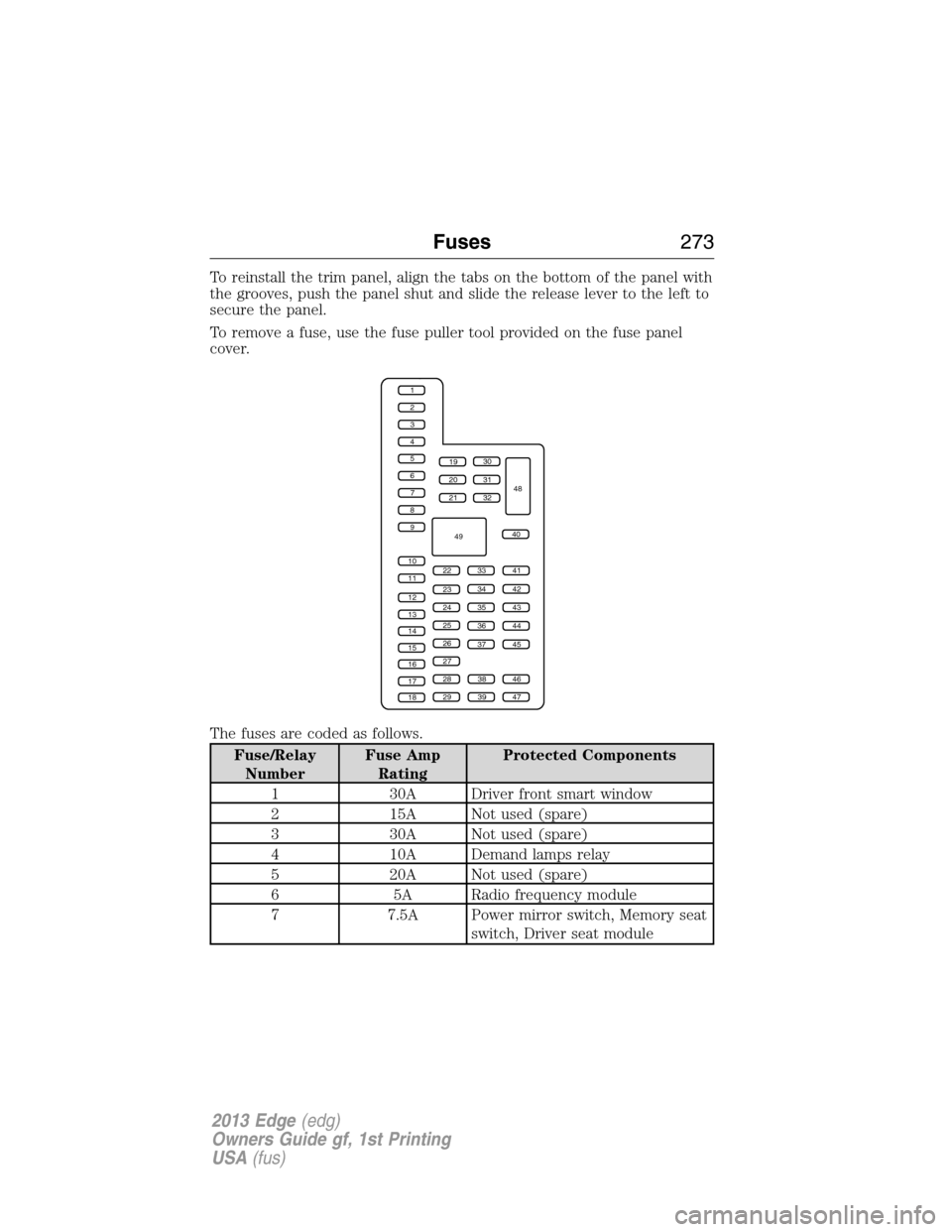
To reinstall the trim panel, align the tabs on the bottom of the panel with
the grooves, push the panel shut and slide the release lever to the left to
secure the panel.
To remove a fuse, use the fuse puller tool provided on the fuse panel
cover.
The fuses are coded as follows.
Fuse/Relay
NumberFuse Amp
RatingProtected Components
1 30A Driver front smart window
2 15A Not used (spare)
3 30A Not used (spare)
4 10A Demand lamps relay
5 20A Not used (spare)
6 5A Radio frequency module
7 7.5A Power mirror switch, Memory seat
switch, Driver seat module
1
2
3
4
5
6
7
8
9
10
11
12
13
14
15
16
17
18
19
20
21
223341
42
43
44
45
34
35
36
37
23
24
25
26
27
283846
394729
32
40
31
30
48
49
Fuses273
2013 Edge(edg)
Owners Guide gf, 1st Printing
USA(fus)
Page 275 of 526
Fuse/Relay
NumberFuse Amp
RatingProtected Components
28 15A Ignition switch (without IA), Key
inhibit solenoid, Push button start
(with IA)
29 20A Radio, Multi-function display
screen, Electronic finish panel,
SYNC�module
30 15A Front park lamps, Auxiliary park
lamps
31 5A Not used (spare)
32 15A Lock switch backlighting,
Moonroof, Power windows (driver
front), Compass/auto-dimming
rear view mirror
33 10A Not used (spare)
34 10A Reverse sensing system, Rearview
camera, Blind spot monitor
35 5A Heads-up display, Headlamp
leveling
36 10A Not used (spare)
37 10A Climate control (3.5L/3.7L
engines)
38 10A Not used (spare)
39 15A High beam headlamps
40 10A Rear park lamps, license plate
lamps
41 7.5A Occupant classification sensor,
Restraints control module
42 5A Grade assist control switch (2.0L
engine)
43 10A Not used (spare)
44 10A Not used (spare)
45 5A Not used (spare)
Fuses275
2013 Edge(edg)
Owners Guide gf, 1st Printing
USA(fus)
Page 292 of 526

If the battery has been disconnected or a new battery has been installed,
the clock and the preset radio stations must be reset once the battery is
reconnected.
Note:Always dispose of automotive batteries in a responsible manner.
Follow your local authorized standards for disposal. Call your local authorized
recycling center to find out more about recycling automotive batteries.
Because your vehicle’s engine is electronically controlled by a computer,
some control conditions are maintained by power from the battery. When
the battery is disconnected or a new battery is installed, the engine must
relearn its idle and fuel trim strategy for optimum driveability and
performance. To begin this process:
1. With the vehicle at a complete stop, set the parking brake.
2. Put the gearshift in P (Park), turn off all accessories and start the engine.
3. Run the engine until it reaches normal operating temperature.
4. Allow the engine to idle for at least one minute.
5. Turn the A/C on and allow the engine to idle for at least one minute.
6. Drive the vehicle to complete the relearning process.
•The vehicle may need to be driven 10 miles (16 km) or more to
relearn the idle and fuel trim strategy.
•Note:If you do not allow the engine to relearn its idle trim, the idle
quality of your vehicle may be adversely affected until the idle trim is
eventually relearned.
If the battery has been disconnected or a new battery has been installed,
the clock and radio settings must be reset once the battery is reconnected.
CHECKING THE WIPER BLADES
Run the tip of your fingers over the edge of the blade
to check for roughness.
Clean the wiper blades with washer fluid or water
applied with a soft sponge or cloth.
292Maintenance
2013 Edge(edg)
Owners Guide gf, 1st Printing
USA(fus)
Page 349 of 526

•The Federal Communications Commission (FCC) and Canadian Radio
Telecommunications Commission (CRTC) regulate the use of mobile
communications systems — such as two-way radios, telephones and
theft alarms - that are equipped with radio transmitters. Any such
equipment installed in your vehicle should comply with FCC or CRTC
regulations and should be installed only by a qualified service
technician.
•Mobile communications systems may harm the operation of your
vehicle, particularly if they are not properly designed for automotive
use.
•To avoid interference with other vehicle functions, such as anti-lock
braking systems, amateur radio users who install radios and antennas
onto their vehicle should not locate the amateur radio antennas in the
area of the driver’s side hood.
•Any non-Ford custom electrical or electronic accessories or
components that are added to the vehicle by the authorized dealer or
the owner, may adversely affect battery performance and durability,
and may also adversely affect the performance of other electrical
systems in the vehicle.
Accessories349
2013 Edge(edg)
Owners Guide gf, 1st Printing
USA(fus)
Page 378 of 526

•Speak naturally, without long pauses between words.
•At any time you can interrupt the system while it is speaking by
pressing the voice icon.
PHONE FEATURES
Hands-free calling is one of the main features of SYNC. While the system
supports a variety of features, many are dependent on your cellular
phone’s functionality. At a minimum, most cellular phones with Bluetooth
wireless technology support the following functions:
•Answering an incoming call
•Ending a call
•Using privacy mode
•Dialing a number
•Redialing
•Call waiting notification
•Caller ID
Other features such as text messaging using Bluetooth and automatic
phonebook download are phone-dependent features. To check your
phone’s compatibility, refer to your phone’s user manual and visit
www.SYNCMyRide.com or www.syncmaroute.ca.
Pairing a Phone for the First Time
Note:SYNC�can support downloading up to approximately 2,000 entries
per Bluetooth-enabled cellular phone.
Note:Make sure the vehicle ignition and radio are turned on and the
transmission is in P (Park).
Note:To scroll through the menus, press the up and down arrows on
your audio system.
Wirelessly pairing your phone with SYNC allows you to make and receive
hands-free calls.
1. Press the phone button; when the display indicates no phone is
paired, press OK.
2. When Add Bluetooth Device appears, press OK.
3. When Find SYNC appears in the display, press OK.
4. Put your phone into Bluetooth discovery mode. Refer to your phone’s
user guide if necessary.
5. When prompted on your phone’s display, enter the six-digit PIN
provided by SYNC in the radio display.
378SYNC�
2013 Edge(edg)
Owners Guide gf, 1st Printing
USA(fus)
Page 379 of 526

6. The display indicates when the pairing is successful.
7. Depending on your phone’s capability and your market, the system
may prompt you with questions such as setting the current phone as
the primary phone (the phone SYNC automatically tries to connect
with first upon vehicle start-up), downloading your phone book, etc.
Pairing Subsequent Phones
Note:To scroll through the menus, press the up and down arrows on
your audio system.
Note:Make sure the vehicle ignition and radio are turned on and that
the transmission is in P (Park).
1. Press the phone button and scroll until System Settings is selected.
2. Press OK and scroll until Bluetooth Devices is selected and press OK.
3. Scroll until Add Bluetooth Device is selected and press OK.
4. When Find SYNC appears in the display, press OK.
5. Put your phone into Bluetooth discovery mode. Refer to your phone’s
user guide if necessary.
6. When prompted on your phone’s display, enter the six-digit PIN
provided by SYNC in the radio display. The display indicates when
the pairing is successful.
7. The system then prompts with questions such as if you would like to
set the current phone as the primary phone (the phone SYNC
automatically tries to connect with first upon vehicle start-up),
download your phone book, etc.
Phone Voice Commands
Press the voice icon and say “Phone”. Say any of the following:
“PHONE”
“Call ”1
“Call on mobile OR cell”1
“Call on other”1
“Phone book at home”2
“Phone book on mobile OR cell”2
“Call history outgoing”2
“Phone book on Other”2
“Call history missed”2
SYNC�379
2013 Edge(edg)
Owners Guide gf, 1st Printing
USA(fus)