Page 359 of 630

displays the current status of the source (such as station
frequency, name, preset or track num- ber, song title, artist
name, album name, etc.).
1. Channel 1 Mode – Displays the current source for
Channel 1.
2. Channel 1 Audio Only/Mute — Audio: The audio
only icon is not used on Channel 1, in a single screen
system. Mute: when the Mute icon is displayed, the
audio for Channel 1 has been muted using the remote
control’s MUTE button.
3. Channel 2 Audio Only/Mute — Audio: Only in a
single screen system: The audio only icon is displayed
on Channel 2 when Channel 1 is in a video mode.
Mute: when the Mute icon is displayed, the audio for
Channel 2 has been muted using the remote control’s
MUTE button.4. Channel 2 Mode — Displays the current source for
Channel 2.
5. Channel 2 ENTER Button Action — When the ENTER
button on the remote control is pressed with the
9INPUT FILE #9 button visible on the screen, the
screen shows a numeric entry keypad which allows
you to enter a specific track number on data discs and
HDD (see Numeric Keypad Menu section of this
manual). Also, Enter Button Action – “INPUT TRK #”
to enter a specific track number on audio discs.
6. Remote Locked Out—When the icon is displayed, the
remote control functions are disabled.
7. Clock — Displays the time.
8. Channel 1 Shared Status — When the icon is dis-
played, the audio for Channel 1 is also shared with the
radio and playing through the cabin speakers.
4
UNDERSTANDING YOUR INSTRUMENT PANEL 357
Page 366 of 630

•Other compression formats such as AAC, MP3 Pro,
Ogg Vorbis, and ATRAC3 will not play. The DVD
player will automatically skip the file and begin play-
ing the next available file.
•If you are creating your own files, the recommended
fixed bit rate for MP3 files is between 96 and 192Kbps
and the recommended fixed bit rate for WMA files is
between 64 and 192Kbps. Variable bit rates are also
supported. For both formats, the recommended
sample rate is either 44.1kHz or 48kHz.
•To change the current file, use the remote control’s or
DVD player ’s�button to advance to the next file, or
the�button to return to the start of the current or
previous file.
•To change the current directory, use the remote con-
trol’s PROG UP and Down buttons or Rewind/skip
back and fast fwd/skip forward.Disc Errors
If the DVD player is unable to read the disc, a�Disc Error�
message is displayed on the VES™ and Radio displays
and the disc is automatically ejected. A dirty, damaged, or
incompatible disc format are all potential causes for a
�Disc Error�message.
If a disc has a damaged track which results in audible or
visible errors that persists for 2.0 seconds, the DVD
player will attempt to continue playing the disc by
skipping forward 1.0 to 3.0 seconds at a time. If the end
of the disc is reached, the DVD player will return to the
beginning of the disc and attempt to play the start of the
first track.
The DVD player may shut down during extremely hot
conditions, such as when the vehicle’s interior tempera-
ture is above 120°F. When this occurs, the DVD player
will display�VES High Temp�and will shut off the VES™
364 UNDERSTANDING YOUR INSTRUMENT PANEL
Page 368 of 630
STEERING WHEEL AUDIO CONTROLS
The remote sound system controls are located on the rear
surface of the steering wheel. The left and right-hand
controls are rocker-type switches with a pushbutton in
the center of each switch. Reach behind the steering
wheel to access the switches.
Right-Hand Switch Functions
•Press the top of the switch to increase the volume.
•Press the bottom of the switch to decrease the volume.
•Press the button in the center of the switch to change
modes (i.e., AM, FM, etc.).
Left-Hand Switch Functions For Radio Operation
•Press the top of the switch to SEEK the next listenable
station up from the current setting.
•Press the bottom of the switch to SEEK the next
listenable station down from the current setting.
•Press the button in the center of the switch to tune to
the next preset that you have programmed.
Remote Sound Controls (Back View Of Steering Wheel)
366 UNDERSTANDING YOUR INSTRUMENT PANEL
Page 370 of 630

NOTE:If you experience difficulty in playing a particu-
lar disc, it may be damaged (i.e., scratched, reflective
coating removed, a hair, moisture or dew on the disc)
oversized, or have protection encoding. Try a known
good disc before considering disc player service.
RADIO OPERATION AND MOBILE PHONES
Under certain conditions, the mobile phone being on in
your vehicle can cause erratic or noisy performance from
your radio. This condition may be lessened or eliminated
by relocating the mobile phone antenna. This condition is
not harmful to the radio. If your radio performance does
not satisfactorily “clear” by the repositioning of the
antenna, it is recommended that the radio volume be
turned down or off during mobile phone operation when
not using Uconnect® (if equipped).
CLIMATE CONTROLS
General Overview
The air conditioning and heating system is designed to
make you comfortable in all types of weather. This
system can be operated through either the Automatic
Climate Controls on the instrument panel or through the
Uconnect® system display.
When the Uconnect® system is in different modes (Radio,
Player, Settings, More, etc.) the driver and passenger
temperature settings will be indicated at the top of the
display.
368 UNDERSTANDING YOUR INSTRUMENT PANEL
Page 429 of 630

These are all normal characteristics of ABS.
WARNING!
•The ABS contains sophisticated electronic equip-
ment that may be susceptible to interference
caused by improperly installed or high output
radio transmitting equipment. This interference
can cause possible loss of anti-lock braking capa-
bility. Installation of such equipment should be
performed by qualified professionals.
•Pumping of the Anti-Lock Brakes will diminish
their effectiveness and may lead to an accident.
Pumping makes the stopping distance longer. Just
press firmly on your brake pedal when you need to
slow down or stop.
(Continued)
WARNING!(Continued)
•The ABS cannot prevent the natural laws of phys-
ics from acting on the vehicle, nor can it increase
braking or steering efficiency beyond that afforded
by the condition of the vehicle brakes and tires or
the traction afforded.
•The ABS cannot prevent accidents, including those
resulting from excessive speed in turns, following
another vehicle too closely, or hydroplaning.
•The capabilities of an ABS equipped vehicle must
never be exploited in a reckless or dangerous
manner, which could jeopardize the user’s safety or
the safety of others.
All vehicle wheels and tires must be the same size and
type and tires must be properly inflated to produce
accurate signals for the computer.
5
STARTING AND OPERATING 427
Page 464 of 630

Tire Pressure Monitoring Low Pressure Warnings
The “Tire Pressure Monitoring Telltale Light” will
illuminate in the instrument cluster, a “LOW
TIRE” message will be displayed and a chime will
sound when tire pressure is low in one or more of the
four active road tires. An�Inflate to XX�message will also
be displayed. Should this occur, you should stop as soon
as possible, check the inflation pressure of each tire on
your vehicle, and inflate each tire to the vehicle’s recom-
mended cold placard pressure value, as shown in the
�Inflate to XX�message. Once the system receives the
updated tire pressures, the system will automatically
update and the “Tire Pressure Monitoring Telltale Light”
and “LOW TIRE” message will turn off. The vehicle may
need to be driven for up to 20 minutes above 15 mph
(24 km/h) in order for the TPMS to receive this
information.
Service TPMS Warning
When a system fault is detected, the “Tire Pressure
Monitoring Telltale Light” will flash on and off for
75 seconds and then remain on solid. The system fault
will also sound a chime. If the ignition switch is cycled,
this sequence will repeat, providing the system fault still
exists. The “Tire Pressure Monitoring Telltale Light” will
turn off when the fault condition no longer exists. A
system fault can occur due to any of the following:
1. Jamming due to electronic devices or driving next to
facilities emitting the same Radio Frequencies as the
TPMS sensors.
2. Installing some form of aftermarket window tinting
that affects radio wave signals.
3. Lots of snow or ice around the wheels or wheel
housings.
462 STARTING AND OPERATING
Page 468 of 630
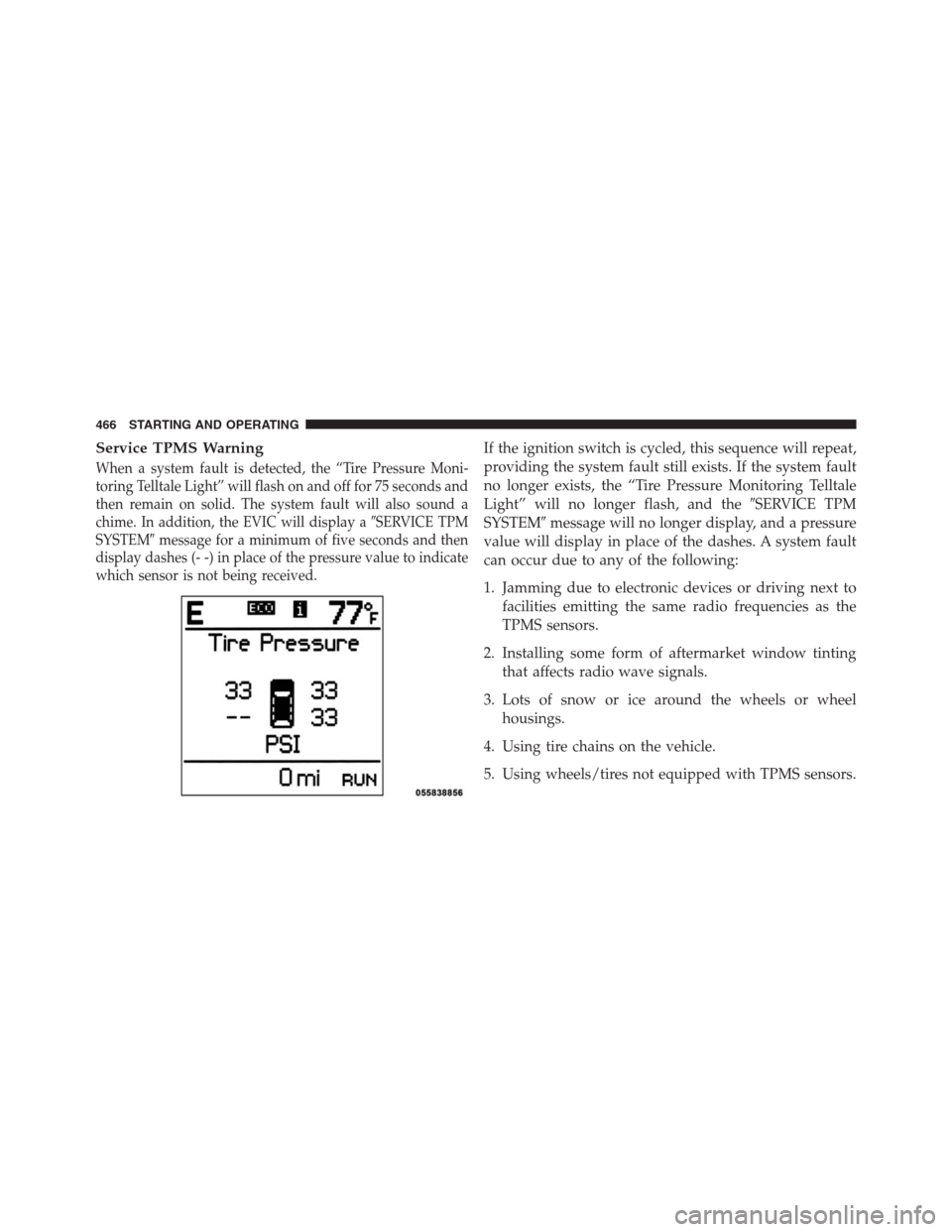
Service TPMS Warning
When a system fault is detected, the “Tire Pressure Moni-
toring Telltale Light” will flash on and off for 75 seconds and
then remain on solid. The system fault will also sound a
chime. In addition, the EVIC will display a�SERVICE TPM
SYSTEM�message for a minimum of five seconds and then
display dashes (- -) in place of the pressure value to indicate
which sensor is not being received.
If the ignition switch is cycled, this sequence will repeat,
providing the system fault still exists. If the system fault
no longer exists, the “Tire Pressure Monitoring Telltale
Light” will no longer flash, and the�SERVICE TPM
SYSTEM�message will no longer display, and a pressure
value will display in place of the dashes. A system fault
can occur due to any of the following:
1. Jamming due to electronic devices or driving next to
facilities emitting the same radio frequencies as the
TPMS sensors.
2. Installing some form of aftermarket window tinting
that affects radio wave signals.
3. Lots of snow or ice around the wheels or wheel
housings.
4. Using tire chains on the vehicle.
5. Using wheels/tires not equipped with TPMS sensors.
466 STARTING AND OPERATING
Page 516 of 630

WARNING!
•Take care to avoid the radiator cooling fan whenever
the hood is raised. It can start anytime the ignition
switch is ON. You can be injured by moving fan
blades.
•Remove any metal jewelry such as rings, watch
bands and bracelets that could make an inadvertent
electrical contact. You could be seriously injured.
•Batteries contain sulfuric acid that can burn your
skin or eyes and generate hydrogen gas which is
flammable and explosive. Keep open flames or
sparks away from the battery.
1. Set the parking brake, shift the automatic transmission
into PARK and turn the ignition to LOCK.
2. Turn off the heater, radio, and all unnecessary electri-
cal accessories.3. Remove the protective cover over the remote posi-
tive(+)battery post. To remove the cover, press the
locking tab and pull upward on the cover.
4. If using another vehicle to jump-start the battery, park
the vehicle within the jumper cables reach, set the
parking brake and make sure the ignition is OFF.
WARNING!
Do not allow vehicles to touch each other as this
could establish a ground connection and personal
injury could result.
(Continued)
514 WHAT TO DO IN EMERGENCIES
