Page 213 of 630
2. Place one hand on the seatback and apply a gentle
pressure.
3. Lift the control lever with the other hand, allow the
seatback to move forward slightly, and then release the
lever.
WARNING!
To prevent personal injury or damage to objects,
keep your head, arms, and objects out of the folding
path of the seatback.
4. Gently guide the seatback into the folded position.
To Unfold The Seat
Raise the seatback and lock it in place.
WARNING!
Be certain that the seatback is locked securely into
position. Otherwise, the seat will not provide the
proper stability for child seats and/or passengers. An
improperly latched seat could cause serious injury.3
UNDERSTANDING THE FEATURES OF YOUR VEHICLE 211
Page 216 of 630
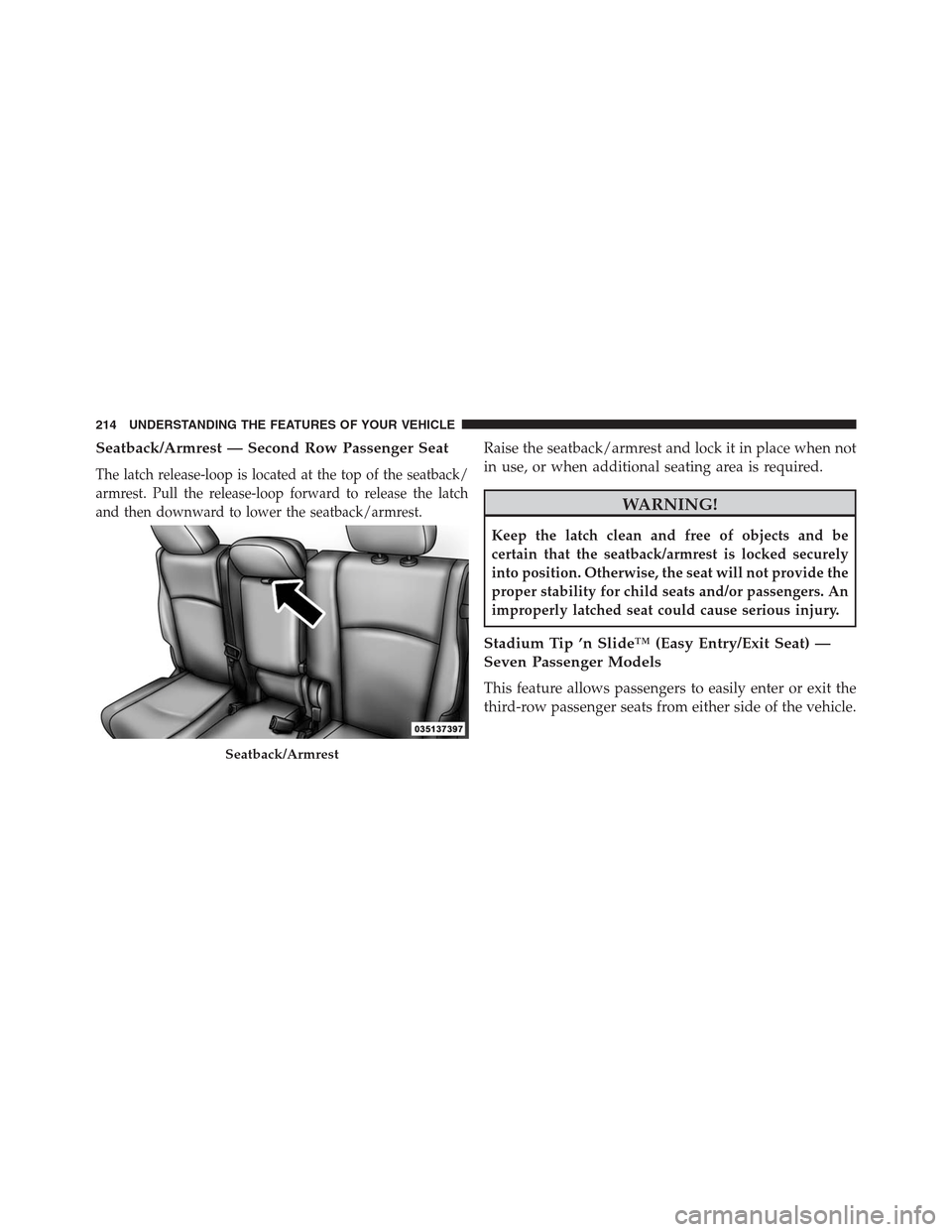
Seatback/Armrest — Second Row Passenger Seat
The latch release-loop is located at the top of the seatback/
armrest. Pull the release-loop forward to release the latch
and then downward to lower the seatback/armrest.
Raise the seatback/armrest and lock it in place when not
in use, or when additional seating area is required.
WARNING!
Keep the latch clean and free of objects and be
certain that the seatback/armrest is locked securely
into position. Otherwise, the seat will not provide the
proper stability for child seats and/or passengers. An
improperly latched seat could cause serious injury.
Stadium Tip ’n Slide™ (Easy Entry/Exit Seat) —
Seven Passenger Models
This feature allows passengers to easily enter or exit the
third-row passenger seats from either side of the vehicle.
Seatback/Armrest
214 UNDERSTANDING THE FEATURES OF YOUR VEHICLE
Page 218 of 630

WARNING!
Do not drive the vehicle with the seat in this posi-
tion, as it is only intended for entering and exiting
the third row seats. Failure to follow this warning
may result in personal injury.
To Unfold And Move The Second-Row Passenger Seat
Rearward
Move the seatback rearward until it locks in place and
then continue sliding the seat rearward on its tracks until
it locks in place.
Push the seat cushion downward to lock it in place.
Adjust the seat track position as desired. Using body
pressure, move forward and rearward on the seat to be
sure that the seat adjusters have latched.
WARNING!
Be certain that the seatback and seat are locked
securely into position. Otherwise, the seat will not
provide the proper stability for child seats and/or
passengers. An improperly latched seat could cause
serious injury.
50/50 Split Third-Row Passenger Seats With
Fold-Flat Feature — Seven Passenger Models
To provide additional storage area, each third-row pas-
senger seatback can be folded flat. This allows for ex-
tended cargo space and still maintains some rear seating
room if needed.
NOTE:Prior to folding the third-row passenger seat-
back, make sure the second-row passenger seatback is
not in a reclined position. This will allow the seatback to
fold easily.
216 UNDERSTANDING THE FEATURES OF YOUR VEHICLE
Page 220 of 630

The seatback can also be locked in the reclined position.
To do so, pull the latch release-loop located at the top of
the seatback upward, allow the seatback to recline, and
release the release-loop.
WARNING!
•Be certain that the seatback is locked securely into
position. Otherwise, the seat will not provide the
proper stability for passengers. An improperly
latched seat could cause serious injury.
•
Do not allow a passenger to sit in a third row seat
without having the head restraint unfolded and
locked in place. Failure to follow this warning may
result in personal injury to the passenger in the event
of a collision.
•Do not allow a passenger to sit in a third row seat
with the second row seatback(s) folded flat. In a
collision, the passenger could slide underneath the
seat belt and be seriously or even fatally injured.
TO OPEN AND CLOSE THE HOOD
Two latches must be released to open the hood.
1. Pull the hood release lever located under the left side
of the instrument panel.
Hood Release
218 UNDERSTANDING THE FEATURES OF YOUR VEHICLE
Page 221 of 630
2. Outside of the vehicle, locate the safety latch lever
near the center of the grille between the grille and
hood opening. Push the safety latch lever to the right
and then raise the hood.3. Use the hood prop rod to secure the hood in the open
position. Place the upper end of the prop rod in the
hole on the underside of the hood.
Underhood Safety Latch
Hood Prop Rod
3
UNDERSTANDING THE FEATURES OF YOUR VEHICLE 219
Page 252 of 630
GARAGE DOOR OPENER — IF EQUIPPED
HomeLink® replaces up to three hand-held transmitters
that operate devices such as garage door openers, motor-
ized gates, lighting or home security systems. The
HomeLink® unit is powered by your vehicles 12 Volt
battery.
The HomeLink® buttons, located on either the overhead
console, headliner or sunvisor, designate the three differ-
ent HomeLink® channels. The HomeLink® indicator is
located above the center button.
HomeLink® Buttons/Overhead Consoles
250 UNDERSTANDING THE FEATURES OF YOUR VEHICLE
Page 253 of 630
NOTE:HomeLink® is disabled when the Vehicle Secu-
rity Alarm is active.
Before You Begin Programming HomeLink®
Be sure that your vehicle is parked outside of the garage
before you begin programming.
For more efficient programming and accurate transmis-
sion of the radio-frequency signal it is recommended that
a new battery be placed in the hand-held transmitter of
the device that is being programmed to the HomeLink®
system.
Erase all channels before you begin programming. To
erase the channels place the ignition in the ON/RUN
position and press and hold the two outside HomeLink®
buttons (I and III) for up 20 seconds or until the red
indicator flashes.
HomeLink® Buttons/Sunvisor/Headliner
3
UNDERSTANDING THE FEATURES OF YOUR VEHICLE 251
Page 259 of 630

Using HomeLink®
To operate, press and release the programmed HomeLink®
button. Activation will now occur for the programmed
device (i.e., garage door opener, gate operator, security
system, entry door lock, home/office lighting, etc.,). The
hand-held transmitter of the device may also be used at any
time.
Security
It is advised to erase all channels before you sell or turn
in your vehicle.
To do this, press and hold the two outside buttons for
20 seconds until the red indicator flashes. Note that all
channels will be erased. Individual channels cannot be
erased.
The HomeLink® Universal Transceiver is disabled when
the Vehicle Security Alarm is active.
Troubleshooting Tips
If you are having trouble programming HomeLink®,
here are some of the most common solutions:
•
Replace the battery in the original hand-held transmitter.
•Press the LEARN button on the Garage Door Opener
to complete the training for a Rolling Code.
•Did you unplug the device for programming and
remember to plug it back in?
If you have any problems, or require assistance, please
call toll-free 1–800–355–3515 or, on the Internet at
www.HomeLink.com for information or assistance.3
UNDERSTANDING THE FEATURES OF YOUR VEHICLE 257