Page 318 of 630

Messages
Press and release the UP or DOWN button until “Mes-
sages: XX” displays highlighted in the EVIC. If there is
more than one message, pressing the SELECT button will
display a stored warning message. Press and release the
UP and DOWN buttons if there is more than one message
to step through the remaining stored messages. If there
are no message, pressing the SELECT button will do
nothing.
Turn Menu OFF
Select from Main Menu using the DOWN button. Press-
ing the SELECT button blanks the menu display. Pressing
any one of the four steering wheel buttons brings the
menu back.
Uconnect® SETTINGS
The Uconnect® system uses a combination of soft and
hard keys located on the center of the instrument panel
that allows you to access and change the customer
programmable features.
Hard-Keys
Hard-Keys are located on the left and right side of the
Uconnect® 4.3 screen. In addition, there is a Scroll/Enter
control knob located on the right side of the Climate
Controls in the center of the instrument panel. Turn the
control knob to scroll through menus and change settings
(i.e., 30, 60, 90), press the center of the control knob one or
more times to select or change a setting (i.e., ON, OFF).
Soft-Keys
Soft-Keys are accessible on the Uconnect® Touch-Screen.
316 UNDERSTANDING YOUR INSTRUMENT PANEL
Page 326 of 630

NOTE:If the vehicle is equipped with Keyless Enter-
N-Go (Passive Entry) and the EVIC is programmed to
Unlock All Doors On 1st Press, all doors will unlock no
matter which Passive Entry equipped door handle is
grasped. If Unlock Driver Door Only On 1st Press is
programmed, only the driver ’s door will unlock when
the driver ’s door is grasped. With Passive Entry, if
Unlock Driver Door Only On 1st Press is programmed,
touching the handle more than once will only result in
the driver ’s door opening. If Unlock Driver Door Only
On 1st Press is selected, once the driver door is opened,
the interior door lock/unlock switch can be used to
unlock all the doors (or use the RKE transmitter).•Passive Entry (Keyless Enter-N-Go)
Touch the Passive Entry soft-key to change this display.
This feature allows you to lock and unlock the vehicle’s
door(s) without having to press the RKE transmitter lock
or unlock buttons. To make your selection, touch the
Passive Entry soft-key and select ON or OFF. Then touch
the arrow back soft-key. Refer to “Keyless Enter-N-Go” in
“Things To Know Before Starting Your Vehicle”.
Heated Seats
•Auto Heated Seats
Touch the Auto Heated Seats soft-key to change this
display. When temperatures are above 80° F (26.7° C) the
driver vented seat will turn on. To make your selection,
touch the Auto Heated Seats soft-key and select ON or
OFF. Then touch the arrow back soft-key.
324 UNDERSTANDING YOUR INSTRUMENT PANEL
Page 339 of 630

NOTE:If the vehicle is programmed to Unlock All Doors
1st Press, all doors will unlock no matter which Passive
Entry equipped door handle is grasped. If Driver Door
1st Press is programmed, only the driver ’s door will
unlock when the driver ’s door is grasped. With Passive
Entry, if Driver Door 1st Press is programmed touching
the handle more than once will only result in the driver ’s
door opening. If driver door first is selected, once the
driver door is opened, the interior door lock/unlock
switch can be used to unlock all doors (or use RKE
transmitter).
•Passive Entry
This feature allows you to lock and unlock the vehicle’s
door(s) without having to press the Remote Keyless
Entry (RKE) transmitter lock or unlock buttons. To make
your selection, touch the Passive Entry soft-key, until acheck-mark appears next to setting, showing that setting
has been selected. Touch the back arrow soft-key to
return to the previous menu. Refer to “Keyless Enter-N-
Go” in “Things To Know Before Starting Your Vehicle”.
Auto-On Comfort & Remote Start
After pressing the Auto-On Comfort & Remote Start
soft-key the following settings will be available.
•Horn With Remote Start
When this feature is selected, the horn will sound when
the remote start is activated. To make your selection,
touch the Sound Horn With Remote Start soft-key, until a
check-mark appears next to setting, showing that setting
has been selected. Touch the back arrow soft-key to
return to the previous menu.
4
UNDERSTANDING YOUR INSTRUMENT PANEL 337
Page 345 of 630
Single Video Screen
NOTE:Typically there are two different ways to operate
the features of the Video Entertainment System (VES)™.
•The Remote Control
•The Touch-Screen Radio (If Equipped)
Play A DVD
1. Press the EJECT button on the radio faceplate (Touch-
Screen).
2. Insert the DVD with the label facing up. The radio
automatically selects the appropriate mode after the
disc is recognized and displays the menu screen or
starts playing the first track.
3. Ensure the VES™ Remote Control and the Headphone
switch is on Channel 1.
Using The Remote Control
1. Press the MODE button on the Remote Control.
2.
While looking at the video screen, highlight DISC
by either pressing Up/Down/Left/Right buttons or
by repeatedly pressing the MODE button, then press
ENTER on the Remote Control.
Select DISC Mode On The VES Screen
4
UNDERSTANDING YOUR INSTRUMENT PANEL 343
Page 346 of 630
NOTE:The VES™ system will retain the last setting
when turned off.
Play Video Games
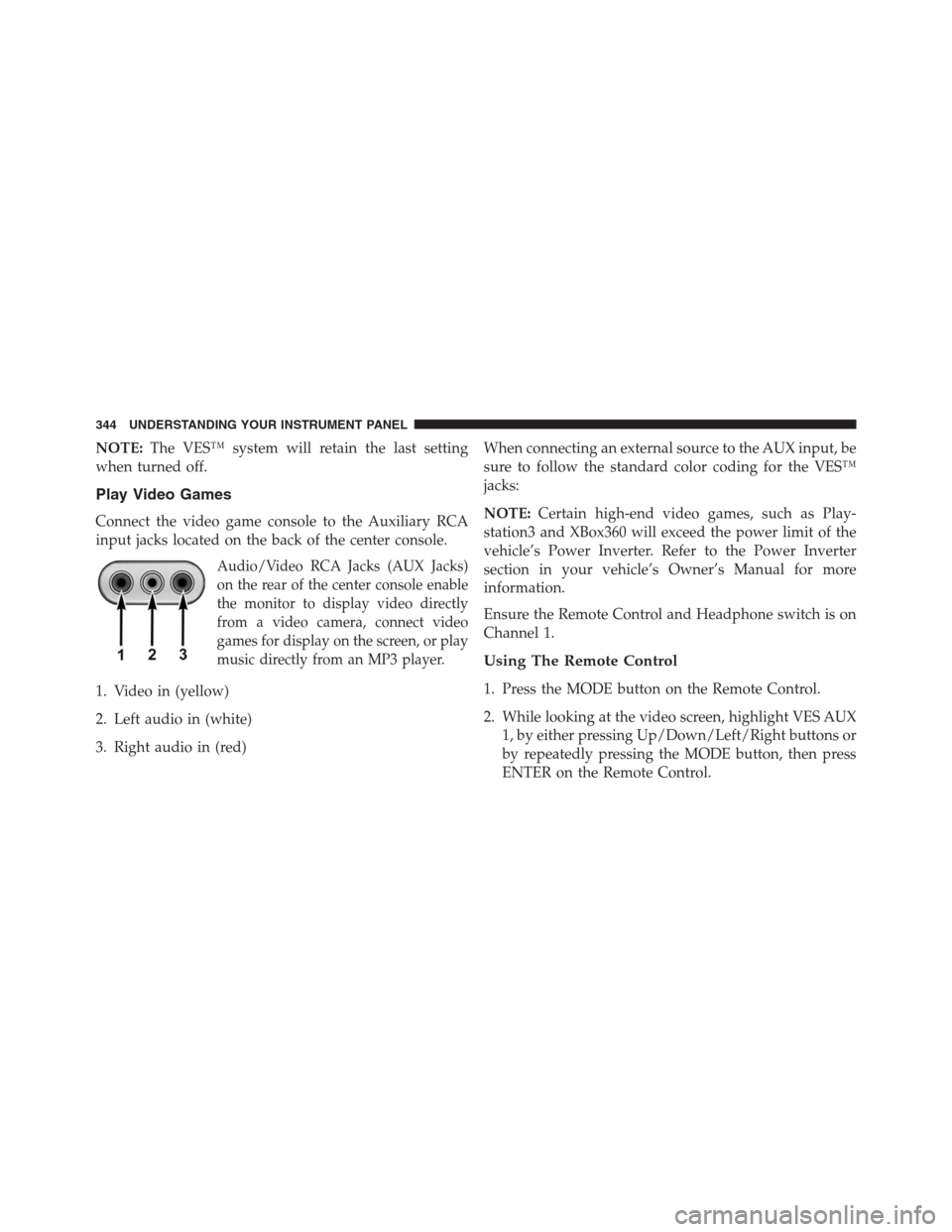
Connect the video game console to the Auxiliary RCA
input jacks located on the back of the center console.
Audio/Video RCA Jacks (AUX Jacks)
on the rear of the center console enable
the monitor to display video directly
from a video camera, connect video
games for display on the screen, or play
music directly from an MP3 player.
1. Video in (yellow)
2. Left audio in (white)
3. Right audio in (red)When connecting an external source to the AUX input, be
sure to follow the standard color coding for the VES™
jacks:
NOTE:Certain high-end video games, such as Play-
station3 and XBox360 will exceed the power limit of the
vehicle’s Power Inverter. Refer to the Power Inverter
section in your vehicle’s Owner’s Manual for more
information.
Ensure the Remote Control and Headphone switch is on
Channel 1.
Using The Remote Control
1. Press the MODE button on the Remote Control.
2. While looking at the video screen, highlight VES AUX
1, by either pressing Up/Down/Left/Right buttons or
by repeatedly pressing the MODE button, then press
ENTER on the Remote Control.
344 UNDERSTANDING YOUR INSTRUMENT PANEL
Page 348 of 630

Important Notes For Single Video Screen System
•VES™ is able to transmit two channels of stereo audio
simultaneously.
•In split screen mode the left side equates to Channel 1
and right side equates to Channel 2.
•If a video source is selected on Channel 1, then
Channel 2 is for audio only. Selecting a video source
(DVD) will not show the video on the screen.
•When selecting a video source on Channel 1, the video
will display on the screen and the audio could be
heard on Channel 1 in the headphones.
•Audio can be heard through the headphones even
when the Video Screen is closed.
Play A DVD Using The Touch-Screen Radio
1. Insert the DVD with the label facing up. The radio
automatically selects the appropriate mode after the
disc is recognized and displays the menu screen or
starts playing the first track.
2. To watch a DVD on Screen 1 for second row passen-
gers, ensure the Remote Control and Headphone
switch is on Channel 1.
Using The Remote Control
1. Press the MODE button on the Remote Control.
2. While looking at Screen 1, highlight DISC by either
pressing Up/Down/Left/Right buttons or by repeat-
edly pressing the MODE button, then press ENTER.
346 UNDERSTANDING YOUR INSTRUMENT PANEL
Page 356 of 630

NOTE:The rear video system must be turned on before
sound can be heard from the headphones. To conserve
battery life, the headphones will automatically turn off
approximately three minutes after the rear video system
is turned off.
Changing the Audio Mode for Headphones
1.
Ensure the Remote Control channel/screen selector
switch is in the same position as the headphone selector
switch.
NOTE:
•When both switches are on Channel 1, the Remote is
controlling Channel 1 and the headphones are tuned to
the audio of the VES™ Channel 1.
•When both switches are on Channel 2, the Remote is
controlling Channel 2 and the headphones are tuned to
the audio of the VES™ Channel 2.2. Press the MODE button on the remote control.
3. If the video screen is displaying a video source (such
as a DVD Video), pressing STATUS shows the status
on a popup banner at the bottom of the screen.
Pressing the MODE button will advance to the next
mode. When the mode is in an audio only source (such
as FM), the Mode Selection menu appears on screen.
4. When the Mode Selection menu appears on screen,
use the cursor buttons on the remote control to navi-
gate to the available modes and press the ENTER
button to select the new mode.
5. To cancel out of the Mode Selection menu, press the
BACK button on the remote control.
354 UNDERSTANDING YOUR INSTRUMENT PANEL
Page 360 of 630
Numeric Keypad Menu
When the display for either Channel 1 or Channel 2
shows DIRECT TUNE, pressing the remote control’sENTER button activates a numeric keypad menu. This
screen makes it easy to enter a specific tuner frequency,
satellite channel, or track number. To enter the desired
digit:
1. Press the remote control’s navigation buttons (�,�,
�,�) to navigate to the desired digit.
2. When the digit is highlighted, press the remote con-
trol’s ENTER button to select the digit. Repeat these
steps until all digits are entered.
3. To delete the last digit, navigate to the Del button and
press the remote control’s ENTER button.
4. After all of the digits are entered, navigate to the Go
button and press the remote control’s ENTER button.
Numeric Keypad Menu
358 UNDERSTANDING YOUR INSTRUMENT PANEL

