Page 275 of 631
The system will indicate a detected obstacle by showing
three solid arcs and will produce a one-half second tone.As the vehicle moves closer to the object, the EVIC
display will show fewer arcs and the sound tone will
change from slow, to fast, to continuous.
Park Assist System Off
Slow Tone
3
UNDERSTANDING THE FEATURES OF YOUR VEHICLE 273
Page 277 of 631
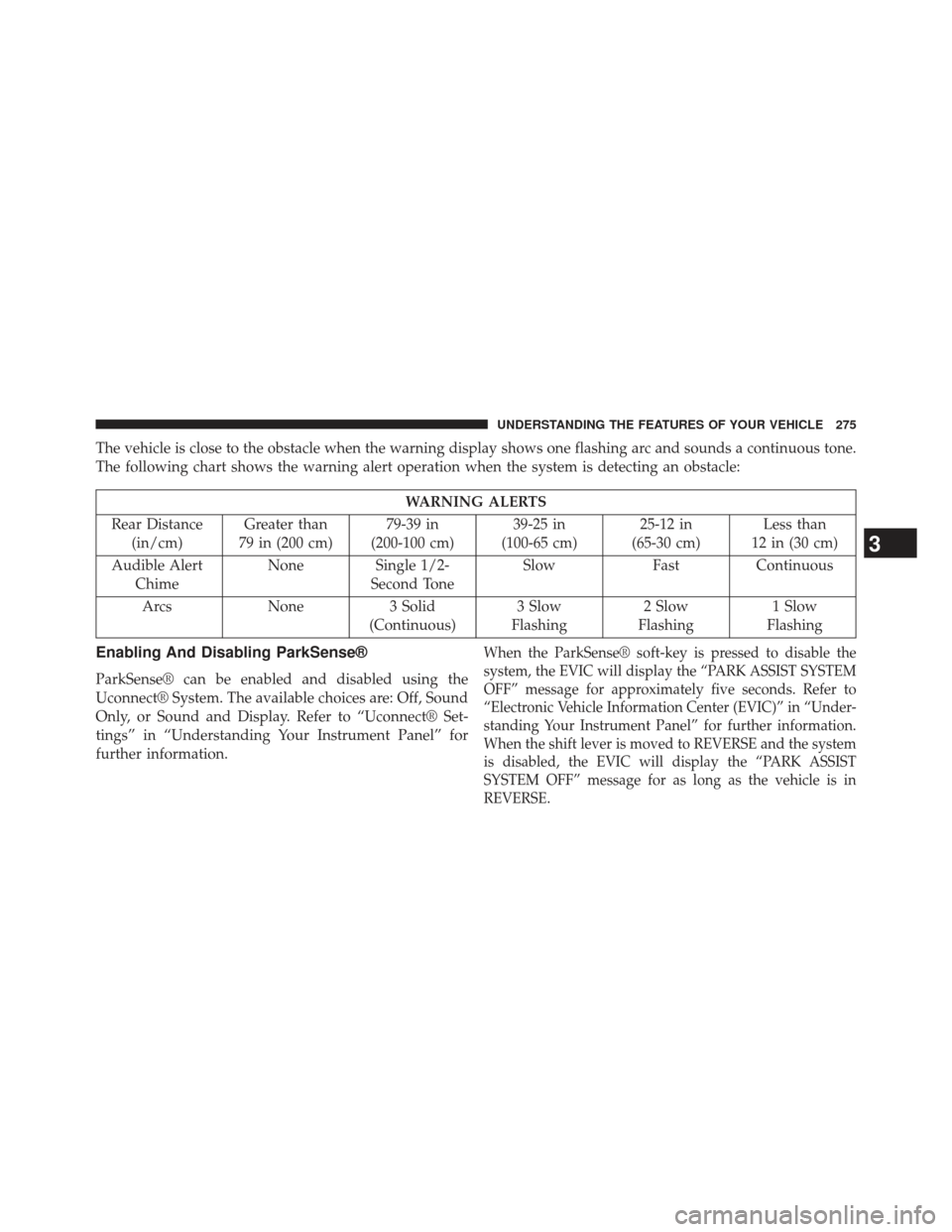
The vehicle is close to the obstacle when the warning display shows one flashing arc and sounds a continuous tone.
The following chart shows the warning alert operation when the system is detecting an obstacle:
WARNING ALERTS
Rear Distance (in/cm) Greater than
79 in (200 cm) 79-39 in
(200-100 cm) 39-25 in
(100-65 cm) 25-12 in
(65-30 cm) Less than
12 in (30 cm)
Audible Alert Chime None Single 1/2-
Second Tone Slow
FastContinuous
Arcs None3 Solid
(Continuous) 3 Slow
Flashing 2 Slow
Flashing 1 Slow
Flashing
Enabling And Disabling ParkSense®
ParkSense® can be enabled and disabled using the
Uconnect® System. The available choices are: Off, Sound
Only, or Sound and Display. Refer to “Uconnect® Set-
tings” in “Understanding Your Instrument Panel” for
further information.
When the ParkSense® soft-key is pressed to disable the
system, the EVIC will display the “PARK ASSIST SYSTEM
OFF” message for approximately five seconds. Refer to
“Electronic Vehicle Information Center (EVIC)” in “Under-
standing Your Instrument Panel” for further information.
When the shift lever is moved to REVERSE and the system
is disabled, the EVIC will display the “PARK ASSIST
SYSTEM OFF” message for as long as the vehicle is in
REVERSE.
3
UNDERSTANDING THE FEATURES OF YOUR VEHICLE 275
Page 278 of 631
Service The ParkSense® Rear Park Assist
System
When the ParkSense® Rear Park Assist system is mal-
functioning, the Electronic Vehicle Information Center
(EVIC) will actuate a single chime, once per ignition
cycle, and it will display the “CLEAN PARK ASSIST”,
“SERVICE PARK ASSIST” or the “SERVICE PARK AS-
SIST SYSTEM” message. Refer to “Electronic Vehicle
Information Center (EVIC)” in “Understanding Your
Instrument Panel” for further information. When the
shift lever is moved to REVERSE and the system has
detected a fault condition, the EVIC will display the
“PARK ASSIST SYSTEM OFF” message for as long as the
vehicle is in REVERSE. Under this condition, ParkSense®
will not operate.If “CLEAN PARK ASSIST” appears in the Electronic
Vehicle Information Center (EVIC) make sure the outer
surface and the underside of the rear fascia/bumper is
clean and clear of snow, ice, mud, dirt or other obstruc-
tion and then cycle the ignition. If the message continues
to appear see an authorized dealer.
If “SERVICE PARK ASSIST” or “SERVICE PARK ASSIST
SYSTEM” appears in the EVIC, see an authorized dealer.
Cleaning The ParkSense® System
Clean the ParkSense® sensors with water, car wash soap
and a soft cloth. Do not use rough or hard cloths. Do not
scratch or poke the sensors. Otherwise, you could dam-
age the sensors.
276 UNDERSTANDING THE FEATURES OF YOUR VEHICLE
Page 279 of 631
ParkSense® System Usage Precautions
NOTE:
•Ensure that the rear bumper is free of snow, ice, mud,
dirt and debris to keep the ParkSense® system oper-
ating properly.
• Jackhammers, large trucks, and other vibrations could
affect the performance of ParkSense®.
• When you turn ParkSense® off, the EVIC will display
“PARK ASSIST SYSTEM OFF.” Furthermore, once you
turn ParkSense® off, it remains off until you turn it on
again, even if you cycle the ignition key.
• When you move the shift lever to the REVERSE
position and ParkSense® is turned off, the EVIC will
display the “PARK ASSIST SYSTEM OFF” message for
as long as the vehicle is in REVERSE. •
Clean the ParkSense® sensors regularly, taking care
not to scratch or damage them. The sensors must not
be covered with ice, snow, slush, mud, dirt or debris.
Failure to do so can result in the system not working
properly. The ParkSense® system might not detect an
obstacle behind the fascia/bumper, or it could provide
a false indication that an obstacle is behind the
fascia/bumper.
• Objects such as bicycle carriers, trailer hitches, etc.,
must not be placed within 12 in (30 cm) from the rear
fascia/bumper while driving the vehicle. Failure to do
so can result in the system misinterpreting a close
object as a sensor problem, causing the “SERVICE
PARK ASSIST” message to be displayed in the EVIC.
3
UNDERSTANDING THE FEATURES OF YOUR VEHICLE 277
Page 281 of 631
PARKVIEW® REAR BACK UP CAMERA — IF
EQUIPPED
Your vehicle may be equipped with the ParkView® Rear
Back Up Camera that allows you to see an on-screen
image of the rear surroundings of your vehicle whenever
the shift lever is put into REVERSE. The image will be
displayed on the touchscreen display along with a cau-
tion note to “check entire surroundings” across the top of
the screen. After five seconds this note will disappear.The ParkView® camera is located on the rear of the
vehicle above the rear License plate.
When the vehicle is shifted out of REVERSE, the rear
camera mode is exited and the navigation or audio screen
appears again.
When displayed, static grid lines will illustrate the width
of the vehicle and will show separate zones that will help
indicate the distance to the rear of the vehicle.The follow-
ing table shows the approximate distances for each zone:
Zone
Distance to the rear of the vehicle
Red 0 - 1 ft (0 - 30 cm)
Yellow 1 ft - 3 ft (30 cm - 1 m)
Green 3 ft or greater (1 m or greater)
3
UNDERSTANDING THE FEATURES OF YOUR VEHICLE 279
Page 313 of 631
UNDERSTANDING YOUR INSTRUMENT PANEL
CONTENTS
�INSTRUMENT PANEL FEATURES ..........313
� INSTRUMENT CLUSTER .................314
� INSTRUMENT CLUSTER — PREMIUM .......315
� INSTRUMENT CLUSTER DESCRIPTIONS .....316
� ELECTRONIC VEHICLE INFORMATION
CENTER (EVIC) ...................... .326
▫ Electronic Vehicle Information Center (EVIC)
Displays ........................... .328
▫ EVIC White Telltale Lights ...............329
▫ EVIC Amber Telltales ...................330 ▫
EVIC Red Telltale Lights ................331
▫ Oil Change Due ..................... .334
▫ Fuel Economy ....................... .335
▫ Vehicle Speed ....................... .337
▫ Trip Info .......................... .338
▫ Units ............................. .338
▫ Vehicle Info (Customer Information Features) . .339
▫ Messages # ......................... .339
▫ Turn Menu OFF ...................... .339
4
Page 319 of 631
7. Odometer Display /Electronic Vehicle Information
Center (EVIC) Display
Odometer Display
The odometer display shows the total distance the ve-
hicle has been driven.
U.S. Federal regulations require that upon transfer of
vehicle ownership, the seller certify to the purchaser the
correct mileage that the vehicle has been driven. If your
odometer needs to be repaired or serviced, the repair
technician should leave the odometer reading the same
as it was before the repair or service. If s/he cannot do so,
then the odometer must be set at zero, and a sticker must
be placed in the door jamb stating what the mileage was
before the repair or service. It is a good idea for you to
make a record of the odometer reading before the repair/
service, so that you can be sure that it is properly reset, or
that the door jamb sticker is accurate if the odometer
must be reset at zero.Electronic Vehicle Information Center (EVIC) Display
The Electronic Vehicle Information Center (EVIC) fea-
tures a driver-interactive display that is located in the
instrument cluster. For further information, refer to
“Electronic Vehicle Information Center (EVIC)”.
The Shift Lever Indicator is self-contained within the
EVIC display. It displays the gear position of the auto-
matic transmission.
NOTE:
You must apply the brakes before shifting from PARK.
The highest available transmission gear is displayed in
the lower right corner of the Electronic Vehicle Informa-
tion Center (EVIC) whenever the Electronic Range Select
(ERS) feature is active. Use the +/- selector on the shift
lever to activate ERS. Refer to “Automatic Transmission”
in “Starting And Operating” for further information.
4
UNDERSTANDING YOUR INSTRUMENT PANEL 317
Page 328 of 631
ELECTRONIC VEHICLE INFORMATION
CENTER (EVIC)
The Electronic Vehicle Information Center (EVIC) fea-
tures a driver-interactive display that is located in the
instrument cluster.This system allows the driver to select a variety of useful
information by pressing the switches mounted on the
steering wheel. The EVIC consists of the following:
•
Radio Info
• Fuel Economy
• Vehicle Speed
• Trip Info
• Tire Pressure
• Vehicle Info (Stored Warning Messages)
• Turn Menu OFF
Electronic Vehicle Information Center (EVIC)
326 UNDERSTANDING YOUR INSTRUMENT PANEL