Page 266 of 519
TIME Button (Auxiliary Mode)
Press this button to change the display to time of day. The
time of day will display for five seconds (when the
ignition is OFF).
Operating Instructions (Uconnect® Phone) —
If Equipped
Refer to “Uconnect® Phone” for further details.
Uconnect® Multimedia (Satellite Radio) —
If Equipped
Satellite radio uses direct satellite-to-receiver broadcast-
ing technology to provide clear digital sound, coast to
coast. The subscription service provider is Sirius Satellite
Radio. This service offers over 130 channels of music,
sports, news, entertainment, and programming for chil-
dren, directly from its satellites and broadcasting studios.
NOTE:Sirius service is not available in Hawaii and has
limited coverage in Alaska.
System Activation
Sirius Satellite Radio service is pre-activated, and you
may begin listening immediately to the one year of audio
service that is included with the factory-installed satellite
radio system in your vehicle. Sirius will supply a wel-
come kit that contains general information, including
how to setup your on-line listening account. For further
information, call the toll-free number 888-539-7474, or
visit the Sirius web site at www.sirius.com, or at
www.siriuscanada.ca for Canadian residents.
Electronic Serial Number/Sirius Identification
Number (ESN/SID)
Please have the following information available when
calling:
1. The Electronic Serial Number/Sirius Identification Number (ESN/SID).
2. Your Vehicle Identification Number.
264 UNDERSTANDING YOUR INSTRUMENT PANEL
Page 278 of 519
Right-Hand Switch Functions
•Press the top of the switch to increase the volume.
• Press the bottom of the switch to decrease the volume.
• Press the button in the center of the switch to change
modes (i.e., AM, FM, etc.).
Left-Hand Switch Functions For Radio Operation
• Press the top of the switch to SEEK the next listenable
station up from the current setting.
• Press the bottom of the switch to SEEK the next
listenable station down from the current setting.
• Press the button in the center of the switch to tune to
the next preset that you have programmed.
Left-Hand Switch Functions For Media (i.e., CD)
Operation
• Press the top of the switch once to listen to the next
track.
• Press the bottom of the switch once either to listen to
the beginning of the current track or to listen to the
beginning of the previous track if it is within one
second after the current track begins to play.
• Press the switch up or down twice to listen to the
second track, three times to listen to the third track,
and so forth.
• Press the button located in the center of the switch to
change to the next preset that you have programmed.
276 UNDERSTANDING YOUR INSTRUMENT PANEL
Page 434 of 519
CAUTION!
Do not overfill the engine. Overfilling the engine
will cause oil aeration, which can lead to loss of oil
pressure and an increase in oil temperature. This
could damage your engine. Also, be sure the oil fill
cap is replaced and tightened after adding oil.
Change Engine Oil
The oil change indicator system will remind you that it is
time to take your vehicle in for scheduled maintenance.
Refer to the “Maintenance Schedule” for further informa-
tion.
NOTE:
Under no circumstances should oil change inter-
vals exceed 10,000 miles (16,000 km) or twelve months,
whichever occurs first.
Engine Oil Selection
For best performance and maximum protection under all
types of operating conditions, the manufacturer only
recommends engine oils that are API Certified and meet
the requirements of Chrysler Material Standard MS-6395.
American Petroleum Institute (API) Engine Oil
Identification Symbol
This symbol means that the oil has
been certified by the American
Petroleum Institute (API). The
manufacturer only recommends
API Certified engine oils.
432 MAINTAINING YOUR VEHICLE
Page 444 of 519
Exhaust System
The best protection against carbon monoxide entry into
the vehicle body is a properly maintained engine exhaust
system.
If you notice a change in the sound of the exhaust system;
or if the exhaust fumes can be detected inside the vehicle;
or when the underside or rear of the vehicle is damaged;
have an authorized technician inspect the complete ex-
haust system and adjacent body areas for broken, dam-
aged, deteriorated, or mispositioned parts. Open seams
or loose connections could permit exhaust fumes to seep
into the passenger compartment. In addition, have the
exhaust system inspected each time the vehicle is raised
for lubrication or oil change. Replace as required.
WARNING!
•Exhaust gases can injure or kill. They contain
carbon monoxide (CO), which is colorless and
odorless. Breathing it can make you unconscious
and can eventually poison you. To avoid breathing
CO, refer to “Safety Tips/Exhaust Gas” in “Things
To Know Before Starting Your Vehicle” for further
information.
• A hot exhaust system can start a fire if you park
over materials that can burn. Such materials might
be grass or leaves coming into contact with your
exhaust system. Do not park or operate your ve-
hicle in areas where your exhaust system can con-
tact anything that can burn.
442 MAINTAINING YOUR VEHICLE
Page 480 of 519

MAINTENANCE SCHEDULE
Your vehicle is equipped with an automatic oil change
indicator system. The oil change indicator system will
remind you that it is time to take your vehicle in for
scheduled maintenance.
Based on engine operation conditions, the oil change
indicator message will illuminate. This means that ser-
vice is required for your vehicle. Operating conditions
such as frequent short-trips, trailer tow, extremely hot or
cold ambient temperatures, and E85 fuel usage will
influence when the “Oil Change Required” message is
displayed. Severe Operating Conditions can cause the
change oil message to illuminate as early as 3,500 miles
(5,600 km) since last reset. Have your vehicle serviced as
soon as possible, within the next 500 miles (805 km).
Your authorized dealer will reset the oil change indicator
message after completing the scheduled oil change. If a
scheduled oil change is performed by someone other than
your authorized dealer, the message can be reset by refer-
ring to the steps described under “Electronic Vehicle Infor-
mation Center (EVIC)/Oil Change Required” in “Under-
standing Your Instrument Panel” for further information
NOTE:Under no circumstances should oil change inter-
vals exceed 10,000 miles (16,000 km) or twelve months,
whichever comes first.
Once A Month Or Before A Long Trip:
• Check engine oil level
• Check windshield washer fluid level
• Check the tire inflation pressures and look for unusual
wear or damage
8
M A I
N T
E
N
A
N
C E
S
C
H E
D
U L
E
S478 MAINTENANCE SCHEDULES
Page 484 of 519
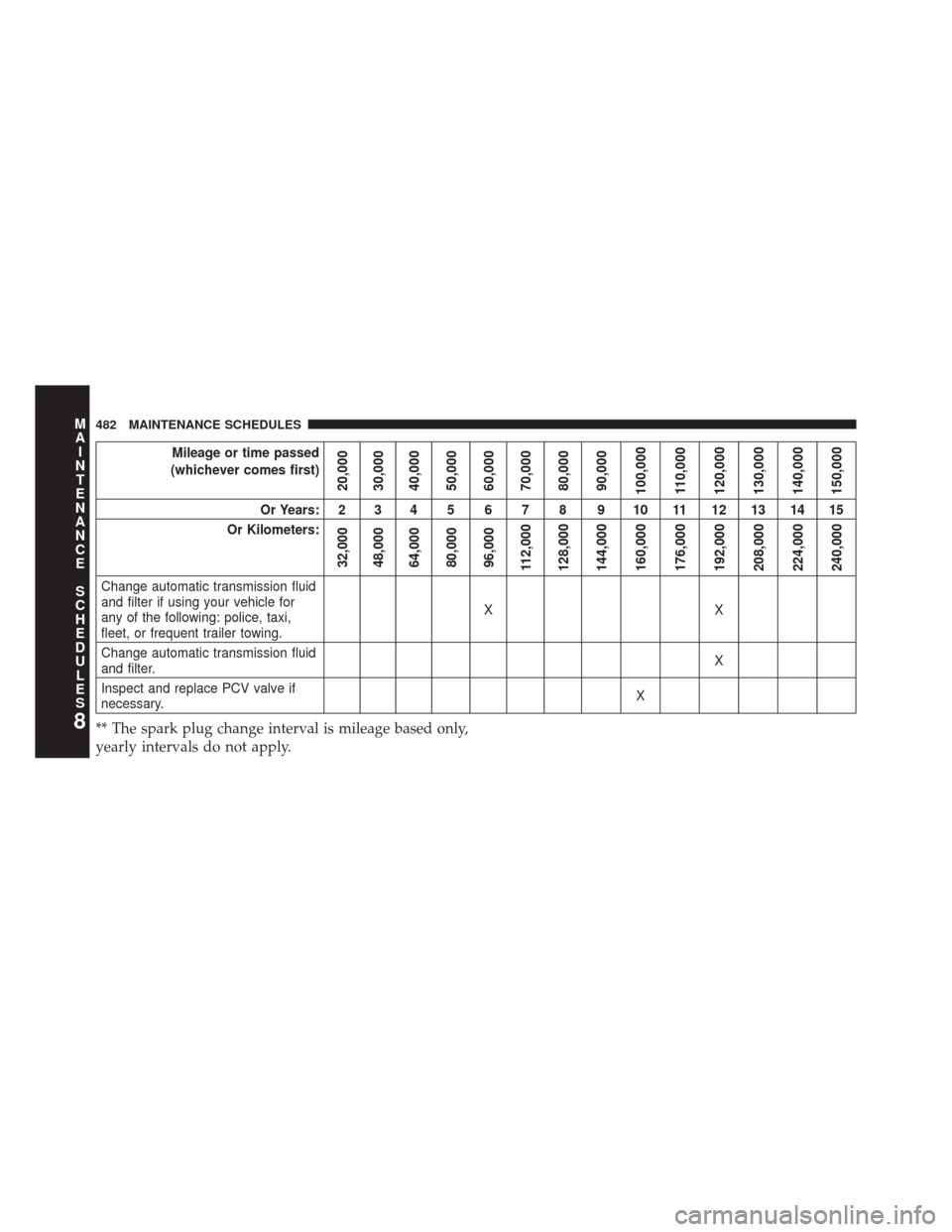
Mileage or time passed
(whichever comes first)
20,000
30,000
40,000
50,000
60,000
70,000
80,000
90,000
100,000 110,000
120,000
130,000
140,000
150,000
Or Years: 2 3 4 5 6 7 8 9 10 11 12 13 14 15
Or Kilometers:
32,000
48,000
64,000
80,000
96,000
112,000
128,000
144,000
160,000
176,000
192,000
208,000
224,000
240,000
Change automatic transmission fluid
and filter if using your vehicle for
any of the following: police, taxi,
fleet, or frequent trailer towing. XX
Change automatic transmission fluid
and filter. X
Inspect and replace PCV valve if
necessary. X
** The spark plug change interval is mileage based only,
yearly intervals do not apply.8
M
A I
N T
E
N
A
N
C E
S
C
H E
D
U L
E
S482 MAINTENANCE SCHEDULES
Page 508 of 519
Jacking Instructions....................... .402
Jack Location ........................... .400
Jack Operation .......................... .400
Jump Starting ........................... .412
Key-In Reminder ..........................15
Keyless Entry System .......................22
Keyless Entry System (Sedan) .................22
Key, Programming .........................18
Key, Replacement ..........................17
Keys ...................................12
Key, Sentry (Immobilizer) ....................16
Knee Bolster ..............................61
Lane Change and Turn Signals ................221
Lane Change Assist ....................... .168
Lap/Shoulder Belts .........................46
Latches ............................... .101
Hood ............................... .163Lead Free Gasoline
....................... .370
Leaks, Fluid ............................ .101
Life of Tires ............................ .357
Light Bulbs ............................. .101
Lights ................................ .101
Airbag ................................68
Back-Up ............................. .472
Battery Saver ......................... .172
Brake Assist Warning ....................337
Brake Warning ........................ .216
Bulb Replacement ...................... .469
Daytime Running ...................... .170
Electronic Stability Program (ESP) Indicator .....337
Engine Temperature Warning ...............215
Exterior ............................. .101
Fog ................................ .169
Headlights ........................... .166
Headlights On With Wipers ................167
Headlight Switch ...................... .166
506 INDEX