2013 Citroen DS5 AUX
[x] Cancel search: AUXPage 308 of 356

01
On / Off.
FIRST STEPS
Volume
adjustment.
Select screen displaybetween modes:
Full screen: Audio
(or
telephone if call in progress) /
In a window: Audio
(or
telephone if call in progress) -Time or Trip computer.
Long press: black screen(DARK).
Selection of AM / FM / DAB *
wavebands.
Select preset radiostation.
Long press: store a
station.
Displa
y the list of stations received,CD/MP3 tracks or folders.
Long press: managing the classifi cation of MP3/WMA fi les /
update the list of stations received.
TA
(Traffi c Announcement)function On / Off.
Lon
g press: access to type of
information.
Confi rmationor display of contextual menu.
Automatic search u
p / down for
radio frequencies.
Select previous / next CD, USB,streaming track.
Navigation in a list.
Abandon the current
operation.
Up one level
(menu or folder).
Manual step b
y step search up / down for radio
frequencies.
Select previous / next MP3 folder.
Select previous / next folder / genre / artist / playlist in the USB device.
Navigation in a list.
Select source:
Radio, CD, AUX, USB, Streaming.
Accept an incoming call.
A
ccess to main menu.
Audio settings:
au
dio ambiences, treble, bass, loudness, distribution, left/right
balance, front/rear fader, automatic
volume.
*
Depending on model.
Page 318 of 356

04AUDIO
APPLE ®
PLAYERS or
PORTABLE PLAYER
Management of the device is via the audio system controls.
The audio
fi les on a Mass Storage portable player *
can
be heard through the vehicle's speakers by connectingit to the USB port (cable not supplied).
If the portable pla
yer is not recognised by the USB port,connect it to the auxiliary Jack socket.The Apple
Æ player must be updated regularly for the bestÆ
connection.
The pla
ylists are those defi ned in the Apple Æplayer.
The Apple
Æplayer must be generation 5 or later.
*
Check your player's manual.
Page 319 of 356

04
317
AUDIO
AUXILIARY SOCKET (AUX)
AUXILIARY JACK SOCKET
Do not connect a device to the USB port and to the auxiliar
yJack socket at the same time. The auxiliar
y Jack socket permits the connection of a portable
non-mass storage device or an Apple® player if not recognised ®
by the USB port.
Connect the portable device to the auxiliary Jack socket using a suitable cable (not supplied). Pr
ess the SOURCEor SRCbutton several times in succession and select "AUX".
First adjust the volume on your portable device.
Then ad
just the volume of the audio
system.
The displa
y and management of controls is on theportable device.
Page 335 of 356

333
FREQUENTLY ASKED QUESTIONS
QUESTIONANSWERSOLUTION
A telephone connects
automatically, disconnecting another
telephone.
Automatic connection overrides manual connection. Modify the telephone settings to remove automatic connection.
The A
pple®
player is ®
not recognised whenconnecting to the USB port. The A
pple ®player is of a generation that is not compatible with the USB. Connect the Apple ®player to the AUX Jack socket using a suitable cable (not supplied).
The hard disk or deviceis not recognised whenconnecting to the USBport.
Some hard disks and devices need a power supply greater than is
provided by the audio system. Connect the device to the 230 V socket, the 12 V socket or an external power supply.
Caution
:
ensure that the device does not transmit
a voltage greater than 5 V (risk of destruction of
the system).
When streamin
g, the sound cuts momentarily. Some telephones prioritise connection of the "hands-free" profi le. Delete the "hands-free" connection profi le to
improve streaming.
In "Random all" pla
y,not all of the tracks areplayed.In "Random all" pla
y, the system can only take into account up to 999 tracks.
With the en
gine off, the
audio system switches off after a few minutes of use. When the en
gine is switched off, the audio system operating time
depends on the battery charge.
The switch-off is normal: the audio s
ystem switches to economy mode and switches off to prevent discharging the vehicle's battery. Start the vehicle's en
gine to increase the batterycharge.
The message "the audio system is overheated"
appears on the display. In order to protect the installation i
f the surrounding temperature is too
high, the audio system switches to an automatic thermal protection mode
leading to a reduction of the volume or stopping of the playing of the CD.
Switch the audio system off for a few minutes to
allow the system to cool.
Page 338 of 356

A
ABS.............................................................173Accessories ..................................55,101,219Accessory position................................55, 101Accessory socket, 12V ...........................84, 85Adjusting headlamps..................................146Adjusting head restraints........................74, 77Adjusting seat belt height ............................177Adjusting the steering wheel.........................83Airbags ..................................................39, 179Airbags, curtain...................................181,182Airbags, front.......................................179,182Airbags, lateral....................................181,182Air conditioning .............................................25Air conditioning, digital ............................91, 92Air filter........................................................r233Air flow..........................................................90Air vents........................................................90Alarm .............................................................62Anti-lock braking system (ABS)........................................................173Anti-pinch................................................65, 67Anti-theft...................................................... 101Armrest ..........................................................84Armrest, front................................................86Armrest, rear.................................................r87Ashtray, removeable.....................................84ASR .............................................................173Assistance, emergency braking ...................................173Assistance call....................................171, 249Audible warning .......................................... 171Audio streaming (Bluetooth)................................291,318,320Audio system...............................................305
Automatic headlamp
dipping................................................32, 143Automatic illumination
of headlamps....................................139, 142Automatic operation of hazard
warning lamps...........................................170Automatic rain sensitivewindscreen wipers............................149,151Auxiliary socket.............................84, 292,317
Battery..........................................210-212, 232
Battery, charging.................................211, 212Battery, remote control...........................57, 58Black panel....................................................45Bluetooth (hands-free)......................................274,319Bluetooth (telephone)........................................274, 319Boot...............................................................61Boot (unlocking) ............................................52
Brake discs ..................................................234
Brake lamps ................................................204
Brake pads ..................................................234
Brakes .........................................................234
Capacity, fuel tank........................................68CD.......................................................288, 312CD MP3 .......................................288,313,314Central locking..............................................52Changing a bulb..................................199-206Changing a fuse...................................207-209Changing a wheel................................192-19 8Changing a wiper blade......................152, 214Changing the date...................46, 47, 298, 329Changing the remotecontrol battery.............................................57Changing the time...................46, 47, 295, 329Checking levels ...................................229-231Checking the engine oil level................43, 229Checking tyre pressures(using the kit)............................................ 191Checks................................................226-234Children................................158 -167, 178, 180Child lock.....................................................167Child seats ..........................................158-166Child seats, conventional ....................161, 162Cigarette lighter.............................................r85Clock .......................................46, 47, 298, 329Closing the boot ............................................61Closing the doors ....................................52, 54Connectors, audio.................86, 292, 315, 317Coolant level.........................................40, 230Coolant temperature indicator......................r40Courtesy lamps...........................................153Cruise control......................................128,131Cup holder.....................................................r84
BC
Page 344 of 356
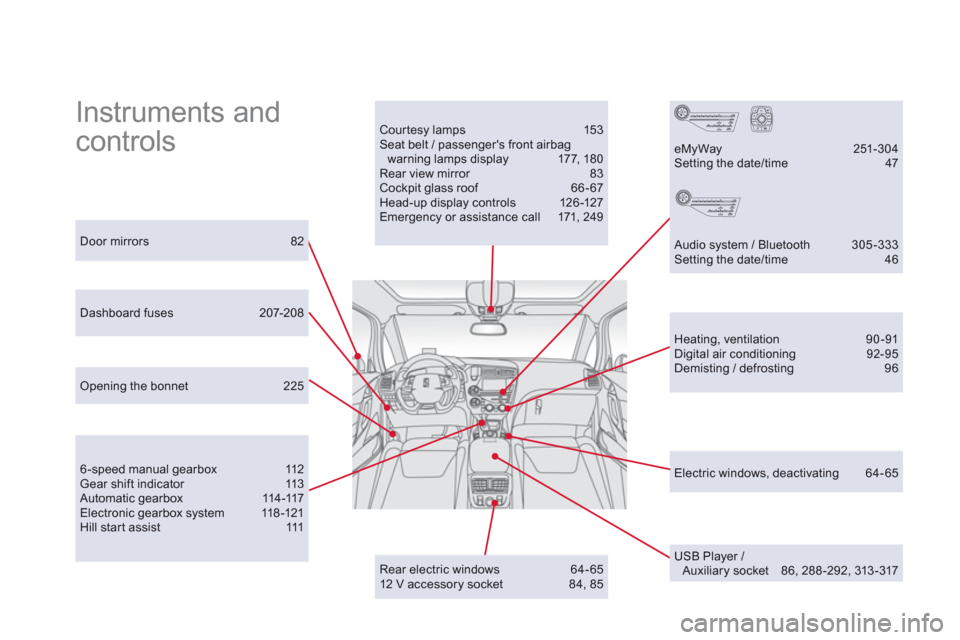
Instruments and
controls Courtesy lamps 153 Seat belt / passenger's front airbag warning lamps display 177, 18 0 Rear view mirror 83 Cockpit glass roof 66 - 67 Head-up display controls 126-127 Emergency or assistance call 171, 249
Door mirrors 82
Heating, ventilation 90-91 Digital air conditioning 92-95 Demisting / defrosting 96
USB Player / Auxiliary socket 86, 288-292, 313-317
Dashboard fuses 207-208
6 -speed manual gearbox 112 Gear shift indicator 113 Automatic gearbox 114-117 Electronic gearbox system 118 -121 Hill start assist 111
eMyWay 251-304 Setting the date/time 47
Audio system / Bluetooth 305 -333 Setting the date/time 46
Opening the bonnet 225
Rear electric windows 64-65 12 V accessory socket 84, 85
Electric windows, deactivating 64-65