2013 Citroen C3 light
[x] Cancel search: lightPage 56 of 284

Comfort
54
Heating / Ventilation Manual air
conditioning
The heating / ventilation or air conditioning systems operates with the engine running, as
well as in STOP mode with Stop & Star t.
1. Temperature adjustment
2. Air fl ow ad
justment
)
Turn the dial from blue(cold) to red (hot) to adjust
the temperature to your
requirements.
) Turn the dial from position 1to position 5
to obtain a comfortable air flow.
Manual control panel
Electric control
panel
Manual control
panel
Electric control
panel
)
If you place the air flow control in position 0
(deactivation of the system), the temperature is nolonger maintained at a comfor table level. However, a slight flow of air,
due to the movement of the vehicle, can still be felt.
Page 60 of 284
Comfort
58
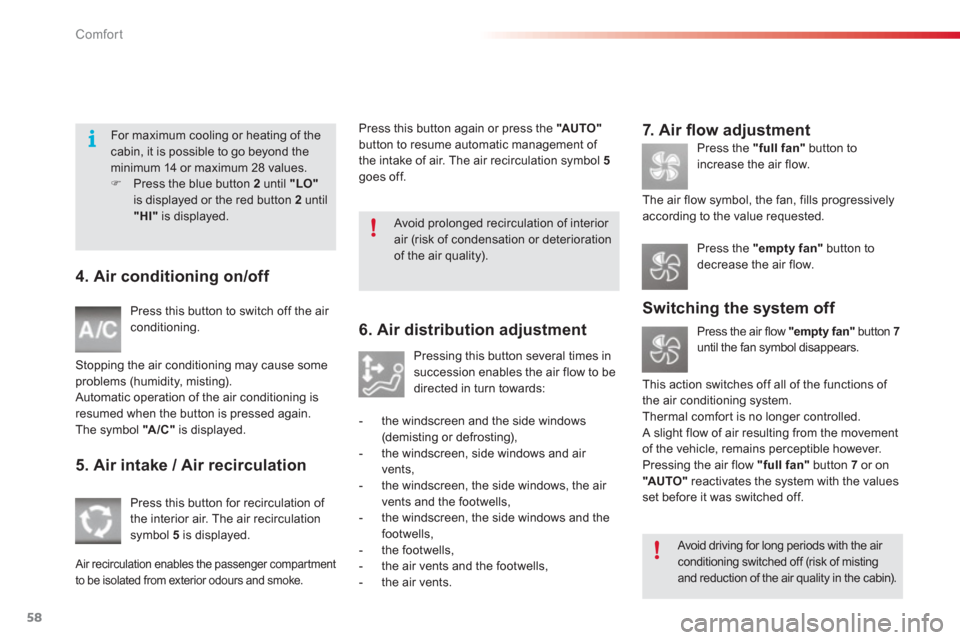
4. Air conditioning on/off
Press this button to switch off the air conditioning.
Stoppin
g the air conditioning may cause some problems (humidity, misting).
Automatic operation of the air conditioning is resumed when the button is pressed again.
The symbol
"A/C"is displayed.
5. Air intake / Air recirculation
Press this button for recirculation of
the interior air. The air recirculation
s
ymbol 5is displayed.
Air recirculation enables the passenger compartment
to be isolated from exterior odours and smoke.
6. Air distribution adjustment
Pressing this button several times in succession enables the air flow to bedirected in turn towards:
- t
he windscreen and the side windows (demisting or defrosting),
- the windscreen, side windows and air
vents,
- the windscreen, the side windows, the air
vents and the footwells,
- the windscreen
, the side windows and thefootwells,
- the footwells,
- the air vents and the footwells,
- the air vents.
7. Air fl ow adjustment
Press the "full fan"button to
in
crease the air flow.
The air
flow symbol, the fan, fills progressivelyaccording to the value requested.
Switching the system off
Press the air flow "empty fan"
button 7until the fan symbol disappears.
Thi
s action switches off all of the functions of
the air conditioning system.
Thermal com
for t is no longer controlled. A slight flow of air resulting from the movement
of the vehicle, remains perceptible however.
Pressin
g the air flow "full fan"
button 7or on "AUTO"
reactivates the system with the values set before it was switched off.
Press the "empty fan"button todecrease the air flow. Press this button again or press the
"AUTO"button to resume automatic management of
the intake of air. The air recirculation s
ymbol 5goes off.
Avoid driving for long periods with the air conditioning switched off (risk of mistingand reduction of the air quality in the cabin).
For maximum cooling or heating of the cabin, it is possible to go beyond the minimum 14 or maximum 28 values.)Press the blue button 2
until "LO"is displayed or the red button 2
until"HI"
is displayed.
Avoid prolonged recirculation of interior air (risk of condensation or deterioration of the air quality).
Page 65 of 284

3
Comfort
63
Rear seats
Bench seat with fixed one-piece cushion and split backrest (right hand 2/3, left hand 1/3) to adjust the load space in the boot.
Rear head restraints Folding the backrest
They can also be removed. To remove a head restraint: )release the backrest using control 1,)tilt the backrest 2
slightly forwards, )pull the head restraint upwards to the stop, )then, press the lug A
.
)
Move the corresponding front seat for ward if necessary.)
Check that the seat belt is positioned correctly on the side of the seat backrest. )
Place the head restraints in the low position.
With passengers in the rear seats,
never drive with the head restraints removed; they must be in place and correctly adjusted. These have one position for use
(up) and a stowed position (down).
)
Pull control 1
forwards to release the seat backrest 2.)
Fold the seat backrest 2on to the cushion.
Repositioning the seat backrest
When repositioning the seat backrest,take care not to trap the seat belts.
)
Straighten the seat backrest 2
and secure it. )
Check that the red indicator, located next to
the control 1, is no longer visible.
Page 67 of 284

3
Comfort
65
Steering wheel adjustment
)
When stationary, pull the control lever to yrelease the adjustment mechanism.)
Adjust the height and reach to suit your driving position.)
Push the control lever to lock theadjustment mechanism.
Rear view mirror
Adjustable mirror providing a central rear ward
view.
Equipped with an anti-dazzle system, whichdarkens the mirror glass and reduces thenuisance to the driver caused by the sun, headlamps from other vehicles...
Adjustment
)Adjust the mirror so that the glass is
directed correctly in the "day" position.
Day / night position
)Pull the lever to change to the "night" anti-
dazzle position.
)Push the lever to change to the normal
"day" position.
Automatic day/night model
By means of a sensor, which measures the light from the rear of the vehicle, this system automatically and progressively changes
between the day and night uses.
Manual day/night model
As a safety measure, the mirrors should be adjusted to reduce the "blind spot".
In order to ensure optimum visibility during your manoeuvres, the mirror lightens automatically when reverse gear is engaged.
As a safety precaution, these
operations should only be carried out while the vehicle is stationary.
Page 68 of 284

Access
66
Remote control key System which permits central unlocking or locking of the vehicle using the lock or from a distance. It is also used to locate and start the vehicle, as well as providing protection against theft.
Unlocking the vehicle
Unfolding the key
)First press this button to unfold the key.
Unlocking using the remote control
)
Press the open padlock to unlock
the vehicle.
Unlocking using the key
)Turn the key to the left in the driver's door lock to unlock the vehicle.
Locking the vehicle
Locking using the remote control
)Press the closed padlock to lock
the vehicle.
Locking using the key
)
Turn the key to the right in the driver's door lock to lock the vehicle completely.
Lockin
g is confirmed by fixed lighting of
the direction indicators for approximately
two seconds.
According to version, the door mirrors fold at
the same time. Unlockin
g is confirmed by rapid flashing of
the direction indicators for approximately
two seconds.
According to version, the door mirrors unfold at
th
e same time.
If one of the doors or the boot is stillopen, the central locking does not takeplace.
When the vehicle is locked, if it isunlocked inadvertently, it will relock automatically after thir ty secondsunless a door or the boot is open.
The folding and unfolding of the door mirrors using the remote control can bedeactivated by a CITROËN dealer or a qualified workshop.
Page 69 of 284

4
Access
67
Folding the key
)First press this button to fold the key.
If you do not press the button when foldingthe key, there is a risk of damage to themechanism.
Anti-theft protection
Electronic engine immobiliser
The key contains an electronic chip which has a special code. When the ignition is switched
on, this code must be recognised in order for
startin
g to be possible.
This electronic engine immobiliser locks the
engine management system a few minutes after the ignition is switched off and prevents
starting of the engine by anyone who does not have the key.
In the event o
f a fault, you are
informed by illumination of this
warning lamp, an audible signal anda message in the screen.
Ignition switch
- Position 1: Stop
- Position 2: Ignition
- Position 3: Starting
Starting the vehicle
)
Inser t the key in the ignition switch.
The system recognises the star ting code.) Turn the key fully towards the dashboard toposition 3 (Starting).)
When the engine star ts, release the key.
Locating your vehicle
)
Press the closed padlock to locate your locked vehicle in acar park.
This is indicated b
y lighting of the cour tesylamps and flashing of the direction indicators for a few seconds. In this case,
your vehicle will not start; contact a CITROËN dealer as soon as possible.
Keep safely the label attached to the keys given
to you on acquisition of the vehicle.
Page 81 of 284

5
Visibility
79
Lighting controls
Main lighting
The various front and rear lamps of the vehicle
are designed to adapt the driver's visibilityprogressively according to climatic conditions:
- sidelamps, to be seen,
- dipped beam headlamps to see without
dazzlin
g other drivers,
- main beam headlamps to see clearly when
the road is clear.
Additional lighting
Other lamps are installed to fulfil the
requirements of par ticular conditions of
visibility:
- a rear foglamp to be seen from afar,
- front fo
glamps for even better forward
vision.
Programming
Various automatic lighting control modes
are also available according to the following
options:
-
guide-me-home lighting,
- automatic illumination of headlamps.
Model without AUTO lighting
Model with AUTO li
ghting
Lighting off / daytime runninglamps.
Automatic illumination of headlamps.
Sidelamps only.
Di
pped or main beam headlamps.
B.
Stalk for switching the headlamp beam: pull the stalk to switch between dipped and main beam headlamps.
In the lamps off and sidelamps modes,
th
e driver can switch on the main beam
headlamps temporarily ("headlamp flash") by
maintaining a pull on the stalk.
Displays
Lighting of the corresponding indicator lamp on
the instrument panel confirms the switching onof the lighting selected.
Depending on version, the instrument panel
may have permanent back-lighting. Illuminationof the instrument panel is therefore not linked to
the exterior lighting.
Manual controls
The lighting is controlled directly by the driver
by means of the ring Aand the stalk B .
A. Main lighting mode selection ring: turn it
to position the s
ymbol required facing themark. S
ystem for selection and control of the various front and rear lamps providing the vehicle's lighting.
Page 82 of 284

Visibility
80
C. Foglamp selection ring.
The
foglamps operate with the dipped and mainbeam headlamps.
Rear fo
glamp
Rotate and release the rin
g C:)
forwards a first time to switch on the front foglamps,)
forwards a second time to switch on the
rear foglamp,) rearwards a first time to switch off the rear foglamp,)
rearwards a second time to switch of thefront fog lamps.
Model with rear foglamp only
)
To switch on the foglamp, turn the ring Cforwards.
When the lighting is switched off automatically (with AUTO model), the foglamp and the dipped beam headlamps will remain on. )
To switch off all of the lighting, turn the
ring Crearwards.
Model with front foglamps and a
rear foglamp Front and rear foglamps When the lighting is switched o
ff automatically
(with AUTO model) or when the dippedheadlamps are switched off manually, the
foglamps and sidelamps will remain on. )Turn the ring rear wards to switch off the
foglamps, the sidelamps will then switch
off.
In good or rainy weather, by both day and night, the front foglamps and the rear foglamp are prohibited. In thesesituations, the power of their beams may dazzle other drivers.
Do not forget to switch off the front foglamps and the rear foglamp whenthey are no longer necessary.