Page 348 of 592
CD/DVD DISC MAINTENANCE
To keep a CD/DVD in good condition, take the following
precautions:
1. Handle the disc by its edge; avoid touching thesurface.
2. If the disc is stained, clean the surface with a soft cloth, wiping from center to edge.
3. Do not apply paper or tape to the disc; avoid scratch- ing the disc.
4. Do not use solvents such as benzene, thinner, cleaners, or anti-static sprays.
5. Store the disc in its case after playing.
6. Do not expose the disc to direct sunlight.
7. Do not store the disc where temperatures may become too high. NOTE:
If you experience difficulty in playing a particular
disc, it may be damaged (i.e., scratched, reflective coating
removed, a hair, moisture or dew on the disc) oversized,
or have protection encoding. Try a known good disc
before considering disc player service.
RADIO OPERATION AND MOBILE PHONES
Under certain conditions, the mobile phone being on in
your vehicle can cause erratic or noisy performance from
your radio. This condition may be lessened or eliminated
by relocating the mobile phone antenna. This condition is
not harmful to the radio. If your radio performance does
not satisfactorily “clear” by the repositioning of the
antenna, it is recommended that the radio volume be
turned down or off during mobile phone operation when
not using Uconnect® (if equipped).
346 UNDERSTANDING YOUR INSTRUMENT PANEL
Page 402 of 592
•A slight drop or fall away of the brake pedal at the end
of the stop.
These are all normal characteristics of ABS.
WARNING!
• The ABS contains sophisticated electronic equip-
ment that may be susceptible to interference
caused by improperly installed or high output
radio transmitting equipment. This interference
can cause possible loss of anti-lock braking capa-
bility. Installation of such equipment should be
performed by qualified professionals.
• Pumping of the Anti-Lock Brakes will diminish
their effectiveness and may lead to a collision.
Pumping makes the stopping distance longer. Just
press firmly on your brake pedal when you need to
slow down or stop.
(Continued)
WARNING! (Continued)
•The ABS cannot prevent the natural laws of phys-
ics from acting on the vehicle, nor can it increase
braking or steering efficiency beyond that afforded
by the condition of the vehicle brakes and tires or
the traction afforded.
• The ABS cannot prevent collisions, including those
resulting from excessive speed in turns, following
another vehicle too closely, or hydroplaning.
• The capabilities of an ABS equipped vehicle must
never be exploited in a reckless or dangerous
manner that could jeopardize the user’s safety or
the safety of others.
All vehicle wheels and tires must be the same size and
type and tires must be properly inflated to produce
accurate signals for the computer.
400 STARTING AND OPERATING
Page 437 of 592

pressure value as shown in the�Inflate to XX�message.
Once the system receives the updated tire pressures, the
system will automatically update and the TPM Telltale
Light and �LOW TIRE� message will turn off. The vehicle
may need to be driven for up to 20 minutes above 15 mph
(24 km/h) in order for the TPMS to receive this
information.
Service TPMS Warning
If a system fault is detected, the TPM Telltale Light will
flash on and off for 75 seconds and then remain on solid.
The system fault will also sound a chime. If the ignition
switch is cycled, this sequence will repeat, providing the
system fault still exists. The TPM Telltale Light will turn
off when the fault condition no longer exists. A system
fault can occur due to any of the following:
1. Signal interference due to electronic devices or driving next to facilities emitting the same radio frequencies as
the TPM sensors. 2. Installing aftermarket window tinting that contains
materials that may block radio wave signals.
3. Accumulation of snow or ice around the wheels or wheel housings.
4. Using tire chains on the vehicle.
5. Using wheels/tires not equipped with TPM sensors.
Vehicles With Full Size Spare
1. The matching full size spare wheel and tire assembly has a TPM sensor that can be monitored by the TPMS.
2. If you install the full size spare in place of a road tire that has a pressure below the low-pressure warning
limit, upon the next ignition switch cycle, a chime will
sound and the TPM Telltale Light and �LOW TIRE�
message will turn ON. The �Inflate to XX�message
will also be displayed.5
STARTING AND OPERATING 435
Page 440 of 592

Should this occur, you should stop as soon as possible
and inflate the tires with a low pressure condition (those
flashing or in a different color in the EVIC graphic) to the
vehicle’s recommended cold placard pressure inflation
value as shown in the�Inflate to XX�message. Once the
system receives the updated tire pressures, the system
will automatically update, the graphic display in the
EVIC will stop flashing or change color back to the
original color, and the TPM Telltale Light will turn off.
The vehicle may need to be driven for up to 20 minutes
above 15 mph (24 km/h) in order for the TPMS to receive
this information.
Service TPMS Warning
If a system fault is detected, the TPM Telltale Light will
flash on and off for 75 seconds and then remain on solid.
The system fault will also sound a chime. In addition, the
EVIC will display a �SERVICE TPM SYSTEM� message fora minimum of five seconds and then display dashes (- -) in
place of the pressure value to indicate which sensor is not
being received.
If the ignition switch is cycled, this sequence will repeat,
providing the system fault still exists. If the system fault
no longer exists, the TPM Telltale Light will no longer
flash, and the
�SERVICE TPM SYSTEM� message will no
longer display, and a pressure value will display in place
of the dashes. A system fault can occur due to any of the
following:
1. Signal interference due to electronic devices or driving next to facilities emitting the same radio frequencies as
the TPM sensors.
2. Installing aftermarket window tinting that contains materials that may block radio wave signals.
3. Accumulation of snow or ice around the wheels or wheel housings.
438 STARTING AND OPERATING
Page 485 of 592
Remote Battery Posts
WARNING!
•Take care to avoid the radiator cooling fan when-
ever the hood is raised. It can start anytime the
ignition switch is ON. You can be injured by
moving fan blades.
• Remove any metal jewelry such as rings, watch
bands and bracelets that could make an inadvertent
electrical contact. You could be seriously injured.
• Batteries contain sulfuric acid that can burn your
skin or eyes and generate hydrogen gas which is
flammable and explosive. Keep open flames or
sparks away from the battery.
1. Set the parking brake, shift the automatic transmission into PARK and turn the ignition to LOCK. 2. Turn off the heater, radio, and all unnecessary electri-
cal accessories.
3. If using another vehicle to jump-start the battery, park the vehicle within the jumper cables reach, set the
parking brake and make sure the ignition is OFF.
WARNING!
Do not allow vehicles to touch each other as this
could establish a ground connection and personal
injury could result.
Jump-Starting Procedure
WARNING!
Failure to follow this procedure could result in per-
sonal injury or property damage due to battery ex-
plosion.
6
WHAT TO DO IN EMERGENCIES 483
Page 531 of 592
WARNING!
Do not use volatile solvents for cleaning purposes.
Many are potentially flammable, and if used in
closed areas they may cause respiratory harm.
Cleaning Headlights
Your vehicle is equipped with plastic headlights and fog
lights (if equipped) that are lighter and less susceptible to
stone breakage than glass headlights.
Plastic is not as scratch resistant as glass and therefore
different lens cleaning procedures must be followed.
To minimize the possibility of scratching the lenses and
reducing light output, avoid wiping with a dry cloth. To
remove road dirt, wash with a mild soap solution fol-
lowed by rinsing.
Do not use abrasive cleaning components, solvents, steel
wool or other aggressive material to clean the lenses.
Glass Surfaces
All glass surfaces should be cleaned on a regular basis
with MOPAR® Glass Cleaner, or any commercial
household-type glass cleaner. Never use an abrasive type
cleaner. Use caution when cleaning the inside rear win-
dow equipped with electric defrosters or the right rear
quarter window equipped with the radio antenna. Do
not use scrapers or other sharp instrument that may
scratch the elements.
When cleaning the rear view mirror, spray cleaner on the
towel or rag that you are using. Do not spray cleaner
directly on the mirror.
Cleaning Plastic Instrument Cluster Lenses
The lenses in front of the instruments in this vehicle are
molded in clear plastic. When cleaning the lenses, care
must be taken to avoid scratching the plastic.
7
MAINTAINING YOUR VEHICLE 529
Page 540 of 592
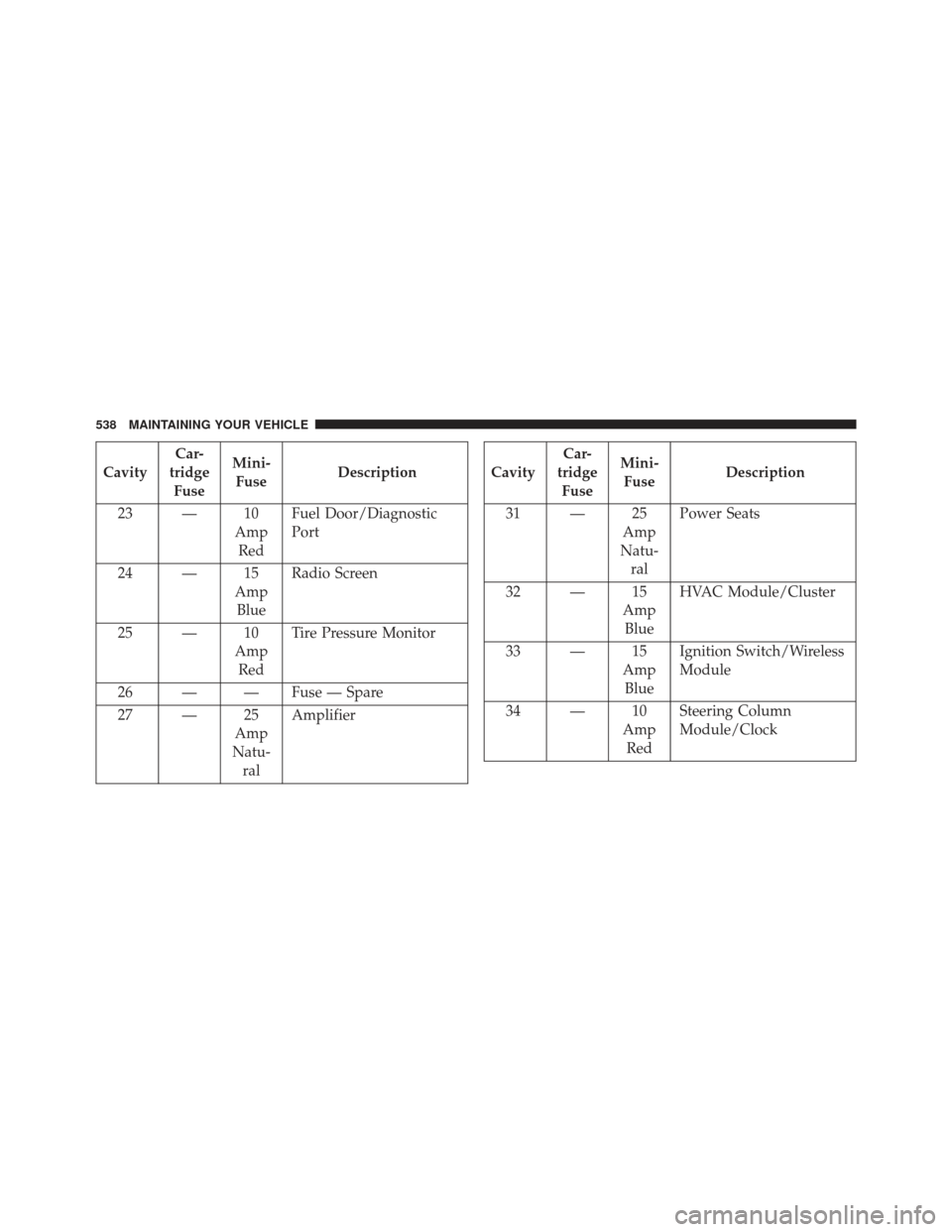
CavityCar-
tridge Fuse Mini-
Fuse Description
23 — 10 AmpRed Fuel Door/Diagnostic
Port
24 — 15 AmpBlue Radio Screen
25 — 10 AmpRed Tire Pressure Monitor
26 — — Fuse — Spare
27 — 25 Amp
Natu- ral AmplifierCavity
Car-
tridge Fuse Mini-
Fuse Description
31 — 25 Amp
Natu- ral Power Seats
32 — 15 AmpBlue HVAC Module/Cluster
33 — 15 AmpBlue Ignition Switch/Wireless
Module
34 — 10 AmpRed Steering Column
Module/Clock
538 MAINTAINING YOUR VEHICLE
Page 541 of 592
CavityCar-
tridge Fuse Mini-
Fuse Description
35 — 10 AmpRed Battery Sensor
36 — — Fuse — Spare
37 — 15 AmpBlue Radio
38 — 20 AmpYel-low Power Outlet Inside Arm
Rest
40 — — Fuse — Spare
41 — — Fuse — SpareCavity Car-
tridge Fuse Mini-
Fuse Description
42 30 AmpPink — Rear Defrost
43 — 25 Amp
Natu- ral Rear Heated Seats/
Steering Wheel
44 — 10 AmpRed Park Assist/Blind Spot/
Camera
45 — 15 AmpBlue Cluster/Rearview
Mirror/Compass
7
MAINTAINING YOUR VEHICLE 539