2013 CHEVROLET TRAX steering
[x] Cancel search: steeringPage 106 of 408
Black plate (2,1)Chevrolet TRAX Owner Manual - 2013 - CRC - 3/6/13
5-2 Instruments and Controls
Controls
Steering Wheel
Adjustment
To adjust the steering wheel:
1. Pull the lever down.
2. Move the steering wheel up,down, forward, and backward.
3. Pull the lever up to lock the steering wheel in place.
Do not adjust the steering wheel
while driving.
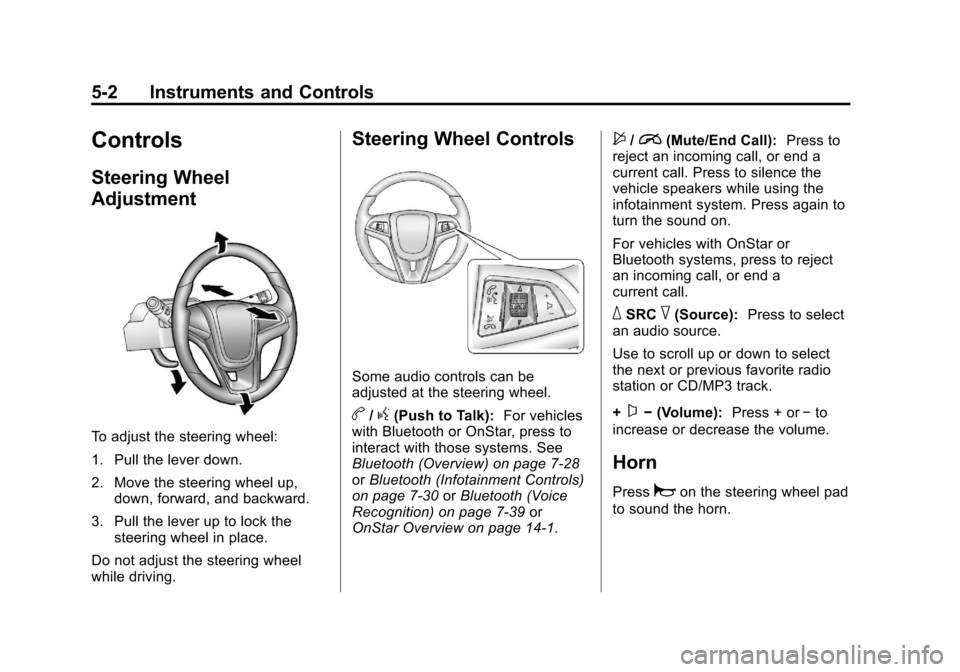
Steering Wheel Controls
Some audio controls can be
adjusted at the steering wheel.
b/g(Push to Talk): For vehicles
with Bluetooth or OnStar, press to
interact with those systems. See
Bluetooth (Overview) on page 7‑28
or Bluetooth (Infotainment Controls)
on page 7‑30 orBluetooth (Voice
Recognition) on page 7‑39 or
OnStar Overview on page 14‑1.
$/i(Mute/End Call): Press to
reject an incoming call, or end a
current call. Press to silence the
vehicle speakers while using the
infotainment system. Press again to
turn the sound on.
For vehicles with OnStar or
Bluetooth systems, press to reject
an incoming call, or end a
current call.
_SRC^(Source): Press to select
an audio source.
Use to scroll up or down to select
the next or previous favorite radio
station or CD/MP3 track.
+
x− (Volume): Press + or−to
increase or decrease the volume.
Horn
Pressaon the steering wheel pad
to sound the horn.
Page 107 of 408

Black plate (3,1)Chevrolet TRAX Owner Manual - 2013 - CRC - 3/6/13
Instruments and Controls 5-3
Windshield Wiper/Washer
The windshield wiper/washer lever
is on the right side of the steering
column.
Move the lever to one of the
following positions:
HI:Use for fast wipes.
LO: Use for slow wipes.
INT (Intermittent Wipes): Move
the lever up to INT for intermittent
wipes, then turn the
xINT band
up for more frequent wipes or down
for less frequent wipes.
OFF: Use to turn the wipers off.
8(Mist): For a single wipe, briefly
move the wiper lever down. For
several wipes, hold the wiper
lever down.
b(Windshield Washer): Pull the
windshield wiper lever toward you to
spray windshield washer fluid and
activate the wipers. The wipers will
continue until the lever is released
or the maximum wash time is
reached. When the windshield wiper
lever is released, additional wipes
may occur depending on how long
the windshield washer had been
activated. See Washer Fluid on
page 10‑21 for information on filling
the windshield washer fluid
reservoir.
{WARNING
In freezing weather, do not use
the washer until the windshield is
warmed. Otherwise the washer
fluid can form ice on the
windshield, blocking your vision.
Clear snow and ice from the wiper
blades before using them. If frozen
to the windshield, carefully loosen or
thaw them. Damaged wiper blades
should be replaced. See Wiper
Blade Replacement on page 10‑26.
Heavy snow or ice can overload the
wiper motor. A circuit breaker will
stop the motor until it cools down.
Page 119 of 408

Black plate (15,1)Chevrolet TRAX Owner Manual - 2013 - CRC - 3/6/13
Instruments and Controls 5-15
.Check that good quality fuel is
used. Poor fuel quality causes
the engine not to run as
efficiently as designed and may
cause stalling after start-up,
stalling when the vehicle is
changed into gear, misfiring,
hesitation on acceleration,
or stumbling on acceleration.
These conditions might go away
once the engine is warmed up.
If one or more of these conditions
occurs, change the fuel brand used.
It may require at least one full tank
of the proper fuel to turn the light off.
See Recommended Fuel on
page 9‑40.
If none of the above have made the
light turn off, your dealer can check
the vehicle. The dealer has the
proper test equipment and
diagnostic tools to fix any
mechanical or electrical problems
that might have developed.Emissions Inspection and
Maintenance Programs
Depending on where you live, your
vehicle may be required to
participate in an emission control
system inspection and maintenance
program. For the inspection, the
emission system test equipment will
likely connect to the vehicle's Data
Link Connector (DLC).
The DLC is under the instrument
panel to the left of the steering
wheel. See your dealer if assistance
is needed.
The vehicle may not pass
inspection if:
.The malfunction indicator lamp is
on with the engine running, or if
the light does not come on when the ignition is turned to ON/RUN
while the engine is off. See your
dealer for assistance in verifying
proper operation of the
malfunction indicator lamp.
.The OBD II (On-Board
Diagnostics) system determines
that critical emission control
systems have not been
completely diagnosed. The
vehicle would be considered not
ready for inspection. This can
happen if the 12-volt battery has
recently been replaced or run
down. The diagnostic system is
designed to evaluate critical
emission control systems during
normal driving. This can take
several days of routine driving.
If this has been done and the
vehicle still does not pass the
inspection for lack of OBD II
system readiness, your dealer
can prepare the vehicle for
inspection.
Page 122 of 408

Black plate (18,1)Chevrolet TRAX Owner Manual - 2013 - CRC - 3/6/13
5-18 Instruments and Controls
Power Steering Warning
Light
This light comes on briefly when the
ignition is turned to ON/RUN as a
check to show it is working.
If it does not come on have the
vehicle serviced by your dealer.
If this light stays on, or comes on
while driving, the system may not be
working. If this happens, see your
dealer for service.
Ultrasonic Parking
Sensor Light
This light comes on to indicate that
there is a malfunction in the system.
See your dealer for service.
SeeUltrasonic Parking Assist on
page 9‑36 for more information.
Traction Off Light
This light comes on briefly while
starting the engine. If it does not,
have the vehicle serviced by your dealer. If the system is working
normally, the indicator light then
turns off.
The traction off light comes on when
the Traction Control System (TCS)
has been turned off by pressing and
releasing the TCS/StabiliTrak
button.
This light and the StabiliTrak OFF
light come on when StabiliTrak is
turned off.
If the TCS is off, wheel spin is not
limited. Adjust driving accordingly.
See
Traction Control System (TCS)
on page 9‑30 andStabiliTrak
®
System on page 9‑31.
Page 128 of 408

Black plate (24,1)Chevrolet TRAX Owner Manual - 2013 - CRC - 3/6/13
5-24 Instruments and Controls
Information Displays
Driver Information
Center (DIC)
The DIC displays information about
your vehicle. It also displays
warning messages if a system
problem is detected. SeeVehicle
Messages on page 5‑27. All
messages appear in the DIC display
in the instrument cluster.
DIC Operation and Displays
The DIC has different displays
which can be accessed by using the
DIC buttons on the turn signal lever
on the left side of the steering
wheel. The DIC displays trip, fuel,
and warning messages if a system
problem is detected. DIC Buttons
1.
SET/CLR: Press to set or clear
the menu item displayed. This is
not used to reset the trip
odometer. To reset the trip
odometer, use the reset button
on the tachometer in the
instrument cluster.
2.
w x(Thumbwheel): Use to
scroll through the items in
each menu.
3. MENU: Press to display the DIC
menus. This button is also used
to return to or exit the last
screen displayed on the DIC.
DIC Menu Items
Press MENU to view the DIC
menus. Some items display in the
upper display area, some in the
lower display area, and others use
both the upper and lower display
areas. Use
w xto scroll through
the menu items. Not all items are
available on every vehicle. The
following is a list of all possible
menu items:
.Average Speed
.Fuel Range
.Average Fuel Economy
.Timer
.Remaining Oil Life
.Units
.Language
.Tire Learn
.Compass
Page 138 of 408

Black plate (34,1)Chevrolet TRAX Owner Manual - 2013 - CRC - 3/6/13
5-34 Instruments and Controls
Remote Start Auto Seat Cool
When on, this feature will turn the
cooled seats on when using the
remote start on hot days.
Press Remote Start Auto Seat Cool
when highlighted and open the
menu. Select On or Off. Press
4.
Remote Start Heated Seats
When on, this feature will turn the
heated seats on when using the
remote start on cold days.
Press Remote Start Heated Seats
when highlighted. Select On or Off.
Press
4.
Cluster Display Info
Select the Cluster Display Info
menu and the following may be
displayed:
.Cluster Eco Telltale
Cluster Eco Telltale
This allows eco telltale information
display to be turned on or off. Press Cluster Eco Telltale when
highlighted. Select On or Off or turn.
Press
4.
Comfort and Convenience
Select the Comfort and
Convenience menu and the
following may be displayed:
.Chime Volume
.Easy Exit Steering Column
.Easy Exit Driver Seat
.Auto Parking Mirror Tilt
.Personalization By Driver
.Auto Wipe in Reverse Gear
Chime Volume
This allows selection of the chime
volume level.
Press Chime Volume when
highlighted. Select Normal or High.
Press
4. Easy Exit Steering Column
This allows the selection of the
Easy Exit Steering Column position
when exiting the vehicle.
Press Easy Exit Steering Column
when highlighted. Select Off,
On-Column In, On-Column Up,
On-Column In & Up. Press
4.
Easy Exit Driver Seat
This will move the seat back to
make it easier to exit the vehicle.
Press Easy Exit Driver Seat when
highlighted. Select On or Off.
Press
4.
Auto Parking Mirror Tilt
This allows the selection of the
reverse tilt mirror feature on or off.
When on, both the driver and
passenger mirrors will tilt downward
when vehicle is shifted to
R (Reverse) to improve visibility of
the ground near the rear wheels.
They will return to their previous
driving position when the vehicle is
Page 142 of 408

Black plate (38,1)Chevrolet TRAX Owner Manual - 2013 - CRC - 3/6/13
5-38 Instruments and Controls
door. The current driver is identified
when the RKE transmitter is used to
unlock the driver door.
Memory Remote Recall is when the
memorized settings will be recalled
when the vehicle is unlocked.
Press Memory Remote Recall when
highlighted. Select On or Off.
Press
4.
Remote Start
This allows the remote start feature
to be turned on or off.
Press Remote Start when
highlighted. Select On or Off.
Press
4.
Remote Left in Vehicle Reminder
This allows the Remote Left in
Vehicle Reminder feature to be
turned on or off. If on, the horn will
chirp if a remote is left in the
vehicle.
Press Remote Left in Vehicle
Reminder when highlighted. Select
On or Off. Press
4.
Rear Camera Option
Select Rear Camera Option and the
following may be displayed:
.Guidelines
Guidelines
This feature will turn on the
guidelines in the rear camera
display.
Press Guidelines when highlighted.
Select On or Off. Press
4.
Vehicle Factory Settings
Select Vehicle Factory Settings to
return all of the vehicle
personalization to the default
settings. Press Vehicle Factory
Settings when highlighted. Select
Yes or No. Press
4.
Sport Mode Settings
Select Sport Mode Settings and the
following may be displayed:
.Sport Suspension
.Powertrain Performance
.Sport Steering
.All Wheel Drive Steering
.Instrument Lighting
Sport Suspension
This feature will turn on the sport
suspension feature.
Press Sport Suspension when
highlighted. Select On or Off.
Press
4.
Powertrain Performance
This feature will turn on the
powertrain performance feature.
Press Powertrain Performance
when highlighted. Select On or Off.
Press
4.
Sport Steering
This feature will turn on the sport
steering feature on.
Press Sport Steering when
highlighted. Select On or Off.
Press
4.
Page 143 of 408

Black plate (39,1)Chevrolet TRAX Owner Manual - 2013 - CRC - 3/6/13
Instruments and Controls 5-39
All Wheel Drive Steering
This feature will turn on the all
wheel drive steering feature.
Press All Wheel Drive Steering
when highlighted. Select On or Off.
Press
4.
Instrument Lighting
This feature will turn on the
instrument lighting feature.
Press Instrument Lighting when
highlighted. Select On or Off.
Press
4.
Language
Select the Language menu and the
following may be displayed:
.English
.French
.Spanish
Press Language when highlighted.
Select the language desired.
Press
4.
Text Scroll
This allows the Text Scroll feature to
be turned on or off.
When on, if there is long text
displayed on the audio screen, the
text is scrolled. When off, the text is
scrolled once and displayed in
truncated form.
Press Text Scroll when highlighted.
Select On or Off. Press
4.
Touch Beep Volume
This allows the Touch Beep Volume
feature to be turned on or off.
When on, a beep will be heard
when pressing the screen. When
off, the beep is canceled.
Press Touch Beep Volume when
highlighted. Select On or Off.
Press
4.
Max Startup Volume
This allows the startup volume of
the infotainment system to be set.
Press Max Startup Volume when
highlighted. Press
SorTselect the
desired volume between 9-21.
Press
4.
About
Select the About menu and the
following will be displayed:
.System Version
.Legal Information
System Version
Press System Version when
highlighted to view the version of
the infotainment system. Press
4.