2013 CHEVROLET MALIBU horn
[x] Cancel search: hornPage 9 of 436

Black plate (3,1)Chevrolet Malibu Owner Manual - 2013 - CRC - 6/6/12
In Brief 1-3
1.Air Vents on page 8‑7.
2. Turn and Lane-Change Lever. See Turn and Lane-Change
Signals on page 6‑4.
Driver Information Center
Buttons. See Driver Information
Center (DIC) on page 5‑24.
3. Instrument Cluster on page 5‑8.
Driver Information Center (DIC)
on page 5‑24.
4. Windshield Wiper/Washer on
page 5‑3.
5. Storage Area. See Instrument
Panel Storage on page 4‑1.
6. Light Sensor. See Automatic
Headlamp System on page 6‑3.
7. Infotainment Display.
8. Infotainment on page 7‑1.
AM-FM Radio on page 7‑14.
9. CD Player on page 7‑22. 10.
Exterior Lamp Controls on
page 6‑1.
Fog Lamps on page 6‑4.
Instrument Panel Illumination
Control on page 6‑5.
11. Hood Release. See Hood on
page 10‑5.
12. Storage Compartment. See Instrument Panel Storage on
page 4‑1.
13. Data Link Connector (Out of View). See Malfunction
Indicator Lamp on page 5‑14.
14. Cruise Control on page 9‑34.
Lane Departure Warning
(LDW) on page 9‑43 (If
Equipped).
Forward Collision Alert (FCA)
System on page 9‑37 (If
Equipped).
15. Steering Wheel Adjustment on
page 5‑2. 16.
Horn on page 5‑3.
Driver Airbag. See Where Are
the Airbags? on page 3‑21.
17. Steering Wheel Controls on
page 5‑2.
18. Ignition Positions (Key Access)
on page 9‑14 orIgnition
Positions (Keyless Access) on
page 9‑16.
19. Heated Front Seats on
page 3‑8 (If Equipped).
20. Power Door Locks on
page 2‑9.
Hazard Warning Flashers on
page 6‑4.
Passenger Airbag Status
Indicator. See Passenger
Sensing System on page 3‑26.
21. Ultrasonic Parking Assist on
page 9‑39 (If Equipped).
Traction Control System (TCS)
on page 9‑32.
StabiliTrak
®System on
page 9‑33.
Page 35 of 436
Black plate (3,1)Chevrolet Malibu Owner Manual - 2013 - CRC - 6/6/12
Keys, Doors, and Windows 2-3
Remote Keyless Entry
(RKE) System
SeeRadio Frequency Statement on
page 13‑21 for information
regarding Part 15 of the Federal
Communications Commission (FCC)
rules and Industry Canada
Standards RSS-GEN/210/220/310.
If there is a decrease in the RKE
operating range:
.Check the distance. The
transmitter may be too far from
the vehicle.
.Check the location. Other
vehicles or objects may be
blocking the signal.
.Check the transmitter's battery.
See “Battery Replacement” later
in this section.
.If the transmitter is still not
working correctly, see your
dealer or a qualified technician
for service.
Remote Keyless Entry
(RKE) System Operation
The transmitter functions may work
up to 20 m (65 ft) away from the
vehicle.
Keep in mind that other conditions,
such as those previously stated, can
impact the performance of the
transmitter.
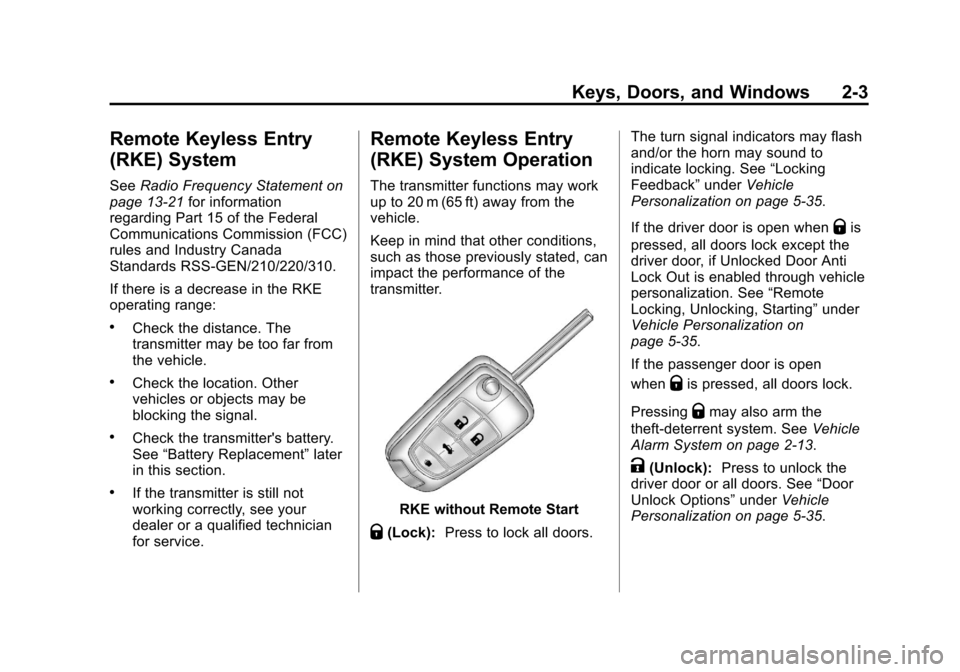
RKE without Remote Start
Q(Lock): Press to lock all doors. The turn signal indicators may flash
and/or the horn may sound to
indicate locking. See
“Locking
Feedback” underVehicle
Personalization on page 5‑35.
If the driver door is open when
Qis
pressed, all doors lock except the
driver door, if Unlocked Door Anti
Lock Out is enabled through vehicle
personalization. See “Remote
Locking, Unlocking, Starting” under
Vehicle Personalization on
page 5‑35.
If the passenger door is open
when
Qis pressed, all doors lock.
Pressing
Qmay also arm the
theft-deterrent system. See Vehicle
Alarm System on page 2‑13.
K(Unlock): Press to unlock the
driver door or all doors. See “Door
Unlock Options” underVehicle
Personalization on page 5‑35.
Page 36 of 436
Black plate (4,1)Chevrolet Malibu Owner Manual - 2013 - CRC - 6/6/12
2-4 Keys, Doors, and Windows
The turn signal indicators may flash
and/or the horn may sound to
indicate unlocking. See“Unlock
Feedback” underVehicle
Personalization on page 5‑35.
Pressing
Kwill disarm the
theft-deterrent system. See Vehicle
Alarm System on page 2‑13.
Memory seat positions may be
recalled when unlocking the vehicle.
See Memory Seats on page 3‑6 and
“Memory Remote Recall” under
Vehicle Personalization on
page 5‑35.
V (Remote Trunk Release):
Press and hold to open the trunk.
7(Vehicle Locator/Panic
Alarm): Press and release one
time to initiate vehicle locator. The
exterior lamps flash and the horn
chirps three times. Press and hold
7for at least
three seconds to sound the panic
alarm. The horn sounds and the
turn signals flash for about
30 seconds until
7is pressed again
or the vehicle is started.
/(Remote Vehicle Start): For
vehicles with this feature, press
Q
and release and then press and
hold
/within two seconds to start
the engine from outside the vehicle
using the RKE transmitter. See
Remote Vehicle Start on page 2‑7.
The buttons on the keys are
disabled when there is a key is in
the ignition, if equipped.
Keyless Access Operation
Some vehicles have the keyless
access system that lets you lock
and unlock the doors and access
the trunk without removing the RKE
transmitter from your pocket, purse, briefcase, etc. The RKE transmitter
must be within 1 m (3 ft) of the door
being unlocked. If the vehicle has
this feature, there will be a button on
the outside front door handles.
The keyless access can be
programmed to unlock all doors on
the first unlock/lock button press
from the driver door. See
Vehicle
Personalization on page 5‑35.
Keyless Unlocking/Locking from
the Driver Door
When the doors are locked and the
RKE transmitter is within 1 m (3 ft)
of the driver door handle, pressing
the lock/unlock button on the driver
door handle will unlock the driver
door. If the lock/unlock button is
pressed again within five seconds,
all passenger doors will unlock. Pull
the door handle to unlatch the door.
Page 45 of 436
Black plate (13,1)Chevrolet Malibu Owner Manual - 2013 - CRC - 6/6/12
Keys, Doors, and Windows 2-13
Vehicle Security
This vehicle has theft-deterrent
features; however, they do not make
the vehicle impossible to steal.
Vehicle Alarm System
This vehicle has an anti-theft alarm
system.
Arming the System
To arm the system, pressQon the
RKE transmitter.
The alarm automatically arms after
about 30 seconds. The security
light, on the instrument cluster,
flashes.
Press
Von the RKE transmitter to
open the trunk without setting off the
alarm. The system rearms when the
trunk is closed.
Disarming the System
To disarm the system, do one of the
following:
.PressKon the RKE transmitter.
.Approach the vehicle with the
RKE transmitter (keyless
access).
.Start the engine.
The alarm automatically disarms.
How to Detect a Tamper
Condition
IfKis pressed and the horn
sounds, an attempted break-in
occurred while the system was
armed.
If the alarm has been activated, a
message will appear on the DIC.
See Security Messages on
page 5‑32.
Immobilizer
See Radio Frequency Statement on
page 13‑21 for information
regarding Part 15 of the Federal
Communications Commission (FCC)
rules and Industry Canada
Standards RSS-GEN/210/220/310.
Immobilizer Operation
(Key Access)
This vehicle has a passive
theft-deterrent system.
The system does not have to be
manually armed or disarmed.
The vehicle is automatically
immobilized when the key is
removed from the ignition.
The system is automatically
disarmed when the vehicle is
started with the correct key.
The key uses a transponder
that matches an immobilizer
control unit in the vehicle and
automatically disarms the system.
Page 109 of 436
Black plate (1,1)Chevrolet Malibu Owner Manual - 2013 - CRC - 6/6/12
Instruments and Controls 5-1
Instruments and
Controls
Controls
Steering Wheel Adjustment . . . 5-2
Steering Wheel Controls . . . . . . 5-2
Horn . . . . . . . . . . . . . . . . . . . . . . . . . . 5-3
Windshield Wiper/Washer . . . . . 5-3
Compass . . . . . . . . . . . . . . . . . . . . . 5-4
Clock . . . . . . . . . . . . . . . . . . . . . . . . . 5-5
Power Outlets . . . . . . . . . . . . . . . . . 5-5
Warning Lights, Gauges, and
Indicators
Warning Lights, Gauges, andIndicators . . . . . . . . . . . . . . . . . . . . 5-7
Instrument Cluster . . . . . . . . . . . . 5-8
Speedometer . . . . . . . . . . . . . . . . 5-10
Odometer . . . . . . . . . . . . . . . . . . . . 5-10
Trip Odometer . . . . . . . . . . . . . . . 5-10
Tachometer . . . . . . . . . . . . . . . . . . 5-10
Fuel Gauge . . . . . . . . . . . . . . . . . . 5-10
Driver Efficiency Gauge . . . . . . 5-11
Engine Coolant Temperature Gauge . . . . . . . . . . . . . . . . . . . . . . 5-11
Safety Belt Reminders . . . . . . . 5-12
Airbag Readiness Light . . . . . . 5-12 Passenger Airbag Status
Indicator . . . . . . . . . . . . . . . . . . . . 5-13
Charging System Light . . . . . . 5-14
Malfunction Indicator Lamp . . . . . . . . . . . . . 5-14
Brake System Warning Light . . . . . . . . . . . . . . . . . . . . . . . 5-17
Electric Parking Brake Light . . . . . . . . . . . . . . . . . . . . . . . 5-17
Service Electric Parking Brake Light . . . . . . . . . . . . . . . . . . . . . . . 5-17
Antilock Brake System (ABS) Warning Light . . . . . . . . . . . . . . 5-18
Lane Departure Warning (LDW) Light . . . . . . . . . . . . . . . . 5-18
Forward Collision Alert (FCA) Warning Light . . . . . . . . . . . . . . 5-19
Traction Off Light . . . . . . . . . . . . 5-19
StabiliTrak
®OFF Light . . . . . . . 5-19
Traction Control System (TCS)/StabiliTrak
®Light . . . . 5-20
Engine Coolant Temperature Warning Light . . . . . . . . . . . . . . 5-20
Tire Pressure Light . . . . . . . . . . 5-21
Engine Oil Pressure Light . . . . 5-22
Low Fuel Warning Light . . . . . . 5-22
Security Light . . . . . . . . . . . . . . . . 5-22
High-Beam On Light . . . . . . . . . 5-23
Front Fog Lamp Light . . . . . . . . 5-23 Lamps On Reminder . . . . . . . . . 5-23
Cruise Control Light . . . . . . . . . 5-23
Door Ajar Light . . . . . . . . . . . . . . 5-24
Information Displays
Center Stack Display . . . . . . . . 5-24
Driver Information
Center (DIC) . . . . . . . . . . . . . . . 5-24
Vehicle Messages
Vehicle Messages . . . . . . . . . . . 5-28
Battery Voltage and ChargingMessages . . . . . . . . . . . . . . . . . . 5-28
Brake System Messages . . . . 5-28
Compass Messages . . . . . . . . . 5-29
Cruise Control Messages . . . . 5-29
Door Ajar Messages . . . . . . . . . 5-29
Engine Cooling System Messages . . . . . . . . . . . . . . . . . . 5-29
Engine Oil Messages . . . . . . . . 5-30
Engine Power Messages . . . . 5-30
Fuel System Messages . . . . . . 5-31
Key and Lock Messages . . . . . 5-31
Lamp Messages . . . . . . . . . . . . . 5-31
Object Detection System Messages . . . . . . . . . . . . . . . . . . 5-31
Ride Control System Messages . . . . . . . . . . . . . . . . . . 5-32
Security Messages . . . . . . . . . . 5-32
Page 111 of 436
Black plate (3,1)Chevrolet Malibu Owner Manual - 2013 - CRC - 6/6/12
Instruments and Controls 5-3
b/g(Push to Talk):For vehicles
with an OnStar, Bluetooth,
or navigation system, press to
interact with those systems. See
Bluetooth (Overview) on page 7‑35
or Bluetooth (Voice Recognition) on
page 7‑40 orBluetooth
(Infotainment Controls) on
page 7‑36 andOnStar Overview on
page 14‑1.
$/i(Mute/End Call): Press to
silence the vehicle speakers only.
Press again to turn the sound on.
For vehicles with OnStar or
Bluetooth systems, press to reject
an incoming call, or to end a
current call.
_SRC^(Thumbwheel Control):
Use this control to select a radio
band or audio source.
Use
_or^to select the next or
previous favorite radio station, CD
track, DVD track/chapter, or MP3
track.
Press SRC to change between
radio and CD or DVD. Press and hold SRC to interact with
the navigation system, if equipped.
+
x−
(Volume): Press + to
increase the volume; press −to
decrease the volume.
Horn
Pressaon the steering wheel pad
to sound the horn.
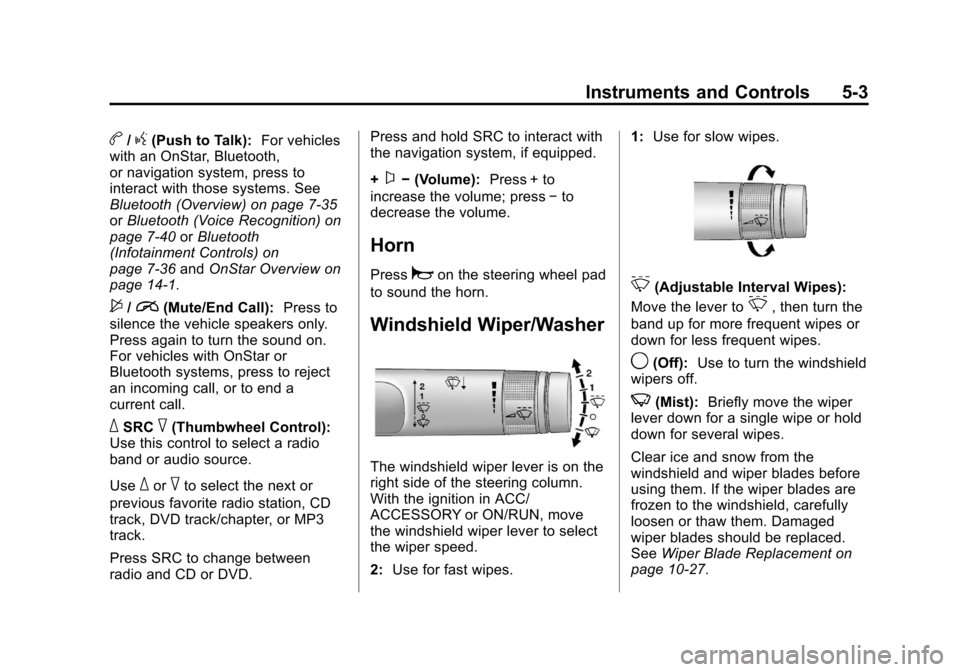
Windshield Wiper/Washer
The windshield wiper lever is on the
right side of the steering column.
With the ignition in ACC/
ACCESSORY or ON/RUN, move
the windshield wiper lever to select
the wiper speed.
2: Use for fast wipes. 1:
Use for slow wipes.
3(Adjustable Interval Wipes):
Move the lever to
3, then turn the
band up for more frequent wipes or
down for less frequent wipes.
9(Off): Use to turn the windshield
wipers off.
3(Mist): Briefly move the wiper
lever down for a single wipe or hold
down for several wipes.
Clear ice and snow from the
windshield and wiper blades before
using them. If the wiper blades are
frozen to the windshield, carefully
loosen or thaw them. Damaged
wiper blades should be replaced.
See Wiper Blade Replacement on
page 10‑27.
Page 146 of 436
Black plate (38,1)Chevrolet Malibu Owner Manual - 2013 - CRC - 6/6/12
5-38 Instruments and Controls
Press TUNE/MENU when Delayed
Door Lock is highlighted. Turn the
TUNE/MENU knob to select On or
Off. Press TUNE/MENU to confirm
and go back to the last menu.
Auto Door Lock
This allows selection of which of the
doors will automatically lock when
the vehicle is shifted out of P (Park).
Press TUNE/MENU when Auto
Door Lock is highlighted. Turn the
TUNE/MENU knob to select All
Doors, Driver Door, or Off. Press
TUNE/MENU to confirm and go
back to the last menu.
Remote Locking, Unlocking,
Starting
Select Remote Locking, Unlocking,
Starting and the following may be
displayed:
.Unlock Feedback (Lights)
.Locking Feedback
.Door Unlock Options
.Memory Remote Recall
.Remote Left in Vehicle Reminder
.Relock Remote Door
.Passive Door Unlock
.Passive Door Lock
Unlock Feedback (Lights)
When on, the exterior lamps will
flash when unlocking the vehicle
with the RKE transmitter.
Press TUNE/MENU when Unlock
Feedback (Lights) is highlighted.
Turn the TUNE/MENU knob to
select On or Off. Press TUNE/
MENU to confirm and go back to the
last menu.
Locking Feedback
This allows selection of what type of
feedback is given when locking the
vehicle with the RKE transmitter. Press TUNE/MENU when Locking
Feedback is highlighted. Turn the
TUNE/MENU knob to select Lights
and Horn, Lights Only, Horn Only,
or Off. Press TUNE/MENU to
confirm and go back to the
last menu.
Door Unlock Options
This allows selection of which doors
will unlock when pressing
Kon the
RKE transmitter.
Press TUNE/MENU when Door
Unlock Options is highlighted. Turn
the TUNE/MENU knob to select All
Doors or Driver Door Only. When
set to Driver Door Only, the driver
door will unlock the first time
Kis
pressed and all doors will unlock
when
Kis pressed a second time.
When set to All Doors, all of the
doors will unlock at the first press
of
K. Press TUNE/MENU to confirm
and go back to the last menu.
Page 147 of 436
Black plate (39,1)Chevrolet Malibu Owner Manual - 2013 - CRC - 6/6/12
Instruments and Controls 5-39
Memory Remote Recall
This allows the Memory Remote
Recall feature to be turned on or off.
When on, this feature will recall the
current driver's last seat and outside
mirror positions upon unlocking the
driver door with the RKE transmitter,
and opening that door. The current
driver is identified when the RKE
transmitter is used to unlock the
driver door. If keyless access
equipped, the recall will occur upon
opening the driver door. See
“Recalling RKE Memory Positions”
underMemory Seats on page 3‑6.
Press TUNE/MENU when Memory
Remote Recall is highlighted. Turn
the TUNE/MENU knob to select On
or Off. Press TUNE/MENU to
confirm and go back to the
last menu. Remote Left in Vehicle Reminder
This allows the Remote Left in
Vehicle Reminder feature to be
turned on or off. If on, the horn will
chirp if a remote is left in the
vehicle.
Press TUNE/MENU when Remote
Left in Vehicle Reminder is
highlighted. Turn the TUNE/MENU
knob to select On or Off. Press
TUNE/MENU to confirm and go
back to the last menu.
Relock Remote Door
When on, the doors will
automatically lock after a period of
time if the vehicle is not entered or
exited.
Press TUNE/MENU when Relock
Remote Door is highlighted. Turn
the TUNE/MENU knob to select
On or Off. Press TUNE/MENU
to confirm and go back to the
last menu.Passive Door Lock
This allows selection of which doors
are unlocked by pressing the button
on the outside door handle.
Press TUNE/MENU when Passive
Door Lock is highlighted. Turn the
TUNE/MENU knob to select Off, On,
or On with Active Horn Chirp. Press
TUNE/MENU to confirm and go
back to the last menu.
Passive Door Unlock
This allows selection of which doors
are locked by pressing the button on
the outside door handle.
Press TUNE/MENU when Passive
Door Unlock is highlighted. Turn the
TUNE/MENU knob to select All
Doors or Driver Door. Press TUNE/
MENU to confirm and go back to the
last menu.