2013 CHEVROLET MALIBU AUX
[x] Cancel search: AUXPage 182 of 436
Black plate (22,1)Chevrolet Malibu Owner Manual - 2013 - CRC - 6/6/12
7-22 Infotainment System
Audio Players
CD Player
The player can be used for CDs
and MP3s.
With the ignition on, insert a CD into
the slot, label side up. The player
pulls it in and begins playing.
The vehicle must be in P (Park) for
video to display.
The system is capable of playing:
.Most audio CDs
.CD-R
.CD-RW
.MP3 or unprotected WMA
formats
When playing any compatible
recordable disc, the sound quality
can be reduced due to disc quality,
the method of recording, the quality
of the music or video that has been
recorded, or the way the disc has
been handled. To avoid damage to the CD player:
.Do not use scratched or
damaged discs.
.Do not apply labels to discs. The
labels could get caught in the
player.
.Insert only one disc at a time.
.Keep the loading slot free of
foreign materials, liquids, and
debris.
If a description label is needed, try
labeling the top of the disc using a
marking pen.
Loading and Ejecting Discs
To load a disc:
1. Turn the ignition on.
2. Insert a disc into the slot. The player pulls it in the rest of the
way. If the disc is damaged or
improperly loaded, there is an
error and the disc ejects.
The disc automatically plays once
loaded. Press
Zto eject a disc from the
CD player.
Playing an Audio CD (Radio
with CD)
CD/AUX: Press to use the CD
player.
w j(Play/Pause): Use to start,
pause, or resume play.
©SEEK¨:
.Press©to seek to the beginning
of the current or previous track.
If the track has been playing for
less than five seconds, it seeks
the previous track. If longer than
five seconds, the current track
starts from the beginning.
.Press and hold©to quickly
reverse through a track. Release
the button to return to playing
speed.
.For AM or FM, press©to seek
to the previous strong station.
.Press¨to seek the next track.
Page 185 of 436
Black plate (25,1)Chevrolet Malibu Owner Manual - 2013 - CRC - 6/6/12
Infotainment System 7-25
Genres:Press to view the genres.
Select a genre to view a list of all
songs of that genre. Select a song
from the list to begin playback.
Folders: Press to open a folder list
to access the files within the folder
structure.
Root Directory
The root directory is treated as a
folder. All files contained directly
under the root directory are
accessed prior to any root directory
folders.
Empty Folders
If a root directory or folder is empty
or contains only folders, the player
advances to the next folder in the
file structure that contains a
compressed audio file. The empty
folder(s) are not displayed or
numbered. No Folder
When the CD only contains
compressed audio files without any
folders or playlists, all files are
under the root folder.
File System and Naming
The song titles, artists, albums, and
genres are taken from the file's ID3
tag and are only displayed if present
in the tag. If a song title is not
present in the ID3 tag, the radio
displays the file name as the
track name.
Preprogrammed Playlists
The radio recognizes
preprogrammed playlists; however,
there is no editing capability. These
playlists are treated as special
folders containing compressed
audio song files.Auxiliary Devices
This vehicle has an auxiliary input
jack in the center console. Possible
auxiliary audio sources include:
.Laptop computer
.MP3 player
.Tape player
This jack is not an audio output. Do
not plug headphones into the
auxiliary input jack. Drivers are
encouraged to set up any auxiliary
device while the vehicle is in
P (Park).
Connect a 3.5 mm (1/8 in) cable
from the auxiliary device to the
auxiliary input jack. When a device
is connected, the system
automatically begins playing audio
from the device over the vehicle
speakers.
Page 186 of 436
Black plate (26,1)Chevrolet Malibu Owner Manual - 2013 - CRC - 6/6/12
7-26 Infotainment System
If an auxiliary device has already
been connected, but a different
source is currently active, press the
CD/AUX button on the radio
faceplate or the Now Playing screen
button on the Home Page, then
press SOURCE repeatedly to cycle
through all of the available audio
source screens, until the AUX
source screen is selected.
Portable devices are controlled by
using the menu system described in
Overview (Radio with CD and
Touchscreen) on page 7‑5or
Overview (Radio with CD) on
page 7‑2.
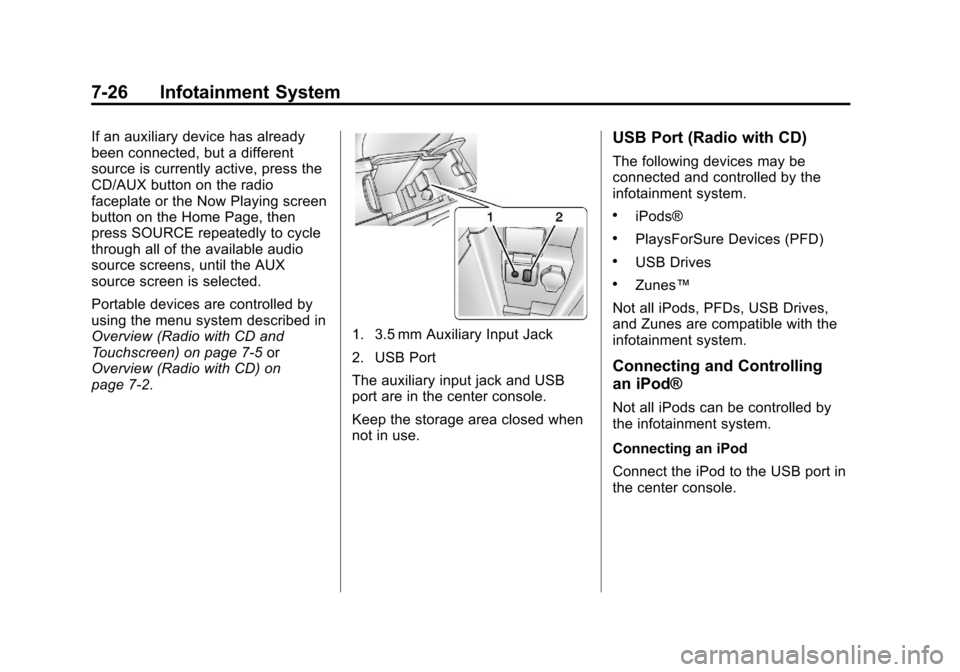
1. 3.5 mm Auxiliary Input Jack
2. USB Port
The auxiliary input jack and USB
port are in the center console.
Keep the storage area closed when
not in use.
USB Port (Radio with CD)
The following devices may be
connected and controlled by the
infotainment system.
.iPods®
.PlaysForSure Devices (PFD)
.USB Drives
.Zunes™
Not all iPods, PFDs, USB Drives,
and Zunes are compatible with the
infotainment system.
Connecting and Controlling
an iPod®
Not all iPods can be controlled by
the infotainment system.
Connecting an iPod
Connect the iPod to the USB port in
the center console.
Page 189 of 436
Black plate (29,1)Chevrolet Malibu Owner Manual - 2013 - CRC - 6/6/12
Infotainment System 7-29
Repeat Off:Playback starts from
the beginning of the current track
after the last track finishes.
Connecting a Bluetooth®
Device
Before a Bluetooth device can be
connected to the infotainment
system, it must first be paired to the
system. Not all Bluetooth devices
can be paired to the infotainment
system. Before pairing the Bluetooth
device, become familiar with its user
guide for Bluetooth functions. The
system only connects to Bluetooth
devices that support A2DP
(Advanced Audio Distribution
Profile) version 1.2.
A Bluetooth phone with MP3
capability cannot be paired to the
vehicle as a phone and an MP3
player at the same time.
Pairing Information:
.Up to five devices can be paired
to the system.
.The pairing process is disabled
when the vehicle is moving.
.The infotainment system
automatically links with the first
available paired device in the
order the device was paired.
.Only one paired device can be
connected to the infotainment
system at a time.
.Pairing should only need to be
completed once, unless changes
to the pairing information have
been made or the device is
deleted.
Bluetooth Setup Menu
The Bluetooth Setup menu can be
accessed with or without a device
attached to the USB port.
To select the Bluetooth Setup menu
when a device is attached to the
USB port and active:
1. Turn the TUNE/MENU knob while in the iPod, Zune, PFD,
or USB device main menu.
2. Select Bluetooth Music Setup. To select the Bluetooth Music Setup
menu when a device is not attached
to the USB port, or when a device is
attached to the USB port but not
active:
1. Press the CD/AUX button until
AUX is the active source.
2. Turn the TUNE/MENU knob.
3. Select Bluetooth Music Setup.
To select the Bluetooth Music Setup
menu when a Bluetooth device is
connected and active:
1. Turn the TUNE/MENU knob.
2. Select Bluetooth Music Setup.
Pairing a Device
1. Select Connect To New Device from the Bluetooth Music
Setup menu.
2. The system asks a series of Yes/No questions to determine
what type of device is being
paired.
Page 193 of 436
Black plate (33,1)Chevrolet Malibu Owner Manual - 2013 - CRC - 6/6/12
Infotainment System 7-33
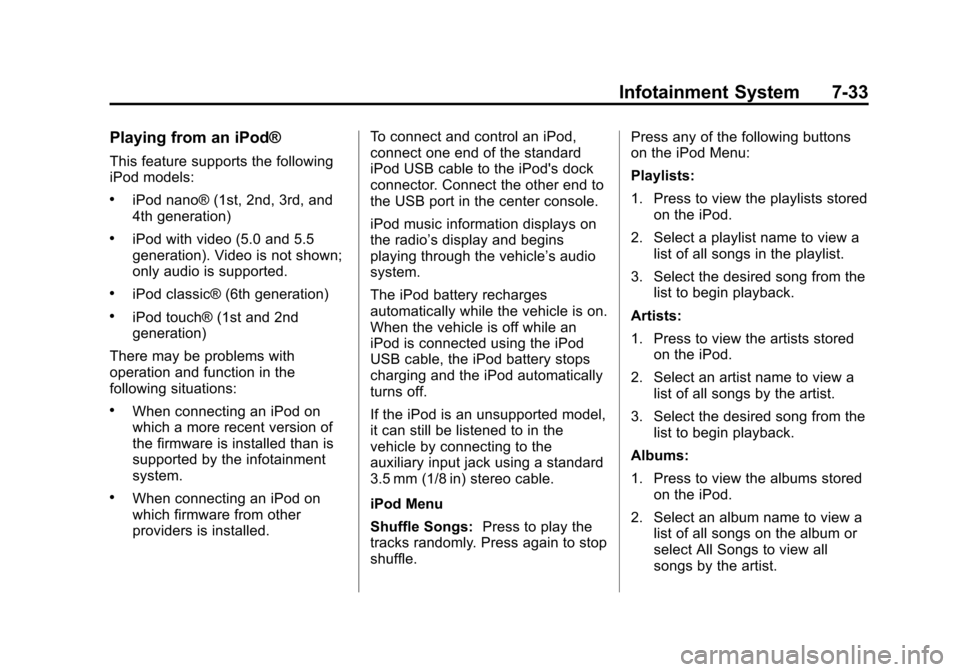
Playing from an iPod®
This feature supports the following
iPod models:
.iPod nano® (1st, 2nd, 3rd, and
4th generation)
.iPod with video (5.0 and 5.5
generation). Video is not shown;
only audio is supported.
.iPod classic® (6th generation)
.iPod touch® (1st and 2nd
generation)
There may be problems with
operation and function in the
following situations:
.When connecting an iPod on
which a more recent version of
the firmware is installed than is
supported by the infotainment
system.
.When connecting an iPod on
which firmware from other
providers is installed. To connect and control an iPod,
connect one end of the standard
iPod USB cable to the iPod's dock
connector. Connect the other end to
the USB port in the center console.
iPod music information displays on
the radio’s display and begins
playing through the vehicle’s audio
system.
The iPod battery recharges
automatically while the vehicle is on.
When the vehicle is off while an
iPod is connected using the iPod
USB cable, the iPod battery stops
charging and the iPod automatically
turns off.
If the iPod is an unsupported model,
it can still be listened to in the
vehicle by connecting to the
auxiliary input jack using a standard
3.5 mm (1/8 in) stereo cable.
iPod Menu
Shuffle Songs:
Press to play the
tracks randomly. Press again to stop
shuffle. Press any of the following buttons
on the iPod Menu:
Playlists:
1. Press to view the playlists stored
on the iPod.
2. Select a playlist name to view a list of all songs in the playlist.
3. Select the desired song from the list to begin playback.
Artists:
1. Press to view the artists stored on the iPod.
2. Select an artist name to view a list of all songs by the artist.
3. Select the desired song from the list to begin playback.
Albums:
1. Press to view the albums stored on the iPod.
2. Select an album name to view a list of all songs on the album or
select All Songs to view all
songs by the artist.
Page 307 of 436
Black plate (41,1)Chevrolet Malibu Owner Manual - 2013 - CRC - 6/6/12
Vehicle Care 10-41
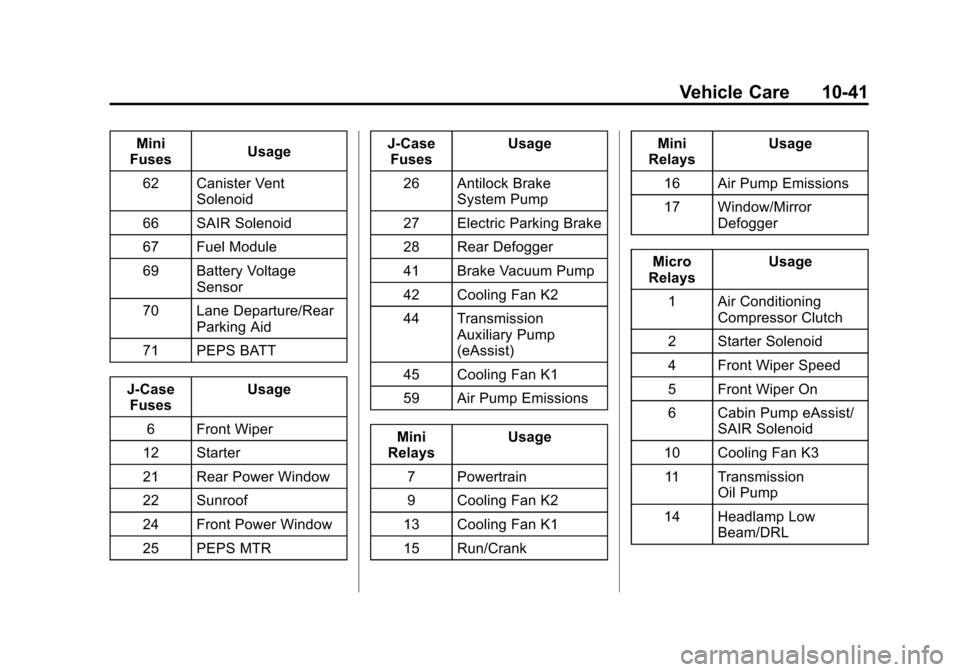
Mini
Fuses Usage
62 Canister Vent Solenoid
66 SAIR Solenoid
67 Fuel Module
69 Battery Voltage Sensor
70 Lane Departure/Rear Parking Aid
71 PEPS BATT
J-Case Fuses Usage
6 Front Wiper
12 Starter
21 Rear Power Window
22 Sunroof
24 Front Power Window
25 PEPS MTR J-Case
Fuses Usage
26 Antilock Brake System Pump
27 Electric Parking Brake
28 Rear Defogger
41 Brake Vacuum Pump
42 Cooling Fan K2
44 Transmission Auxiliary Pump
(eAssist)
45 Cooling Fan K1
59 Air Pump Emissions
Mini
Relays Usage
7 Powertrain
9 Cooling Fan K2
13 Cooling Fan K1
15 Run/Crank Mini
Relays Usage
16 Air Pump Emissions
17 Window/Mirror Defogger
Micro
Relays Usage
1 Air Conditioning Compressor Clutch
2 Starter Solenoid
4 Front Wiper Speed
5 Front Wiper On
6 Cabin Pump eAssist/ SAIR Solenoid
10 Cooling Fan K3 11 Transmission Oil Pump
14 Headlamp Low Beam/DRL
Page 425 of 436

Black plate (1,1)Chevrolet Malibu Owner Manual - 2013 - CRC - 6/6/12
INDEX i-1
A
Accessories andModifications . . . . . . . . . . . . . . . . . 10-3
Accessory Power . . . . . . . . . . . . . . 9-22
Add-On Electrical Equipment . . . . . . . . . . . . . . . . . . . 9-50
Additional Information
OnStar
®. . . . . . . . . . . . . . . . . . . . . . 14-5
Adjustments Lumbar, Front Seats . . . . . . . . . . . 3-4
Air Cleaner/Filter, Engine . . . . . 10-15
Air Filter, Passenger
Compartment . . . . . . . . . . . . . . . . . 8-8
Air Vents . . . . . . . . . . . . . . . . . . . . . . . 8-7
Airbag System Check . . . . . . . . . . . . . . . . . . . . . . . . 3-31
How Does an Airbag
Restrain? . . . . . . . . . . . . . . . . . . . 3-24
Passenger Sensing System . . . . . . . . . . . . . . . . . . . . . . 3-26
What Makes an Airbag Inflate? . . . . . . . . . . . . . . . . . . . . . . 3-23 Airbag System (cont'd)
What Will You See after an
Airbag Inflates? . . . . . . . . . . . . . 3-24
When Should an Airbag
Inflate? . . . . . . . . . . . . . . . . . . . . . . 3-22
Where Are the Airbags? . . . . . . 3-21
Airbags Adding Equipment to theVehicle . . . . . . . . . . . . . . . . . . . . . . 3-30
Passenger Status Indicator . . . 5-13
Readiness Light . . . . . . . . . . . . . . 5-12
Servicing Airbag-Equipped Vehicles . . . . . . . . . . . . . . . . . . . . . 3-30
System Check . . . . . . . . . . . . . . . . 3-19
Alarm Vehicle Security . . . . . . . . . . . . . . 2-13
AM-FM Radio . . . . . . . . . . . . . . . . . . 7-14
Antenna Satellite Radio . . . . . . . . . . . . . . . . 7-21
Antilock Brake System (ABS) . . . . . . . . . . . . . . . . 9-28
Warning Light . . . . . . . . . . . . . . . . . 5-18
Appearance Care
Exterior . . . . . . . . . . . . . . . . . . . . . 10-97
Interior . . . . . . . . . . . . . . . . . . . . . 10-100 Armrest
Rear Seat . . . . . . . . . . . . . . . . . . . . 3-10
Assistance Program, Roadside . . . . . . . . . . . . . . 13-7, 13-11
Audio Players . . . . . . . . . . . . . . . . . 7-22 CD . . . . . . . . . . . . . . . . . . . . . . . . . . . 7-22
MP3 . . . . . . . . . . . . . . . . . . . . . . . . . . 7-24
Audio System Backglass Antenna . . . . . . . . . . . 7-21
Radio Reception . . . . . . . . . . . . . . 7-20
Theft-Deterrent Feature . . . . . . . . 7-2
Automatic Door Locks . . . . . . . . . . . . . . . . . . . 2-10
Headlamp System . . . . . . . . . . . . . 6-3
Transmission . . . . . . . . . . . . . . . . . 9-26
Transmission Fluid . . . . . . . . . 10-14
Automatic Transmission Manual Mode . . . . . . . . . . . . . . . . . 9-27
Shift Lock ControlFunction Check . . . . . . . . . . . 10-26
Auxiliary
Devices . . . . . . . . . . . . . . . . . . . . . . . 7-25
Page 427 of 436

Black plate (3,1)Chevrolet Malibu Owner Manual - 2013 - CRC - 6/6/12
INDEX i-3
Climate Control Systems . . . . . . . 8-1Air Conditioning . . . . . . . . . . . . . . . 8-1
Dual Automatic . . . . . . . . . . . . . . . . 8-3
Heating . . . . . . . . . . . . . . . . . . . . . . . . 8-1
Clock . . . . . . . . . . . . . . . . . . . . . . . . . . . 5-5
Cluster, Instrument . . . . . . . . . . . . . 5-8
Collision Damage Repair . . . . . 13-15
Compact Spare Tire . . . . . . . . . . 10-89
Compass . . . . . . . . . . . . . . . . . . . . . . . 5-4 Messages . . . . . . . . . . . . . . . . . . . . 5-29
Compressor Kit,
Tire Sealant . . . . . . . . . .10-68, 10-75
Connections OnStar
®. . . . . . . . . . . . . . . . . . . . . . 14-4
Control of a Vehicle . . . . . . . . . . . . . 9-3
Convenience Net . . . . . . . . . . . . . . . 4-3
Convex Mirrors . . . . . . . . . . . . . . . . 2-15
Coolant Engine . . . . . . . . . . . . . . . . . . . . . . 10-18
Engine TemperatureGauge . . . . . . . . . . . . . . . . . . . . . . 5-11
Engine Temperature Warning Light . . . . . . . . . . . . . . . 5-20 Cooling System . . . . . . . . . . . . . . . 10-16
Engine Messages . . . . . . . . . . . . 5-29
Courtesy Lamps . . . . . . . . . . . . . . . . 6-5
Courtesy Transportation Program . . . . . . . . . . . . . . . . . . . . . 13-13
Cruise Control . . . . . . . . . . . . . . . . . 9-34 Light . . . . . . . . . . . . . . . . . . . . . . . . . . 5-23
Messages . . . . . . . . . . . . . . . . . . . . 5-29
Cupholders . . . . . . . . . . . . . . . . . . . . . 4-2
Customer Assistance . . . . . . . . . . 13-6 Offices . . . . . . . . . . . . . . . . . . . . . . . . 13-5
Text Telephone (TTY)
Users . . . . . . . . . . . . . . . . . . . . . . . 13-6
Customer Information Service PublicationsOrdering Information . . . . . . 13-17
Customer Satisfaction Procedure . . . . . . . . . . . . . . 13-2, 13-4
D
Damage Repair, Collision . . . . . 13-15
Danger, Warnings, andCautions . . . . . . . . . . . . . . . . . . . . . . . . iv
Data Recorders, Event . . . . . . . 13-20 Daytime Running
Lamps (DRL) . . . . . . . . . . . . . . . . . . 6-2
Defensive Driving . . . . . . . . . . . . . . . 9-2
Devices Auxiliary . . . . . . . . . . . . . . . . . . . . . . 7-25
Diagnostics OnStar
®. . . . . . . . . . . . . . . . . . . . . . 14-5
Distracted Driving . . . . . . . . . . . . . . . 9-2
Dome Lamps . . . . . . . . . . . . . . . . . . . 6-5
Door Ajar Light . . . . . . . . . . . . . . . . . . . . . 5-24
Ajar Messages . . . . . . . . . . . . . . . 5-29
Ajar Reminder . . . . . . . . . . . . . . . . . 2-9
Locks . . . . . . . . . . . . . . . . . . . . . . . . . . 2-8
Power Locks . . . . . . . . . . . . . . . . . . . 2-9
Drive Belt Routing, Engine . . . . . 12-4
Driver Efficiency Gauge . . . . . . . 5-11
Driver Information
Center (DIC) . . . . . . . . . . . . . . . . . 5-24
Driving Defensive . . . . . . . . . . . . . . . . . . . . . . 9-2
Drunk . . . . . . . . . . . . . . . . . . . . . . . . . . 9-3
For Better Fuel Economy . . . . . 1-26
Highway Hypnosis . . . . . . . . . . . . . 9-6
Hill and Mountain Roads . . . . . . . 9-7
If the Vehicle is Stuck . . . . . . . . . . 9-9