2013 CHEVROLET CORVETTE engine
[x] Cancel search: enginePage 143 of 414
Black plate (39,1)Chevrolet Corvette Owner Manual - 2013 - crc2 - 11/8/12
Instruments and Controls 5-39
HOT ENGINE AIR
CONDITIONING OFF
This message displays when the
engine coolant becomes hotter than
the normal operating temperature.
To avoid added strain on a hot
engine, the air conditioning
compressor is automatically turned
off. When the coolant temperature
returns to normal, the A/C operation
automatically resumes. You can
continue to drive the vehicle. If this
message continues to appear, have
the system repaired by your dealer
as soon as possible to avoid
compressor damage.
Engine Oil Messages
CHANGE ENGINE OIL
This message displays when the life
of the engine oil has expired. See
Maintenance Schedule on
page 11‑3. After an oil change, the
engine oil life system must be reset.See
“Engine Oil Life” underDriver
Information Center (DIC) on
page 5‑25. Also, see Engine Oil on
page 10‑13 andEngine Oil Life
System on page 10‑19 for more
information.
CHECK OIL LEVEL
On some vehicles, this message
displays and two chimes sound if
the oil level in the vehicle is low.
Once the vehicle senses a change
in the engine oil level, the light
remains off.
If this message appears after
starting the engine, the engine oil
level may be too low. You may need
to add oil. See Engine Overheating
on page 10‑29.
To acknowledge the message, press
the RESET button. The message
reappears every 10 minutes until
this condition changes.
LOW OIL PRESSURE
This message displays if low oil
pressure levels occur. If this
message appears while the engine
is running, stop the engine and do
not operate it until the cause of low
oil pressure is corrected. Severe
damage to the engine can result.
A sound will be heard when this
message is displayed. See Engine
Oil on page 10‑13.
Engine Power Messages
ENGINE DRAG CONTROL
ACTIVE
This message displays when engine
drag control is active. When driving
in a lower gear in rainy, snowy,
or icy conditions and then letting up
on the accelerator or downshifting,
the rear wheels may begin to slip
and this message displays. This
message stays on for a few
seconds following the engine drag
control event.
Page 144 of 414
Black plate (40,1)Chevrolet Corvette Owner Manual - 2013 - crc2 - 11/8/12
5-40 Instruments and Controls
REDUCED ENGINE POWER
If this message displays and the
check engine light comes on, a
noticeable reduction in the vehicle's
performance may occur. If the
REDUCED ENGINE POWER
message is displayed, but there is
no reduction in performance,
proceed to your destination. The
performance may be reduced the
next time the vehicle is driven.
The vehicle may be driven at a
reduced speed while the REDUCED
ENGINE POWER message is
displayed, but acceleration and
speed may be reduced. Anytime the
check engine light stays on, the
vehicle should be taken to your
dealer as soon as possible for
diagnosis and repair. See
Malfunction Indicator Lamp on
page 5‑18for more information.
Multiple chimes sound when this
message is displayed. To acknowledge the message, press
the RESET button. The message
reappears every five minutes until
this condition changes.
If the REDUCED ENGINE POWER
message is displayed in
combination with the COOLANT
OVER TEMPERATURE message,
see
Engine Overheating on
page 10‑29.
Fuel System Messages
CHECK GAS CAP
This message displays if the fuel
cap has not been fully tightened.
Check the fuel cap to make sure
that it is on properly. Once
tightened, it takes at least one
overnight park to reset or clear this
message. If both the CHECK GAS
CAP message and the malfunction
indicator lamp in the instrument
panel cluster are on, you may need
to see your dealer for service. See
Malfunction Indicator Lamp on
page 5‑18 for more information.
LOW FUEL
This message displays when the
fuel tank is less than 10 percent full
and the display is turned off.
A sound will be heard when this
message is displayed. Refill the fuel
tank as soon as possible. See Fuel
Gauge on page 5‑12.
SERVICE FUEL SYSTEM
This message displays if the
Powertrain Control Module (PCM)
has detected a problem within the
fuel system. Have the vehicle
serviced by your dealer. This
message also displays when the
cluster is not getting fuel information
from the PCM.
Key and Lock Messages
FOB AUTOLEARN WAIT
XX MINUTES
See “Matching Transmitter(s) to
Your Vehicle” underRemote
Keyless Entry (RKE) System
Operation on page 2‑3.
Page 146 of 414

Black plate (42,1)Chevrolet Corvette Owner Manual - 2013 - crc2 - 11/8/12
5-42 Instruments and Controls
.The vehicle's battery voltage is
low. The battery voltage must be
above 10 volts for the RKE
transmitter to be detected
properly.
NO FOB - OFF OR RUN?
This message displays when the
RKE transmitter is not detected
inside the vehicle while you are
trying to turn the ignition off. The
vehicle may be near a strong radio
antenna signal causing the RKE
system to be jammed. The vehicle
will remain in ACCESSORY until the
vehicle is turned off or is restarted,
or five minutes has expired. If you
turn the ignition off and you cannot
find the RKE transmitter, you will not
be able to restart the vehicle. The
RKE transmitter needs to be inside
the vehicle in order for the vehicle to
start. SeeStarting the Engine on
page 9‑20 for more information.
OFF–ACCESSORY TO LEARN
See“Matching Transmitter(s) to
Your Vehicle” underRemote
Keyless Entry (RKE) System
Operation on page 2‑3.
READY FOR FOB #X
See “Matching Transmitter(s) to
Your Vehicle” underRemote
Keyless Entry (RKE) System
Operation on page 2‑3.
Lamp Messages
HEADLAMPS SUGGESTED
This message displays if it is dark
enough outside and the headlamps
and the Twilight Sentinel
®controls
are off. This message informs the
driver that turning on the exterior
lamps is recommended. It has
become dark enough outside to
require the headlamps and/or other
exterior lamps.
TURN SIGNAL ON
This message displays and a sound
will be heard if a turn signal is left
on for 1.2 km (three-quarters of a
mile). Move the turn signal/
multifunction lever to the off
position.
To acknowledge this message,
press the RESET button.
Ride Control System
Messages
ACTIVE HANDLING
This message displays when the
Active Handling System is
operating. The Active Handling
System is a computer controlled
system that assists the driver in
controlling the vehicle in difficult
driving conditions. You may feel or
hear the system working and see
the ACTIVE HANDLING message
displayed in the DIC. This message
stays on for a few seconds following
the active handling event. This is
normal when the system is
Page 151 of 414
Black plate (47,1)Chevrolet Corvette Owner Manual - 2013 - crc2 - 11/8/12
Instruments and Controls 5-47
The reminder will be repeated if the
ignition is on, the vehicle is in
motion, the driver is buckled, the
passenger is still unbuckled, and the
passenger airbag is enabled. If the
passenger's safety belt is already
buckled, this message will not
come on.
BUCKLE SEATBELT
This message reminds you to
buckle the driver's safety belt.
This message displays and a sound
will be heard when the ignition is on,
the driver's safety belt is unbuckled,
and the vehicle is in motion. You
should buckle your safety belt.
If the driver remains unbuckled
when the ignition is on and the
vehicle is in motion, the reminder
will be repeated. If the driver's
safety belt is already buckled, this
message will not come on.This message is an additional
reminder to the safety belt reminder
light in the instrument panel cluster.
See
Safety Belt Reminders on
page 5‑16 for more information.
Service Vehicle Messages
SERVICE AIR CONDITIONING
This message displays when the
electronic sensors that control the
air conditioning and heating
systems are no longer working.
Have the climate control system
serviced by your dealer if you notice
a drop in heating and air
conditioning efficiency.
SERVICE ELECTRICAL
SYSTEM
This message displays if an
electrical problem has occurred
within the Powertrain Control
Module (PCM). Have the vehicle
serviced by your dealer.
SERVICE VEHICLE SOON
This message displays and a sound
will be heard when there may be an
electrical or another system problem
with the vehicle. Have your vehicle
checked by your dealer if this
message keeps appearing.
Starting the Vehicle
Messages
PRESS BRAKE TO START
ENGINE (Automatic
Transmission Only)
This message displays if you try to
start the engine by pressing the
keyless ignition start button without
having the brake pressed. The
brake needs to be pressed when
starting the engine. See Ignition
Positions on page 9‑18 for more
information.
Page 154 of 414
Black plate (50,1)Chevrolet Corvette Owner Manual - 2013 - crc2 - 11/8/12
5-50 Instruments and Controls
Information label. SeeRun-Flat
Tires on page 10‑53, Vehicle Load
Limits on page 9‑12, Tire Pressure
on page 10‑60, and Tire Pressure
Monitor System on page 10‑62. The
DIC also shows the tire pressure
values. See Driver Information
Center (DIC) on page 5‑25.
To acknowledge the message, press
the RESET button. A message
reappears every 10 minutes until the
condition is corrected.
Transmission Messages
SERVICE TRANSMISSION
This message displays when there
is a problem with the transmission.
See your dealer for service.
SHIFT TO PARK
If the vehicle has an automatic
transmission, this message displays
if the vehicle is not in P (Park) when
the engine is being turned off. The
vehicle will be in ACCESSORY.
Once the shift lever is moved to
P (Park), the vehicle will turn off. The vehicle will remain in
ACCESSORY, without the 20 minute
time-out period, until the shift lever
is moved to P (Park) or until the
driver presses the pushbutton to
restart the vehicle. See
Ignition
Positions on page 9‑18 for more
information.
TRANSMISSION HOT IDLE
ENGINE
This message displays and four
chimes sound if the transmission
fluid temperature rises above 132°C
(270°F) or rises rapidly. The
transmission may shift gears or
apply the torque converter clutch to
reduce the fluid temperature. Driving
aggressively or driving on long hills
can cause the transmission fluid
temperature to be higher than
normal. If this message appears,
you may continue to drive at a
slower speed. Monitor the
transmission fluid temperature and
allow it to cool to at least 110°C
(230°F). The transmission fluid
temperature can be monitored with the gauges button on the DIC. See
“DIC Operation and Displays”
under
Driver Information Center (DIC) on
page 5‑25 andAutomatic
Transmission Fluid on page 10‑20.
Also check the engine coolant
temperature. If it is also hot, see
Engine Overheating on page 10‑29.
If this message is displayed during
normal vehicle operation on flat
roads, the vehicle may need
service. See your dealer for an
inspection.
If driving in a performance or
competitive manner, the use of
(S) Sport Automatic Mode or
(S) Sport Manual Paddle Shift gear
selection is recommended. See
Automatic Transmission on
page 9‑25 for more information.
To acknowledge the message, press
the RESET button. The message
reappears every 10 minutes until
this condition changes. If you do not
press the RESET button, the
message remains on the display
until the condition changes.
Page 157 of 414
Black plate (53,1)Chevrolet Corvette Owner Manual - 2013 - crc2 - 11/8/12
Instruments and Controls 5-53
The DIC will display the current
driver number (1 or 2) for a few
seconds and then will display
instructions on which buttons to
use for setting the
personalizations. The RESET
button is used to select a setting
for a particular feature. The
OPTION button is used to move
to the next feature.
3. Press the OPTION button while the instruction screen is
displayed to enter the first
personalization menu item.
4. Once you have cycled through all of the personal options,
pressing the OPTION button a
final time exits the personal
options menu. In addition, if no
button is pressed within
45 seconds, the DIC will exit the
personal options menu. Personal Options
The following options are available
for programming:
Display Units:
This option allows
you to choose the measurement
units.
Press the OPTION button until
DISPLAY UNITS appears on the
display, then press the RESET
button to scroll through the following
modes:
.ENGLISH (default)
.METRIC
If you choose ENGLISH, all
information will be displayed in
English units.
If you choose METRIC, all
information will be displayed in
metric units.
When the mode you want is
selected, press the OPTION button
to set your choice and advance to
the next personal option. Auto Memory Recall (Automatic
Transmission only):
If your
automatic transmission vehicle has
the memory package, you may have
this option. This option allows the
driver seat, the telescopic steering
column, if your vehicle has this
feature, and the outside rearview
mirrors to automatically move to the
current driver's set position when
the engine starts.
Press the OPTION button until
AUTO MEMORY RECALL appears
on the display, then press the
RESET button to scroll through the
following modes:
.YES
.NO (default)
If you choose YES, the driver seat,
the outside rearview mirrors and the
telescopic steering column, if your
vehicle has this feature, positions
are recalled when you turn the
ignition on.
If you choose NO, this option will
turn off.
Page 171 of 414
Black plate (1,1)Chevrolet Corvette Owner Manual - 2013 - crc2 - 11/8/12
Lighting 6-1
Lighting
Exterior Lighting
Exterior Lamp Controls . . . . . . . . 6-1
Exterior Lamps OffReminder . . . . . . . . . . . . . . . . . . . . 6-2
Headlamp High/Low-Beam Changer . . . . . . . . . . . . . . . . . . . . . 6-2
Flash-to-Pass . . . . . . . . . . . . . . . . . 6-2
Daytime Running Lamps (DRL) . . . . . . . . . . . . . . . . 6-2
Twilight Sentinel . . . . . . . . . . . . . . 6-3
Hazard Warning Flashers . . . . . 6-4
Turn and Lane-Change Signals . . . . . . . . . . . . . . . . . . . . . . 6-4
Fog Lamps . . . . . . . . . . . . . . . . . . . . 6-5
Interior Lighting
Instrument Panel Illumination Control . . . . . . . . . . . . . . . . . . . . . . 6-6
Courtesy Lamps . . . . . . . . . . . . . . 6-6
Reading Lamps . . . . . . . . . . . . . . . 6-6
Lighting Features
Entry/Exit Lighting . . . . . . . . . . . . . 6-6
Battery Power Protection . . . . . . 6-7
Exterior Lighting Battery Saver . . . . . . . . . . . . . . . . . . . . . . . . 6-7
Exterior Lighting
Exterior Lamp Controls
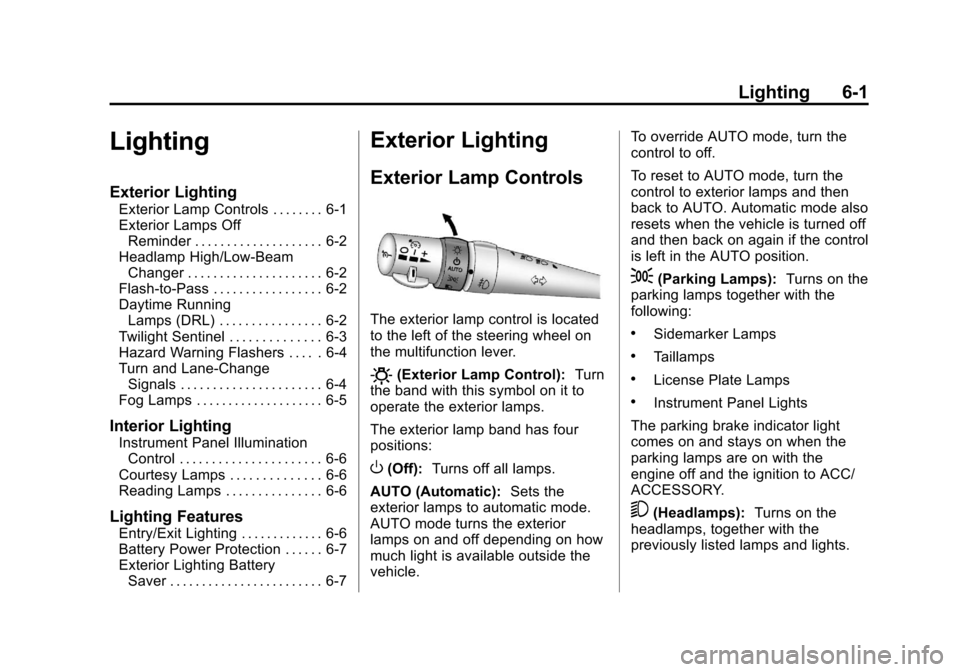
The exterior lamp control is located
to the left of the steering wheel on
the multifunction lever.
O(Exterior Lamp Control): Turn
the band with this symbol on it to
operate the exterior lamps.
The exterior lamp band has four
positions:
O(Off): Turns off all lamps.
AUTO (Automatic): Sets the
exterior lamps to automatic mode.
AUTO mode turns the exterior
lamps on and off depending on how
much light is available outside the
vehicle. To override AUTO mode, turn the
control to off.
To reset to AUTO mode, turn the
control to exterior lamps and then
back to AUTO. Automatic mode also
resets when the vehicle is turned off
and then back on again if the control
is left in the AUTO position.
;(Parking Lamps):
Turns on the
parking lamps together with the
following:
.Sidemarker Lamps
.Taillamps
.License Plate Lamps
.Instrument Panel Lights
The parking brake indicator light
comes on and stays on when the
parking lamps are on with the
engine off and the ignition to ACC/
ACCESSORY.
5(Headlamps): Turns on the
headlamps, together with the
previously listed lamps and lights.
Page 174 of 414
Black plate (4,1)Chevrolet Corvette Owner Manual - 2013 - crc2 - 11/8/12
6-4 Lighting
To turn Twilight Sentinel back on,
turn the band to
Oagain, then
release it.
If the Twilight Sentinel has the
headlamps turned on and you turn
the ignition off, the headlamps will
stay on for a period of time while
you leave the vehicle.
Use the Driver Information Center to
turn Twilight Sentinel on or off and
to increase or decrease the length
of the delayed illumination period.
See “Personal Options” under
Vehicle Personalization on
page 5‑51.
The regular headlamp system
should be turned on when needed.
Lights On with Wipers
If the windshield wipers are
activated in daylight with the engine
on, and the exterior lamp control is
in AUTO, the headlamps, parking
lamps, and other exterior lamps
come on. The transition time for the
lamps coming on varies based on
wiper speed. When the wipers are not operating, these lamps turn off.
Move the exterior lamp control to
P
or;to disable this feature.
Hazard Warning Flashers
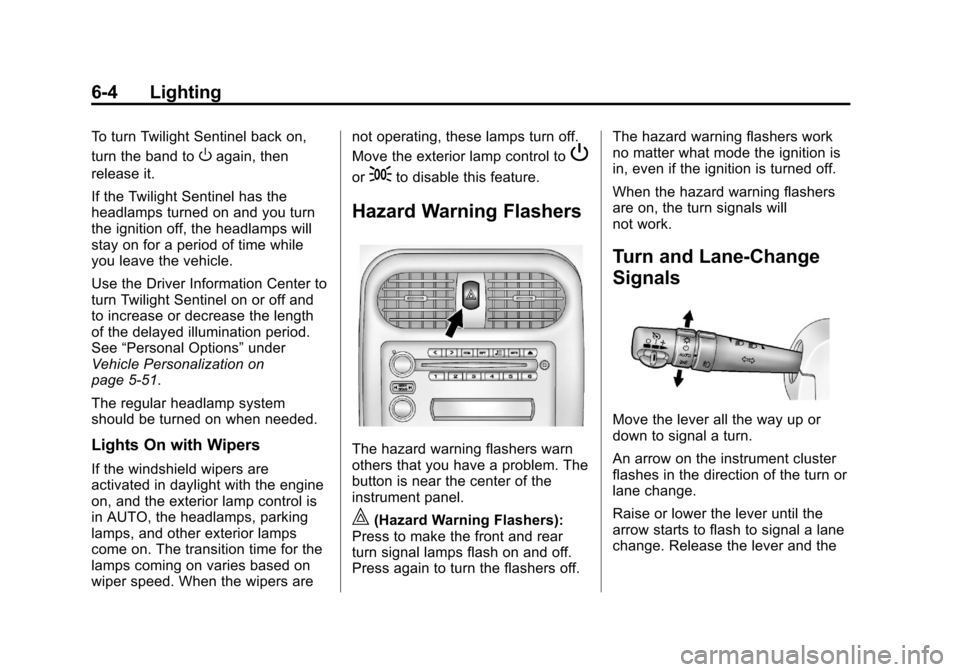
The hazard warning flashers warn
others that you have a problem. The
button is near the center of the
instrument panel.
|(Hazard Warning Flashers):
Press to make the front and rear
turn signal lamps flash on and off.
Press again to turn the flashers off. The hazard warning flashers work
no matter what mode the ignition is
in, even if the ignition is turned off.
When the hazard warning flashers
are on, the turn signals will
not work.
Turn and Lane-Change
Signals
Move the lever all the way up or
down to signal a turn.
An arrow on the instrument cluster
flashes in the direction of the turn or
lane change.
Raise or lower the lever until the
arrow starts to flash to signal a lane
change. Release the lever and the