2013 CHEVROLET CORVETTE reset
[x] Cancel search: resetPage 162 of 414

Black plate (58,1)Chevrolet Corvette Owner Manual - 2013 - crc2 - 11/8/12
5-58 Instruments and Controls
Auto Unlock:This option allows
you to select whether the driver
door, both doors, or neither door
automatically unlocks when the shift
lever is moved into P (Park) for
automatic transmission vehicles or
when the ignition is turned off or is
in RAP for manual transmission
vehicles.
Press the OPTION button until
AUTO UNLOCK appears on the
display, then press the RESET
button to scroll through the following
modes:
.OFF
.DRIVER
.BOTH (default)
If you choose OFF, this option will
turn off.
If you choose DRIVER, on
automatic transmission vehicles, the
driver door will automatically unlock
when the shift lever is moved into
P (Park). On manual transmission vehicles, the driver door will
automatically unlock when the
ignition is turned off or is in RAP.
If you choose BOTH, on automatic
transmission vehicles, both doors
will automatically unlock when the
shift lever is moved into P (Park).
On manual transmission vehicles,
both doors will automatically unlock
when the ignition is turned off or is
in RAP.
When the mode you want is
selected, press the OPTION button
to set your choice and advance to
the next personal option.
Language:
This option allows you
to select the language the DIC, the
Head-Up Display (HUD), if your
vehicle has this feature, and the
radio uses to display messages.
Each language mode will be
displayed in its own language. For
example, English will be displayed
as ENGLISH, Spanish as
ESPANOL, etc. If your vehicle has
the navigation system, you will not
have the Japanese language mode. Press the OPTION button until
LANGUAGE appears on the display,
then press the RESET button to
scroll through the following modes:
.ENGLISH (default)
.DEUTSCH (German)
.FRANCAIS (French)
.ITALIANO (Italian)
.ESPANOL (Spanish)
.JAPANESE
If you choose a language that you
do not understand, press the
OPTION and RESET buttons for
five seconds. The DIC will begin
displaying all of the various
languages one by one for as long
as the buttons are pressed. When
the desired language is displayed,
release the buttons and the DIC will
set to this language.
When the mode you want is
selected, press the OPTION button
to set your choice and advance to
the next personal option.
Page 163 of 414
Black plate (59,1)Chevrolet Corvette Owner Manual - 2013 - crc2 - 11/8/12
Instruments and Controls 5-59
Personalize Name:This option
allows you to type in a name or
greeting that will appear on the DIC
display whenever the corresponding
RKE transmitter (1 or 2) is used or
one of the memory buttons (1 or 2)
located on the driver door is
pressed.
Press the OPTION button until
PERSONALIZE NAME appears on
the display, then press the RESET
button to scroll through the following
modes:
.YES
.NO (default)
If you choose YES, you can type in
a name that will appear on the DIC
display.
To program a name, use the
following procedure:
1. Enter the PERSONAL OPTIONS menu and select the driver
number (1 or 2) that you would
like to program by following the instructions listed previously
under
“Entering the Personal
Options Menu”.
2. Press the OPTION button until the PERSONALIZE NAME
option appears on the display.
3. Select YES under PERSONALIZE NAME by
pressing the RESET button.
4. Press the OPTION button and a cursor will display where you
can insert a letter.
5. Press the OPTION button again until the letter you want is
displayed. To scroll through the
letters faster and without a
beeping noise, keep the
OPTIONS button depressed.
There are alpha/numeric
characters and a blank space
available. 6. Press the RESET button to
select the letter of your choice
and proceed on to the next
space to the right.
If you make a mistake and would
like to clear or replace a letter,
perform the following steps:
6.1. Press the RESET button to reach the letter you would
like to change.
6.2. Press the OPTION button to scroll through the letter
choices.
6.3. Press the RESET button to select the letter and
proceed on to the next
space to the right.
7. Repeat Steps 5 and 6 until the name or greeting you want is
complete. After the name or
greeting is complete, keep
pressing the RESET button until
the display turns blank and exits
out of this option. You can
program up to 20 characters.
Page 171 of 414
Black plate (1,1)Chevrolet Corvette Owner Manual - 2013 - crc2 - 11/8/12
Lighting 6-1
Lighting
Exterior Lighting
Exterior Lamp Controls . . . . . . . . 6-1
Exterior Lamps OffReminder . . . . . . . . . . . . . . . . . . . . 6-2
Headlamp High/Low-Beam Changer . . . . . . . . . . . . . . . . . . . . . 6-2
Flash-to-Pass . . . . . . . . . . . . . . . . . 6-2
Daytime Running Lamps (DRL) . . . . . . . . . . . . . . . . 6-2
Twilight Sentinel . . . . . . . . . . . . . . 6-3
Hazard Warning Flashers . . . . . 6-4
Turn and Lane-Change Signals . . . . . . . . . . . . . . . . . . . . . . 6-4
Fog Lamps . . . . . . . . . . . . . . . . . . . . 6-5
Interior Lighting
Instrument Panel Illumination Control . . . . . . . . . . . . . . . . . . . . . . 6-6
Courtesy Lamps . . . . . . . . . . . . . . 6-6
Reading Lamps . . . . . . . . . . . . . . . 6-6
Lighting Features
Entry/Exit Lighting . . . . . . . . . . . . . 6-6
Battery Power Protection . . . . . . 6-7
Exterior Lighting Battery Saver . . . . . . . . . . . . . . . . . . . . . . . . 6-7
Exterior Lighting
Exterior Lamp Controls
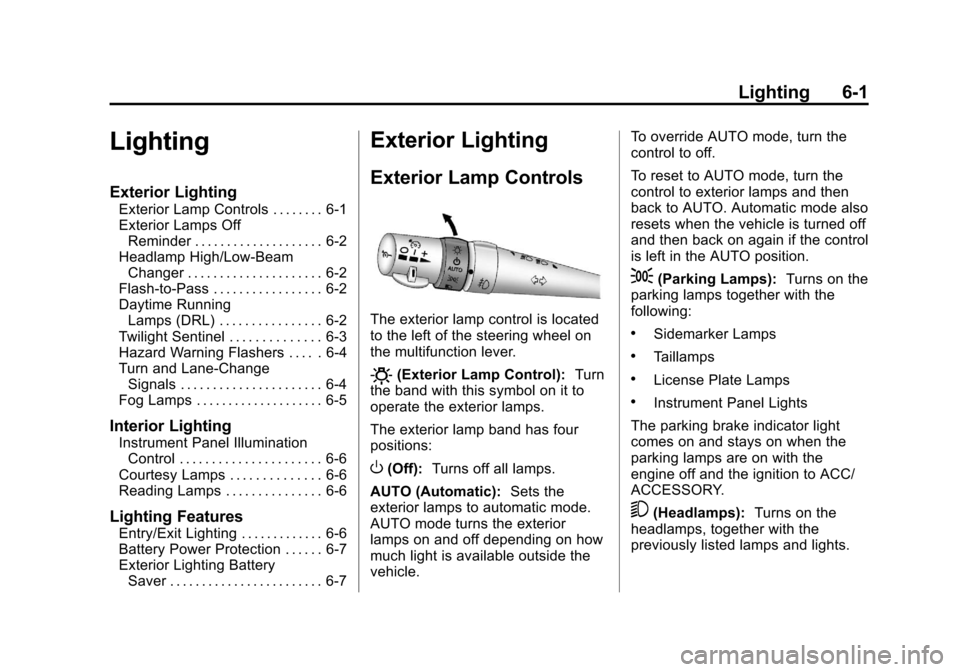
The exterior lamp control is located
to the left of the steering wheel on
the multifunction lever.
O(Exterior Lamp Control): Turn
the band with this symbol on it to
operate the exterior lamps.
The exterior lamp band has four
positions:
O(Off): Turns off all lamps.
AUTO (Automatic): Sets the
exterior lamps to automatic mode.
AUTO mode turns the exterior
lamps on and off depending on how
much light is available outside the
vehicle. To override AUTO mode, turn the
control to off.
To reset to AUTO mode, turn the
control to exterior lamps and then
back to AUTO. Automatic mode also
resets when the vehicle is turned off
and then back on again if the control
is left in the AUTO position.
;(Parking Lamps):
Turns on the
parking lamps together with the
following:
.Sidemarker Lamps
.Taillamps
.License Plate Lamps
.Instrument Panel Lights
The parking brake indicator light
comes on and stays on when the
parking lamps are on with the
engine off and the ignition to ACC/
ACCESSORY.
5(Headlamps): Turns on the
headlamps, together with the
previously listed lamps and lights.
Page 177 of 414
Black plate (7,1)Chevrolet Corvette Owner Manual - 2013 - crc2 - 11/8/12
Lighting 6-7
Battery Power Protection
This vehicle has a feature to help
prevent the battery from being
drained in case any of the following
lamps are left on: the underhood
lamp, if your vehicle has this
feature, vanity mirror lamps, cargo
lamps, reading lamps, center
console, or glove box lamps. If any
of these lamps are left on, they will
automatically time-out after about
10 minutes. To reset it, all of the
above lamps must be turned off or
the ignition key on.
Exterior Lighting Battery
Saver
If the manual parking lamps or
headlamps have been left on, the
exterior lamps will turn off as soon
as the ignition is turned off or
Retained Accessory Power (RAP) is
active. This protects against
draining the battery in case you
have accidentally left the headlamps
or parking lamps on. The batterysaver does not work if the
headlamps are turned on after the
ignition switch is turned to off.
If you need to leave the lamps on,
use the exterior lamp control to turn
the lamps back on.
Page 179 of 414

Black plate (1,1)Chevrolet Corvette Owner Manual - 2013 - crc2 - 11/8/12
Infotainment System 7-1
Infotainment
System
Introduction
Infotainment . . . . . . . . . . . . . . . . . . . 7-1
Theft-Deterrent Feature . . . . . . . 7-2
Overview . . . . . . . . . . . . . . . . . . . . . . 7-2
Operation . . . . . . . . . . . . . . . . . . . . . 7-4
Radio
AM-FM Radio . . . . . . . . . . . . . . . . . 7-6
Satellite Radio . . . . . . . . . . . . . . . . 7-8
Radio Reception . . . . . . . . . . . . . 7-11
Diversity Antenna System . . . 7-12
Satellite Radio Antenna . . . . . . 7-12
Audio Players
CD Player . . . . . . . . . . . . . . . . . . . 7-12
Auxiliary Devices . . . . . . . . . . . . 7-17
Phone
Bluetooth . . . . . . . . . . . . . . . . . . . . 7-17
Trademarks and License
Agreements
Trademarks and LicenseAgreements . . . . . . . . . . . . . . . . 7-25
Introduction
Infotainment
Determine which radio the vehicle
has and read the following pages to
become familiar with its features.
{WARNING
Taking your eyes off the road for
extended periods could cause a
crash resulting in injury or death
to you or others. Do not give
extended attention to infotainment
tasks while driving.
This system provides access to
many audio and non-audio listings.
To minimize taking your eyes off the
road while driving, do the following
while the vehicle is parked:
.Become familiar with the
operation and controls of the
audio system.
.Set up the tone, speaker
adjustments, and preset radio
stations.
For more information, see Defensive
Driving on page 9‑3.
Notice: Contact your dealer
before adding any equipment.
Adding audio or communication
equipment could interfere with
the operation of the engine, radio,
or other systems, and could
damage them. Follow federal
rules covering mobile radio and
telephone equipment.
The vehicle has Retained
Accessory Power (RAP). With RAP,
the audio system can be played
even after the ignition is turned off.
See Retained Accessory Power
(RAP) on page 9‑21 for more
information.
Navigation/Radio System
For vehicles with a navigation radio
system, see the navigation manual.
Page 183 of 414
Black plate (5,1)Chevrolet Corvette Owner Manual - 2013 - crc2 - 11/8/12
Infotainment System 7-5
Adjusting the Speakers
(Balance/Fade)
O/e(Balance/Fade):To adjust
the balance:
Press and release
O/euntil
BALANCE displays.
.Turn theO/eknob to move
the sound toward the right or the
left speakers.
.Press and hold theO/eknob
until the level changes to the
middle position.
To adjust the fade:
Press and release
O/euntil
FADE displays
.Turn theO/eknob to move
the sound toward the front or the
rear speakers.
.Press and hold theO/eknob
until the level changes to the
middle position. AUTO EQ (Automatic
Equalization):
The radio saves
separate AUTO EQ settings for
each preset and source.
For vehicles without the Bose
®
sound system:
.Press AUTO EQ to select
equalization settings designed
for CLASSICAL, POP, ROCK,
JAZZ, TALK, and COUNTRY.
.Select CUSTOM or change bass
or treble to return the EQ to the
manual bass and treble settings.
For vehicles with the Bose sound
system:
.Press AUTO EQ to select
equalization settings from EQ1
through EQ6.
.Select CUSTOM or change bass
or treble to return the EQ to the
manual bass and treble settings. AUTO
n(Automatic Volume):
Automatic volume automatically
adjusts the audio system to make
up for road and wind noise, by
increasing the volume as vehicle
speed increases.
For vehicles without the Bose sound
system:
1. Set the volume at the desired level.
2. Press AUTO
nto select
AUTO VOLUME MIN (minimum),
AUTO VOLUME MED (medium),
or AUTO VOLUME MAX
(maximum). Each higher setting
provides more volume
compensation at faster vehicle
speeds.
3. Press AUTO
nuntil AUTO
VOLUME OFF displays to turn
automatic volume off.
Page 186 of 414

Black plate (8,1)Chevrolet Corvette Owner Manual - 2013 - crc2 - 11/8/12
7-8 Infotainment System
The radio only stops at stations with
a strong signal.
tSCANu:Press and holdtorufor two seconds until
FREQUENCY SCAN displays. The
radio goes to a station, plays for a
few seconds, then goes on to the
next station. Press
toruagain to
stop scanning.
To scan preset stations:
Press and hold
torufor
four seconds until PRESET SCAN
displays. The radio goes to the next
preset station, plays for a few
seconds, then goes to the next
preset station. Press
toruagain
or press one of the pushbuttons to
stop scanning presets.
The radio only scans stations with a
strong signal.
1–6 (Preset Pushbuttons): Press
to play stations that are
programmed to the radio preset
pushbuttons.
Storing Radio Stations
Drivers are encouraged to store
radio station while the vehicle is
parked. See Defensive Driving on
page 9‑3. Tune to stored radio
stations using the presets, favorites
button, and steering wheel controls,
if the vehicle has this feature.
Up to 30 stations (six FM1, six FM2,
six AM, six M1, and six XM2), and
equalization settings for each
station can be programmed on the
six numbered pushbuttons.To set
presets:
1. Turn the radio on.
2. Press BAND to select FM1, FM2, AM, XM1, or XM2.
3. Tune in the desired station.
4. Press AUTO EQ to select the equalization.
5. Press and hold one of the six numbered pushbuttons until the
radio beeps once.
6. Repeat the steps for each pushbutton.
Satellite Radio
SiriusXM™ Satellite Radio
Service
SiriusXM is a satellite radio service
based in the 48 contiguous United
States and 10 Canadian provinces.
SiriusXM Satellite Radio has a wide
variety of programming and
commercial-free music, coast to
coast, and in digital-quality sound.
A service fee is required to receive
the SiriusXM service. If SiriusXM
Service needs to be reactivated, the
radio will display "No Subscription
Please Renew" on channel XM1.
For more information, contact
SiriusXM at www.siriusxm.com or
1-800-929-2100 in the U.S., and
www.xmradio.ca or
1-877-438-9677 in Canada.
Finding an SiriusXM Channel
BAND: Press to switch between
FM1, FM2, AM, XM1, or XM2.
O/e(Tune): Turn to manually
select an XM channel.
Page 187 of 414
Black plate (9,1)Chevrolet Corvette Owner Manual - 2013 - crc2 - 11/8/12
Infotainment System 7-9
tSEEKu:Press to go to the
previous or to the next XM channel.
tSCANu: Press and holdtorufor two seconds until
FREQUENCY SCAN displays. The
radio goes to a channel, plays for a
few seconds, then goes on to the
next station. Press
toruagain to
stop scanning.
To scan preset stations:
Press and hold
torufor
four seconds until PRESET SCAN
displays. The radio goes to the next
preset station, plays for a few
seconds, then goes to the next
preset station. Press
toruagain
or press one of the pushbuttons to
stop scanning presets.
1–6 (Preset Pushbuttons): Press
to play channels that are
programmed to the radio preset
pushbuttons.
Finding a Category (CAT)
Station
To select an SiriusXM station by
category:
1. Press the CAT button. The last selected category displays.
2. Turn the
O/eknob to select
a category.
3. Press
toruto go to a
category's station. SEEKING
CATEGORY displays.
4. To go to another station within that category, press the CAT
button to display the category,
then press
toruto go to
another station.
If the radio cannot find the desired
category, NONE displays and the
radio returns to the last station
tuned. SCAN:
To scan the stations within
a category:
1. Press CAT. The last selected
category displays.
2. Turn the
O/eknob to select
a category.
3. Press and hold
toruuntil a
beep sounds and SCAN
CATEGORY displays. The radio
begins scanning the stations in
the category.
4. Press
toruto stop scanning.
Storing SiriusXM Channels
Drivers are encouraged to store XM
channels while the vehicle is
parked. See Defensive Driving on
page 9‑3. Tune to stored radio
stations using the presets, favorites
button, and steering wheel controls,
if the vehicle has this feature.