2013 CHEVROLET CORVETTE door lock
[x] Cancel search: door lockPage 161 of 414
Black plate (57,1)Chevrolet Corvette Owner Manual - 2013 - crc2 - 11/8/12
Instruments and Controls 5-57
the vehicle can still be used to start
the vehicle or unlock the doors,
if needed. A person approaching the
outside of the locked vehicle without
an authorized RKE transmitter,
however, will not be able to open
the door, even with a transmitter in
the vehicle.
You may temporarily disable the
passive door locking feature by
pressing the door unlock switch for
three seconds on an open door.
Passive door locking will then
remain disabled until a door lock
switch is pressed or until the power
mode transitions from the off
power mode.
Press the OPTION button until
PASSIVE DOOR LOCKING appears
on the display, then press the
RESET button to scroll through the
following modes:
.OFF (default)
.SILENT
.HORNIf you choose OFF, this option will
turn off.
If you choose SILENT, the doors will
automatically lock a short time after
you remove a RKE transmitter from
the interior of the vehicle and close
both doors.
If you choose HORN, the doors will
automatically lock and the horn will
sound a short time after you remove
a RKE transmitter from the interior
of the vehicle and close both doors.
If you are parking in a quiet area
and do not want the horn to sound
when the doors lock, press the lock
button on the RKE transmitter
immediately after removing it from
the interior and closing the doors.
This will lock the doors and cancel
the passive locking for this ignition
cycle.
When the mode you want is
selected, press the OPTION button
to set your choice and advance to
the next personal option.
Passive Door Unlock:
This option
allows you to select which doors will
automatically unlock when you
approach and open the driver door
with the RKE transmitter. See Door
Locks on page 2‑7 for more
information.
Press the OPTION button until
PASSIVE DOOR UNLOCK appears
on the display, then press the
RESET button to scroll through the
following modes:
.DRIVER
.BOTH (default)
If you choose DRIVER, only the
driver door will automatically unlock
when you approach and open the
driver door with the RKE transmitter.
If you choose BOTH, both doors will
automatically unlock when you
approach and open the driver door
with the RKE transmitter.
Page 162 of 414

Black plate (58,1)Chevrolet Corvette Owner Manual - 2013 - crc2 - 11/8/12
5-58 Instruments and Controls
Auto Unlock:This option allows
you to select whether the driver
door, both doors, or neither door
automatically unlocks when the shift
lever is moved into P (Park) for
automatic transmission vehicles or
when the ignition is turned off or is
in RAP for manual transmission
vehicles.
Press the OPTION button until
AUTO UNLOCK appears on the
display, then press the RESET
button to scroll through the following
modes:
.OFF
.DRIVER
.BOTH (default)
If you choose OFF, this option will
turn off.
If you choose DRIVER, on
automatic transmission vehicles, the
driver door will automatically unlock
when the shift lever is moved into
P (Park). On manual transmission vehicles, the driver door will
automatically unlock when the
ignition is turned off or is in RAP.
If you choose BOTH, on automatic
transmission vehicles, both doors
will automatically unlock when the
shift lever is moved into P (Park).
On manual transmission vehicles,
both doors will automatically unlock
when the ignition is turned off or is
in RAP.
When the mode you want is
selected, press the OPTION button
to set your choice and advance to
the next personal option.
Language:
This option allows you
to select the language the DIC, the
Head-Up Display (HUD), if your
vehicle has this feature, and the
radio uses to display messages.
Each language mode will be
displayed in its own language. For
example, English will be displayed
as ENGLISH, Spanish as
ESPANOL, etc. If your vehicle has
the navigation system, you will not
have the Japanese language mode. Press the OPTION button until
LANGUAGE appears on the display,
then press the RESET button to
scroll through the following modes:
.ENGLISH (default)
.DEUTSCH (German)
.FRANCAIS (French)
.ITALIANO (Italian)
.ESPANOL (Spanish)
.JAPANESE
If you choose a language that you
do not understand, press the
OPTION and RESET buttons for
five seconds. The DIC will begin
displaying all of the various
languages one by one for as long
as the buttons are pressed. When
the desired language is displayed,
release the buttons and the DIC will
set to this language.
When the mode you want is
selected, press the OPTION button
to set your choice and advance to
the next personal option.
Page 176 of 414
Black plate (6,1)Chevrolet Corvette Owner Manual - 2013 - crc2 - 11/8/12
6-6 Lighting
Interior Lighting
Instrument Panel
Illumination Control
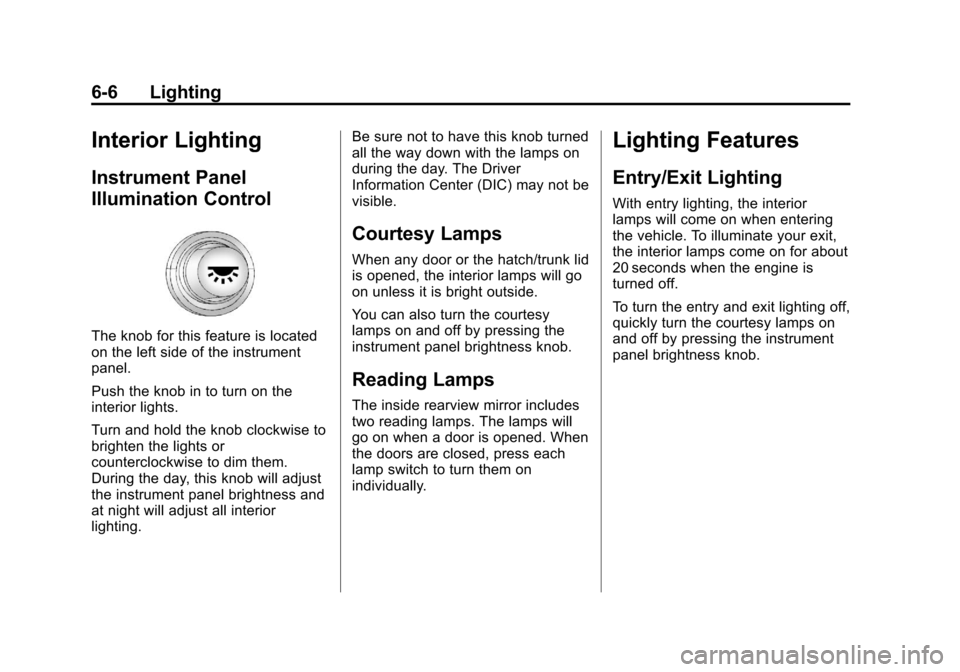
The knob for this feature is located
on the left side of the instrument
panel.
Push the knob in to turn on the
interior lights.
Turn and hold the knob clockwise to
brighten the lights or
counterclockwise to dim them.
During the day, this knob will adjust
the instrument panel brightness and
at night will adjust all interior
lighting.Be sure not to have this knob turned
all the way down with the lamps on
during the day. The Driver
Information Center (DIC) may not be
visible.
Courtesy Lamps
When any door or the hatch/trunk lid
is opened, the interior lamps will go
on unless it is bright outside.
You can also turn the courtesy
lamps on and off by pressing the
instrument panel brightness knob.
Reading Lamps
The inside rearview mirror includes
two reading lamps. The lamps will
go on when a door is opened. When
the doors are closed, press each
lamp switch to turn them on
individually.
Lighting Features
Entry/Exit Lighting
With entry lighting, the interior
lamps will come on when entering
the vehicle. To illuminate your exit,
the interior lamps come on for about
20 seconds when the engine is
turned off.
To turn the entry and exit lighting off,
quickly turn the courtesy lamps on
and off by pressing the instrument
panel brightness knob.
Page 233 of 414
Black plate (21,1)Chevrolet Corvette Owner Manual - 2013 - crc2 - 11/8/12
Driving and Operating 9-21
to the floor while cranking for up
to 15 seconds maximum. Wait at
least 15 seconds between each
try, to allow the cranking motor
to cool down. When the engine
starts, let go of the accelerator.
If the vehicle starts briefly but
then stops again, repeat these
steps. This clears the extra
gasoline from the engine.
Notice: Cranking the engine for
long periods of time, by pressing
the START button immediately
after cranking has ended, can
overheat and damage the
cranking motor, and drain the
battery. Wait at least 15 seconds
between each try, to allow the
cranking motor to cool down.
The vehicle has a
Computer-Controlled Cranking
System. This feature assists in
starting the engine and protects
components. Once cranking has
been initiated, the engine continues
cranking for a few seconds or until
the vehicle starts. If the engine does
not start, cranking automatically stops after 15 seconds to prevent
cranking motor damage. To prevent
gear damage, this system also
prevents cranking if the engine is
already running.
Notice:
If you add electrical parts
or accessories, you could change
the way the engine operates. Any
resulting damage would not be
covered by the vehicle warranty.
See Add-On Electrical Equipment
on page 9‑50.
Stopping the Engine
If the vehicle has an automatic
transmission, move the shift lever to
P (Park) and press and hold the
Acc. (Off/Accessory) button, located
on the instrument panel, until the
engine shuts off. If the shift lever is
not in P (Park), the engine shuts off
and the vehicle goes into the
accessory mode. The DIC displays
SHIFT TO PARK. Once the shifter is
moved to P (Park), the vehicle turns
off. If the vehicle has a manual
transmission, it is recommended
that you move the shift lever to R (Reverse) and set the parking
brake after you turn off the engine
by pressing and holding the Acc.
(Off/Accessory) button.
If the RKE transmitter is not
detected inside the vehicle when it
is turned to off, the DIC displays
NO FOB
–OFF OR RUN?.
See Key and Lock Messages on
page 5‑40 for more information.
Retained Accessory
Power (RAP)
These vehicle accessories can be
used for up to 10 minutes after the
engine is turned off:
.Audio System
.Power Windows
These features continue to work up
to 10 minutes after the engine is
turned off or until either door is
opened. If a door is opened, the
power windows and audio system
will shut off.
Page 260 of 414
Black plate (48,1)Chevrolet Corvette Owner Manual - 2013 - crc2 - 11/8/12
9-48 Driving and Operating
WARNING (Continued)
.Fuel can spray out if the fuel
cap is opened too quickly.
This spray can happen if the
tank is nearly full, and is
more likely in hot weather.
Open the fuel cap slowly and
wait for any hiss noise to stop
then unscrew the cap all
the way
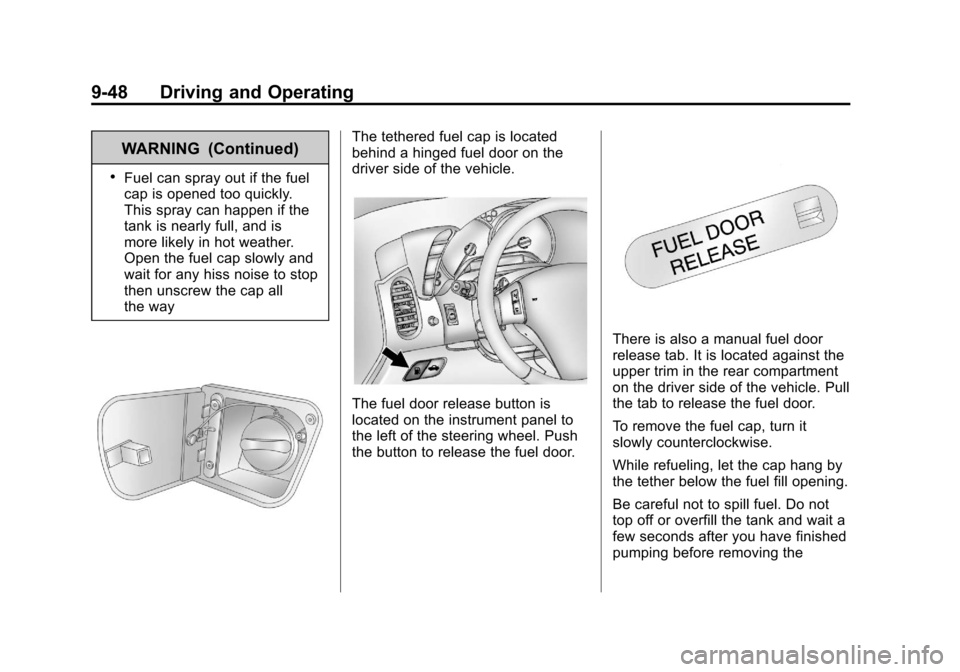
The tethered fuel cap is located
behind a hinged fuel door on the
driver side of the vehicle.
The fuel door release button is
located on the instrument panel to
the left of the steering wheel. Push
the button to release the fuel door.
There is also a manual fuel door
release tab. It is located against the
upper trim in the rear compartment
on the driver side of the vehicle. Pull
the tab to release the fuel door.
To remove the fuel cap, turn it
slowly counterclockwise.
While refueling, let the cap hang by
the tether below the fuel fill opening.
Be careful not to spill fuel. Do not
top off or overfill the tank and wait a
few seconds after you have finished
pumping before removing the
Page 311 of 414

Black plate (49,1)Chevrolet Corvette Owner Manual - 2013 - crc2 - 11/8/12
Vehicle Care 10-49
The vehicle may not be equipped
with all of the fuses, relays, and
features shown.Fuses Usage
BCK/
UP LAMP Back-up Lamps
BLANK Not Used
BLANK Not Used
BTSI SOL/
STR
WHL LCK Brake
Transmission Shift
Interlock, Steering
Wheel
Column Lock
CLSTR/HUD Cluster, Head-Up Display
CRUISE
SWTCH Cruise Control
Switch
CTSY/LAMP Courtesy Lamp
DR LCK Door Locks
DRIV DR
SWITCH Driver Door Switch
ECM Engine Control Module (ECM)
Page 344 of 414

Black plate (82,1)Chevrolet Corvette Owner Manual - 2013 - crc2 - 11/8/12
10-82 Vehicle Care
Wheels and Trim—Aluminum
or Chrome
Use a soft, clean cloth with mild
soap and water to clean the wheels.
After rinsing thoroughly with clean
water, dry with a soft, clean towel.
A wax may then be applied.
Notice: Chrome wheels and other
chrome trim may be damaged if
the vehicle is not washed after
driving on roads that have been
sprayed with magnesium,
calcium, or sodium chloride.
These chlorides are used on
roads for conditions such as ice
and dust. Always wash the
chrome with soap and water after
exposure.
Notice: To avoid surface damage,
do not use strong soaps,
chemicals, abrasive polishes,
cleaners, brushes, or cleaners
that contain acid on aluminum or
chrome-plated wheels. Use only
approved cleaners. Also, never
drive a vehicle with aluminum or
chrome-plated wheels through an automatic car wash that uses
silicone carbide tire cleaning
brushes. Damage could occur
and the repairs would not be
covered by the vehicle warranty.
Steering, Suspension, and
Chassis Components
Visually inspect front and rear
suspension and steering system for
damaged, loose, or missing parts or
signs of wear. Inspect the power
steering for proper hook-up, binding,
leaks, cracks, chafing, etc. Visually
check constant velocity joints,
rubber boots, and axle seals for
leaks.
Body Component Lubrication
Lubricate all key lock cylinders,
hood hinges, liftgate hinges, and
steel fuel door hinge unless the
components are plastic. Applying
silicone grease on weatherstrips
with a clean cloth will make them
last longer, seal better, and not stick
or squeak.
Underbody Maintenance
Use plain water to flush dirt and
debris from the vehicle's underbody.
Your dealer or an underbody car
washing system can do this. If not
removed, rust and corrosion can
develop.
Fiberglass Springs (Composite
Springs)
Notice:
Do not use acidic or
corrosive cleaning products,
engine degreasers, or aluminum
cleaning agents on fiberglass
springs as it may cause damage.
The repairs would not be covered
by the vehicle's warranty. Use
only approved cleaners.
Sheet Metal Damage
If the vehicle is damaged and
requires sheet metal repair or
replacement, make sure the body
repair shop applies anti-corrosion
material to parts repaired or
replaced to restore corrosion
protection.
Page 363 of 414
Black plate (13,1)Chevrolet Corvette Owner Manual - 2013 - crc2 - 11/8/12
Service and Maintenance 11-13
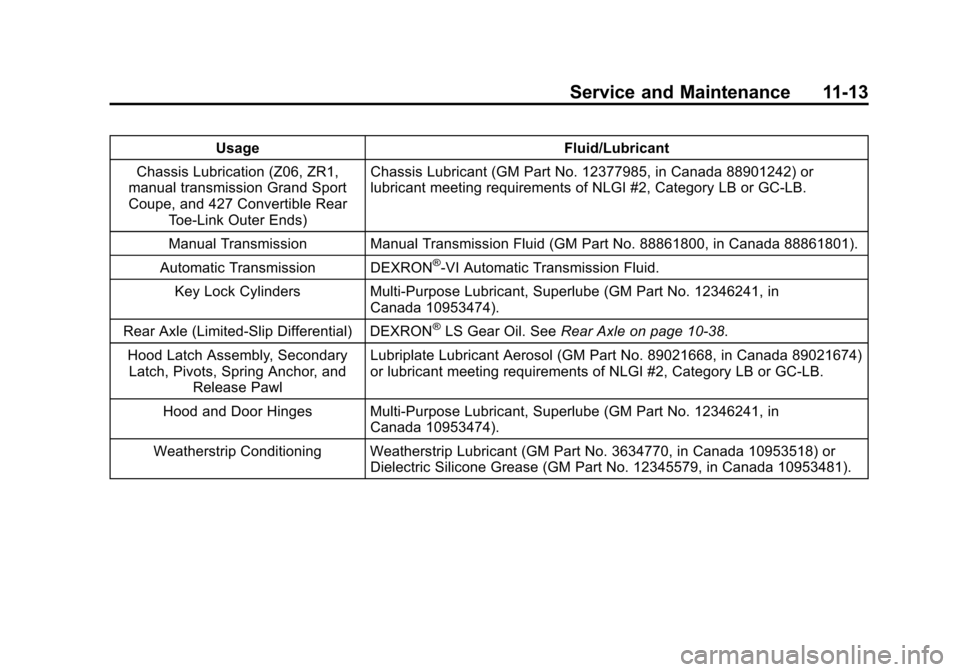
UsageFluid/Lubricant
Chassis Lubrication (Z06, ZR1,
manual transmission Grand Sport
Coupe, and 427 Convertible Rear
Toe-Link Outer Ends) Chassis Lubricant (GM Part No. 12377985, in Canada 88901242) or
lubricant meeting requirements of NLGI #2, Category LB or GC-LB.
Manual Transmission Manual Transmission Fluid (GM Part No. 88861800, in Canada 88861801).
Automatic Transmission DEXRON
®-VI Automatic Transmission Fluid.
Key Lock Cylinders Multi-Purpose Lubricant, Superlube (GM Part No. 12346241, in Canada 10953474).
Rear Axle (Limited-Slip Differential) DEXRON
®LS Gear Oil. See Rear Axle on page 10‑38.
Hood Latch Assembly, Secondary Latch, Pivots, Spring Anchor, and Release Pawl Lubriplate Lubricant Aerosol (GM Part No. 89021668, in Canada 89021674)
or lubricant meeting requirements of NLGI #2, Category LB or GC-LB.
Hood and Door Hinges Multi-Purpose Lubricant, Superlube (GM Part No. 12346241, in Canada 10953474).
Weatherstrip Conditioning Weatherstrip Lubricant (GM Part No. 3634770, in Canada 10953518) or Dielectric Silicone Grease (GM Part No. 12345579, in Canada 10953481).