2013 CHEVROLET CAMARO lock
[x] Cancel search: lockPage 90 of 404
Black plate (42,1)Chevrolet Camaro Owner Manual (Include Mex) - 2012
3-42 Seats and Restraints
According to accident statistics,
children and infants are safer when
properly restrained in a child
restraint system or infant restraint
system secured in a rear seating
position. SeeWhere to Put the
Restraint on page 3‑37 for
additional information.
Securing a Child Restraint
Designed for the LATCH
System
{WARNING
If a LATCH-type child restraint is
not attached to anchors, the child
restraint will not be able to protect
the child correctly. In a crash, the
child could be seriously injured or
killed. Install a LATCH-type child
restraint properly using the
anchors, or use the vehicle safety
belts to secure the restraint,
following the instructions that
came with the child restraint and
the instructions in this manual.
{WARNING
Do not attach more than one child
restraint to a single anchor.
Attaching more than one child
restraint to a single anchor could
cause the anchor or attachment
to come loose or even break
during a crash. A child or others
could be injured. To reduce the
risk of serious or fatal injuries
during a crash, attach only one
child restraint per anchor.
{WARNING
Children can be seriously injured
or strangled if a shoulder belt is
wrapped around their neck and
the safety belt continues to
tighten. Buckle any unused safety
belts behind the child restraint so
children cannot reach them. Pull
the shoulder belt all the way out
(Continued)
WARNING (Continued)
of the retractor to set the lock,
if the vehicle has one, after the
child restraint has been installed.
Notice: Do not let the LATCH
attachments rub against the
vehicle’ s safety belts. This may
damage these parts. If necessary,
move buckled safety belts to
avoid rubbing the LATCH
attachments.
Do not fold the empty rear seat
with a safety belt buckled. This
could damage the safety belt or
the seat. Unbuckle and return the
safety belt to its stowed position,
before folding the seat.
1. Attach and tighten the lower attachments to the lower
anchors. If the child restraint
does not have lower
attachments, secure the child
restraint with the safety belts
and top tether, if equipped.
Page 93 of 404
Black plate (45,1)Chevrolet Camaro Owner Manual (Include Mex) - 2012
Seats and Restraints 3-45
If more than one child restraint
needs to be installed in the rear
seat, be sure to readWhere to Put
the Restraint on page 3‑37.
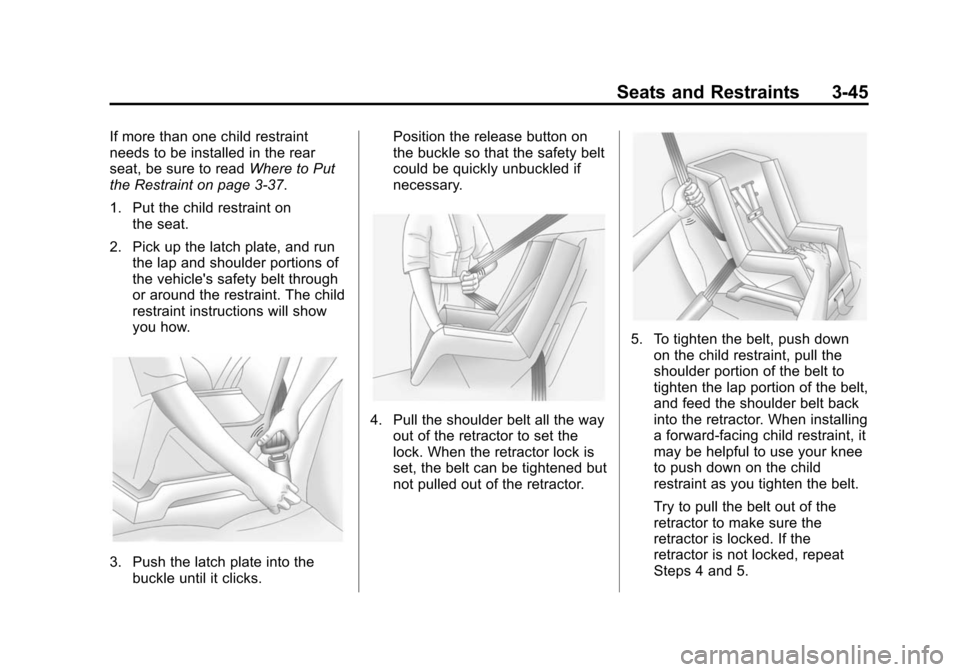
1. Put the child restraint on the seat.
2. Pick up the latch plate, and run the lap and shoulder portions of
the vehicle's safety belt through
or around the restraint. The child
restraint instructions will show
you how.
3. Push the latch plate into thebuckle until it clicks. Position the release button on
the buckle so that the safety belt
could be quickly unbuckled if
necessary.
4. Pull the shoulder belt all the way
out of the retractor to set the
lock. When the retractor lock is
set, the belt can be tightened but
not pulled out of the retractor.
5. To tighten the belt, push downon the child restraint, pull the
shoulder portion of the belt to
tighten the lap portion of the belt,
and feed the shoulder belt back
into the retractor. When installing
a forward-facing child restraint, it
may be helpful to use your knee
to push down on the child
restraint as you tighten the belt.
Try to pull the belt out of the
retractor to make sure the
retractor is locked. If the
retractor is not locked, repeat
Steps 4 and 5.
Page 96 of 404
Black plate (48,1)Chevrolet Camaro Owner Manual (Include Mex) - 2012
3-48 Seats and Restraints
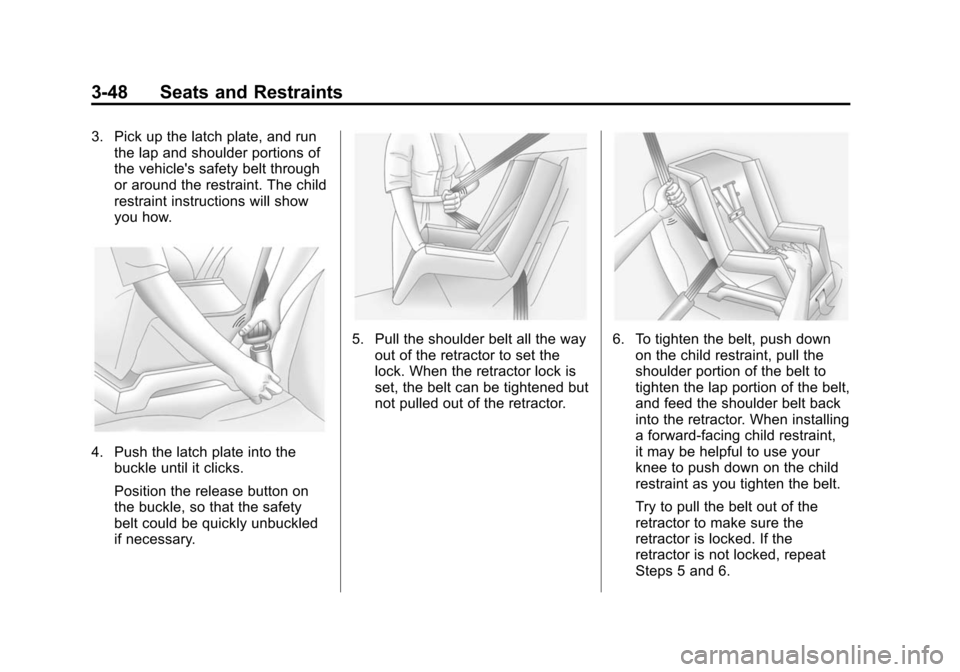
3. Pick up the latch plate, and runthe lap and shoulder portions of
the vehicle's safety belt through
or around the restraint. The child
restraint instructions will show
you how.
4. Push the latch plate into thebuckle until it clicks.
Position the release button on
the buckle, so that the safety
belt could be quickly unbuckled
if necessary.
5. Pull the shoulder belt all the way
out of the retractor to set the
lock. When the retractor lock is
set, the belt can be tightened but
not pulled out of the retractor.6. To tighten the belt, push downon the child restraint, pull the
shoulder portion of the belt to
tighten the lap portion of the belt,
and feed the shoulder belt back
into the retractor. When installing
a forward-facing child restraint,
it may be helpful to use your
knee to push down on the child
restraint as you tighten the belt.
Try to pull the belt out of the
retractor to make sure the
retractor is locked. If the
retractor is not locked, repeat
Steps 5 and 6.
Page 99 of 404

Black plate (1,1)Chevrolet Camaro Owner Manual (Include Mex) - 2012
Storage 4-1
Storage
Storage Compartments
Glove Box . . . . . . . . . . . . . . . . . . . . 4-1
Rear Storage . . . . . . . . . . . . . . . . . 4-1
Center Console Storage . . . . . . 4-2
Additional Storage Features
Tonneau Cover . . . . . . . . . . . . . . . . 4-3
Convenience Net . . . . . . . . . . . . . 4-5
Storage
Compartments
Glove Box
Open the glove box by lifting up on
the lever. Use the key to lock and
unlock the glove box.
Rear Storage
Rear Trunk Partition
The trunk partition keeps cargo
away from the convertible top.
The trunk partition attaches to the
sides of the trunk to protect the
convertible top or can be rolled up
and stored when the convertible top
is up.Fastened Position
1. Pull on the handle (A) to detach
and roll out the trunk partition (B)
at the front of the trunk (C).
2. Attach the trunk partition (B) into
the brackets (A).
3. Remove any objects from the top of the trunk partition (B).
Page 105 of 404

Black plate (1,1)Chevrolet Camaro Owner Manual (Include Mex) - 2012
Instruments and Controls 5-1
Instruments and
Controls
Controls
Steering Wheel Adjustment . . . 5-2
Steering Wheel Controls . . . . . . 5-2
Horn . . . . . . . . . . . . . . . . . . . . . . . . . . 5-3
Windshield Wiper/Washer . . . . . 5-3
Compass . . . . . . . . . . . . . . . . . . . . . 5-4
Clock . . . . . . . . . . . . . . . . . . . . . . . . . 5-4
Power Outlets . . . . . . . . . . . . . . . . . 5-5
Warning Lights, Gauges, and
Indicators
Warning Lights, Gauges, andIndicators . . . . . . . . . . . . . . . . . . . . 5-6
Instrument Cluster . . . . . . . . . . . . 5-7
Speedometer . . . . . . . . . . . . . . . . . 5-8
Odometer . . . . . . . . . . . . . . . . . . . . . 5-8
Trip Odometer . . . . . . . . . . . . . . . . . 5-8
Tachometer . . . . . . . . . . . . . . . . . . . 5-8
Fuel Gauge . . . . . . . . . . . . . . . . . . . 5-8
Engine Oil Pressure Gauge . . . 5-9
Engine Oil Temperature Gauge . . . . . . . . . . . . . . . . . . . . . . 5-10
Engine Coolant Temperature Gauge . . . . . . . . . . . . . . . . . . . . . . 5-11 Transmission Temperature
Gauge . . . . . . . . . . . . . . . . . . . . . . 5-12
Voltmeter Gauge . . . . . . . . . . . . . 5-13
Safety Belt Reminders . . . . . . . 5-13
Airbag Readiness Light . . . . . . 5-14
Passenger Airbag Status Indicator . . . . . . . . . . . . . . . . . . . . 5-15
Charging System Light . . . . . . 5-15
Malfunction Indicator Lamp . . . . . . . . . . . . . 5-16
Brake System Warning Light . . . . . . . . . . . . . . . . . . . . . . . 5-18
Antilock Brake System (ABS) Warning Light . . . . . . . . . . . . . . 5-19
Traction Off Light . . . . . . . . . . . . 5-20
Traction Control System (TCS)/StabiliTrak®Light . . . . 5-20
Traction Control System (TCS) OFF/StabiliTrak
®OFF
Light . . . . . . . . . . . . . . . . . . . . . . . 5-21
Tire Pressure Light . . . . . . . . . . 5-21
Engine Oil Pressure Light . . . . 5-22
Immobilizer Light . . . . . . . . . . . . 5-22
High-Beam On Light . . . . . . . . . 5-23
Front Fog Lamp Light . . . . . . . . 5-23
Taillamp Indicator Light . . . . . . 5-23
Cruise Control Light . . . . . . . . . 5-24
Information Displays
Driver Information Center (DIC) . . . . . . . . . . . . . . . 5-24
Head-Up Display (HUD) . . . . . 5-27
Vehicle Messages
Vehicle Messages . . . . . . . . . . . 5-31
Battery Voltage and Charging Messages . . . . . . . . . . . . . . . . . . 5-31
Brake System Messages . . . . 5-31
Compass Messages . . . . . . . . . 5-32
Convertible Top Messages . . . 5-32
Cruise Control Messages . . . . 5-33
Door Ajar Messages . . . . . . . . . 5-33
Engine Cooling System Messages . . . . . . . . . . . . . . . . . . 5-33
Engine Oil Messages . . . . . . . . 5-34
Engine Power Messages . . . . 5-34
Fuel System Messages . . . . . . 5-34
Key and Lock Messages . . . . . 5-34
Lamp Messages . . . . . . . . . . . . . 5-35
Object Detection System Messages . . . . . . . . . . . . . . . . . . 5-35
Ride Control System Messages . . . . . . . . . . . . . . . . . . 5-36
Airbag System Messages . . . . 5-36
Safety Belt Messages . . . . . . . 5-36
Anti-theft Alarm System Messages . . . . . . . . . . . . . . . . . . 5-36
Page 106 of 404

Black plate (2,1)Chevrolet Camaro Owner Manual (Include Mex) - 2012
5-1 Instruments and Controls
Service Vehicle Messages . . . 5-37
Tire Messages . . . . . . . . . . . . . . . 5-37
Transmission Messages . . . . . 5-38
Vehicle ReminderMessages . . . . . . . . . . . . . . . . . . 5-38
Vehicle Speed Messages . . . . 5-38
Window Messages . . . . . . . . . . . 5-39
Vehicle Personalization
Vehicle Personalization . . . . . . 5-39
Universal Remote System
Universal Remote System . . . 5-43
Universal Remote System Programming . . . . . . . . . . . . . . . 5-43
Universal Remote System Operation . . . . . . . . . . . . . . . . . . 5-46
Controls
Steering Wheel
Adjustment
To adjust the steering wheel:
1. Pull the lever (A) down.
2. Move the steering wheel up
or down.
3. Pull or push the steering wheel closer or away from you.
4. Pull the lever (A) up to lock the steering wheel in place. Do not adjust the steering wheel
while driving.
Steering Wheel Controls
Some audio controls can be
adjusted at the steering wheel.
b/g(Push to Talk):
For vehicles
with a Bluetooth®or OnStar®, press
to interact with those systems. See
Bluetooth (Overview) on page 7‑21
or Bluetooth (Infotainment Controls)
on page 7‑23 orBluetooth (Voice
Page 108 of 404

Black plate (4,1)Chevrolet Camaro Owner Manual (Include Mex) - 2012
5-4 Instruments and Controls
When the windshield wiper lever is
released, additional wipes may
occur depending on how long the
windshield washer had been
activated. SeeWasher Fluid on
page 10‑27 for information on filling
the windshield washer fluid
reservoir.
{WARNING
In freezing weather, do not use
the washer until the windshield is
warmed. Otherwise the washer
fluid can form ice on the
windshield, blocking your vision.
Clear ice and snow from the wiper
blades before using them. If they
are frozen to the windshield,
carefully loosen or thaw them.
Damaged wiper blades should be
replaced. See Wiper Blade
Replacement on page 10‑33.
Heavy snow or ice can overload the
wipers. A circuit breaker stops them
until the motor cools.
Compass
The vehicle may have a compass
display on the Driver Information
Center (DIC). The compass receives
its heading and other information
from the Global Positioning
System (GPS) antenna, StabiliTrak,
and vehicle speed information.
Avoid covering the GPS antenna for
long periods of time with objects
that may interfere with the antenna's
ability to receive a satellite signal.
See Backglass Antenna on
page 7‑13 andSatellite Radio
Antenna on page 7‑14 for the
location of the vehicle's antennas.
The compass system is designed to
operate for a certain number of
miles or degrees of turn before
needing a signal from the GPS
satellites. When the compass
display shows CAL, drive the
vehicle for a short distance in an
open area where it can receive a
GPS signal. The compass system
will automatically determine when
the GPS signal is restored and provide a heading again. See
Compass Messages on page 5‑32
for more information on the
messages that may be displayed for
the compass.
Clock
The infotainment system controls
are used to access the time and
date settings through the menu
system. The clock menu can be
only be used with the radio on while
in ON/RUN or ACC/ACCESSORY.
See
Operation on page 7‑4 for
information about how to use the
menu system.
Setting the Time and Date
1. Press the CONFIG button.
2. Select Time and Date Settings.
3. Select Set Time or Set Date.
4. Turn the MENU/SELECT knob to adjust the highlighted value.
5. Press the MENU/SELECT knob to select the next value.
Page 122 of 404

Black plate (18,1)Chevrolet Camaro Owner Manual (Include Mex) - 2012
5-18 Instruments and Controls
Emissions Inspection and
Maintenance Programs
Some local governments may have
programs to inspect the on-vehicle
emission control equipment. For the
inspection, the emission system test
equipment is connected to the
vehicle’s Data Link
Connector (DLC).
The DLC is under the instrument
panel on the outboard side of the
steering wheel. See your dealer if
assistance is needed.The vehicle may not pass
inspection if:
.The malfunction indicator lamp is
on with the engine running, or if
the light does not come on when
the ignition is turned to ON/RUN
while the engine is off.
.The OBD II (On-Board
Diagnostics) system determines
that critical emission control
systems have not been
completely diagnosed. The
vehicle would be considered not
ready for inspection. This can
happen if the 12-volt battery has
recently been replaced or run
down. The diagnostic system is
designed to evaluate critical
emission control systems during
normal driving. This can take
several days of routine driving.
If this has been done and the
vehicle still does not pass the
inspection for lack of OBD II
system readiness, your dealer
can prepare the vehicle for
inspection.
Brake System Warning
Light
The vehicle brake system consists
of two hydraulic circuits. If one
circuit is not working, the remaining
circuit can still work to stop the
vehicle. For normal braking
performance, both circuits need to
be working
If the warning light comes on, there
is a brake problem. Have the brake
system inspected right away.
EnglishMetric
If the vehicle has antilock brakes,
this light should come on when the
key is turned to START. If it does
not come on, have it fixed so it will
be ready to warn if there is a
problem.